Someone paints a black box over a name, flattens nothing, ships the file, and the reviewer selects the rectangle and pastes the name into an email. PDFiumPas answers that with operator-level redaction: SaveAsRedacted deletes only the Unicode scalars whose character boxes touch a redaction rectangle, rebuilds the survivors from the original font, size, matrix, render mode and colour, and crops axis-aligned paths and images rather than dropping them whole
Why a painted rectangle is not a redaction
A drawing operation added on top of a content stream hides nothing, because the text-showing operators underneath it are still in the stream and still map to code points. ISO 32000-1 §9.4 defines a text object as a sequence of positioning and showing operators inside BT and ET; a filled rectangle drawn afterwards is simply another operator in the same stream. Extraction walks the operators, not the pixels, so the covered string comes back intact. Real redaction has to remove the operand, not obscure the output
The obvious safe implementation is brutal: find every page object whose bounding box intersects a redaction rectangle and delete the whole object. That is what earlier PDFiumPas releases did, and it is correct but expensive. A single Tj can carry an entire table row, so blacking out one account number took the date, the description and the amount with it. A rectangular fill that happens to be a full-width table band vanished across the whole page. An invoice logo disappeared because the redaction clipped one corner of it. Version 3.101.0 moves the decision one level down, from the page object to the operand
What does operator-level redaction actually delete?
PDFiumPas deletes Unicode scalars, not text objects. During SaveAsRedacted the component builds a character-to-page-object mapping from the loaded text page, then for every character owned by the object under test it reads the character box and intersects that box against each redaction rectangle. Characters that touch a rectangle are marked for removal; the rest are marked as survivors. If nothing intersects, the object is left completely alone. If every character intersects, the object is removed whole, exactly as before. Only the mixed case triggers a split
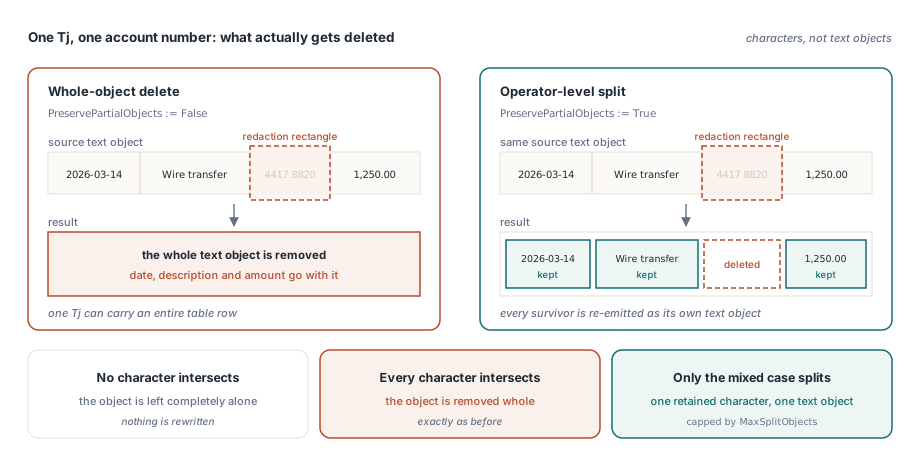
Each survivor is then re-emitted as its own text object built from the original font handle, the original font size, the per-character text matrix, the original text render mode, and the fill and stroke state of the parent object including stroke width, line join, line cap and dash array. Reusing the font handle rather than resolving a new one is what keeps the glyphs metrically identical, and reusing the per-character matrix is what keeps kerning and word spacing in place without re-running layout. The cost is object count: one retained character becomes one text object, which is why TPdfRedactionOptions.MaxSplitObjects exists as a hard ceiling on generated fragments
procedure RedactDocument(const SourcePdf, TargetPdf: string);
var
  Pdf: TPdf;
  Options: TPdfRedactionOptions;
  Report: TPdfRedactionReport;
begin
  Pdf := TPdf.Create(nil);
  try
    Pdf.FileName := SourcePdf;   // the file already carries /Redact annotations
    Pdf.Active := True;

    Options := TPdfRedactionOptions.Default;
    Options.PreservePartialObjects := True;    // operator-level split (the default)
    Options.RemoveIntersectingAnnotations := True;
    Options.MaxSplitObjects := 20000;          // ceiling on generated fragments

    if not Pdf.SaveAsRedacted(TargetPdf, Options, Report) then
      raise Exception.Create(Report.ErrorMessage);   // fail closed, do not ship
  finally
    Pdf.Free;
  end;
end;
Rectangles crop, rotated geometry does not
Paths are split only when PDFiumPas can prove the path is an axis-aligned rectangle. The proof is deliberately narrow: the object matrix must have both shear terms below 0.0001, the path must consist of four to six segments beginning with a MOVETO and continuing with LINETO only, and the transformed points must land on all four corners of the object bounds within a tolerance of 0.01. A path that clears that check is reduced by successive rectangle subtraction, each redaction rectangle carving the survivor set into left, right, below and above strips, and every resulting strip is re-created with the original fill mode, stroke flag and paint state. Curves, triangles, clipped shapes and anything rotated fail the check and the whole object is removed
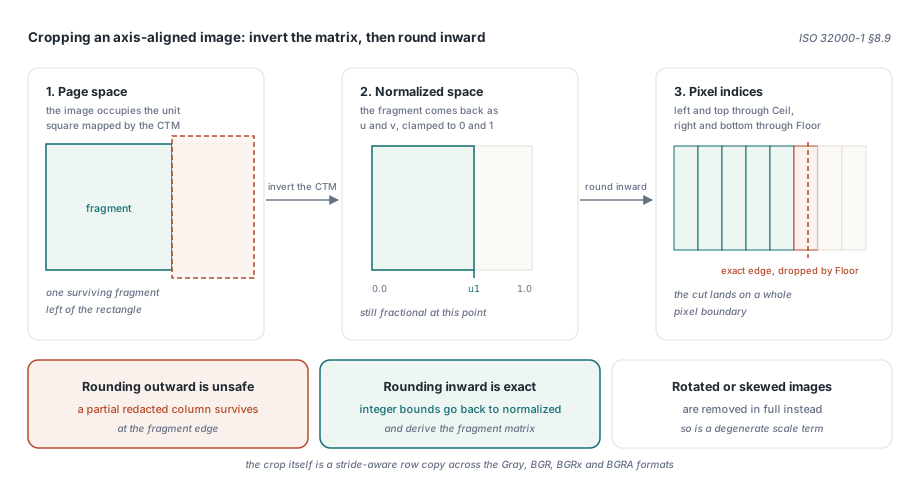
Images follow ISO 32000-1 §8.9, where the image samples occupy the unit square mapped through the current transformation matrix. PDFiumPas inverts that mapping to turn each surviving page-space fragment back into normalised image coordinates, clamps them to the unit interval, and then converts to pixel indices by rounding inward: the left and top edges go through Ceil, the right and bottom through Floor. That direction matters. Rounding outward would let a partial column of source pixels from the redacted side survive at the fragment edge. The integer pixel bounds are then converted back into normalised coordinates and used to derive the fragment matrix, so the cropped bitmap lands exactly on the pixel boundary it was cut at. The crop itself is a stride-aware row copy across the Gray, BGR, BGRx and BGRA formats. As with paths, a rotated or skewed image, or one whose matrix has a degenerate scale term, is removed in full
// After a successful SaveAsRedacted call
Writeln(Format('applied %d redaction(s) on %d page(s)',
  [Report.RedactionCount, Report.RedactedPageCount]));
Writeln(Format('scanned %d object(s), removed %d',
  [Report.ScannedObjectCount, Report.RemovedObjectCount]));
Writeln(Format('split text/path/image: %d / %d / %d',
  [Report.SplitTextObjectCount, Report.SplitPathObjectCount,
   Report.SplitImageObjectCount]));
Writeln(Format('preserved %d fragment(s)', [Report.PreservedFragmentCount]));
Writeln(Format('pruned %d resource name(s), swept %d object(s)',
  [Report.ResourcePruneReport.RemovedNameCount,
   Report.ResourcePruneReport.RemovedObjectCount]));

if Report.PreservedFragmentCount = 0 then
  // nothing could be split: every intersecting object was dropped whole
  LogWholeObjectFallback(SourcePdf);
Why does PDFiumPas fail closed on unmapped characters?
Because a glyph that has no reproducible Unicode scalar cannot be rebuilt honestly. Reconstructing a survivor means calling the text-setting API with a string, and that requires a stable code point for every retained character. Symbolic subset fonts with broken or absent ToUnicode data can yield an empty mapping, and re-encoding by guesswork would produce output that looks correct on screen while carrying a different character underneath. PDFiumPas refuses: the retained-character check raises, the exception is caught inside SaveAsRedacted, TPdfRedactionReport.Succeeded comes back False with the message in ErrorMessage, and the function returns False. The same rule applies to the split budget, which raises rather than silently truncating the fragment set. When a document has fonts you do not trust and you want the deterministic old behaviour, set Options.PreservePartialObjects := False and every intersecting object goes away whole
Resource pruning across shared scopes
Splitting objects leaves orphans behind, and pruning them is not as simple as diffing the page-level /Resources dictionary. ISO 32000-1 §7.8.3 lets the same resource dictionary be referenced by several pages, by Form XObjects, by patterns, and by annotation appearance streams at once. Deleting a font name because one page stopped using it will break another page that still does. PruneUnusedPdfResources therefore works per scope: it resolves /Contents whether it is a direct array, an indirect reference to an array, or a single stream, then collects resource usage from the operators that actually name resources — Tf for fonts, Do for XObjects, gs for graphics state, CS, cs, SCN and scn for colour spaces and patterns, sh for shadings, BDC and DP for marked-content properties, plus the /CS entry of inline images. When one dictionary is shared by several scopes, the used-name sets are unioned per category before anything is removed
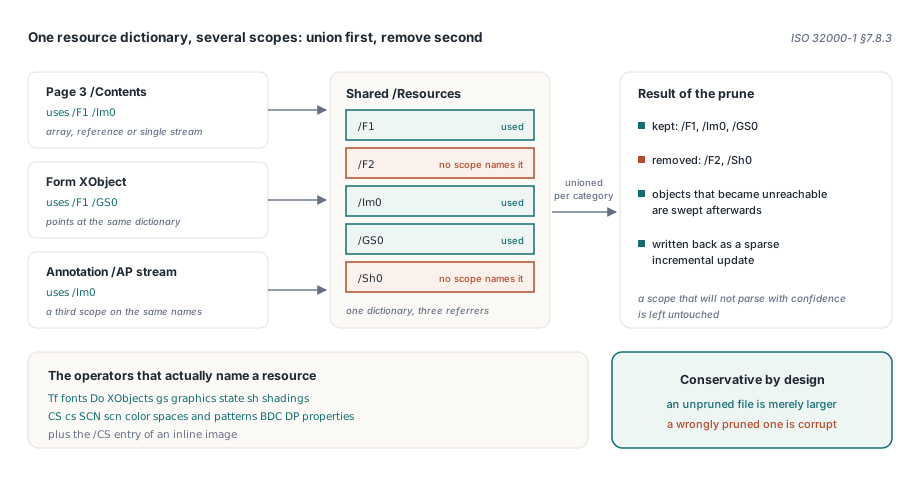
Only names confirmed unreferenced across every scope that points at the dictionary are dropped. A scope that cannot be parsed with confidence is left untouched, which is the conservative direction: an unpruned file is merely larger, a wrongly pruned one is corrupt. The surviving dictionaries are written back as a sparse incremental update carrying the exact generation numbers, and a reachability rewrite then sweeps the objects that became unreachable once the names disappeared. TPdfResourcePruneReport reports ScannedScopeCount, UpdatedScopeCount, RemovedNameCount, RemovedObjectCount, the byte counts, and a Succeeded flag. SaveAsRedacted runs this step automatically on the sanitised output, so the redaction path already includes it, but the function is exported at stream level for pipelines that want it on its own
uses
  FPdfCompress;

procedure PruneResourceNames(const SourcePdf, TargetPdf: string);
var
  Source, Dest: TFileStream;
  Report: TPdfResourcePruneReport;
begin
  Source := TFileStream.Create(SourcePdf, fmOpenRead or fmShareDenyWrite);
  try
    Dest := TFileStream.Create(TargetPdf, fmCreate);
    try
      // AllowSignedDocument stays False: an incremental rewrite would
      // invalidate the byte ranges a signature covers
      PruneUnusedPdfResources(Source, Dest, Report);
      if not Report.Succeeded then
        raise Exception.Create(Report.ErrorMessage);
      Writeln(Format('%d name(s) removed from %d scope(s), %d -> %d bytes',
        [Report.RemovedNameCount, Report.UpdatedScopeCount,
         Report.SourceByteCount, Report.OutputByteCount]));
    finally
      Dest.Free;
    end;
  finally
    Source.Free;
  end;
end;
Wiring it into a document pipeline
The redaction path never mutates the document you loaded. SaveAsRedacted captures an isolated snapshot, applies the /Redact annotations there, strips attachments, runs the sanitisation pass that removes the open action, catalogue actions, name trees, associated files, the AcroForm and the metadata, prunes resources, and only then writes the output stream. Reopening that output as an independent document and re-extracting the text is the verification step worth keeping in your own test suite, because it is the only check that answers the original question — can a reader still get the string. One consequence to plan for: splitting replaces page objects, so any FPDF_PAGEOBJECT handle you were holding is dead afterwards, the same lifetime trap described in stale page object handles after a transform
Two neighbouring pieces make the workflow complete. Deciding where the redaction rectangles go usually starts from extracted geometry, and the block and reading-order model in structured text blocks and reading order is a better source of candidate boxes than raw character runs. Serving the result to a reviewer belongs to the hardening rules in building a secure PDF preview, where form filling and JavaScript stay off by default. Together they cover the loop most compliance workflows need: locate, redact at operator level, verify by reopening, preview safely. The full API surface, the trial download and the licensing terms for the component live on the PDFium Delphi Component product page