HotXLS, the native Delphi and C++Builder Excel library, saves a classic BIFF8 .xls workbook cache first: TXLSWorksheet.WriteFormula asks TXLSWorkbook.TryGetCachedFormulaValue for the value Excel stored beside each formula and only calls the evaluator when that cache is missing or invalidated. A workbook you opened and never touched saves the same numbers back, and fresh results take one explicit Recalculate call instead of being a hidden side effect of SaveAs
The bug that forced this contract into the open was embarrassingly small. A corpus file called nested-subtotals.xls holds a grand total in R2C4 whose cached value is 37. Open it with HotXLS, ask TryGetCachedFormulaValue for the cell, get 37. Save it without changing a single cell, open the saved copy, ask the same question, get 67. Nothing in the API had been asked to compute anything, yet a number in the file had moved by exactly 30 — and 30 happens to be the sum of the two group subtotals, 10 and 20, that sit inside the range the grand total covers
Why does saving an XLS file change a formula value?
Two independent defects had to line up for that 37 to become 67, and fixing either one alone would have hidden the other. The first was structural: the classic writer recalculated every formula on every save. The second was a type check that could never be true for a formula loaded from disk, which made the evaluator count nested SUBTOTAL cells twice. The corpus file was simply the first input where a save-time recalculation produced a different answer from Excel and somebody compared the two. The structural defect is easy to state: before v2.382.3, TXLSWorksheet.WriteFormula and its shared-formula sibling WriteFormulaWithTExp obtained the eight-byte FormulaValue field of every Formula record by calling TXLSWorkbook.GetFormulaValue, which is the evaluator. The cache that ParseFormula had carefully decoded from the source file at load time was never consulted on the way out. In effect, each save was a full recalculation with the workbook-level recalc API bypassed, so nothing you could set on the workbook would have stopped it. Any place where the HotXLS evaluator disagreed with Excel, whether a legitimately unsupported function or a plain bug, became a silent data change on save
The second defect lived in the nested-subtotal callback the evaluator uses. Excel defines every SUBTOTAL form as ignoring cells whose own formula is another SUBTOTAL, so the calculator in lxCalc.pas arms FIgnoreSubtotalCells during aggregation and asks the workbook, through TXLSWorkbook.GetClassicIsSubtotalCell, whether each cell in the range is one. That callback fetched the formula text as a Variant and tested it with VarType(f) = varOleStr. The text comes back from GetUnCompiledFormula as a Delphi String, and a String assigned to a Variant is varUString, never varOleStr. The predicate was false for every cell in every loaded file, group subtotals were rolled into the grand total a second time, and on a save that recalculated everything, 10 + 20 + 7 became 67
// HotXLS 2.381 and earlier: a formula Variant built from a String
// is varUString, so this comparison never succeeded
Result := (VarType(f) = varOleStr) and
  (SameText(Copy(f, 1, 9), 'SUBTOTAL(') or
   SameText(Copy(f, 1, 10), '=SUBTOTAL('));

// HotXLS 2.382.0: VarIsStr accepts varString, varOleStr and varUString,
// and AGGREGATE is excluded from enclosing subtotals as Excel does
if VarIsStr(f) then
  Result := SameText(Copy(f, 1, 9), 'SUBTOTAL(') or
    SameText(Copy(f, 1, 10), '=SUBTOTAL(') or
    SameText(Copy(f, 1, 10), 'AGGREGATE(') or
    SameText(Copy(f, 1, 11), '=AGGREGATE(');
v2.382.0 shipped the VarIsStr fix and, while in the same function, taught the callback that AGGREGATE cells are excluded from enclosing subtotals too. That alone made the corpus assertion pass, because the recalculated 37 now matched the loaded 37. It did not make the library honest: the save was still recalculating, and the test was only green because the evaluator happened to agree with Excel on that particular file. The rules for which cells SUBTOTAL and AGGREGATE skip, including hidden rows, are covered in the SUBTOTAL and AGGREGATE hidden-row article; what matters here is that no evaluator should get a vote on a file you did not ask it to compute
What does Excel guarantee about cached values on save?
Excel treats a save as a snapshot, not a calculation event. The value written into the FormulaValue field of a Formula record ([MS-XLS] §2.4.127, layout in §2.5.133) is whatever the cell currently displays, which in manual calculation mode may be years stale, and Excel still writes it faithfully. Recalculation is a separate operation with its own trigger. HotXLS now follows the same rule for classic saves: WriteFormula and WriteFormulaWithTExp call TryGetCachedFormulaValue first, take CacheInfo.Value when the state is xlfcsLoaded or xlfcsCalculated, and fall through to GetFormulaValue only for xlfcsMissing and xlfcsInvalidated. The read-side half of this contract, including what each state means and why a cached blank or False still counts as a value, is described in Read Excel Cached Formula Values in Delphi Without Recalc
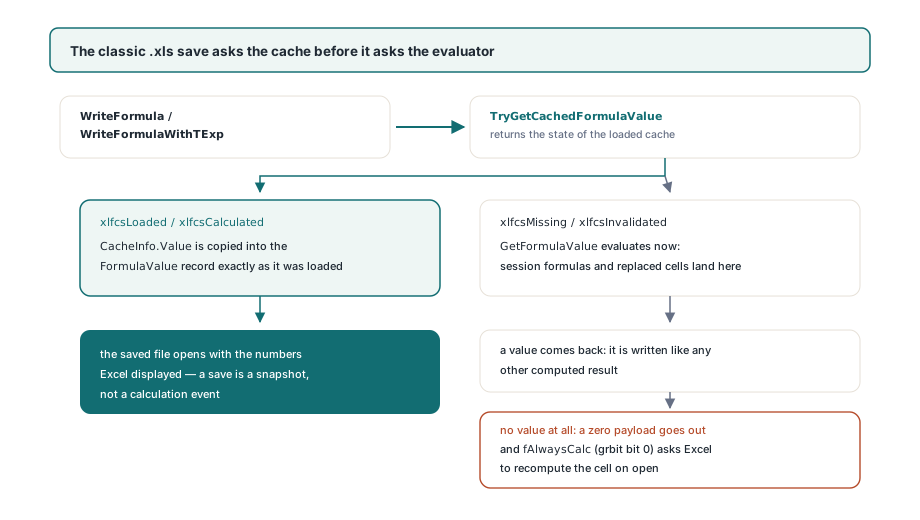
The fallback path is deliberately kept, not removed. A formula you assigned in this session through Cells[Row, Col].Formula arrives with no cache, and a formula you replaced on a loaded cell is marked xlfcsInvalidated by _SetCompiledFormula; both are evaluated at save time exactly as before, so a generated workbook still opens in Excel with numbers in it. When even the evaluator cannot produce a value, the writer emits a zero payload and sets fAlwaysCalc (grbit bit 0 of §2.4.127) so that Excel recomputes the cell on open instead of trusting the placeholder
procedure RoundTripWithoutRecalc(const Source, Target: string);
var
  Book: TXLSWorkbook;
  Before, After: TXLSFormulaCacheInfo;
begin
  Book := TXLSWorkbook.Create;
  try
    Book.Open(Source);
    // 1-based sheet, row and column: R2C4 on the first sheet
    if not Book.TryGetCachedFormulaValue(1, 2, 4, Before) then
      raise Exception.Create('R2C4 carries no usable cache');
    Book.SaveAs(Target);        // no evaluator involved for cached cells
  finally
    Book.Free;
  end;

  Book := TXLSWorkbook.Create;
  try
    Book.Open(Target);
    Book.TryGetCachedFormulaValue(1, 2, 4, After);
    // Before.Value = After.Value = 37 for nested-subtotals.xls
    // A save that recalculated would have written 67 here
  finally
    Book.Free;
  end;
end;
Where does a BIFF shared formula root keep its cached value?
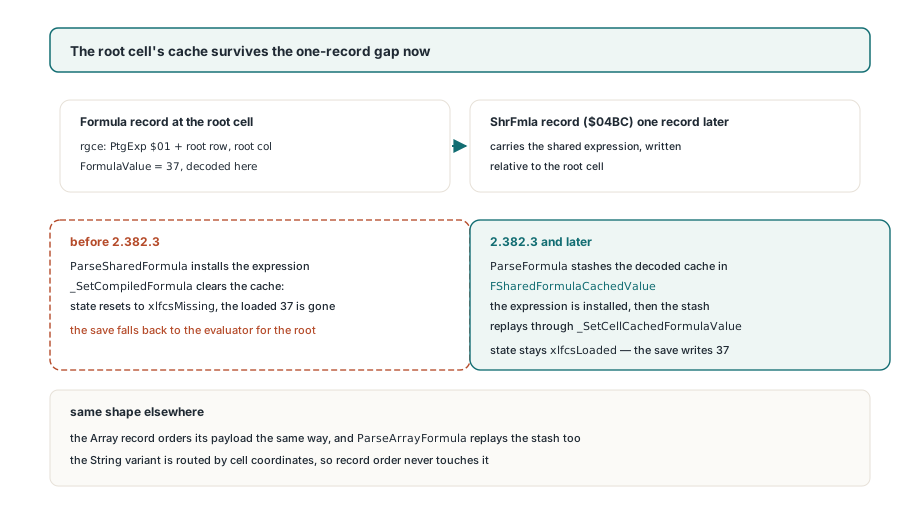
In its own Formula record, like every other formula cell, and that is exactly what made the root cell of a shared group the one place cache-first saving still lost. A shared formula in BIFF8 is stored as a ShrFmla record ([MS-XLS] §2.4.260) that follows the Formula record of the top-left cell, and every member cell, root included, carries an rgce consisting of a single PtgExp token (§2.5.198): the first byte of the parsed expression is $01, followed by the row and column of the root cell. The follower cells are self-contained — HotXLS reads each one's FormulaValue and resolves the expression by looking up the root's compiled formula. The root cell is different, because when its Formula record is parsed the expression does not exist yet; it arrives one record later
That one-record gap is where the cache went. TXLSReader.ParseFormula decodes the cached value and, on seeing a PtgExp whose coordinates equal the cell's own, remembers the cell in FSharedFormulaRow and FSharedFormulaCol and publishes the cache to the cell. When the ShrFmla record ($04BC) arrives, ParseSharedFormula compiles the expression and installs it with _SetCompiledFormula, and _SetCompiledFormula does what it must do for any formula change: it clears FCachedFormulaValue and resets the state to xlfcsMissing. The root's loaded 37 was therefore thrown away before anyone could read it, TryGetCachedFormulaValue reported the root as uncached, and the cache-first writer dutifully fell back to the evaluator for precisely the cell everyone was looking at. The Array record (§2.4.4) shares the same ordering and had the same hole
The fix in v2.382.3 adds a third field, FSharedFormulaCachedValue, next to the pending root coordinates. ParseFormula stashes the decoded cache there when it recognises a root, and both ParseSharedFormula and ParseArrayFormula replay it through _SetCellCachedFormulaValue immediately after installing the compiled expression, then reset the stash to Unassigned. The String variant of the cache is unaffected by all of this because its payload arrives in a separate String record and is routed by cell coordinates, not by record order. If you work with the OOXML side of the same concept, the XLSX shared formula si expansion article explains why the package format has no equivalent ordering problem but its own expansion pitfalls
Why do shared formula followers need a relative shift?
Because the expression stored in ShrFmla is written relative to the root cell, and a follower that reuses it verbatim evaluates the root's references instead of its own. The old reader installed Value.GetCopy() on each follower, a deep copy with no displacement, so a group rooted at B1 with =A1*3 gave every follower =A1*3 too. Cache-first saving actually masked this for loaded files, since followers had their own FormulaValue and never needed the expression to save correctly; it surfaced the moment anything recalculated. The reader now installs TXLSCompiledFormula.GetCopy(row - srow, col - scol), which walks the syntax tree and offsets every relative reference by the follower's distance from the root, so the follower at B2 owns a genuine =A2*3
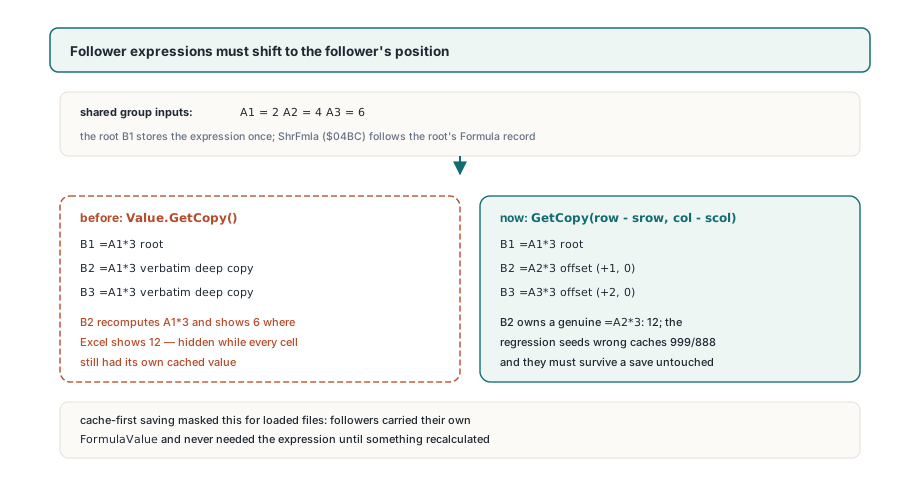
The regression test that pins both behaviours is worth reading because it refuses to let a coincidence pass. It builds a workbook with =A1*3 and =A2*3 over the inputs 2 and 4, then injects the deliberately wrong caches 999 and 888 through _SetCellCachedFormulaValue, once with UseSharedFormulas on and once off. After a save and reload, both cells must still report 999 and 888 — proof that the save touched neither the root nor the follower cache. Only after an explicit Recalculate must they become 6 and 12, proof that the follower's shifted expression is correct. A test that seeded the true values would have passed under the old writer as well, which is the whole point of seeding wrong ones
var
  Book: TXLSWorkbook;
  Info: TXLSFormulaCacheInfo;
begin
  Book := TXLSWorkbook.Create;
  try
    Book.Open('quarterly-model.xls');
    Book.Sheets[1].Cells[1, 1].Value := 5;   // change an input

    // Loaded caches of dependent formulas are NOT invalidated by a
    // literal edit, so a plain SaveAs would keep the old numbers.
    // Ask for a recalculation when you actually want fresh results:
    Book.Recalculate;

    if Book.TryGetCachedFormulaValue(1, 1, 2, Info) then
      Writeln('B1 now ', VarToStr(Info.Value),
        ', state ordinal ', Ord(Info.State));   // xlfcsCalculated
    Book.SaveAs('quarterly-model-updated.xls');
  finally
    Book.Free;
  end;
end;
What the cache-first contract does not do for you
Cache-first saving preserves what was loaded; it does not track whether what was loaded is still true. Changing a literal that a formula depends on marks the dependency graph dirty for the evaluator, but it leaves the dependent cell's xlfcsLoaded cache in place, and the classic writer will happily write that stale value unless you call Recalculate or read the cell's Value first, which computes it and moves the state to xlfcsCalculated. This is the same trade Excel makes in manual calculation mode, and it is the right one for a pipeline that opens third-party files, edits a few labels and saves — but it means a workbook that edits inputs must own its recalculation step explicitly. The XLSX writer's RecalcBeforeSave policy is unchanged by this work and has its own manual mode that preserves caches in the same spirit. Two smaller boundaries follow from this: the cache-first path only helps cells whose state is xlfcsLoaded or xlfcsCalculated; a generator that writes formulas and never evaluates them still pays for one evaluation per cell at save time, exactly as it did before. And the nested-subtotal fix corrects which cells the evaluator skips, not every function the evaluator implements — a file whose formulas HotXLS cannot compute identically to Excel is now safe to round-trip untouched, but a deliberate Recalculate on that file will still produce the library's answer rather than Excel's, and you should compare the two before trusting a recalculated save
Cache-first classic saves, the restored shared and array formula root caches, the relative-reference shift for shared followers and the corrected SUBTOTAL and AGGREGATE nesting rules all ship in the standard HotXLS Delphi Spreadsheet Component for Delphi and C++Builder, with no dependency on Excel or any OLE automation server; the product page carries the full API reference for the workbook, cache reader and recalculation entry points used here