HotXLS refuses to route 20 dangerous formula names, including CALL, REGISTER.ID, WEBSERVICE and DDE, to your Delphi user-function callbacks unless you opt in. The workbook property AllowUnsafeFormulaCallbacks defaults to False, the check runs before any argument is evaluated, and a denied call reports xlfeUnsafeFunctionDenied without invoking a single handler
The scenario that made this necessary is mundane. A service accepts uploaded XLS or XLSX files, recalculates them server-side and reads a few totals back. The host application registered an OnUserFunction handler years ago for a couple of business functions, and somewhere along the way that handler grew a catch-all branch that forwards anything it does not recognise to a plugin table. Nobody on the team ever typed =WEBSERVICE(...) into a cell. The uploader did. Keeping that formula intact through open, recalc and save is a file-fidelity feature. Letting it reach host code that can open sockets or files is an authorisation decision, and until HotXLS separated the two, the library was quietly making that decision on your behalf
Why did preserving a formula turn into permission to run it?
The root cause was a single fallback path. HotXLS parses every Excel function name it knows, but not every known name has an implementation in the calculation engine. Built-ins that are recognised yet unimplemented used to drop into the same user-defined function fallback as genuinely custom names, so CALL and REGISTER.ID shared a dispatch path with your DISCOUNT or REGIONRATE. Unknown names such as WEBSERVICE or DDE could likewise match a same-named entry in the workbook registry, the process-wide registry or an event handler. The mechanics of that fallback are covered in how HotXLS resolves custom functions through OnUserFunction; the problem was that nothing on that path asked whether the name itself was one a sane host should ever execute
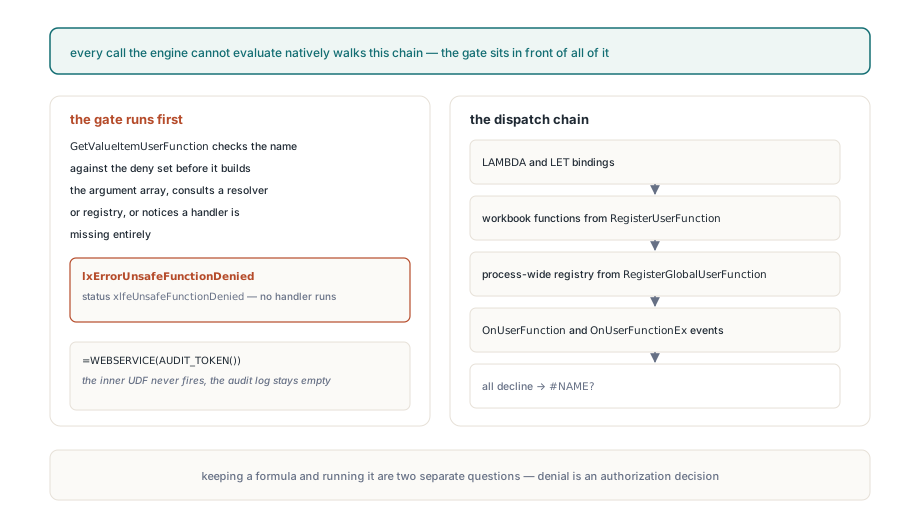
The dispatch order matters for what "unknown" means here. A call the engine cannot evaluate natively is offered in turn to lexical LAMBDA and LET bindings, which the closure support in the HotXLS formula engine resolves first, then to workbook-local functions registered with RegisterUserFunction, then to process-wide functions from TXLSWorkbook.RegisterGlobalUserFunction, and finally to the OnUserFunction and OnUserFunctionEx events. Only when all of them decline does a truly unknown function become #NAME?. Every stage after the lambda lookup hands control to code you wrote, which is exactly why the safety check has to sit in front of the whole chain instead of inside any one handler
Which function names does HotXLS block by default?
XLSFormulaCallbackIsUnsafe in lxCalc.pas holds a fixed deny set of 20 names: DDE, CALL, REGISTER, REGISTER.ID, WEBSERVICE, RTD, SQL.REQUEST, EXEC, RUN, CREATE.OBJECT, APP.ACTIVATE, SEND.KEYS, OPEN, SAVE, SAVE.AS, FOPEN, FWRITE, FWRITELN, FCLOSE and FILE.DELETE. They are the names that, in Excel or its macro language, load native code, reach the network, talk to other processes or touch the file system. Before comparison the function trims surrounding whitespace, uppercases the name and strips a single _XLFN. or _XLWS. prefix, so _xlfn.webservice written by a newer Excel build is caught just like the bare spelling. The list lives at the calculator boundary rather than in the Classic, XLSX and ODS parsers, which keeps one AST, one BIFF token stream and one converted workbook behaving identically
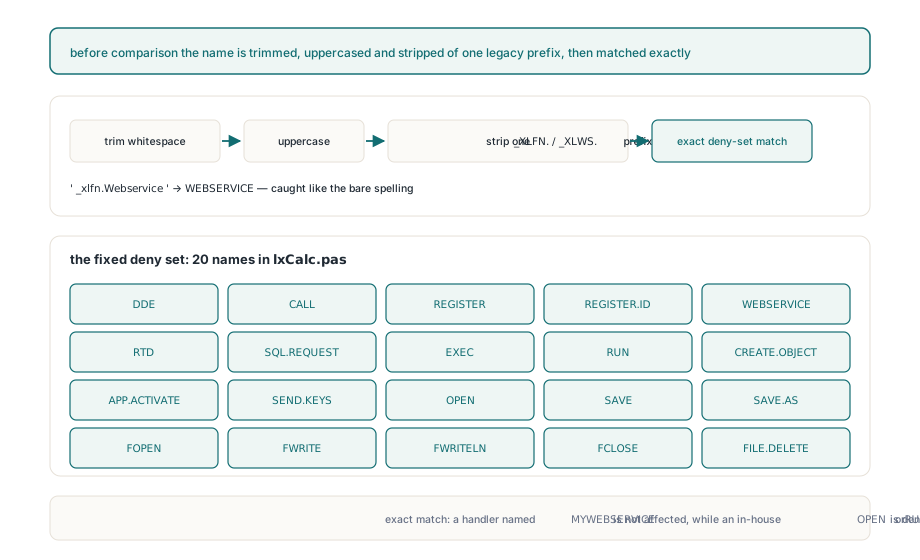
Two edges are worth knowing before you rely on it. The match is exact, so a handler you register as MYWEBSERVICE is not affected, and conversely a legitimate in-house UDF that happens to be called OPEN or RUN is now denied by default. The deny set is also not a sandbox for your own handlers. If your catch-all branch executes arbitrary plugin names, the gate stops the famous dangerous ones and nothing else; the durable fix is still a handler that matches an explicit allowlist with SameText and leaves Handled at False for everything it does not own
Why must the gate run before argument evaluation?
A gate that fires after the arguments are computed is too late, because the arguments themselves can call your code. GetValueItemUserFunction checks the name first and exits with lxErrorUnsafeFunctionDenied before it builds the argument array, before it consults a resolver or either registry, and even before it notices that no handler is assigned at all. That ordering is what defeats the nested case below, where the outer call would be refused anyway but a harmless-looking inner UDF would otherwise fire first and leave its side effect behind
procedure TImportService.HandleUdf(Sender: TObject;
  const FunctionName: WideString; const Args: Variant;
  var Value: Variant; var Handled: Boolean);
begin
  if SameText(FunctionName, 'AUDIT_TOKEN') then
  begin
    FAuditLog.Add('AUDIT_TOKEN evaluated');   // side effect in host code
    Value := 'token-42';
    Handled := True;
  end;
end;

Book.OnUserFunction := HandleUdf;
Eval := Sheet.EvaluateFormulaAt(1, 1, '=WEBSERVICE(AUDIT_TOKEN())');
// Eval.Status = xlfeUnsafeFunctionDenied, Eval.Value = Null,
// Eval.Issue.NativeCode = -106, and FAuditLog is still empty
Workbook default versus per-call TXLSFormulaEvaluationOptions
The workbook flag is the default and the per-call option is the final word. TXLSWorkbook.AllowUnsafeFormulaCallbacks and TXLSXWorkbook.AllowUnsafeFormulaCallbacks govern ordinary recalculation, Calculate, the two-argument EvaluateFormulaAt, evaluation templates, read-only views and, on XLSX, every worker in the parallel recalculation pool. Any entry point that accepts an explicit TXLSFormulaEvaluationOptions record takes Options.AllowUnsafeFormulaCallbacks as the verdict for that call and does not OR it with the workbook property. That asymmetry is deliberate: a trusted internal job can authorise one RTD lookup without flipping the whole workbook, and a workbook that is globally opted in can still force a sensitive evaluation back to deny
var
  Options: TXLSFormulaEvaluationOptions;
  Eval: TXLSFormulaEvaluationResult;
begin
  // workbook stays locked down, one trusted call is allowed through
  Book.AllowUnsafeFormulaCallbacks := False;
  Options := XLSDefaultFormulaEvaluationOptions;
  Options.AllowUnsafeFormulaCallbacks := True;
  Eval := Sheet.EvaluateFormulaAt(4, 2, '=WEBSERVICE(B1)', xlfrsA1, Options);

  // workbook opted in, but this evaluation of uploaded text is not
  Book.AllowUnsafeFormulaCallbacks := True;
  Options := XLSDefaultFormulaEvaluationOptions;   // flag is False again
  Eval := Sheet.EvaluateFormulaAt(4, 2, UploadedFormula, xlfrsA1, Options);
  if Eval.Status = xlfeUnsafeFunctionDenied then
    LogRejected(Eval.Issue.Message);
end;
Toggling the workbook property also marks the dependency graph dirty on both engines. Without that step a cached result computed while callbacks were allowed could be served after they were revoked, or a cached xlfeUnsafeFunctionDenied outcome could outlive an opt-in. The new status was appended to TXLSFormulaEvaluationStatus after xlfeFailed, so it has ordinal 10 and every existing ordinal keeps its value; the same tail-append rule applies to the options record field and the IXLSWorkbook getter and setter, although a consumer built against an older release still needs a recompile
What happens to unknown and unsafe formula text on save?
Keeping a formula and running it are now two separate questions, and the entry policy only answers the first one. FormulaEntryPolicy on either workbook class carries UnknownFunctionMode and UnknownNameMode, both defaulting to xlfusmReject, so assigning a formula with an unknown call through the normal Formula property is rejected before the cell value, formula cache or dependencies change. ValidateFormulaEntry reports the same decision without side effects. Trusted paths such as file loading, copying and format conversion bypass that user-entry policy, because a strict default must never reject symbols already present in a file you are merely opening
var
  Policy: TXLSFormulaEntryPolicy;
begin
  Policy := Book.FormulaEntryPolicy;
  Policy.UnknownFunctionMode := xlfusmPreserve;   // compatibility entry
  Book.FormulaEntryPolicy := Policy;
  Sheet.Cells[3, 1].Formula := '=ACME_RATE(B3)';  // stored, not authorised
  Book.SaveAs('rates.xls');
end;
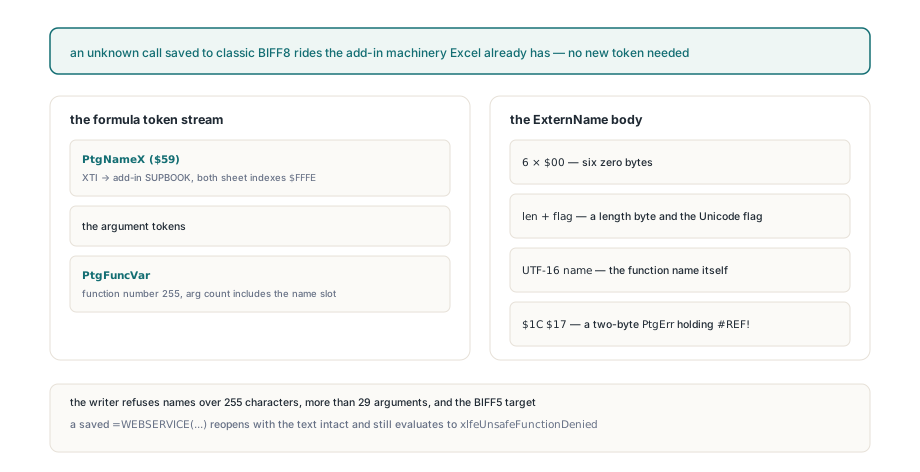
In Classic BIFF8 an unknown call has no token of its own, so HotXLS writes it the way Excel writes add-in functions. The formula gets a PtgNameX token ($59) whose XTI entry points at the add-in SUPBOOK with both sheet indexes set to $FFFE, followed by the argument tokens and a PtgFuncVar carrying function number 255 and an argument count that includes the name slot. The backing ExternName body is six zero bytes, a length byte and Unicode flag, the UTF-16 function name, then a two-byte formula of $1C $17, a PtgErr holding #REF!. The writer refuses names longer than 255 characters, more than 29 arguments, and the BIFF5 target. How HotXLS classifies these add-in SUPBOOK entries next to external workbook links is explained in the SUPBOOK and XTI classification rules for BIFF external links. XLSX keeps the raw function text and ODS keeps its msoxl: formula, and in every format a file that saved =WEBSERVICE(...) reopens with the text intact and still evaluates to xlfeUnsafeFunctionDenied by default
If your pipeline evaluates workbooks it did not author, leave AllowUnsafeFormulaCallbacks at False, keep handlers on an explicit allowlist, and grant per-call options only where the formula source is yours. The full callback, entry-policy and evaluation API is documented with the HotXLS Delphi spreadsheet component