The cell reads =NetOf(B2, C2), B2 holds 1250, C2 holds 0.19, Excel shows 1012.5, and the workbook contains neither a VBA module nor an add-in. NetOf lives in the Name Manager: it is a defined name whose text is LAMBDA(amount, rate, amount*(1-rate)). A server-side calculator that treats every defined name as a range or a constant finds nothing it can call there, and the cell comes back as #NAME?
Getting that cell right takes rather more than a parser that accepts the word LAMBDA. A classic spreadsheet evaluator knows five kinds of value: numbers, text, booleans, errors and references to cells holding those. LAMBDA adds a sixth, a function value that carries its parameter names, its body and the names that were visible where it was written. LET is the other half of the story, because LET is where users bind those functions to short local names and call them a few tokens later, often three levels deep
Three places a function name can resolve
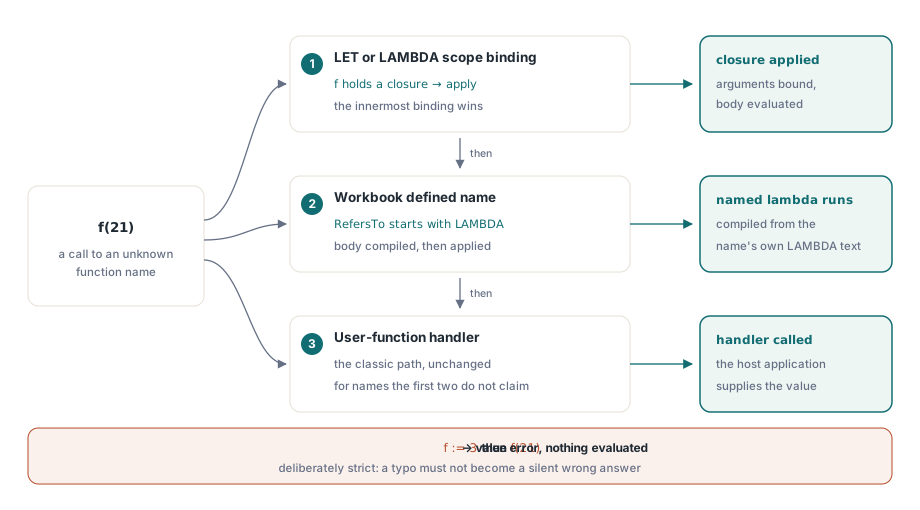
When the HotXLS formula engine comes across a call to a name that is not a built-in function, it tries three sources in a fixed order. The first is the current LET or LAMBDA scope: if f is a local binding holding a closure, f(21) applies it. The second is a workbook defined name whose text begins with LAMBDA, so NetOf(1250, 0.19) compiles the name's body and applies it to the two arguments. The third is the user-function handler you may already be using for custom Delphi functions, described in custom functions in the HotXLS formula engine. Only when all three pass does the cell become #NAME?
The order matters in one particular situation. A local name always beats a workbook name with the same spelling, even when the local binding holds an ordinary number. In that case the defined-name lookup is skipped altogether and the call goes straight to the user-function handler, and a workbook LAMBDA of the same name is never consulted for that call
The Delphi side is brief. A named function is simply a defined name added with TXLSXDefinedNames.Add, and a closure inside one formula needs no registration whatsoever:
var
  Book: TXLSXWorkbook;
  Sheet: TXLSXWorksheet;
begin
  Book := TXLSXWorkbook.Create;
  try
    Sheet := Book.Sheets.Add('Model');

    // Two-argument Add = workbook scope, which is what call-by-name looks up
    Book.DefinedNames.Add('NetOf', 'LAMBDA(amount, rate, amount*(1-rate))');

    // 1250 * (1 - 0.19) = 1012.5
    Sheet.Cells[2, 2].Formula := 'NetOf(1250, 0.19)';

    // A closure bound and applied inside one formula: 42
    Sheet.Cells[3, 2].Formula := 'LET(double, LAMBDA(x, x*2), double(21))';

    // bump captures base = 100; bump(5) = 105, step*2 = 210
    Sheet.Cells[4, 2].Formula :=
      'LET(base, 100, bump, LAMBDA(v, v+base), LET(step, bump(5), step*2))';

    // Postfix application, no name at all: 42
    Sheet.Cells[5, 2].Formula := 'LAMBDA(x, x*2)(21)';

    Book.Recalculate;
    Book.SaveAs('lambda-model.xlsx');
  finally
    Book.Free;
  end;
end;
The last cell shows a form people tend to forget. Excel lets you apply a LAMBDA expression directly by writing the argument list straight after it, and HotXLS parses LAMBDA(x, x*2)(21) in the same way. The parser accepts that trailing argument list only after something that could produce a function, such as a name, a LET or IF expression, or another application. Writing (1+2)(3) fails at compile time rather than at evaluation time
What a closure remembers, and why parameters win
Evaluating a LAMBDA expression in HotXLS produces a closure value: the parameter names, a copy of the body, the sheet it was written on, and a snapshot of every LET or LAMBDA binding visible at that moment. In the fourth cell above, bump is created whilst base is already bound to 100, so the closure takes base = 100 along with it. When bump(5) runs inside the inner LET, the body still sees that 100, even though the inner LET knows nothing about base by name
A call then happens in three steps. The argument expressions are evaluated first, in the caller's scope. Then the captured environment is pushed, then the parameters on top of it, and the body is evaluated. Lookups search from the top down, so a parameter named rate hides a captured binding named rate, and a captured binding hides anything the caller happened to bind under the same name. When the body returns, or fails, the scope is cut back to where the call began
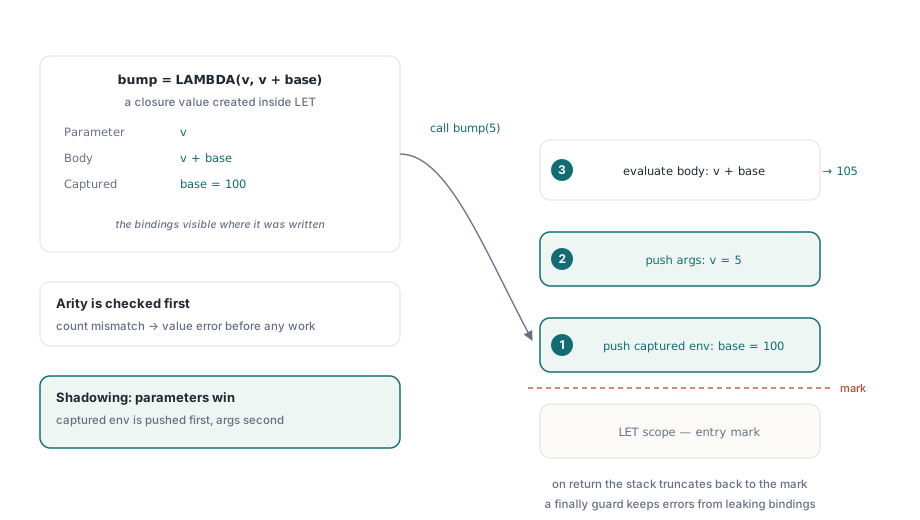
Evaluating the arguments before any binding is installed sounds like a minor detail until you write LET(x, 10, f, LAMBDA(x, x+1), f(x*2)). The argument x*2 has to mean the outer x, which gives 20, and the result is 21. If the parameter were installed first, the argument would read the very parameter it is about to define. The rule that falls out is the one Excel users expect: what a named function computes depends on its arguments and on what it captured when it was written, and the caller's other local names never leak into it
Why does f(21) fail when f holds a number?
A local binding that holds anything other than a closure is never applied as a function. LET(f, 3, f(21)) does not multiply 3 by 21, nor does it fall back to a workbook name called f. The call moves on to the user-function handler, and if no handler claims the name, the cell ends up as #NAME?. That is the right outcome for a spreadsheet: a typo that silently turned a function call into a multiplication would produce a plausible number that nobody questions
Postfix application is stricter still. Whatever sits in front of the argument list is evaluated, and if the result is not a closure, the cell gets #VALUE!, so LET(g, 3, (g)(21)) and LET(g, 3, g(21)) fail with different errors. Other failures you can reproduce in a throwaway workbook:
- Wrong argument count:
LET(add, LAMBDA(a, b, a+b), add(1))returns #VALUE! before the argument expression is even evaluated - Errors inside arguments travel as values: in
LET(safe, LAMBDA(x, IFERROR(x, 0)), safe(1/0))the #DIV/0! is bound toxand the IFERROR inside the body turns it into 0 - References stay references: an argument such as
A1reaches the body as a cell reference, so functions that care about reference identity, ISREF amongst them, see a reference rather than the cell's value - A LAMBDA definition takes up to 253 parameters, the same ceiling Excel documents for LAMBDA
- Runaway recursion is stopped: a named lambda that calls itself shares a default ceiling of 256 nested levels with ordinary formula nesting, and beyond that the call ends with a resource-limit error rather than exhausting the Delphi stack
// Log is your own logging routine, not part of HotXLS
procedure ProbeLambdaErrors(Sheet: TXLSXWorksheet; Book: TXLSXWorkbook);
begin
  Sheet.Cells[2, 4].Formula := 'LET(f, 3, f(21))';                       // #NAME? without a handler
  Sheet.Cells[3, 4].Formula := 'LET(g, 3, (g)(21))';                     // #VALUE!, postfix
  Sheet.Cells[4, 4].Formula := 'LET(add, LAMBDA(a, b, a+b), add(1))';     // #VALUE!, arity
  Sheet.Cells[5, 4].Formula := 'LET(safe, LAMBDA(x, IFERROR(x, 0)), safe(1/0))'; // 0
  Book.Recalculate;
  Log(Sheet.Cells[2, 4].FormattedText);
  Log(Sheet.Cells[3, 4].FormattedText);
  Log(Sheet.Cells[4, 4].FormattedText);
  Log(Sheet.Cells[5, 4].FormattedText);
end;
LET bindings in HotXLS, nested and partial
HotXLS evaluates LET from left to right: each binding is evaluated with all earlier bindings in scope, then pushed, and the last argument is evaluated under the complete set. So LET(a, 1, b, a+1, LET(c, b*2, c)) returns 4, and the inner LET sees both a and b. Once the outer LET finishes, its bindings are gone, which means a sibling formula in the next cell starts from an empty scope
Two shape rules are enforced before anything runs. LET needs an odd number of arguments, at least three, so LET(a, 1) is #VALUE!. And every name slot must be a plain name: LET(A1, 5, A1*2) is rejected because A1 is a cell reference, whereas short names such as x or ab, which also spell column letters, are read as local names inside LET and LAMBDA. A binding to a range keeps the range, so LET(r, A1:A10, ROWS(r)) returns 10 and SUM(r) adds up the cells
The same closure values feed the helper functions built for them: MAP, REDUCE, SCAN, MAKEARRAY, BYROW and BYCOL. MAP(A2:A6, LAMBDA(v, v*2)) spills five doubled values, and REDUCE(0, A2:A6, LAMBDA(acc, v, acc+v)) folds them into a single sum. The captured environment travels into those calls exactly as it does for a direct call, so a LET-bound rate is still visible inside the MAP body
Commas, semicolons and what SaveAs writes
The HotXLS formula parser accepts the comma and the semicolon as argument separators interchangeably. Formula text arrives from places you do not control: a support ticket written on a German-locale machine, documentation that uses Excel's canonical commas, a script that generates formula strings, older HotXLS code that used semicolons throughout. SUM(A1,A2) and SUM(A1;A2) compile to the same thing, and so does a LAMBDA written either way
Inline array constants are the exception. Inside braces the semicolon keeps its Excel meaning of row separator, so {1,2;3,4} is a two-by-two array, not a four-argument list. If you generate formulas with semicolons as argument separators, keep array constants in Excel's syntax and the two will never collide
Cell.Formula returns the text you assigned. When SaveAs writes an XLSX file, semicolons used as argument separators outside braces are written out as commas, because the OOXML file format stores formulas in Excel's comma syntax, and functions that Excel stores under an _xlfn. prefix pick up that prefix on the way out. A formula loaded from a file and left untouched is written back from its original XML text
Reading named lambdas from customer workbooks
Workbooks authored in Excel store LAMBDA names the way Excel writes them: with an _xlfn. prefix on the function name and often _xlpm. on the parameters. HotXLS strips those prefixes when it evaluates the name, but TXLSXDefinedName.Formula returns the definition text exactly as the file supplied it. A check written as Copy(Name.Formula, 1, 6) = 'LAMBDA' passes for names you created in code and misses every name that came out of Excel. That mismatch is easy to overlook, because the calculated values are correct either way and only your own audit code disagrees
// IsLambdaDefinition is a helper you add yourself, not a HotXLS API
function IsLambdaDefinition(const Text: WideString): Boolean;
var
  S: WideString;
begin
  S := UpperCase(Trim(Text));
  if (S <> '') and (S[1] = '=') then
    Delete(S, 1, 1);
  if Copy(S, 1, 6) = '_XLFN.' then
    Delete(S, 1, 6);
  Result := Copy(S, 1, 7) = 'LAMBDA(';
end;

procedure AuditLambdas(const FileName: string);
var
  Book: TXLSXWorkbook;
  Name: TXLSXDefinedName;
  I: Integer;
begin
  // Log is your own logging routine
  Book := TXLSXWorkbook.Create;
  try
    if Book.Open(FileName) = 1 then
    begin
      for I := 0 to Book.DefinedNames.Count - 1 do
      begin
        Name := Book.DefinedNames[I];
        if IsLambdaDefinition(Name.Formula) and (Name.SheetIndex >= 0) then
          Log('Sheet-scoped lambda, not callable by name: ' + Name.Name);
      end;
      Book.Recalculate;
      Log(VarToStr(Book.Sheets[1].Cells[2, 2].Value));
    end;
  finally
    Book.Free;
  end;
end;
The scope check in that loop is there because call-by-name in HotXLS looks the callee up amongst workbook-level names. Keep named functions at workbook scope. A sheet-scoped LAMBDA name can still be read through FindByName(AName, ASheetIndex), but a function people call from several sheets belongs to the workbook, and the scoping rules behind that are set out in defined names and cross-sheet formulas
Editing a lambda later is cheap. Assigning a new text to TXLSXDefinedName.Formula invalidates the dependency graph, so the next Recalculate rebuilds it and re-evaluates the cells that call the function; the mechanics are in incremental recalculation and the dependency graph. A cell whose formula evaluates to a bare closure, such as =LAMBDA(x, x*2) with no call, gets no cached value at all, since there is no number or text to store; Excel shows #CALC! for the same cell. For reports that have to open in tools without LAMBDA support, freeze the results with Sheet.Cells.ConvertFormulasToValues after the last Recalculate, which keeps each cached value and drops the formula text
LAMBDA, LET, the helper functions and the defined-name API all ship in the same native Delphi and C++Builder library, which reads and writes XLS, XLSX and ODS without Excel being installed. The full formula function list is on the HotXLS spreadsheet component page