HotXLS, the Delphi and C++Builder Excel component, cuts embedded PDF font size through TrueType font subsetting: at PDF export time it calls the Windows system library fontsub.dll's CreateFontPackage function to rebuild an embedded TrueType font around only the Unicode code points a worksheet actually used, instead of shipping the whole typeface file. A report with two hundred rows of Chinese product names might only need a few hundred distinct Han characters, yet the CJK fonts Windows ships routinely run 5 to 20 MB apiece. Embed one whole, and the font alone can outweigh every other object in the PDF combined
fontsub.dll is not a library most Delphi developers have ever heard of, and there is a reason for that: Microsoft ships it as a small, sparsely documented utility DLL rather than a headline Win32 API. HotXLS treats it as an optional capability, not a hard dependency, so how the exporter loads it, calls it, and falls back when it is missing says as much about defensive Windows programming as it does about font formats, and both halves of that story are worth walking through
Why does Unicode text balloon a HotXLS PDF export?
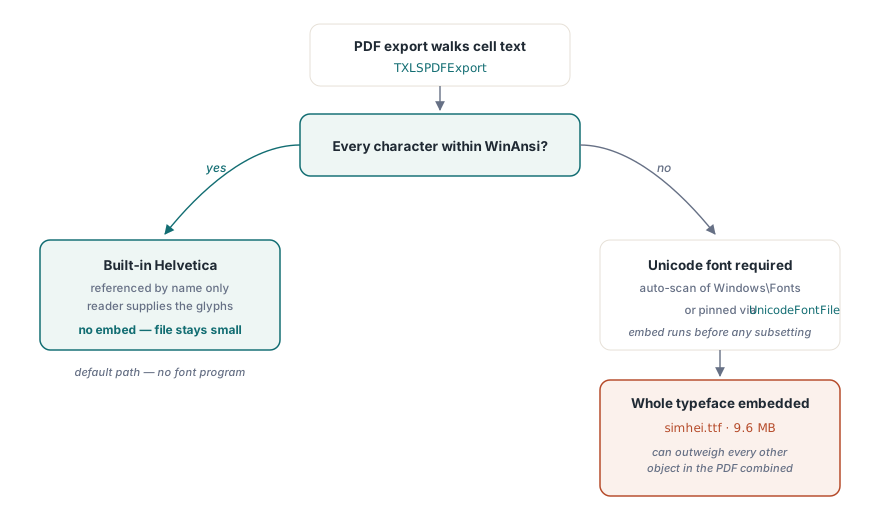
HotXLS's PDF exporter reaches for an embedded TrueType font only when worksheet text falls outside WinAnsi, and stays on the built-in Helvetica family the rest of the time, the default path the worksheet-to-PDF export walkthrough covers in depth. WinAnsi covers Western European text well enough that plenty of workbooks never trigger a font embed at all: the PDF just references Helvetica by name and the reader supplies it locally, so the file stays small. The moment a cell holds something WinAnsi cannot represent, a Chinese product name, a Korean note, a stray symbol in a comment, the exporter has to embed an actual font program, because a PDF reader has no fallback glyph source for characters outside the standard 14 fonts
HotXLS locates that font automatically, scanning the Windows Fonts folder for a short list of installed candidates, including the CJK-capable typefaces Windows ships for Chinese and Korean rendering, unless the exporter's UnicodeFontFile property already points at a specific file, and whichever font it lands on gets embedded whole before subsetting ever runs. That embedding requirement is specific to PDF: HotXLS's RTF and HTML export paths keep Unicode text intact by escaping code points into the byte stream rather than shipping a font program, which is why the size problem this article covers has no equivalent on those two formats
uses
  lxHandle, lxPDF;

var
  Book: TXLSWorkbook;
  Exporter: TXLSPDFExport;
begin
  Book := TXLSWorkbook.Create;
  try
    Book.Open('catalog-cn.xlsx');
    Exporter := TXLSPDFExport.Create;
    try
      // Optional: pin a specific CJK-capable font instead of the
      // exporter's automatic Windows\Fonts scan.
      Exporter.UnicodeFontFile := 'C:\Windows\Fonts\simhei.ttf';
      Exporter.SaveAsPDF(Book.ActiveSheet, 'catalog-cn.pdf');
    finally
      Exporter.Free;
    end;
  finally
    Book.Free;
  end;
end;
What is fontsub.dll, and why not write a subsetter from scratch?
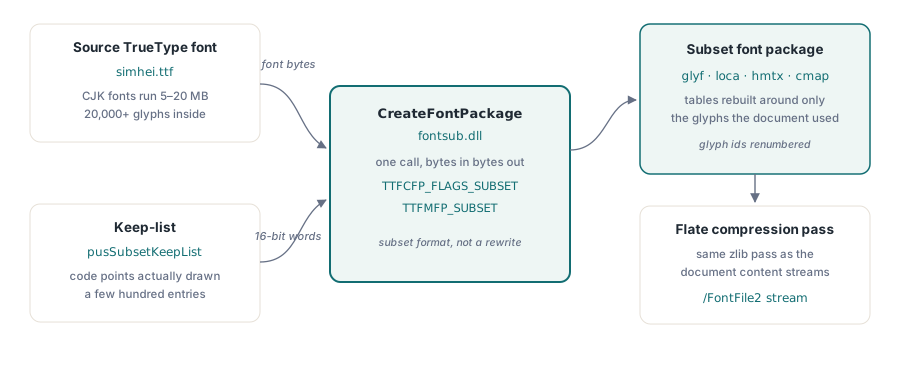
fontsub.dll is a small Windows system library, shipped since Windows XP, that exposes a single function relevant here: CreateFontPackage. Hand it the bytes of a source TrueType font and a list of Unicode code points to keep, and it hands back a minimal font that still satisfies every font-format constraint: glyph indices renumbered, glyf and loca rebuilt around only the retained outlines, hmtx and cmap rewritten to match. HotXLS declares the function pointer type directly against that contract
const
  TTFCFP_FLAGS_SUBSET = 1;
  TTFMFP_SUBSET = 0;
  TTFCFP_MS_PLATFORMID = 3;
  TTFCFP_UNICODE_CHAR_SET = 1;

type
  TCreateFontPackage = function(puchSrcBuffer: Pointer; ulSrcBufferSize: Cardinal;
    var puchFontPackageBuffer: PAnsiChar; var pulFontPackageBufferSize: Cardinal;
    var pulBytesWritten: Cardinal; usFlags, usTTCIndex, usSubsetFormat,
    usSubsetLanguage, usSubsetPlatform, usSubsetEncoding: Word;
    pusSubsetKeepList: PWordArray; usSubsetKeepListCount: Word;
    lpfnAllocate, lpfnReAllocate, lpfnFree, reserved: Pointer): Cardinal; cdecl;
Writing CreateFontPackage's job by hand instead of calling it would mean implementing a correct TrueType subsetter: walking composite glyphs to pull in every component glyph a retained glyph references, rebuilding loca offsets after outlines are dropped, respecting the embedding-permission bits in a font's OS/2 table, and getting all of it right across whatever oddball fonts a customer's machine happens to have installed. Microsoft has already solved that problem and ships the solution as part of Windows itself, so calling a system DLL it maintains, tests against its own font-rendering stack, and distributes to every machine for free costs HotXLS a dynamic load and a function pointer; reimplementing the same logic would mean owning a parser for a binary format with decades of edge cases, for a feature that only matters when a font happens to be large
Building the keep-list from glyphs actually rendered
HotXLS builds the subsetting keep-list from a map it was already maintaining for a different reason, so the accounting costs nothing extra. Every time the page-rendering code draws a character that needs the embedded Unicode font, it looks up that character's glyph index and records the pairing in FUnicodeGlyphMap, a glyph-to-codepoint table that also drives the PDF ToUnicode CMap so copy-and-paste out of the finished document returns the original text rather than raw glyph IDs. By the time the page content streams are finished, that map already lists exactly the set of Unicode code points the document used, no more and no less
var
  keepList: array of Word;
  keepCount, i: Integer;
  codePoint: LongWord;
begin
  SetLength(keepList, FUnicodeGlyphMap.Count);
  keepCount := 0;
  for i := 0 to FUnicodeGlyphMap.Count - 1 do
  begin
    codePoint := LongWord(StrToIntDef('$' + FUnicodeGlyphMap.ValueFromIndex[i], 0));
    if codePoint > 0 then
    begin
      keepList[keepCount] := Word(codePoint);
      Inc(keepCount);
    end;
  end;
end;
At finalise time, HotXLS walks that same map a second time to build the keep-list CreateFontPackage expects, a plain array of the Unicode code points to retain in the 16-bit form the API's keep-list argument requires. Because that argument is an array of 16-bit words, it addresses the Basic Multilingual Plane cleanly, which covers ordinary CJK, Cyrillic, Greek, and Arabic text without complication; a worksheet that leans on supplementary-plane characters, certain emoji or rare historic scripts, sits outside what a single keep-list entry can name directly, which is a boundary worth knowing about rather than a defect, since the vast majority of Unicode-heavy business spreadsheets never go near that plane in the first place
What happens when fontsub.dll is missing?
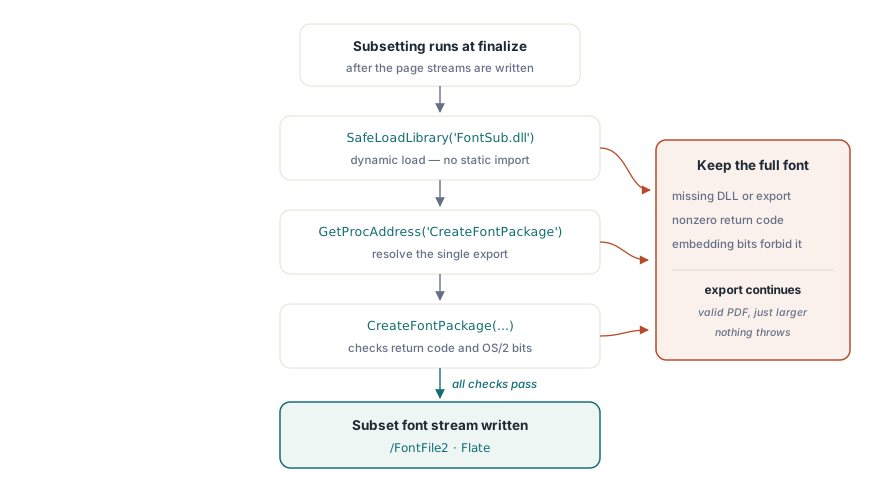
HotXLS never assumes fontsub.dll is present, and the PDF export never fails because it is not. The library is loaded dynamically at the moment a subset is needed, with SafeLoadLibrary and GetProcAddress rather than a static import, precisely because fontsub.dll is not a documented, guaranteed-present public API the way kernel32.dll is: it is bundled font-embedding tooling, and nothing in Microsoft's contract promises it survives on every SKU, every servicing branch, or every compatibility layer that tries to emulate Windows
var
  hFontSub: HMODULE;
  CreateFontPackage: TCreateFontPackage;
begin
  hFontSub := SafeLoadLibrary('FontSub.dll');
  if hFontSub = 0 then
    Exit; // no subsetting available - keep the full embedded font
  try
    @CreateFontPackage := GetProcAddress(hFontSub, 'CreateFontPackage');
    if not Assigned(CreateFontPackage) then
      Exit;
    // ... call CreateFontPackage, check its return code ...
  finally
    FreeLibrary(hFontSub);
  end;
end;
Every failure path folds back to the same outcome. A missing DLL, a missing export, a nonzero return code, or a font whose OS/2 table forbids subsetting through its embedding-permission bits, HotXLS just keeps the full font it had already embedded and moves on. Nothing throws, nothing aborts the export, and the calling code never has to wrap a font optimisation in its own exception handling; the exported PDF is valid either way, and the only variable is whether it ends up small or somewhat larger
How much smaller does the PDF actually get?
HotXLS's TrueType font subsetting typically shrinks a Unicode-heavy worksheet's exported PDF to somewhere between a twentieth and an eighth of its unsubsetted size, an 8-to-20-times reduction whose scale tracks how much of a full font a given document actually touches: a purchase order built around a few hundred distinct Chinese characters keeps only those few hundred glyphs out of the tens of thousands a CJK typeface ships, while a sheet spanning a broader mix of characters keeps proportionally more. HotXLS layers a further Flate compression pass on top of the subset font bytes before writing them into the PDF's /FontFile2 stream, the same compression the rest of the document's content streams already go through, and none of it asks anything extra of the calling code: a worksheet that never leaves WinAnsi never touches this path and keeps exporting through plain Helvetica, while a worksheet that does trigger the Unicode font path gets subsetting automatically, with no property to set and no separate call to make, and the one property involved, UnicodeFontFile, only chooses which font gets embedded and subsetted, not whether subsetting happens
Font subsetting is one detail inside the broader PDF export surface of the HotXLS Delphi Excel Component, alongside pagination, worksheet print metadata, and the CSV, HTML, and RTF export paths it ships with