An Excel table whose Amount column holds =[@Qty]*[@Price] does not store [@Qty] anywhere in the saved file. Unzip the workbook and the <f> element in the sheet XML shows what Excel actually writes: the long, table-qualified spelling Lines[[#This Row],[Qty]]*Lines[[#This Row],[Price]], because the formula grammar in ECMA-376 Part 1, §18.17 has a #This Row keyword and no @. A summary cell further down holds SUM(Lines[Amount]). Neither string contains a single cell address, so an engine that only parses A1 references has nothing to compute until it knows where the table sits, which row carries the headers and which row the formula itself lives on
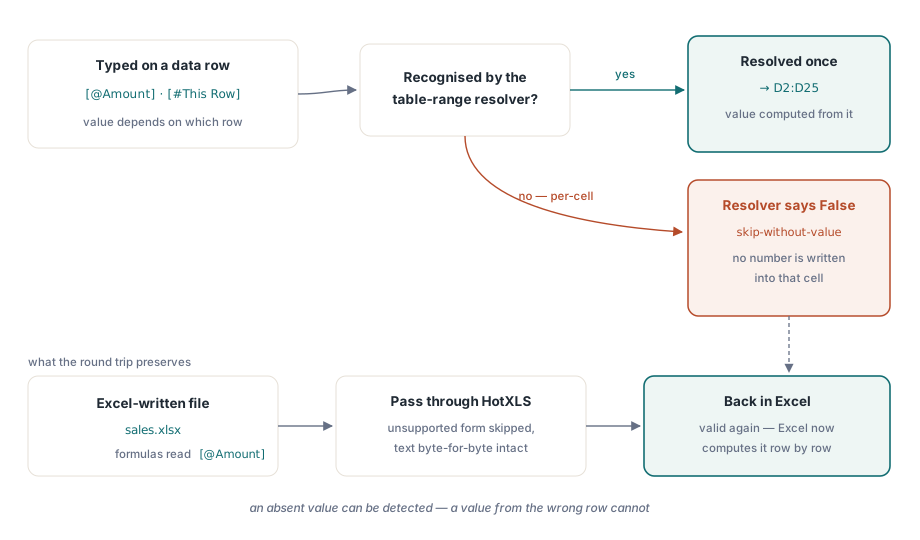
That last piece of information is the awkward one. A column reference can be turned into a rectangle once per table. A current-row reference cannot; it means a different cell for every row it is copied to
Why is a structured reference not just a range with a friendly name?
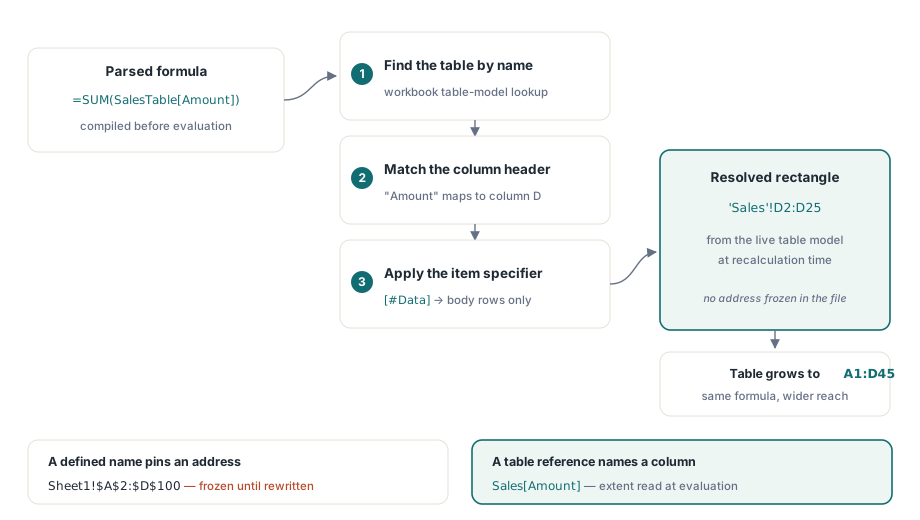
A defined name freezes an address and a table reference does not. Point the name DataBlock at Sheet1!$A$2:$D$100 and it stays that rectangle until something rewrites it. Sales[Amount] means "the Amount column of the Sales table", whatever the table's extent happens to be when the formula is evaluated. Add twenty rows to the table and the sum covers them; there is no reference to adjust because the formula never held an address in the first place
HotXLS resolves these references every time it compiles a formula for evaluation. TXLSXWorkbook looks the table up by name in the workbook's table model (TXLSXTable.Name or DisplayName, compared case-insensitively), matches the column against the header text stored in TXLSXTable.Columns, applies the item specifier to pick the row band, and hands the compiler an absolute range such as 'Sales'!$D$2:$D$25. The rewritten text exists only for that compile. The cell keeps the formula exactly as it was written, and because the lookup runs against TXLSXTable.Range as it stands at recalculation time, a formula written before the table grew still evaluates against the larger table
The rectangle grammar: columns, spans and item specifiers
Every table-wide form HotXLS evaluates produces one contiguous block. The accepted spellings are [Col] and its bracketed twin [[Col]], the bare item specifiers [#Data], [#All], [#Headers] and [#Totals], the combined form [[#Data],[Col]], a span inside an item specifier such as [[#Data],[Col1]:[Col2]], and a plain span [[Col1]:[Col2]]. A span may be written right to left; [[Q2]:[Q1]] resolves to the same two columns as [[Q1]:[Q2]]
The row band each specifier selects follows two flags on the table. TXLSXTable.HasHeaderRow decides whether the first row of Range is a header, and TXLSXTable.TotalsRowShown decides whether the last row is a totals row. A plain column reference and [#Data] cover the rows between those two. [#All] takes the full Range, header and totals included. Ask for [#Headers] on a table without a header row, [#Totals] on a table without a totals row, or a column of a table whose body has no rows, and the reference becomes #REF!. That matches what Excel shows for the same request, and it keeps an impossible reference from quietly turning into an empty range that sums to zero
Column names that contain brackets, a hash, an at sign or an apostrophe follow Excel's escape rule: each such character is prefixed with an apostrophe inside the reference, so a header called Unit [USD] is written Sales[Unit '[USD']]. The single-column and current-row forms decode those escapes before matching. Spans and the combined [#Data],[Col] forms resolve against tables on the formula's own sheet, so a summary sheet that needs a span over another sheet's table is better served by a plain column reference per column
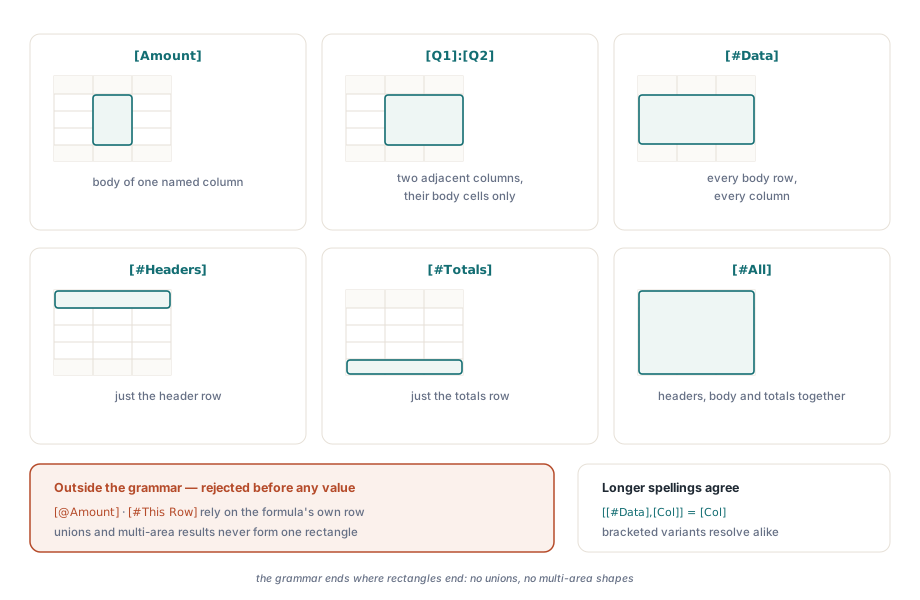
The sample below builds a 24-row sales table and places five summary formulas beside it in F2 to F6, on the same sheet as the table. Row 1 is the header row, rows 2 to 25 are the body, and there is no totals row, so SalesTable[#All] spans 25 rows while SalesTable[Amount] spans 24
var
  Book: TXLSXWorkbook;
  Sheet: TXLSXWorksheet;
  Cols: TStringList;
begin
  Book := TXLSXWorkbook.Create;
  Cols := TStringList.Create;
  try
    Sheet := Book.Sheets.Add('Sales');
    Cols.Add('Region');
    Cols.Add('Q1');
    Cols.Add('Q2');
    Cols.Add('Amount');
    Sheet.Tables.Add('SalesTable', 'A1:D25', Cols);
    // ... write the header row and 24 data rows ...

    Sheet.Cells[2, 6].Formula := 'SUM(SalesTable[Amount])';
    Sheet.Cells[3, 6].Formula := 'SUM(SalesTable[[Q1]:[Q2]])';
    Sheet.Cells[4, 6].Formula := 'COUNTA(SalesTable[[#Data],[Region]])';
    Sheet.Cells[5, 6].Formula := 'ROWS(SalesTable[#All])';
    Sheet.Cells[6, 6].Formula := 'COUNTA(SalesTable[#Headers])';

    Book.Recalculate;
    Book.SaveAs('sales.xlsx');
  finally
    Cols.Free;
    Book.Free;
  end;
end;
Expected values for that layout: F5 is 25 and F6 is 4, one count per header cell. F2 to F4 depend on the data you write
How does [@Column] know which row to read?
A current-row reference takes its row from the cell that is being evaluated. When Recalculate reaches a formula containing Lines[@Qty] in row 7, HotXLS resolves it to the Qty column of row 7; the same formula text in row 8 reads row 8. The long spelling Excel writes to disk, Lines[[#This Row],[Qty]], is treated as the same reference, and so is Lines[@[Unit Price]] for a header that contains a space
The unqualified form [@Qty], with no table name in front, needs one more fact: which table it belongs to. HotXLS answers that by position. If the evaluating cell sits inside the body rows and the column span of a table on the same sheet, that table supplies the column, and inside such a table [@[Q1]:[Q2]] becomes a one-row range across those columns. Anywhere else the reference is left unresolved. A defined name whose formula uses a current-row reference picks up its row from the cell that refers to the name, which is the same behaviour a formula would get inline
Keep current-row formulas on the table's own body rows, and qualify them with the table name when the code generates them. Qualified references survive being moved, they read the same way Excel stores them, and a formula on the table's own rows is the one case where Excel and any other consumer of the file agree on what @ means
var
  Book: TXLSXWorkbook;
  Sheet: TXLSXWorksheet;
  Cols: TStringList;
  Row: Integer;
begin
  Book := TXLSXWorkbook.Create;
  Cols := TStringList.Create;
  try
    Sheet := Book.Sheets.Add('Orders');
    Cols.Add('Item');
    Cols.Add('Qty');
    Cols.Add('Price');
    Cols.Add('Amount');
    Sheet.Tables.Add('Lines', 'A1:D13', Cols);
    // ... write the header row and items, quantities, prices in rows 2..13 ...

    // One formula text, twelve different results: each cell reads its own row
    for Row := 2 to 13 do
      Sheet.Cells[Row, 4].Formula := 'Lines[@Qty]*Lines[@Price]';

    // Cross-check under the table: column total against a recomputed product
    Sheet.Cells[15, 4].Formula :=
      'SUM(Lines[Amount])-SUMPRODUCT(Lines[Qty],Lines[Price])';

    Book.Recalculate;
    // Expected: D15 evaluates to 0 when every Amount cell matches Qty * Price
    Book.SaveAs('orders.xlsx');
  finally
    Cols.Free;
    Book.Free;
  end;
end;
The check in D15 is cheap and worth leaving in a generated report while it is being built. A per-row formula that picked up the wrong row would make the two totals disagree, and the difference shows up as a nonzero number in a cell anyone can read
What happens when the table changes shape
Growth is the easy case, provided the table definition actually grows. Writing a value into row 26 under a table whose Range is A1:D25 does not make row 26 part of the table. Auto-expansion is an Excel editing feature triggered by someone typing next to the table, and writing cells through HotXLS does not set it off. Set TXLSXTable.Range to the new extent after an import, or insert the rows inside the table with TXLSXWorksheet.InsertRows, which shifts Tables[i].Range along with every other reference on the sheet. Either way [#Data] widens and not one formula changes
Shrinking is where references can break, and HotXLS follows Excel's rule. DeleteCols over a table column rewrites every structured reference that names that column to #REF!, in cell formulas, conditional formats, data validation rules, chart series and defined names. DeleteRows that removes the header row deletes the table and invalidates its references the same way, and one that removes the totals row clears TotalsRowShown, after which [#Totals] no longer has a row to point at. Ordinary A1 references go through the same adjustment, described in formula reference adjustment on insert and delete
TXLSXTables.DeleteByName and renaming through TXLSXTable.Name work on the table model only. Formulas that mention the old name keep their text, so rename those formulas in the same pass when your code renames a table
var
  Book: TXLSXWorkbook;
  Sheet: TXLSXWorksheet;
  Table: TXLSXTable;
  Row: Integer;
begin
  Book := TXLSXWorkbook.Create;
  try
    if Book.Open('sales.xlsx') <> 1 then Exit;
    Sheet := Book.Sheets[1];  // workbook sheets are 1-based

    Table := Sheet.Tables.FindByName('SalesTable');
    if Table = nil then Exit;

    // ... write 20 imported rows into A26:D45 ...
    Table.Range := 'A1:D45';  // the body now runs from row 2 to row 45

    Book.Recalculate;  // SUM(SalesTable[Amount]) in F2 now covers 44 rows

    // Recordset-style lookup over the table body, 1-based row result, 0 = none
    Row := Table.FindFirst(Sheet, 'Region', 'EMEA');
    while Row > 0 do
    begin
      Log(VarToStr(Sheet.Cells[Row, 4].Value));  // Log is your own routine
      Row := Table.FindNext(Sheet, 'Region', 'EMEA', Row);
    end;

    Book.SaveAs('sales.xlsx');
  finally
    Book.Free;
  end;
end;
FindFirst and FindNext compare strings case-insensitively and numbers by value, and they scan only the body rows, so the header text Region is never returned as a match
Round-trip discipline
A workbook loaded with SUM(SalesTable[Amount]) is saved with SUM(SalesTable[Amount]), and a cell holding Lines[[#This Row],[Qty]] goes back out with that text intact. The resolved address never replaces what the user wrote. If HotXLS saved SUM($D$2:$D$25) instead, the file would open in Excel looking fine and then stop covering new rows the first time someone extended the table, which is the slowest kind of breakage to trace back to its cause
Table definitions themselves, including header-less tables and per-table comments, round-trip through the table model covered in data validation, AutoFilter and Excel tables. When many cells share one formula pattern, XLSX can store it once as a shared formula, and the expansion of those cells is covered in shared formula si expansion. A calculated column saved by Excel often arrives that way, so a structured reference in a table body passes through both paths before it is evaluated: the shared formula expands to per-cell text first, then each cell resolves its own row
The table model, the Recalculate engine and the worksheet insert and delete calls used here are part of HotXLS, which reads and writes XLS, XLSX and ODS from Delphi and C++Builder with no Excel installation. The full API reference lives on the HotXLS Delphi spreadsheet component page