Export a sheet in Excel's accounting format 44 with a homemade formatter and the PDF shows $1,234.50 jammed together, or $* 1,234.50 with a stray asterisk. That gap is a * fill sized by column width and font, and its position in the text, which HotXLS returns from TXLSXCell.GetFormattedTextFill, is all a renderer needs to count the repeats
How do * and _ work in an Excel number format?
ECMA-376 Part 1 §18.8.30 defines both characters in its table of format-code symbols. * repeats the next character "enough times to fill the column to its current width"; a section may hold one asterisk, and if several appear, all but the last are ignored. _ "skips the width of the next character", so _) leaves a blank as wide as a closing parenthesis and positive amounts line up with negatives shown as (1,234.50). The standard's examples are short. 0*- puts dashes after a number up to the cell edge, *0 in front of a format gives leading zeros, and 0*x shows 3 as 3xxxxxx in a column of one particular width. The formats that combine both characters are Excel's built-in accounting formats, IDs 41 to 44. Those numbers are Excel's own: the built-in table in §18.8.30 jumps from 40 straight to 45, and HotXLS registers the four codes below under Excel's numbering
| Excel ID | Format code | Symbol | Decimals |
|---|---|---|---|
| 41 | _(* #,##0_);_(* (#,##0);_(* "-"_);_(@_) | none | 0 |
| 42 | _("$"* #,##0_);_("$"* (#,##0);_("$"* "-"_);_(@_) | $ | 0 |
| 43 | _(* #,##0.00_);_(* (#,##0.00);_(* "-"??_);_(@_) | none | 2 |
| 44 | _("$"* #,##0.00_);_("$"* (#,##0.00);_("$"* "-"??_);_(@_) | $ | 2 |
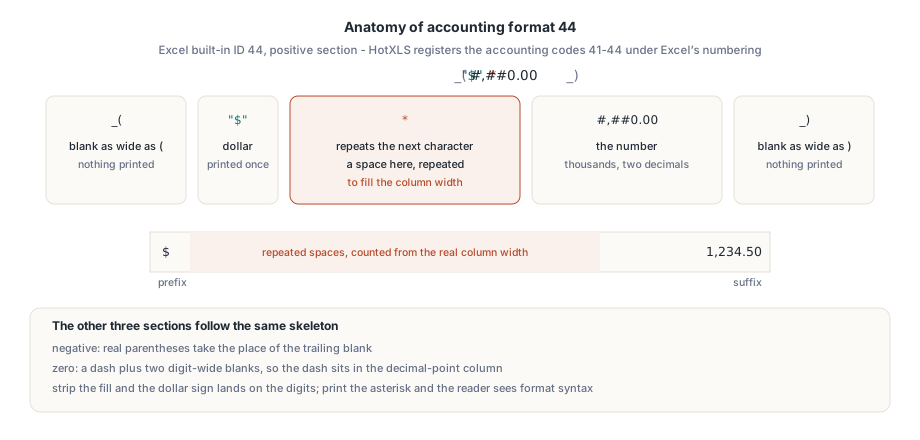
Read the positive section of 44, _("$"* #,##0.00_), from left to right: a blank the width of (, a dollar sign, a space repeated to fill the column, the number, and a blank the width of ). The negative section swaps that trailing blank for real parentheses. The zero section prints a dash followed by ?? — two digit-wide blanks that put the dash in the column of the decimal point. Which of the four sections a value picks, and what an empty section does, follows the rules for Excel number format sections. Strip the fill and the dollar sign lands on the digits. Print the asterisk and the reader is looking at format syntax
Why can a formatter not insert the repeats itself?
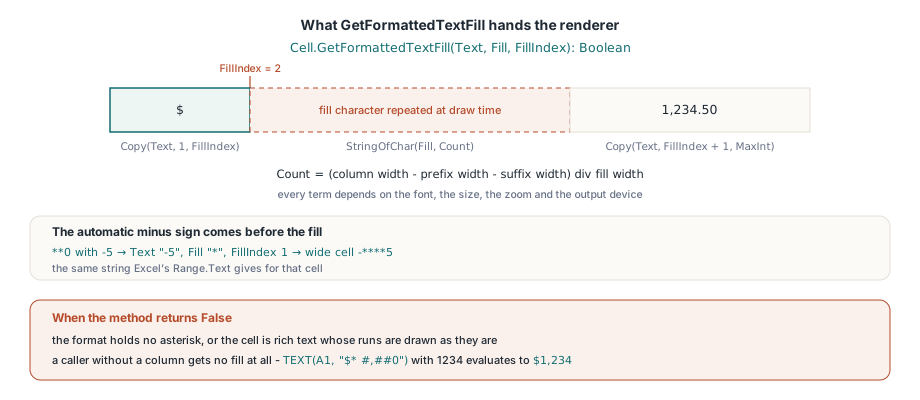
It does not know the count. The number of repeats is the column width minus the width of everything else, divided by the width of one fill character. Every term depends on the font, the size, the zoom and the output device. A formatter that returns a plain string would have to pick a number, and any fixed number is wrong once someone resizes the column. HotXLS splits the job. TXLSXCell.FormattedText returns the display text with no copy of the fill character, and GetFormattedTextFill returns that same text plus the fill character and an index: the number of characters before the point where the repeats belong. The method returns False when the format has no fill and for a rich-text cell, whose runs are drawn as they are
The automatic minus sign comes before the fill. With the format **0 and the value -5, the text is -5, the fill character is * and the index is 1. A wide cell therefore displays -****5, the same string Excel's Range.Text gives for that cell. A caller without a column gets no fill at all. The TEXT worksheet function is such a caller, so in the HotXLS calculation engine TEXT(A1, "$* #,##0") with 1234 in A1 evaluates to $1,234. The code below sets three formats and prints what a renderer receives for each
uses
  SysUtils, lxHandleX;

procedure InspectFills;
const
  Formats: array[0..2] of WideString = (
    // the same code as Excel's built-in format 44
    '_("$"* #,##0.00_);_("$"* (#,##0.00);_("$"* "-"??_);_(@_)',
    '0*-',     // dashes after the number
    '**0');    // stars in front of the number
  Values: array[0..2] of Double = (1234.5, 42, -5);
  // Each row should print:
  //   [ $] fill " " [1,234.50 ]
  //   [42] fill "-" []
  //   [-] fill "*" [5]
var
  Book: TXLSXWorkbook;
  Sheet: TXLSXWorksheet;
  Text: WideString;
  Fill: WideChar;
  FillIndex, I: Integer;
begin
  Book := TXLSXWorkbook.Create;
  try
    Sheet := Book.Sheets.Add('Fills');
    for I := 0 to High(Formats) do
    begin
      Sheet.Cells[I + 1, 1].NumberFormat := Formats[I];
      Sheet.Cells[I + 1, 1].Value := Values[I];
      if Sheet.Cells[I + 1, 1].GetFormattedTextFill(Text, Fill, FillIndex) then
        Writeln(Format('[%s] fill "%s" [%s]', [
          Copy(Text, 1, FillIndex), string(Fill),
          Copy(Text, FillIndex + 1, MaxInt)]))
      else
        Writeln('no fill: ', string(Sheet.Cells[I + 1, 1].FormattedText));
    end;
    Sheet.SaveAsPDF('fills.pdf');   // the PDF export lays the fill out per column
  finally
    Book.Free;
  end;
end;
Each line shows the prefix, the fill character and the suffix in brackets. Note the blanks: in the first row the prefix is a space and a dollar sign, and the suffix ends with a space, both produced by the _ pairs. SaveAsPDF works from the same three parts and computes the repeat count from the real column width. In fills.pdf the dollar sign should sit on the left padding of the first cell, and the dashes after 42 should run to the right edge of the second. Page setup, margins and fonts for that file are handled by the regular worksheet PDF export settings
Which side gets the leftover fraction of a character?
For General and left-aligned cells, the space between the fill and the suffix. The repeat count is a whole number, so a fraction of a character is almost always left over, and §18.8.30 says nothing about where it goes. Excel's own PDF output and its Range.Text show the following placement, which depends on the horizontal alignment:
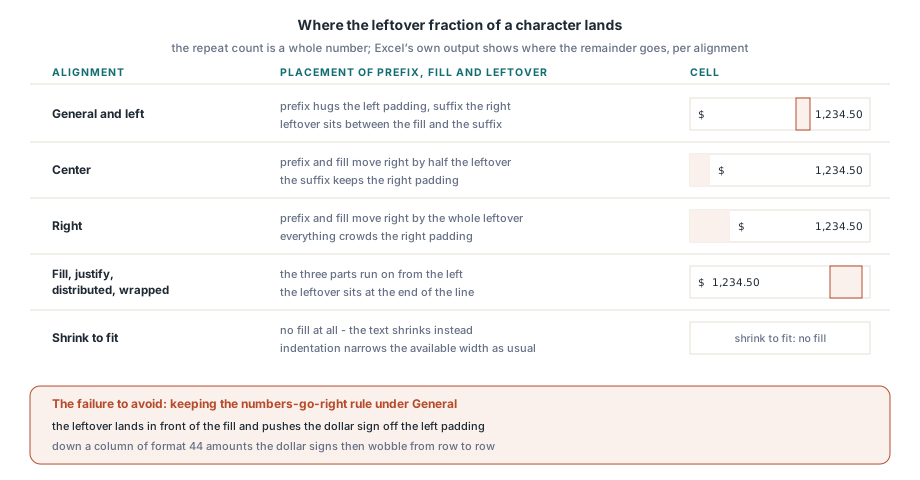
- General and left: the prefix hugs the left padding, the suffix hugs the right padding, and the leftover sits between the fill and the suffix (at the end of the line when there is no suffix)
- Centre: prefix and fill move right by half the leftover; right alignment moves them by all of it
- Fill, justify, distributed and wrapped text: the three parts run on from the left, with the leftover at the end of the line
- Indentation narrows the available width as usual, and a "shrink to fit" cell gets no fill
General alignment is where homemade renderers go wrong. Numbers under General are normally right-aligned. A filled cell is not. Keep the "numbers go right" rule and the leftover lands in front of the fill, pushing the dollar sign off the left padding by up to one space width. Down a column of format 44 amounts, the dollar signs then wobble from row to row. Less common layouts follow the same model:
- Rotated text: the fill length comes from the longest line that still fits inside the cell once rotated
- Rich text: the repeated character takes its style from the character just before the fill position
- Centre across selection: the fill covers the whole span
- Multi-line text: only the line that contains the fill position gets repeats
Right-to-left sheets are the case HotXLS does not copy from Excel's PDF export. That export drops the fill and the prefix glyphs, although Range.Text for the same cells still contains them. HotXLS lays such cells out the way the grid shows them, with the fill in place
Drawing the fill on a VCL canvas
Measure with the canvas you will draw on. That holds for a custom grid, a report band and a thumbnail alike. The VCL canvas selects an integer font size when it scales, so a width computed from font metrics at the fractional size comes out slightly narrower than what GDI paints. The error per character is tiny. Across a run of repeats it adds up. Count from the narrower width and the left part overruns its rectangle; with DT_END_ELLIPSIS among the drawing flags, GDI then puts an ellipsis on top of the suffix. The routine below handles the common single-line case with General or left alignment and sends everything else down the plain TextRect path:
uses
  Windows, Types, Graphics, lxHandleX;

procedure DrawFilledCell(Canvas: TCanvas; const R: TRect; Cell: TXLSXCell);
const
  Pad = 2;                                   // inner cell padding, pixels
var
  Text: WideString;
  Fill: WideChar;
  FillIndex, Avail, Used, FillWidth, Count: Integer;
  Prefix, Suffix: string;
begin
  if not Cell.GetFormattedTextFill(Text, Fill, FillIndex) then
  begin
    Canvas.TextRect(R, R.Left + Pad, R.Top + Pad, Cell.FormattedText);
    Exit;
  end;
  Prefix := Copy(Text, 1, FillIndex);
  Suffix := Copy(Text, FillIndex + 1, MaxInt);

  // Measure with the same canvas, font and size that will draw the text
  Avail := (R.Right - R.Left) - 2 * Pad;
  Used := Canvas.TextWidth(Prefix) + Canvas.TextWidth(Suffix);
  FillWidth := Canvas.TextWidth(string(Fill));
  Count := 0;
  if (FillWidth > 0) and (Used < Avail) then
    Count := (Avail - Used) div FillWidth;   // whole characters only

  // General / left: prefix + fill at the left, suffix at the right,
  // the leftover fraction stays between the fill and the suffix
  Canvas.TextOut(R.Left + Pad, R.Top + Pad, Prefix + StringOfChar(Fill, Count));
  Canvas.TextOut(R.Right - Pad - Canvas.TextWidth(Suffix), R.Top + Pad, Suffix);
end;
Drawing the two halves with separate calls keeps the amount pinned to the right edge however the integer division rounds. For centred or right-aligned cells, shift the first TextOut by half or all of Avail - Used - Count * FillWidth. Rotated and multi-line cells are simpler to handle another way: insert the counted repeats into the text at FillIndex and draw the result as one string with your usual rotation or wrapping code. In a hand-built grid such as this custom spreadsheet grid in Delphi, the same canvas should drive row heights and merged ranges too
Fill and underscore in fixed-width text and CSV
Plain-text output has no pixels, but it can still have a width. TXLSXCell.FormattedText writes each _x as one ordinary space, so the positive section of format 44 comes back as $1,234.50 with a blank at each end. In a proportional font a space is usually a little narrower than a parenthesis, close enough for a preview. In a monospaced text report every character has the same advance, so the space is an exact stand-in and the fill count is plain arithmetic: the column width in characters minus the length of the text. CSV is different. A spreadsheet or database that reads the file wants a number, so write the cell's Value there and keep the padded text for reports that people read:
uses
  lxHandleX;

// Fixed-width report column: format 44, value 1234.5 and Width 14
// give ' $   1,234.50 ' (three repeated spaces after the dollar sign)
function PadToWidth(Cell: TXLSXCell; Width: Integer): WideString;
var
  Text: WideString;
  Fill: WideChar;
  FillIndex, Count: Integer;
begin
  if not Cell.GetFormattedTextFill(Text, Fill, FillIndex) then
    Exit(Cell.FormattedText);
  Count := Width - Length(Text);
  if Count < 0 then
    Count := 0;                    // text wider than the column: no repeats
  Result := Copy(Text, 1, FillIndex) + StringOfChar(Fill, Count) +
    Copy(Text, FillIndex + 1, MaxInt);
end;
Start with one cell: format 44, the value 1234.5, and a GetFormattedTextFill call that should report a space at index 2. Resize the column twice and check that the dollar sign stays on the left padding while 1,234.50 stays on the right edge. Once your renderer passes that, the other alignments are offsets of the first TextOut, and a SaveAsPDF page from the HotXLS Delphi Excel component is the reference to compare them with