The question "does this workbook still define a name called TaxRate?" is answered by one small part of an XLSX package. Sheet names, their hidden or very-hidden state and every workbook-level defined name live in xl/workbook.xml (ECMA-376 Part 1, §18.2), usually a few kilobytes. The cells live elsewhere, one xl/worksheets/sheetN.xml part per sheet plus a shared-string table, and that is where nearly all of the bytes are. A loader that insists on building the complete workbook before you may ask anything will inflate and parse all of it, for every file in the folder, to answer a question the first few kilobytes already settled
The split that matters is between reading the shape of a workbook and reading its weight. A loader that can stop after the shape, load the weight for a chosen subset of sheets, and fetch one more sheet later turns "open a workbook" from an all-or-nothing step into something you scope per call. It also brings two traps with it, one about index bases and one about how long the source file has to stay put
What a metadata-only Open reads, and where it stops
With TXLSXWorkbook.MetadataOnly set to True before Open, HotXLS parses the workbook part, styles, theme, defined names, sheet names and visibility states, connections, external links and the document properties from docProps/core.xml and docProps/app.xml. It then skips every worksheet's cell XML and the per-sheet satellite parts: comments, drawings and tables. The shared-string table is skipped too, which matters more than it sounds, because in text-heavy workbooks that one part can rival the worksheets in size
The workbook that comes back is structurally complete. Sheets.Count is right, each sheet has its real name and Visibility, DefinedNames is populated, ExternalLinks lists every linked target, and Title, Author and LastModifiedBy carry what the file declared. Every sheet simply has zero cells
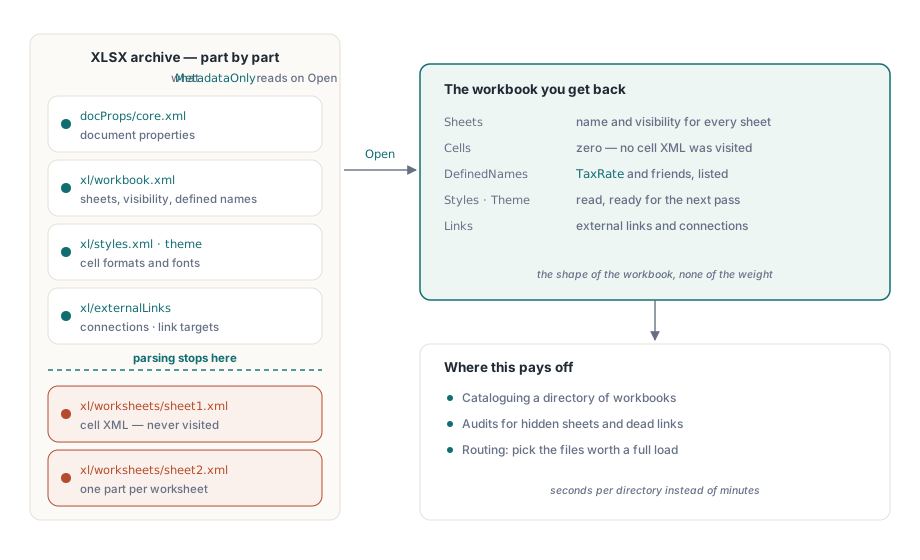
That is exactly the data an audit runs on. Which workbooks hide a sheet? Which ones still define TaxRate, and to what? Which ones link to a file share that was retired last year? The scanner below answers all three for one file. Note the two indexing conventions side by side: Sheets[] is 1-based, matching the XLS engine, while DefinedNames and ExternalLinks are ordinary 0-based lists
procedure ScanWorkbook(const FileName: WideString; Report: TStrings);
var
  Workbook: TXLSXWorkbook;
  Name: TXLSXDefinedName;
  I: Integer;
begin
  Workbook := TXLSXWorkbook.Create;
  try
    Workbook.MetadataOnly := True;           // read by Open, so set it first
    if Workbook.Open(FileName) <> 1 then
    begin
      Report.Add(FileName + ': open failed');
      Exit;
    end;
    for I := 1 to Workbook.Sheets.Count do   // Sheets[] is 1-based
      case Workbook.Sheets[I].Visibility of
        xlsxSheetHidden:
          Report.Add(FileName + ': hidden sheet ' + Workbook.Sheets[I].Name);
        xlsxSheetVeryHidden:
          Report.Add(FileName + ': very hidden sheet ' + Workbook.Sheets[I].Name);
      end;
    Name := Workbook.DefinedNames.FindByName('TaxRate');
    if Name <> nil then
      Report.Add(FileName + ': TaxRate = ' + Name.Formula);
    for I := 0 to Workbook.ExternalLinks.Count - 1 do   // 0-based list
      Report.Add(FileName + ': links to ' + Workbook.ExternalLinks[I].Target);
  finally
    Workbook.Free;
  end;
end;
The scanner reads Visibility rather than the Boolean Visible on purpose. Visible is False for both hidden states, and a very hidden sheet is the one an audit most wants to flag, since Excel's Unhide dialog does not list it and only VBA or a direct edit of the file brings it back
Loading two sheets out of forty with SelectedSheets
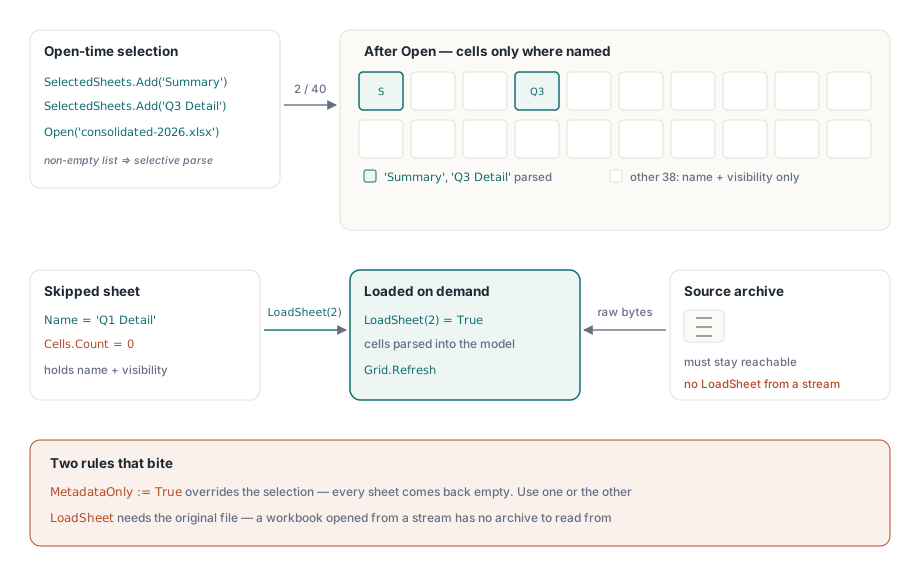
SelectedSheets is a TStringList owned by the workbook. When it holds at least one name, Open parses cell XML only for the sheets it names; every other sheet is created with its correct name and visibility and no cells. An empty list, the default, loads every sheet. Names are looked up with the list's own IndexOf, so with default settings the match ignores case, which lines up with Excel's rule that two sheet names in one workbook cannot differ only by case
Workbook := TXLSXWorkbook.Create;
Workbook.SelectedSheets.Add('Summary');
Workbook.SelectedSheets.Add('Q3 Detail');
if Workbook.Open('consolidated-2026.xlsx') = 1 then
  ShowSheet(Workbook.Sheets[1]);   // ShowSheet is your own UI code
The two switches interact in one direction only. MetadataOnly = True overrides the selection and skips all sheets, so a workbook configured with both comes back with no cells anywhere, and the selection looks broken when it was simply outranked. Use one per Open: metadata-only for discovery, a selection for targeted work
Selective loading also runs through the parallel parse phase when ParallelParse is on; unselected sheets are skipped inside the worker jobs, so the threads spend their time on the sheets you asked for. The same two properties apply when the source is a binary .xlsb workbook, with one scope rule: an .xlsb that carries a VBA project has to be opened without these two options; with either one set, Open reports the selective read as unsupported
Why does LoadSheet(1) load the wrong sheet?
Because LoadSheet takes a 0-based position while Sheets[] is 1-based. LoadSheet(1) materialises the second sheet in the workbook, and since loading a sheet that already has cells is a no-op that returns True, a mixed-up index can look like success while the sheet the user clicked stays empty. The conversion belongs in exactly one place in your code
The second trap is file lifetime. LoadSheet does not hold the archive open between calls. It reopens the original file by name, parses the workbook part, styles and shared strings, then parses the requested worksheet. Before trusting that file, HotXLS compares its size and last-write time with the values captured at Open; if another process has saved over the workbook in the meantime, LoadSheet returns False instead of mixing cells from a different version into the model you already hold
procedure TReportForm.ShowSheetNo(SheetNo: Integer);  // SheetNo is 1-based, like Sheets[]
var
  Sheet: TXLSXWorksheet;
begin
  Sheet := FWorkbook.Sheets[SheetNo];
  if Sheet.Cells.Count = 0 then
    if not FWorkbook.LoadSheet(SheetNo - 1) then      // LoadSheet wants the 0-based position
    begin
      StatusBar.SimpleText := 'The workbook changed on disk; reopen it';
      Exit;
    end;
  Grid.ShowSheet(Sheet);                              // your own grid code
end;
A few consequences follow from that design. A workbook opened from a TStream has no source file to go back to, so LoadSheet returns False for a stream-opened .xlsx; the same holds for an encrypted workbook, which is decrypted into memory before parsing. A binary .xlsb opened selectively from a stream is the exception, because HotXLS stages a temporary copy of the stream for the deferred sheets. And a sheet that is genuinely empty will be re-read on every call, since zero cells is also what a skipped sheet looks like
The cost model decides how to use it. Every LoadSheet call re-parses the shared-string table, so materialising ten sheets one by one pays for that part ten times. For a viewer where the user opens one more tab now and then, that is a fair price. When you already know the set of sheets, reopen with SelectedSheets instead: one archive pass, one shared-string parse. There is a content difference as well: LoadSheet brings in a sheet's cells, values, formulas and formats, while comments, drawings and tables arrive with an Open, so sheets whose comments or tables your code reads belong in the selection up front
Why does a round trip change parts you never touched?
A save that regenerates everything rewrites bytes that never changed. Decompress the theme, build an object model, serialize it, compress it again, and the result differs from the original even though nobody edited the theme. For VBA projects and pivot caches the cost is higher than a noisy diff: a VBA project is a binary compound file with its own internal streams, and a pivot cache holds a snapshot of source data whose fields the pivot table definitions address by position, so the safest thing to do with either one, when nobody changed it, is to leave its bytes alone
PreserveRawParts, which defaults to True, makes SaveAs copy the compressed bytes of unchanged parts straight from the source archive. That covers the theme, the VBA project, connections, charts, embedded media, printer settings, pivot tables and pivot cache definitions and records, each one only while the model says it was not modified. Those parts are never inflated or re-deflated on the way through. Setting the property to False forces full re-serialisation of every part, which is the switch to reach for when you want the output to reflect only what the object model contains
The raw-copy path uses the same file check as LoadSheet: the source must still exist with the size and timestamp seen at Open. When it does not, SaveAs serializes those parts normally and the file is still complete. Two cases always take the serialising path: a workbook whose source was a binary .xlsb, which is converted to XML on read, and a save with StrictOOXML set, where the part namespaces change
Saving a partially loaded workbook needs a decision. For an .xlsb source, SaveAs refuses while any sheet is still deferred and records "Load every deferred binary worksheet before saving" in Diagnostics. For an .xlsx, treat a selectively loaded workbook as a read view: a stub sheet has no cells for the writer to emit, so either call LoadSheet for every stub first or reopen without a selection before you edit and save
A discovery pipeline that reopens on purpose
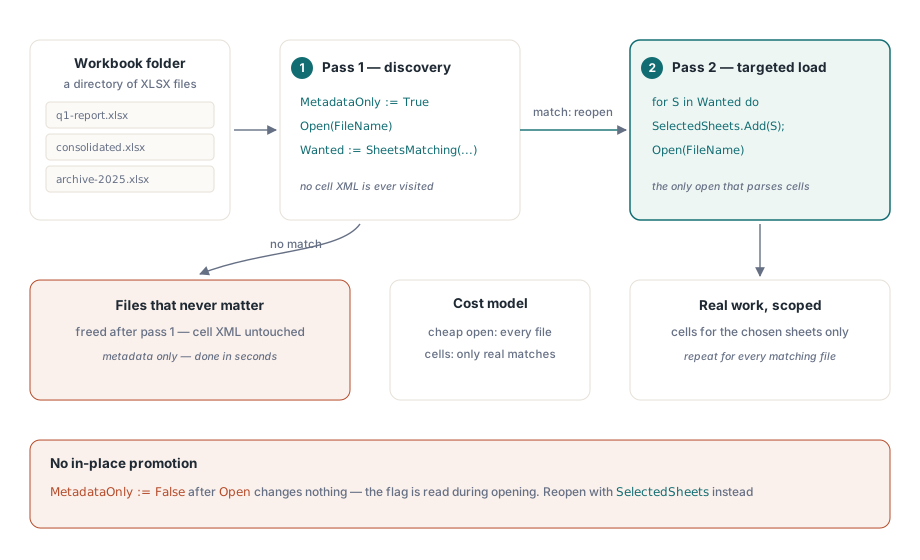
The pattern that holds up has two passes. Pass one opens every file metadata-only and decides. Pass two reopens only the files that matched, with a sheet selection, and does the work. Reopening looks wasteful until you count what pass one avoided: the second Open is the only one that parses cells, and it parses only the sheets pass one picked
procedure ProcessInvoiceFile(const FileName: WideString);
var
  Probe, Workbook: TXLSXWorkbook;
  Wanted: TStringList;
  I: Integer;
begin
  Wanted := TStringList.Create;
  try
    // Pass 1: discovery, no cells
    Probe := TXLSXWorkbook.Create;
    try
      Probe.MetadataOnly := True;
      if Probe.Open(FileName) <> 1 then
        Exit;
      for I := 1 to Probe.Sheets.Count do
        if Pos('Invoice', Probe.Sheets[I].Name) > 0 then
          Wanted.Add(Probe.Sheets[I].Name);
    finally
      Probe.Free;
    end;
    if Wanted.Count = 0 then
      Exit;                               // nothing in this file is worth parsing

    // Pass 2: cells for the chosen sheets only
    Workbook := TXLSXWorkbook.Create;
    try
      Workbook.SelectedSheets.Assign(Wanted);
      if Workbook.Open(FileName) = 1 then
        PostInvoices(Workbook);           // your own processing code
    finally
      Workbook.Free;
    end;
  finally
    Wanted.Free;
  end;
end;
Clearing MetadataOnly after Open does not turn the probe into a full workbook. The flag is read while opening; changing it afterwards only affects the next Open on that object. The probe can still grow a sheet at a time through LoadSheet, and for one or two sheets that is reasonable, but a pipeline is better served by the clean reopen, which also brings each sheet's comments and tables along
Where this fits with the other large-file levers
Selective loading cuts what you parse. It does nothing for the cost of a sheet once it is loaded, and it cannot help when the job needs every cell of every sheet. That case is about storage, covered in the article on row-block cell storage and range-based styles, and about parse throughput, covered in parallel XLSX parsing and the memory allocator. When the task is a pure read with no editing at all, the streaming direct reader skips the workbook object model entirely and is the better tool than any load strategy that builds one
All of this runs inside your own Delphi or C++Builder executable, with no Excel installation on the server that does the scanning. Supported formats, editions and licensing are listed on the HotXLS Delphi spreadsheet component page