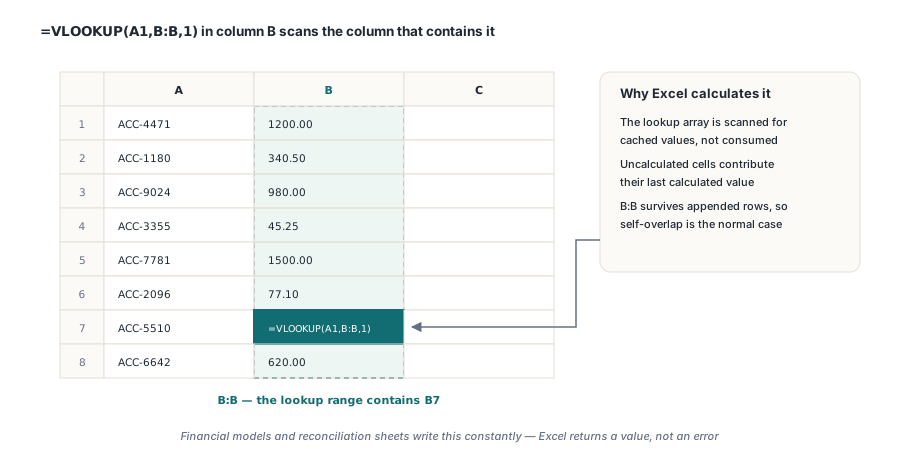
Put =VLOOKUP(A1,B:B,1) in a cell in column B and Excel calculates it without complaint. Feed the same workbook to a dependency-graph recalculation engine and you are likely to get a circular reference error, because the formula depends on a range that contains the formula. HotXLS reported exactly that until v2.361.98. The fix is not a special case for whole-column ranges; it is a distinction between two kinds of dependency edge that a spreadsheet engine needs and a plain directed graph does not have
The lookup-array argument of the lookup family, LOOKUP, MATCH, HLOOKUP, VLOOKUP, XLOOKUP and XMATCH, is now marked as a scan reference. A scan reference still seeds dirtiness, so editing a cell inside the range recalculates the formula, but it never contributes to cycle detection or to evaluation ordering. Real cycles are still found; the false ones are gone
Why does Excel allow a lookup range to contain the formula?
Because that argument is not consumed the way an arithmetic operand is. The lookup family scans the range for cached values and returns a match; it does not require the range to have been evaluated to completion first. Excel treats a self-overlapping lookup range as reading whatever those cells currently hold, which is the same semantics it applies to any non-iterative workbook: cells that have not been recalculated in this pass contribute their last calculated value
Whole-column references make this the common case rather than an exotic one. B:B is the idiomatic way to write "the whole lookup table" in a sheet where rows get appended, and any formula that lives in column B is then inside its own lookup range. Financial models, reconciliation sheets and audit workbooks do this constantly, usually without anyone noticing that the range overlaps
What a dependency graph does with the same formula
HotXLS recalculates incrementally, which requires a real dependency graph: nodes for cells, edges for references, a topological order for evaluation and a strongly connected component pass to classify cycles. That machinery is described in the incremental recalculation article, and it is precisely why the false positive appeared
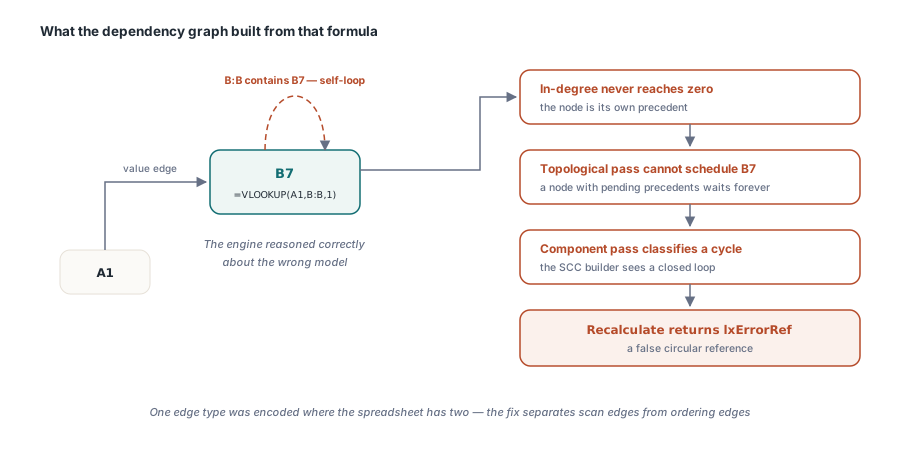
Extract dependencies from =VLOOKUP(A1,B:B,1) in cell B7 and the second argument yields a range containing B7 itself. The graph now has a self-loop. The in-degree of that node never reaches zero, so the topological pass can never schedule it, and the component pass classifies it as a cycle. The engine is reasoning correctly about the graph it was given. The graph is the wrong model, because it encodes one edge type where the spreadsheet has two
Two edge classes, one graph
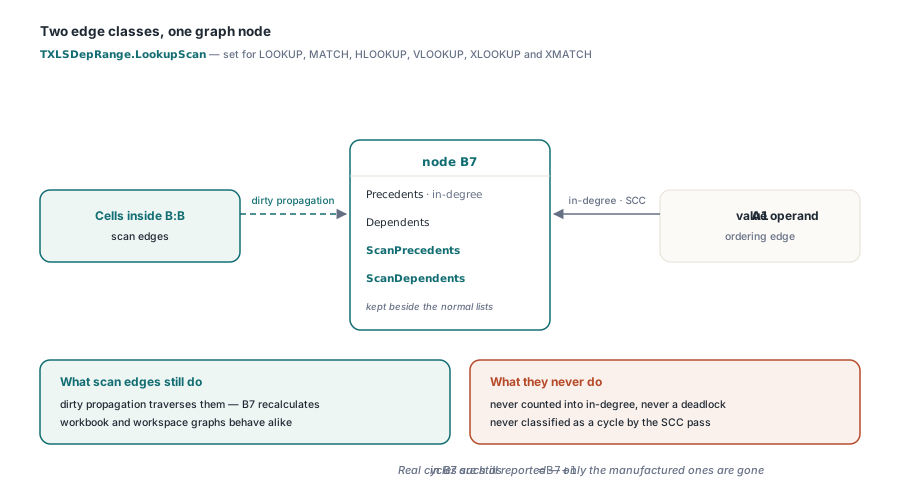
The change adds a flag to the resolved reference record, TXLSDepRange.LookupScan, which the dependency extractor sets when it walks the lookup-array argument of one of the six functions. Downstream, edges sourced from those references are stored apart from ordinary edges: the graph node keeps ScanDependents and ScanPrecedents lists alongside its normal dependent and precedent lists
The separation is what makes the semantics right. Scan edges are traversed by dirty propagation, so an edit anywhere in B:B still marks B7 dirty and B7 recalculates. Scan edges are never counted into in-degree and never enter the component builder, so they cannot create a topological deadlock and cannot be classified as a cycle. Both graph implementations in the library, the classic per-workbook graph and the cross-workbook workspace graph that carries the component analysis, were changed together; letting them drift would produce a workbook that recalculates differently depending on whether it was opened alone or as part of a workspace
var
  Book: TXLSXWorkbook;
  Sheet: TXLSXWorksheet;
begin
  Book := TXLSXWorkbook.Create;
  try
    Sheet := Book.Sheets.Add('Ledger');
    Sheet.Cells[1, 1].Value := 'ACC-4471';
    Sheet.Cells[1, 2].Value := 1200.00;
    // The lookup range covers column B, and this formula lives in it
    Sheet.Cells[7, 2].Formula := 'VLOOKUP(A1,B:B,1)';

    case Book.Recalculate of
      lxOk:
        // Before v2.361.98 this branch was unreachable for this sheet
        SaveReport(Book);
      lxErrorRef:
        LogWarning('Genuine circular reference - review model inputs');
    end;
  finally
    Book.Free;
  end;
end;
What you give up by excluding scan edges from the ordering
Exactly one thing, and it is worth stating plainly rather than hiding. Because scan edges do not participate in the topological order, a lookup formula can be evaluated in the same pass before some cells in its lookup range have been recalculated, and it will then read their previous values. The result converges on the next recalculation
That is acceptable because it is what Excel does. For a workbook without iterative calculation enabled, Excel's own answer for a value not yet recalculated in the current pass is the last calculated value, so an engine that reproduces this behaviour is matching the reference implementation rather than approximating it. If you need a genuinely converged answer over a self-referential model, the mechanism for that is iterative calculation with an explicit iteration limit, covered in the iterative calculation article, and it applies to real cycles rather than to scan overlaps
The regression hazard hiding inside the fix
Adding LookupScan to TXLSDepRange introduced a risk that has nothing to do with lookups and everything to do with Pascal. TXLSDepRange is an unmanaged record, so a local variable of that type is not zero-initialised. Every place in the codebase that builds one by hand, including the data-table dependency blocks and several test helpers, therefore had to be updated to set the new field explicitly. Miss one and whatever byte happened to be on the stack decides whether that reference is treated as a scan edge, which produces a recalculation bug that appears and disappears with unrelated code changes
// A new Boolean field in an unmanaged record makes every manual
// construction site a latent bug. Two safe idioms:
var
  R: TXLSDepRange;
begin
  FillChar(R, SizeOf(R), 0);      // zero everything, then fill in
  R.Sheet1 := SheetIndex;
  R.Sheet2 := SheetIndex;
  R.Row1 := Row; R.Col1 := Col;
  R.Row2 := Row; R.Col2 := Col;

  // or set every field, including the new one, at every site
  R.LookupScan := False;
end;
The general rule this earned: adding a field to a record that is constructed on the stack in more than a handful of places is a higher-risk change than it looks, and the compiler will not help you find the sites. If the record is reachable from a hot path, prefer a helper that initialises it completely over trusting every call site to be updated
Telling a real cycle from a scan overlap
Nothing about this change weakens cycle detection. =B7+1 in B7 is still a cycle, a chain of three formulas that closes on itself is still a cycle, and both are still reported through the recalculation result with the cycle members retaining their previous cached values while everything outside the cycle stays current. What changed is only that the lookup-array argument no longer manufactures cycles that Excel does not see
If you are auditing a workbook and want to know which references the engine actually resolved and in what order, the evaluation tracer is the tool for it; the formula evaluation tracer article covers how to read its output. HotXLS is a native Delphi and C++Builder spreadsheet component that reads and writes XLS, XLSX, ODS and CSV without Excel installed, and the recalculation engine is the same on every format; the current function and engine coverage is listed on the HotXLS Delphi spreadsheet component product page