To compute intentional circular references in Delphi, HotXLS exposes iterative calculation on its XLSX engine: set TXLSXWorkbook.Iterate to True and TXLSXWorkbook.Recalculate walks each detected reference cycle towards a fixed point — up to IterateCount passes, or until every cell changes by less than IterateDelta — rather than returning #REF! and giving up
That distinction matters more than the single boolean suggests. The same engine that detects a reference cycle and refuses to loop on it will, with one property flipped, evaluate that cycle deliberately until it settles. Keeping the two behaviours straight — when a cycle is a defect to report and when it is a model to solve — is the whole subject of this article
Why does a circular reference error out by default?
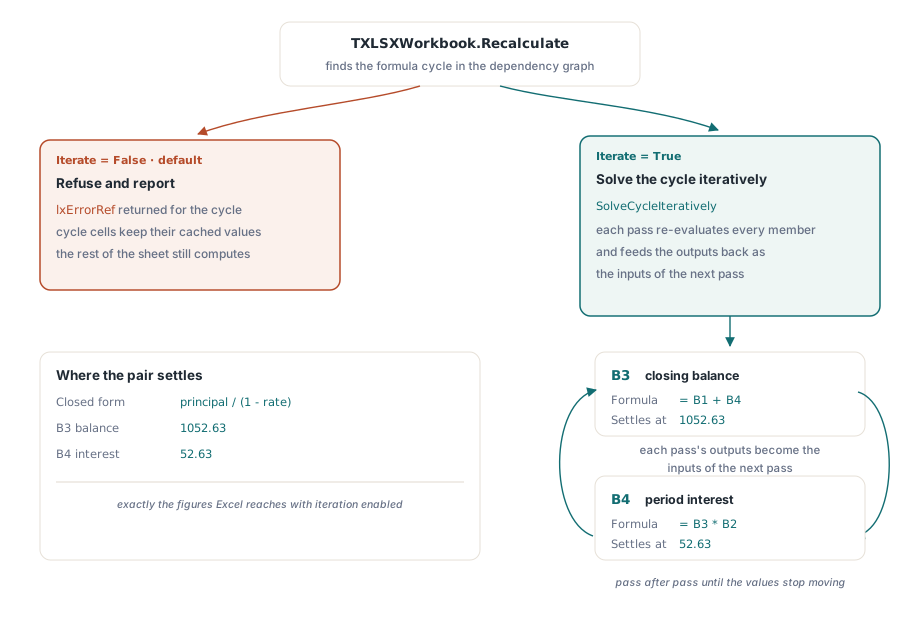
By default HotXLS treats any reference cycle as an authoring mistake and reports it instead of computing it. TXLSXWorkbook.Recalculate builds a formula dependency graph, evaluates every formula cell in topological order, and returns lxErrorRef the moment it finds a cycle — the nodes that can never be released during the topological sort. Those cycle members keep their previous cached values; every formula outside the cycle still evaluates normally. The mechanics of that graph, and why the cycle members are skipped rather than looped, are covered in the companion article on incremental formula recalculation and the dependency graph
The default is the safe one because most cycles are bugs: a summary row accidentally pulled into its own SUM range, a copy-paste that shifted a reference onto itself. A loud error code at recalculation time is exactly what you want for those. But a specific and important class of models is circular on purpose. Interest-on-interest schedules, circular cost or overhead allocations between departments, and balance-driven fee calculations all describe a value that legitimately feeds back into its own inputs — and Excel computes them only once the user ticks File → Options → Formulas → Enable iterative calculation
How do you enable iterative calculation in HotXLS?
HotXLS mirrors that Excel checkbox with three properties on TXLSXWorkbook: Iterate turns the mode on, and when it is True a detected cycle is handed to an iterative solver instead of producing lxErrorRef. Consider the canonical interest-on-interest cell pair, where the closing balance depends on the interest and the interest depends on the balance
var
  Book: TXLSXWorkbook;
  Sheet: TXLSXWorksheet;
begin
  Book := TXLSXWorkbook.Create;
  try
    Sheet := Book.Sheets.Add('Model');
    Sheet.Cells[1, 2].Value   := 1000;     // B1: opening principal
    Sheet.Cells[2, 2].Value   := 0.05;     // B2: period rate
    Sheet.Cells[3, 2].Formula := 'B1+B4';  // B3: balance  = principal + interest
    Sheet.Cells[4, 2].Formula := 'B3*B2';  // B4: interest = balance * rate

    Book.Iterate := True;                   // opt in to iterative calculation
    if Book.Recalculate = lxOk then
      // B3 converges to 1052.63..., B4 to 52.63...
      Report(Sheet.Cells[3, 2].Value);
  finally
    Book.Free;
  end;
end;
B3 references B4 and B4 references B3, so the dependency graph reports a two-node cycle. With Iterate left at its default of False, that pair would come back as lxErrorRef and neither cell would settle. With it True, Recalculate seeds the cycle from the current cached values and re-evaluates its members pass after pass, feeding each pass's outputs back as the next pass's inputs, until the numbers stop moving. Here the closed form is principal / (1 - rate), so the balance settles at 1052.63 and the interest at 52.63 — the same figures Excel produces with iteration enabled
What makes the iteration stop?
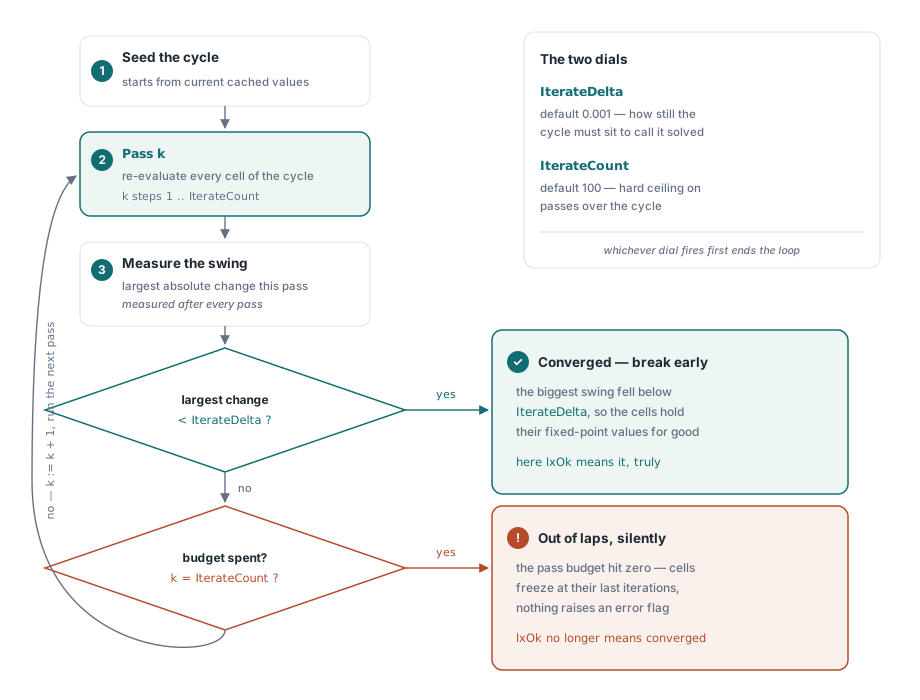
Two independent stop conditions bound the solver, and understanding both is what keeps a model from either erroring or spinning. IterateCount is the hard cap on how many times the cycle members are re-evaluated; it defaults to 100, matching Excel. IterateDelta is the convergence threshold: after each pass the solver measures the largest numeric change across all cycle cells, and once that maximum change drops below IterateDelta — default 0.001 — the pass loop breaks early. Whichever condition is met first ends the iteration
Book.Iterate := True;
Book.IterateCount := 1000;    // hard cap: at most 1000 passes over the cycle
Book.IterateDelta := 0.0001;  // convergence: stop once every cell moves < 0.0001

case Book.Recalculate of
  lxOk:
    // the cycle converged, OR it hit the 1000-pass cap and kept its
    // last-iteration values -- both paths return lxOk when Iterate is True
    SaveWorkbook(Book);
  lxErrorRef:
    // only reachable with Iterate = False: the cycle was reported, not solved
    LogWarning('Circular reference with iteration disabled');
end;
One consequence is worth stating plainly, because it is the honest boundary of the feature. When the cap is reached without the change dropping below IterateDelta, SolveCycleIteratively does not raise an error — it returns lxOk and leaves the cells holding their last-iteration values, exactly as Excel writes the last computed numbers when its own iteration limit is hit without convergence. So a successful return code from Recalculate under iterative mode means "the solver ran", not "the solver converged". A model whose feedback loop diverges or oscillates will quietly consume all IterateCount passes and hand back numbers that are not a fixed point at all, and no exception marks the difference
How is the setting saved to XLSX and XLS files?
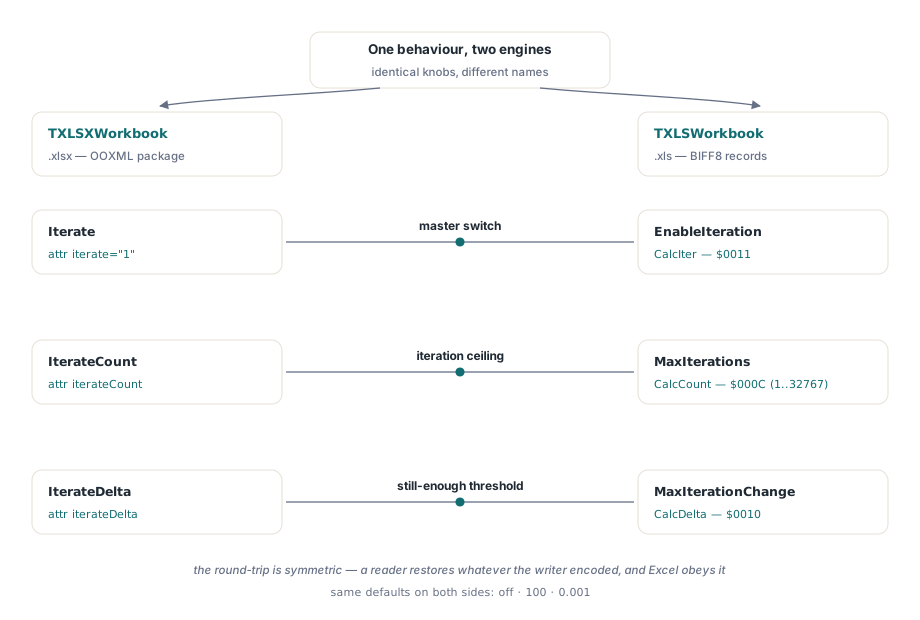
The iterative-calculation settings persist in both spreadsheet formats, so a workbook opened in Excel behaves the way your Delphi code configured it. On the XLSX side the writer emits the OOXML <calcPr> element only when Iterate is True, and it omits any attribute still at its default to keep output minimal: a workbook using the defaults writes just <calcPr iterate="1"/>, while iterateCount appears only when it differs from 100 and iterateDelta only when it differs from 0.001. On open, TXLSXWorkbook reads the same three attributes back, so the round-trip is symmetric
The legacy BIFF8 (.xls) engine, TXLSWorkbook, carries the equivalent state through three separate records under a different property triple. EnableIteration maps to the CalcIter record ($0011, [MS-XLS] §2.4.33), MaxIterations to the CalcCount record ($000C, [MS-XLS] §2.4.31), and MaxIterationChange to the CalcDelta record ($0010, [MS-XLS] §2.4.32). The setters enforce the spec ranges — CalcCount must lie in 1..32767, so MaxIterations is clamped, and a negative MaxIterationChange snaps back to the 0.001 default. Set them on a loaded .xls workbook and the three calc records are written faithfully on save
var
  Book: TXLSWorkbook;   // BIFF8 (.xls) engine
begin
  Book := TXLSWorkbook.Create;
  try
    Book.Open('model.xls');
    Book.EnableIteration    := True;    // CalcIter  record $0011
    Book.MaxIterations      := 500;     // CalcCount record $000C (clamped to 1..32767)
    Book.MaxIterationChange := 0.0001;  // CalcDelta record $0010
    Book.SaveAs('model.xls');           // the three calc records round-trip
  finally
    Book.Free;
  end;
end;
Note the deliberate naming split: the XLSX engine speaks Iterate / IterateCount / IterateDelta (the OOXML vocabulary), while the BIFF8 engine speaks EnableIteration / MaxIterations / MaxIterationChange (aligned with the [MS-XLS] record names). Both triples describe the same three knobs — an on/off switch, an iteration cap, and a convergence delta — with the same defaults of off, 100, and 0.001
When is a circular reference a bug rather than a model?
Enabling iteration is not a way to make circular-reference warnings disappear, and treating it that way is the trap. Turning Iterate on globally converts every accidental cycle — the ones the default error code was there to catch — into a silently converged or silently non-converged number. The discipline is the reverse: keep Iterate False as the normal mode so genuine authoring mistakes still surface as lxErrorRef, and enable iteration only on workbooks whose circularity is by design and understood
When a cycle does appear and you are not sure which kind it is, the formula evaluation tracer is the tool that tells them apart: trace the suspect formula and the reference chain that folds back on itself becomes visible step by step, so you can decide whether it encodes a real feedback loop or a stray self-reference. It also helps to remember that a cycle cell can call any built-in function on the way round the loop — the same calculator that resolves an engineering or complex-number formula evaluates the cycle members on every pass — so a diverging model is often a formula problem inside the loop, not an iteration-settings problem
The practical checklist is short. Confirm the loop has a real fixed point before you rely on iteration; keep IterateDelta tight enough that "converged" means what your model needs it to mean; and after a Recalculate that you expect to converge, sanity-check a known output rather than trusting the lxOk alone, since that code cannot distinguish convergence from a hit iteration cap
Iterative circular-reference calculation is part of the XLSX engine in the HotXLS Delphi Excel Component, alongside the incremental dependency-graph recalculation it builds on and the OOXML and BIFF8 persistence that carries the setting into every file you write. For the financial and engineering models that are circular on purpose, it is the difference between an error code and an answer