Excel refuses to open an XLSX workbook whose list data validation holds an inline list longer than 255 characters, and that holds even for a file Excel saved itself. HotXLS, the native Excel component for Delphi and C++Builder, loads those lists and models cross-sheet list rules as x14 extensions, but the durable fix is the same everywhere: keep long lists in a worksheet range or a defined name
The bug report usually arrives from a customer, not from your tests. A template grows a Region or Product column whose dropdown started at eight entries and now has sixty. Everything still works in the XLSB copy someone keeps on a share drive. Then an export job writes the same rule into an XLSX, and Excel answers with a repair prompt or a flat refusal. Nothing in your code changed except the length of one string, which is exactly why this boundary is worth understanding before it finds you
Where does the 255-character list limit actually apply?
The limit applies to the inline form of a list validation in XLSX, the quoted, comma-separated string stored in formula1, and Excel enforces it when opening the file, not only when you type the list in the Data Validation dialog. Testing against Excel directly gave a clean result: a 253-character list opened, while 260-character and 421-character lists were refused. The 421-character case is the instructive one, because it came from a workbook Excel had authored itself. Excel will write a file that Excel will not read back
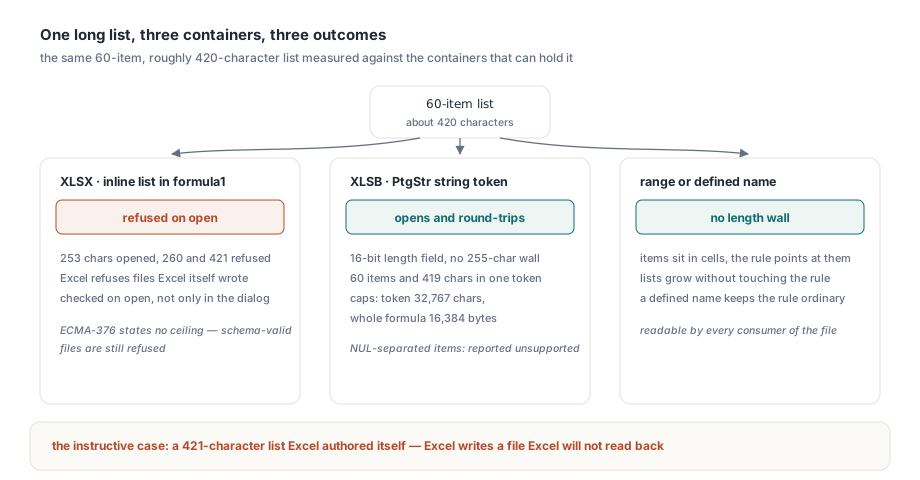
The schema does not save you here. ECMA-376 Part 1, §18.3.1.32 defines the dataValidation element and its formulas without stating a 255-character ceiling, so a file can be schema-valid and still be rejected. That is an application constraint, and the only reliable reference for it is Excel's own behaviour
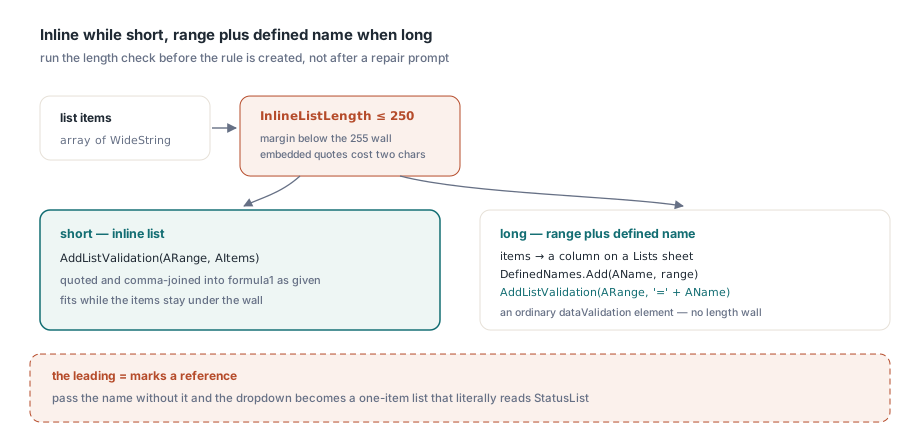
HotXLS does not enforce that ceiling for you. TXLSXWorksheet.AddListValidation wraps the items in quotes and stores them as given; it neither truncates nor rejects a long list, so a 400-character list goes into the saved XLSX exactly as requested and Excel then refuses the result. That is a deliberate choice, since silently trimming a list would corrupt data in a way nobody notices, but it puts the length check on your side. A small helper keeps it honest:
const
  // Excel opened a 253-char list and refused 260 and 421 chars.
  // Keep a margin instead of aiming at the exact edge.
  MaxInlineListChars = 250;

function InlineListLength(const AItems: array of WideString): Integer;
var
  I: Integer;
begin
  Result := 0;
  for I := 0 to High(AItems) do
    Inc(Result, Length(AItems[I]));
  if Length(AItems) > 1 then
    Inc(Result, High(AItems));  // separating commas
end;
Treat embedded double quotes as costing two characters, because AddListValidation doubles them to keep the formula string valid
Why XLSB can carry lists that XLSX cannot
XLSB stores an inline list as a single PtgStr string token whose length is a 16-bit field, so the binary format has no 255-character wall. A native sample with 60 items and 419 characters lives in one token and round-trips in Excel without complaint. The same list in XLSX is the 421-character case above
A loader that applied the dialog's 255-character limit to XLSB would reject that file. The HotXLS XLSB validation token check bounds a string token at 32,767 characters instead, the same ceiling as an Excel cell string. Two qualifications are worth stating plainly. The loader also caps a complete validation formula at 16,384 bytes, so the practical ceiling for one inline list is lower than the token check alone suggests. And lists separated by NUL characters inside a PtgStr fall outside the supported profile, so they are reported as unsupported instead of being guessed at
The trap sits in conversion. A long list that is perfectly healthy in XLSB becomes a refused file the moment anything, HotXLS included, saves that workbook as XLSX. If a pipeline converts customer XLSB files, run the length check on every list rule before the XLSX save, not after a customer reports it
What happens to lists that point at another sheet?
Excel stores a list whose source sits on a different worksheet in the x14:dataValidations extension, not in the ordinary dataValidations element. The rule lives inside the worksheet's extLst under the extension URI {CCE6A557-97BC-4b89-ADB6-D9C93CAAB3DF}, defined in [MS-XLSX], and its source reference is an xm:f element such as Lists!$A$2:$A$61. XLSB keeps the same rule in its own extension records
HotXLS parses those XLSX extension rules into the typed DataValidations collection and flags each one with TXLSXDataValidation.IsExtension. A cross-sheet list therefore shows up alongside ordinary rules with its range, type and formula readable, and it survives edits, saves and reopens. On save, the writer keeps extension rules out of the ordinary element and rebuilds the x14 extension at its schema position at the tail of the worksheet. Both formulas are kept, so whole-number, decimal, text-length, date and time rules using between or notBetween keep both bounds
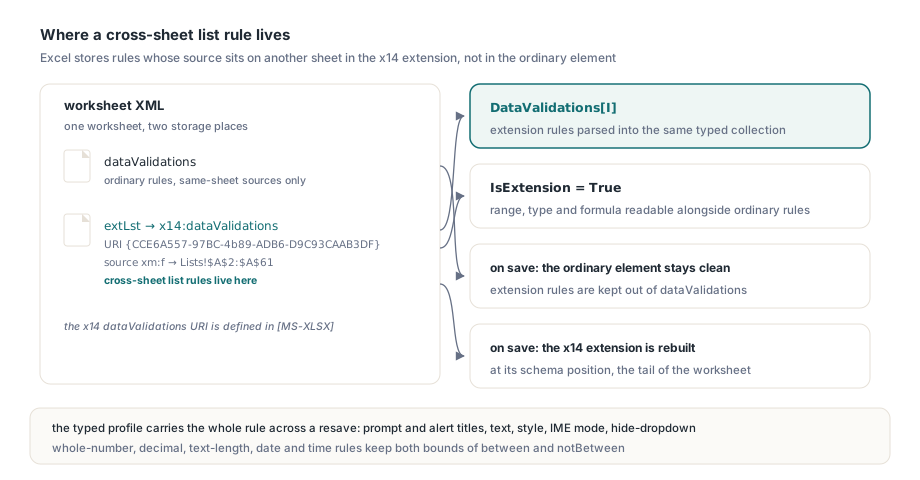
The typed extension profile covers the whole rule. Besides type, operator, allowBlank, the two show flags, the range and both formulas, an extension rule keeps its input prompt title and text, its error alert title and text, the alert style, the IME mode and the hide-dropdown setting through a load and resave, with the same escaping rules as an ordinary validation
uses
  SysUtils, lxHandleX, lxDiagnostics;

procedure AuditListRules(const FileName: WideString);
var
  Book: TXLSXWorkbook;
  Sheet: TXLSXWorksheet;
  Dv: TXLSXDataValidation;
  S, I: Integer;
begin
  Book := TXLSXWorkbook.Create;
  try
    if Book.Open(FileName) <> 1 then
      raise Exception.Create('Cannot open ' + FileName);
    for S := 1 to Book.Sheets.Count do        // Sheets[] is 1-based
    begin
      Sheet := Book.Sheets[S];
      for I := 0 to Sheet.DataValidations.Count - 1 do
      begin
        Dv := Sheet.DataValidations[I];
        if Dv.ValidationType <> xlsxDvList then
          Continue;
        if Dv.IsExtension then
          Writeln(Sheet.Name, ' ', Dv.Range, ': x14 list from ', Dv.Formula1)
        else if (Dv.Formula1 <> '') and (Dv.Formula1[1] = '"') and
                (Length(Dv.Formula1) - 2 > MaxInlineListChars) then
          Writeln(Sheet.Name, ' ', Dv.Range, ': inline list of ',
            Length(Dv.Formula1) - 2, ' chars, refused by Excel as XLSX');
      end;
    end;
  finally
    Book.Free;
  end;
end;
For reading the items behind a dropdown, selecting entries and checking typed input against these rules, see reading dropdown items and validating input with HotXLS; this article stays with the storage formats
How Excel and HotXLS treat unknown validation types
Excel opens a dataValidation whose type attribute holds an unrecognised token as a rule of type none, keeps its formula, and on save rewrites it as a bare dataValidation element with no type attribute, dropping the unknown attribute. Such tokens come from hand-edited XML, third-party generators and future Office features, and Excel's answer is tolerance, not rejection
HotXLS follows the same tolerance. Rather than dropping the rule, which would lose it on resave with no trace, the reader keeps it as xlsxDvNone with its formulas and range, and records one warning diagnostic per normalised rule with code 1307, exposed as the xlsDiagnosticValidationTypeNormalized constant in lxDiagnostics. On save, a none rule is written as the bare element, the same form Excel produces. A none rule validates nothing, so the diagnostic is your cue that a rule the author believed was active no longer constrains input
for I := 0 to Book.Diagnostics.Count - 1 do
  if Book.Diagnostics[I].Code = xlsDiagnosticValidationTypeNormalized then
    Writeln('Untyped rule kept on sheet ', Book.Diagnostics[I].SheetName,
      ': ', Book.Diagnostics[I].Message);
Why can Excel refuse a workbook after a round trip?
Excel refuses a resaved workbook when a replayed extension fragment uses a namespace prefix that the new file never declares, because the result is not well-formed XML. Extension fragments routinely carry prefixed attributes such as xr:uid, whose xmlns:xr declaration sits on the original worksheet root, not inside the fragment. Copy the fragment verbatim into a new worksheet root that lacks that declaration and the XML namespace rules are broken before Excel looks at a single cell
HotXLS handles this in the capture step. While reading, it scans each replayed fragment for element and attribute prefixes the fragment does not declare itself, resolves each prefix to its URI through the reader, and writes those declarations onto the worksheet root at save time. The streaming save path builds the root through the same routine, so both save modes produce well-formed output, and a resaved file reopens in Excel with every validation rule present, including a replayed cross-sheet x14 list. The broader picture of how HotXLS carries extLst content it does not model is covered in lossless XLSX round-trips for themes, extLst and calcChain, and the general rules behind Excel's repair prompt are in why Excel shows a repair prompt
Long lists belong in a range or a defined name
The robust design for any list that might grow is to store the items in worksheet cells and point the validation at them through a defined name. A range source has no 255-character limit in either format, the items can be edited without touching the rule, and a defined name keeps the rule in the ordinary dataValidation element even when the cells sit on a separate sheet, which every consumer of the file can read
// Lists is a dedicated sheet, e.g. Book.Sheets.Add('Lists')
function AddListRule(Book: TXLSXWorkbook; Target, Lists: TXLSXWorksheet;
  ACol: Integer; const ARange, AName: WideString;
  const AItems: array of WideString): Integer;
var
  I: Integer;
  ColRef: WideString;
begin
  if InlineListLength(AItems) <= MaxInlineListChars then
  begin
    Result := Target.AddListValidation(ARange, AItems);
    Exit;
  end;
  for I := 0 to High(AItems) do
    Lists.WriteAutoValue(I + 1, ACol, AItems[I]);   // 1-based row, col
  ColRef := Chr(Ord('A') + ACol - 1);               // columns A..Z
  Book.DefinedNames.Add(AName, Lists.Name + '!$' + ColRef + '$1:$' +
    ColRef + '$' + IntToStr(Length(AItems)));
  // The leading '=' marks a reference; without it the name is quoted as text
  Result := Target.AddListValidation(ARange, '=' + AName);
end;
That leading equals sign matters. AddListValidation treats an argument starting with = as a reference and strips the sign, leaves an argument containing ! unquoted as a range, and quotes everything else as an inline list. Pass 'StatusList' without the sign and you get a one-item dropdown that literally reads StatusList. Two smaller points: WriteAutoValue converts text the way Excel's cell entry does, so an item such as TRUE becomes a Boolean, and a sheet name containing spaces needs single quotes in the reference
For a rule that must point straight at another sheet without a name, set IsExtension := True on the rule at the index AddListValidation returned, and HotXLS writes it as the x14 extension, the same form Excel itself uses. The defined-name route is simpler and keeps working for tools that never parse extensions, which is why it is the default recommendation here
All the behaviour described here ships in the HotXLS Delphi Excel component for Delphi, C++Builder and Lazarus, where the product page lists the supported validation types, file formats and the full diagnostics reference