A workbook saved by Excel 4.0 in 1992 begins with the bytes 09 04 06 00, while every .xls from Excel 5.0 onwards begins with the compound-file signature D0 CF 11 E0. A reader that checks for that signature rejects the older file before reading a single cell, and a reader that skips the check and assumes BIFF8 parses the first record as something it is not. Both failures come from the same assumption: that every .xls has a container. Excel 2.0, 3.0 and 4.0 files have none, so the record stream itself has to say which generation wrote it, and the cell records have to be decoded with that generation's layout
These files still turn up, which is the only reason any of this matters. Engineering archives, records-retention stores, laboratory exports from instruments whose control software dates from the early 1990s, and long-running accounting systems all left BIFF2 to BIFF4 workbooks behind. Current Excel builds block several of these formats by default through their File Block settings, so the data set often sits in a folder that nobody can open with the tools on their desk
How a pre-OLE workbook announces itself
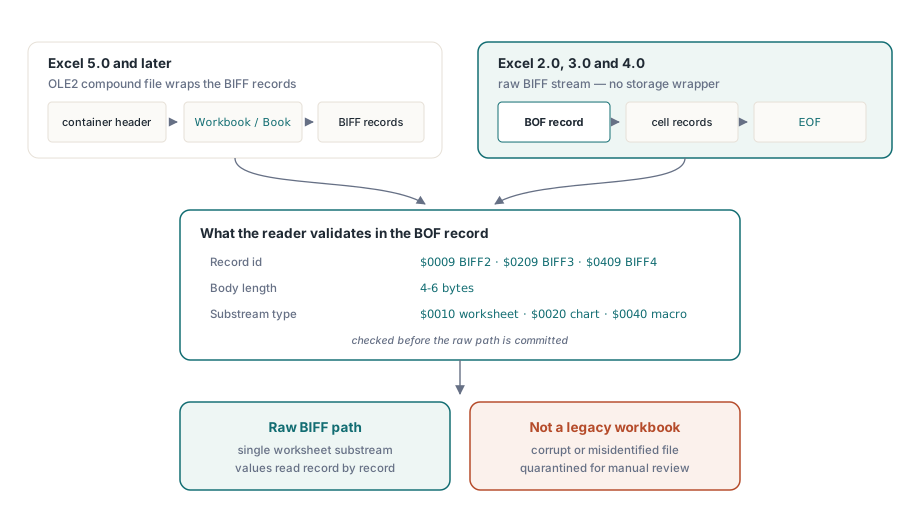
HotXLS recognises a pre-OLE workbook from its first record, inside the same TXLSWorkbook.Open call that loads every other .xls. Every .xls from Excel 5.0 onwards is an OLE2 compound file, a small file system inside a file, with the workbook living in a stream named Workbook or Book; parsing one starts by parsing that container, as described in the compound file binary format in Pascal
BIFF2 through BIFF4 skip all of that. The file starts directly with a BOF record, and the record number of that BOF encodes the generation: $0009 for BIFF2, $0209 for BIFF3 and $0409 for BIFF4. The version word inside the body, which later formats rely on, is ignored by these generations, so the record id is the only trustworthy signal. Before committing to the raw path, the HotXLS stream layer checks two more things: the BOF body must be four to six bytes long, and the substream type word must be $0010 for a worksheet, $0020 for a chart or $0040 for a macro sheet. Anything else makes Open return an error code
Those checks matter more than they look. Two bytes of $09 $00 at offset zero are not rare in arbitrary binary data, and a quarantine folder of unidentified .xls files tends to contain renamed text exports, truncated copies and the occasional file from a different program entirely. Three independent fields all agreeing is a far stronger signal than one
Three generations, three record layouts
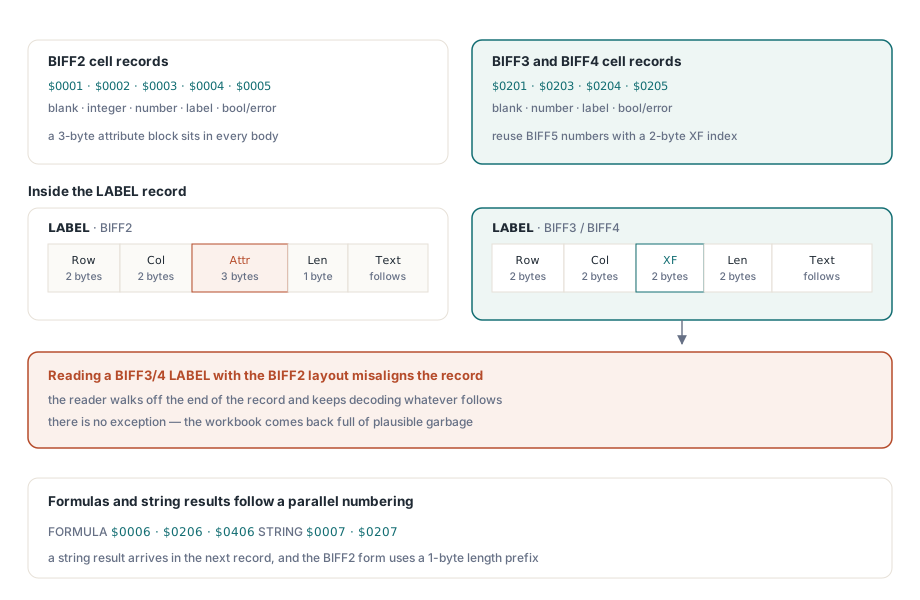
The cell records are where the generations diverge most visibly. BIFF2 occupies a contiguous block of low record numbers, $0001 through $0005, for blank, integer, number, label and boolean-or-error cells. Each of those bodies carries a three-byte attribute field where later versions put a two-byte extended format index, so every value sits one byte further into the record. The BIFF2 INTEGER record is its own oddity: an unsigned 16-bit value with no fractional part, a record type that BIFF3 dropped in favour of RK
BIFF3 and BIFF4 abandon the low numbers and reuse the BIFF5 record ids and layouts: $0201, $0203, $0204, $0205 and $027E, each with a two-byte XF index. That reuse causes a specific and easily misdiagnosed failure. A BIFF3 or BIFF4 LABEL record is structurally identical to its BIFF5 counterpart: row, column, format index, then a two-byte character count at offset 6. Apply that layout to a BIFF2 label and the count is assembled from the last attribute byte and the real one-byte length, so a five-character label claims at least 1,280 characters and the reader runs off the end of the record. Go the other way, BIFF2 layout on a BIFF3 record, and the length is read from the high byte of the count, which is zero for any short string. Nothing throws in either direction. The workbook comes back with empty labels or plausible garbage, and HotXLS avoids both by dispatching on the record id together with the generation taken from the BOF
The BIFF2 attribute field hides one more trap. Its first byte holds the format index in the low six bits, and the value $3F means 'the real index is too large for six bits, look at the preceding IXFE record'. HotXLS tracks the most recent IXFE and resolves the escape before assigning the cell its style, so a cell whose format index needs more than six bits still gets its own formatting
Text in all three generations is a plain byte string with no Unicode anywhere. The encoding comes from the file's CODEPAGE record, which in these files sits inside the one worksheet stream because there is no workbook-level stream to hold it. HotXLS decodes labels and string results through that code page and falls back to Windows-1252 when the record is absent, which covers the western default most of these files were written with. A Japanese or Central European workbook that lacks a CODEPAGE record will therefore decode as Latin text, and the only fix is to know where the file came from
Opening one from Delphi
Detection happens inside Open, so the calling code is the same as for any workbook. The loop below walks the used range and prints each cell twice over when it holds a formula: the translated expression and the value as Excel would display it through the cell's number format
uses
  SysUtils, Variants, lxHandle;

var
  Book: TXLSWorkbook;
  Sheet: TXLSWorksheet;
  Cell: IXLSRange;
  R, C: Integer;
begin
  Book := TXLSWorkbook.Create;
  try
    try
      if Book.Open('archive\1992-inventory.xls') <> 1 then
      begin
        Writeln('not a readable workbook - quarantine for manual review');
        Exit;
      end;
    except
      // Open raises when the file is really a ZIP package,
      // typically an .xlsx that someone renamed to .xls
      on E: Exception do
      begin
        Writeln('rejected: ', E.Message);
        Exit;
      end;
    end;

    Sheet := Book.Sheets[1];          // Sheets[] is 1-based
    for R := Sheet.UsedRange.FirstRow + 1 to Sheet.UsedRange.LastRow + 1 do
      for C := Sheet.UsedRange.FirstCol + 1 to Sheet.UsedRange.LastCol + 1 do
      begin
        Cell := Sheet.Cells[R, C];
        if VarIsEmpty(Cell.Value) or VarIsNull(Cell.Value) then
          Continue;
        if Cell.HasFormula then
          Writeln(Format('R%dC%d  %s  -> %s',
            [R, C, VarToStr(Cell.Formula), Cell.FormattedText]))
        else
          Writeln(Format('R%dC%d  %s', [R, C, Cell.FormattedText]));
      end;
  finally
    Book.Free;
  end;
end;
Watch the index arithmetic. UsedRange bounds are zero-based while both the sheet collection and cell access are one-based, an inconsistency the API keeps for compatibility with existing code. Forget the adjustment and the loop audits the wrong rectangle without reporting anything unusual. The files this path accepts carry a single worksheet, chart or macro-sheet substream, so Sheets[1] is the only sheet you will find; an Excel 4.0 bound workbook (BOF type $0100) falls outside that set and Open returns an error code. Cheap pre-checks that avoid loading a file at all are covered in lightweight workbook inspection
Password-protected files follow the same single-stream rule. The FILEPASS record appears right after the BOF in the worksheet stream, where HotXLS picks it up and switches on the legacy XOR deobfuscation these generations used; pass the password through the Open(FileName, APassWord) overload
What happens to formulas in a BIFF2 to BIFF4 file?
HotXLS reads both halves of a legacy formula: the cached result Excel stored when it last calculated, and the token stream, which is translated into the current calculation model during load. Formula records share a parallel numbering across the three generations, $0006, $0206 and $0406, but the bodies differ in exactly the places a BIFF8 parser would trip over
The cached result starts at byte 7 in BIFF2, because of the attribute field, and at byte 6 in BIFF3 and BIFF4. Non-numeric results use a marker word of $FFFF in the last two bytes of that eight-byte slot, with a discriminator in the first byte: 0 for a string, 1 for a boolean, 2 for an error code, 3 for a blank. A string result does not fit in the slot at all, so the text arrives in the next record, $0007 in BIFF2 with a one-byte length or $0207 in BIFF3 and BIFF4 with a two-byte length
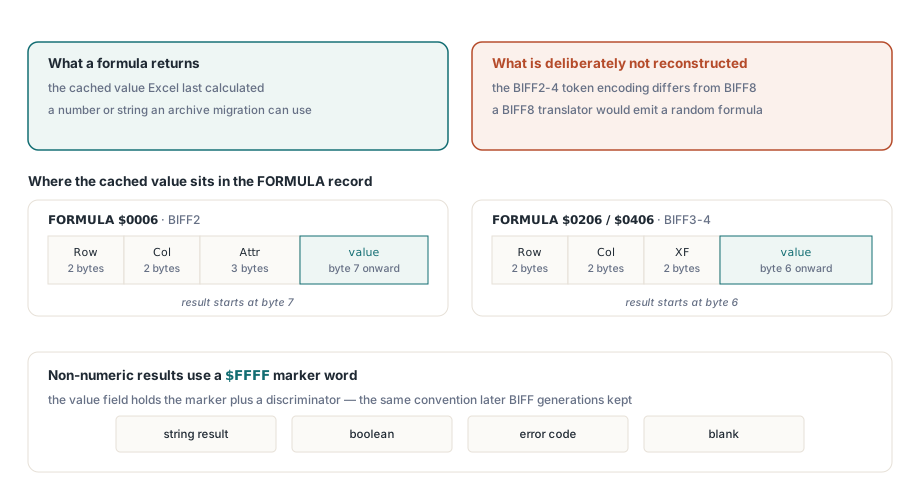
The token stream is where a naive implementation produces nonsense. BIFF2 prefixes the expression with a one-byte length at offset 16 and starts the tokens at 17; BIFF3 and BIFF4 use a two-byte length and start at 18. Inside the stream, function tokens carry a one-byte function index before BIFF5 and a two-byte index from BIFF5 on. Feed BIFF4 tokens to a BIFF8 translator unchanged and every function call consumes one byte too many, so the result is not a slightly wrong formula but an unrelated one. The HotXLS translator takes the BIFF version as a parameter and reads each token with that generation's widths
Having both halves raises a practical question: which number goes into the migrated workbook? The cached value is what the file's users saw, printed and signed off on in 1992. A recalculation on a modern engine computes what the formula means today, and function behaviour has not stood still for three decades. For an archive migration the cached value is the record, so keep it and run a recalculation only as a cross-check that tells you which cells deserve a human look:
// Cross-check: compare stored results with a fresh recalculation.
// This helper and its CachedText array are your own code
procedure CompareWithRecalc(Book: TXLSWorkbook; Sheet: TXLSWorksheet);
var
  CachedText: array of array of string;
  Rows, Cols, R, C: Integer;
begin
  Rows := Sheet.UsedRange.LastRow + 1;
  Cols := Sheet.UsedRange.LastCol + 1;
  SetLength(CachedText, Rows + 1, Cols + 1);
  for R := 1 to Rows do
    for C := 1 to Cols do
      if Sheet.Cells[R, C].HasFormula then
        CachedText[R, C] := VarToStr(Sheet.Cells[R, C].Value);

  Book.Recalculate;

  for R := 1 to Rows do
    for C := 1 to Cols do
      if Sheet.Cells[R, C].HasFormula and
         (VarToStr(Sheet.Cells[R, C].Value) <> CachedText[R, C]) then
        Writeln(Format('R%dC%d  stored=%s  now=%s  formula=%s',
          [R, C, CachedText[R, C], VarToStr(Sheet.Cells[R, C].Value),
           VarToStr(Sheet.Cells[R, C].Formula)]));
end;
Run this on a copy, or before the save, since Recalculate replaces the stored results in memory. An empty report is the outcome you want; a short one usually points at volatile functions such as NOW() or at references the original author left dangling
Formatting, dates and the General-format trap
HotXLS converts the formatting records of these generations into the same workbook model a modern .xls produces. FONT records (with the separate BIFF2 FONTCOLOR record folded in), the FORMAT strings, and the XF records of each generation, with their fill patterns, border styles and legacy colour indexes, become ordinary fonts, number formats and cell styles that you can read and edit through Font, NumberFormat and the other range properties
Dates benefit directly. When a numeric cell carries a date number format, the reader also applies the workbook's DATEMODE flag, so a 1904-system workbook lands on the same TDateTime scale as a 1900-system one, and FormattedText shows the date the way Excel did. The rules behind the 1462-day offset are covered in date serial numbers, the 1904 system and number formats
The trap is the column that holds dates under a General format. Plenty of 1990s workbooks were filled by macros or by imports that wrote serial numbers without bothering to format them, and the file gives no signal that 33604 means a day in January 1992 rather than a part number. Those cells come back exactly as stored, uncorrected for the date system. Decide per column, from what you know about the source, and convert those columns yourself:
// ColumnHoldsDates is your own lookup, built from knowledge of the
// source system; the legacy file cannot answer this question for you.
// Serial is a local Double; Cell and C come from the first listing
if ColumnHoldsDates(C) and (Pos('d', LowerCase(Cell.NumberFormat)) = 0) then
begin
  // General-formatted serial: no date system correction applied yet
  Serial := Cell.Value;
  if Book.Date1904 then
    Serial := Serial + 1462;
  Writeln(DateToStr(TDateTime(Serial)))
end
else
  Writeln(Cell.FormattedText);
The Pos('d', ...) test is deliberately crude and meant only to skip cells that already carry a day token in their format; a stricter check against your own list of known date formats is worth the extra lines if the archive is large
Writing the migrated copy
A workbook opened from a BIFF2 to BIFF4 file is saved through the BIFF5/BIFF8 or XLSX writers, since there is no reason to produce new files in a format that current Excel blocks. Book.SaveAs('migrated\1992-inventory.xls', xlExcel97) writes a BIFF8 copy that carries the values, the translated formulas and the converted styles, and every later tool in the pipeline can open it without special handling. Keep the original next to it: if a cell turns up a question two years from now, the 1992 bytes are the only authority
Legacy reading, modern writing, recalculation and formatting all live in one library for Delphi and C++Builder; the format coverage is listed on the HotXLS Delphi spreadsheet component page