An invoice form computes a surcharge with Round(Subtotal * 0.025, 2), and a Delphi service re-checking its totals disagrees with the flattened PDF on half-cent lines. FormCalc rounds halves away from zero and returns a Double, while System.Round rounds to even, so the dependable check is letting HotPDF flatten the XFA form and run its FormCalc scripts
Half away from zero, and the result stays a Double
Delphi's System.Round follows the FPU rounding mode, and the default mode rounds half to even: Round(2.5) is 2, Round(3.5) is 4 and Round(-2.5) is -2. Banker's rounding suits statistics. It is a poor match for a form that has always shown 3. FormCalc's Round takes halves away from zero, so 2.5 becomes 3 and -2.5 becomes -3. The return type differs too. System.Round returns an Int64, which is why the familiar idiom Round(X * 100) / 100 overflows once X * 100 leaves the Int64 range, whereas FormCalc's Round(X, 2) takes a Double and gives one back
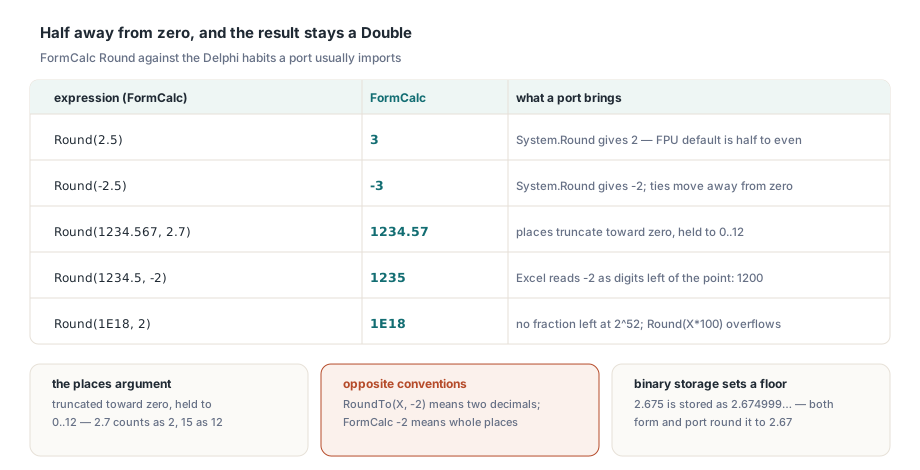
Large values need one more rule. A Double has 52 explicit fraction bits, so a magnitude of 252 (4,503,599,627,370,496) or more has no fractional part left to round. HotPDF scales the absolute value by 10places, and when the scaled value reaches 252 it hands the input back unchanged — multiplying further would only invent digits or overflow. Binary storage sets the other limit, and that one applies to any Double-based evaluator, FormCalc included. The literal 2.675 is stored as 2.67499999999999982236431605997495353221893310546875. Rounded to two places, it gives 2.67. FormCalc has no decimal-exact money type, so a form and a port can only agree on the binary value both of them hold
uses
  Math;

// FormCalc-style Round for a Delphi port: halves away from zero,
// place count truncated toward zero and held to 0..12, result stays a Double
function FormCalcRound(Value: Double; Places: Double = 0): Double;
const
  NoFractionBits = 4503599627370496.0;   // 2^52
var
  Digits: Integer;
  Scale, Scaled, Whole: Double;
begin
  if IsNan(Value) or IsNan(Places) then
    Exit(NaN);
  if IsInfinite(Value) or (Value = 0) then
    Exit(Value);
  Digits := Trunc(EnsureRange(Places, 0.0, 12.0));
  Scale := IntPower(10, Digits);
  if Abs(Value) >= NoFractionBits / Scale then
    Exit(Value);                         // no fractional digits left to round
  Scaled := Abs(Value) * Scale;
  Whole := Int(Scaled);
  if Scaled - Whole >= 0.5 then
    Whole := Whole + 1;
  Result := Whole / Scale;
  if Value < 0 then
    Result := -Result;
end;

// FormCalcRound(2.5)            = 3        System.Round(2.5)  = 2
// FormCalcRound(-2.5)           = -3       System.Round(-2.5) = -2
// FormCalcRound(1234.567, 2.7)  = 1234.57  (2.7 places count as 2)
// FormCalcRound(1234.5, -2)     = 1235     (a negative count means 0 places)
// FormCalcRound(1E18, 2)        = 1E18     (Round(1E18 * 100) overflows Int64)
How many decimal places does FormCalc Round accept?
Whole places from 0 to 12. HotPDF truncates the second argument toward zero and then holds it to that range, so Round(X, 2.7) rounds to two places, Round(X, 15) to twelve, and both Round(X, -2) and Round(X, -0.5) to a whole number. The rule is the same wherever HotPDF evaluates FormCalc, so a total computed during flattening and one computed while the form is being filled come out identical. Spreadsheet habits pull the other way. Excel's ROUND(1234.5, -2) gives 1200 because Excel reads a negative count as digits to the left of the decimal point; FormCalc gives 1235. Delphi's helpers flip the convention once more: Math.RoundTo and SimpleRoundTo take a power of ten, so RoundTo(X, -2) means two decimals and RoundTo(1234.567, 2) is 1200. A port that copies the script's second argument straight into RoundTo prints hundreds where the form shows cents. Keep the place count as FormCalc defines it and route it through a helper such as FormCalcRound, which also keeps the tie rule right
Why does a - b * Int(a / b) return the wrong remainder?
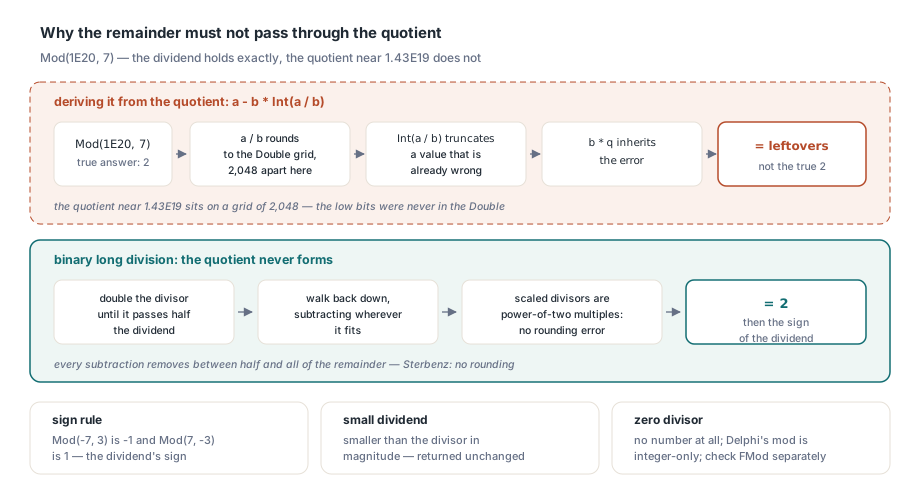
Because the quotient stops being exact long before the dividend does. Take Mod(1E20, 7). The dividend is representable without error — 1020 is 220 × 520, and 520 fits in 53 bits — and the true remainder is 2. The quotient, about 1.43 × 10¹⁹, is not: Doubles in that range sit 2,048 apart, so Int(a / b) is wrong before the multiplication even starts, and a - b * q returns whatever the rounding errors leave behind. Delphi's mod operator works on integers only, and Trunc cannot hold a quotient beyond the Int64 range. Check System.Math.FMod before you lean on it here. An implementation that derives the remainder from the quotient inherits the same error, and comparing FMod(1E20, 7) with the expected 2 settles the question in one line
Binary long division never forms the quotient. Double the divisor until it passes half the dividend, then walk back down, subtracting the scaled divisor wherever it fits. Every scaled divisor is the original times a power of two, so it carries no rounding error. Every subtraction takes away a number between half and all of the current remainder — the case in which, by the Sterbenz lemma, IEEE 754 subtraction involves no rounding. The result is exact. FormCalc's sign rule then applies: the remainder takes the sign of the dividend, so Mod(-7, 3) is -1 and Mod(7, -3) is 1. A dividend smaller in magnitude than the divisor comes back unchanged, and a zero divisor yields no number at all
// Exact floating-point remainder, sign of the dividend, no quotient needed
function FormCalcMod(Dividend, Divisor: Double): Double;
var
  Step, Half: Double;
begin
  if IsNan(Dividend) or IsNan(Divisor) or IsInfinite(Dividend) or (Divisor = 0) then
    Exit(NaN);
  if IsInfinite(Divisor) or (Abs(Dividend) < Abs(Divisor)) then
    Exit(Dividend);
  Divisor := Abs(Divisor);
  Result := Abs(Dividend);
  Half := Result * 0.5;
  Step := Divisor;
  while Step <= Half do
    Step := Step * 2;                   // largest power-of-two multiple
  while Step > Divisor do
  begin
    if Result >= Step then
      Result := Result - Step;          // exact: Step <= Result < 2 * Step
    Step := Step * 0.5;
  end;
  if Result >= Divisor then
    Result := Result - Divisor;
  if Dividend < 0 then
    Result := -Result;
end;

// FormCalcMod(1E20, 7) = 2      FormCalcMod(-7, 3) = -1
// FormCalcMod(7, -3)   = 1      FormCalcMod(7.5, 2) = 1.5
// FormCalcMod(1, 0)    = NaN
Choose truncates its index, HasValue ignores blanks
Choose(n, item1, item2, …) converts its first argument to a number and truncates it, so Choose(2.7, "a", "b", "c") returns "b" and raises no type error. An index below 1 or beyond the last item returns an empty string, and a null index returns null. HasValue is the function form authors use to test optional fields: it answers 0 for null and for text made only of Unicode white space. The number 0 still counts. A quantity field holding 0 has been filled in; a comments box holding three spaces has not, even though XFA white-space text values keep those spaces intact through a save. Together the two functions give the usual guard for optional line items, if (HasValue(Qty)) then Round(Qty * Price, 2) else null endif, which leaves an unfilled line empty and keeps a column total limited to what was entered. A Delphi port that treats an empty quantity as 0 prints a 0.00 line total where the form prints nothing
What does FormCalc return for an empty field?
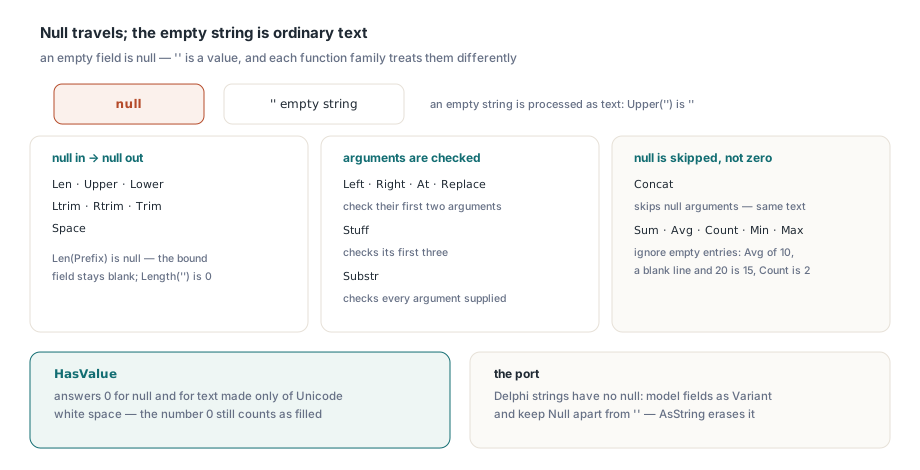
Null — and null survives most of the functions a calculate script calls. In FormCalc an empty string is a real value and null is its absence, and the string functions keep the two apart:
Len,Upper,Lower,Ltrim,Rtrim,TrimandSpacereturn null when their argument is nullLeft,Right,AtandReplacecheck their first two arguments,Stuffits first three, andSubstrevery argument supplied- An empty string passed to any of them is processed as text:
Upper("")is "", not null - Scripts can produce null explicitly with the
nullliteral orNull()
Delphi strings have no null, and that is where hand-written ports drift furthest. Concat sits outside the list: it skips null arguments, so Concat(Prefix, Code) on an unfilled prefix yields the same text a port builds from ''. Len does not. Len(Prefix) is null and a numeric field bound to it stays blank, while Length('') puts 0 there. The aggregates follow the skipping rule: Sum, Avg, Count, Min and Max ignore empty entries, so Avg over 10, an empty line and 20 is 15 and Count is 2. A port that reads the empty line as 0 reports an average of 10. A column with nothing entered gives Sum no value at all, which keeps the grand total field empty
uses
  Variants;

// FormCalc-style Avg: empty entries are skipped, not counted as zero
function FormCalcAvg(const Values: array of Variant): Variant;
var
  I, Count: Integer;
  Total: Double;
begin
  Result := Null;
  Total := 0;
  Count := 0;
  for I := Low(Values) to High(Values) do
    if not VarIsNull(Values[I]) then
    begin
      Total := Total + Values[I];
      Inc(Count);
    end;
  if Count > 0 then
    Result := Total / Count;
end;

// FormCalcAvg([10, Null, 20]) = 15     reading the empty entry as 0 gives 10
// FormCalcAvg([Null, Null])   = Null   the average field stays blank
Model fields as Variant in the port and keep Null apart from ''. Values pulled from a dataset need the same care: TField.Value returns Null for a NULL column, while TField.AsString turns it into an empty string and erases the difference before the port ever sees it
Let the form run its own scripts
The safest port is often no port at all. THotPDF.FlattenLoadedXFA evaluates each field's calculate script while it lays the form out and rebuilds the fields as AcroForm fields, applying the rounding, remainder and null rules above. The same call handles the rest of XFA to AcroForm flattening, from layout to widget mapping. A formula that cannot be evaluated — an unresolved reference, a division by zero, a parse error — fails as a whole. Nothing half-computed reaches the field. Reloading the flattened file and comparing its field values with the port's output turns a vague disagreement into a list of field names:
uses
  SysUtils, Classes, HPDFDoc;

function SameFieldValue(const FormText, PortText: string): Boolean;
var
  FS: TFormatSettings;
  A, B: Double;
begin
  FS := TFormatSettings.Create;
  FS.DecimalSeparator := '.';
  if TryStrToFloat(FormText, A, FS) and TryStrToFloat(PortText, B, FS) then
    Result := A = B
  else
    Result := FormText = PortText;      // '' against '0.00' is a real mismatch
end;

procedure CheckPortAgainstForm(const XfaFile, FlatFile: string; Port: TStrings);
var
  Pdf: THotPDF;
  Pairs: TStringList;
  I: Integer;
  FieldName: string;
begin
  Pdf := THotPDF.Create(nil);
  try
    if Pdf.LoadFromFile(XfaFile) <= 0 then
      raise Exception.Create('Cannot open the XFA form');
    Pdf.FlattenLoadedXFA(False);        // False = fields become read-only
    for I := 0 to Pdf.XFAFlattenWarnings.Count - 1 do
      Writeln('XFA: ', Pdf.XFAFlattenWarnings[I]);
    Pdf.SaveLoadedDocument(FlatFile);
  finally
    Pdf.Free;
  end;

  Pdf := THotPDF.Create(nil);
  Pairs := TStringList.Create;
  try
    if Pdf.LoadFromFile(FlatFile) <= 0 then
      raise Exception.Create('Cannot open the flattened PDF');
    Pdf.GetLoadedFormFieldNameValuePairs(Pairs);
    for I := 0 to Pairs.Count - 1 do
    begin
      FieldName := Pairs.Names[I];
      if (Port.IndexOfName(FieldName) >= 0) and
         not SameFieldValue(Pairs.ValueFromIndex[I], Port.Values[FieldName]) then
        Writeln(Format('%s: form "%s", port "%s"',
          [FieldName, Pairs.ValueFromIndex[I], Port.Values[FieldName]]));
    end;
  finally
    Pairs.Free;
    Pdf.Free;
  end;
end;
Read the warnings before trusting any total; the list names every element the conversion could not map, so look for entries that name a calculated field. Then give the port a sample built for the rules above: line amounts that land on .5 at the second decimal, a 20-digit account number run through Mod, a Round with a fractional place count, and one optional line left empty. Every line the procedure prints is a rule the port gets wrong. Forms that compute with AcroForm format and calculate scripts follow JavaScript number rules — Math.round(-2.5) is -2 there, a third answer to the same question
If the figure your service needs is one the form already prints, take it from the form: flatten it with the HotPDF Delphi PDF component, reload the result and read the field. The helper functions above earn their keep only for numbers the form never computes