An invoice or expense PDF where the line items add themselves up and the date formats itself needs three things bolted onto its AcroForm, and HotPDF adds all three to a loaded file in Delphi: ApplyLoadedFieldCalculation for AFSimple_Calculate totals, ApplyLoadedFieldValidation for the Acrobat AF format and validate helpers, and EnsureLoadedFieldAppearanceStream to bake the value a viewer actually draws
HotPDF is a native VCL PDF component for Delphi and C++Builder, and these three methods operate on a document you opened with LoadFromFile rather than one you are building from scratch. Each takes a zero-based field index into the AcroForm /Fields array — the same order GetLoadedFormFieldNames returns — and writes directly into the field dictionary, so the whole job is load, index, attach, SaveLoadedDocument. Building the field set itself is a separate task, covered in adding AcroForm fields to a loaded PDF in Delphi, while this page is about giving an existing field set arithmetic and formatting
Why does a PDF form need scripts to add up its own fields?
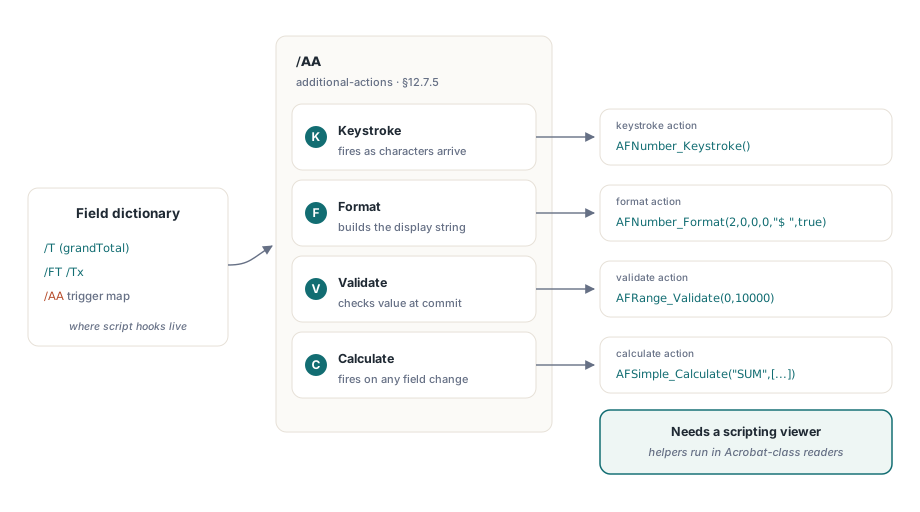
Because PDF has no spreadsheet layer. A text field holds a string, not a formula, and nothing in the file recomputes a total when a line item changes unless a script is attached to do it. The mechanism is the field additional-actions dictionary, /AA (ISO 32000-1 §12.7.5), which maps trigger events to actions: a keystroke trigger (K) as characters arrive, a format trigger for display, a validate trigger (V) at commit, and a calculate trigger (C) that fires whenever any field on the form changes. Each action is a JavaScript action, /S /JavaScript (ISO 32000-1 §12.6.4.14), and the script it runs is what actually performs the sum or the reformat. Acrobat ships a library of ready-made helpers — AFSimple_Calculate, AFNumber_Format, AFDate_FormatEx and the rest — so the attached script is usually a one-line call into that library rather than bespoke code
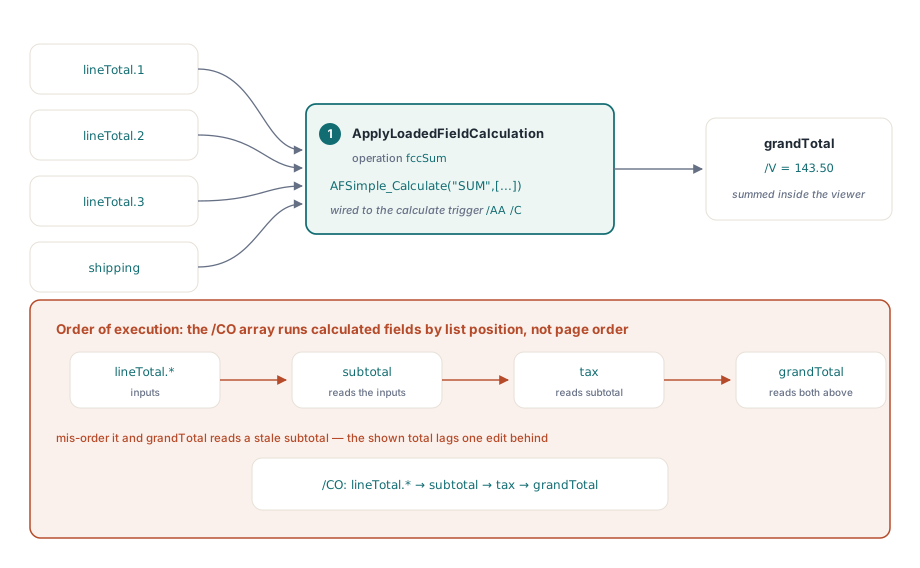
One detail decides whether a multi-step form gives the right answer: calculation order. Acrobat runs every field that carries a calculate action, and it runs them in the sequence the AcroForm /CO array lists, not in page order. ApplyLoadedFieldCalculation attaches the calculate action to the field you name; when one calculated field feeds another — a subtotal that a tax line reads, then a grand total that reads both — you have to confirm the /CO order lists each input ahead of the field that consumes it, or the grand total will read a stale subtotal and lag one edit behind
How do you make a PDF form calculate totals automatically?
ApplyLoadedFieldCalculation takes the target field index, an operation, and the names of the source fields it should aggregate. HotPDF writes AFSimple_Calculate("SUM", ["lineTotal.1", "lineTotal.2", ...]) into the target field calculate action, and the THPDFFieldCalcOp enumeration picks the function: fccSum, fccAverage, fccProduct, fccMinimum and fccMaximum map to Acrobat SUM, AVG, PRD, MIN and MAX. The source names are AcroForm field names, the same strings GetLoadedFormFieldNames hands back, so a total over three line items and a shipping charge is a single call
var
  Pdf: THotPDF;
  Names: THPDFAnsiStringArray;
  i, TotalIdx: Integer;
begin
  Pdf := THotPDF.Create(nil);
  try
    Pdf.LoadFromFile('invoice.pdf');
    Names := Pdf.GetLoadedFormFieldNames;
    TotalIdx := -1;
    for i := 0 to High(Names) do
      if Names[i] = 'grandTotal' then TotalIdx := i;
    if TotalIdx >= 0 then
    begin
      Pdf.ApplyLoadedFieldCalculation(TotalIdx, fccSum,
        ['lineTotal.1', 'lineTotal.2', 'lineTotal.3', 'shipping']);
      Pdf.EnsureLoadedFieldAppearanceStream(TotalIdx);
    end;
    Pdf.SaveLoadedDocument('invoice-live.pdf');
  finally
    Pdf.Free;
  end;
end;
The EnsureLoadedFieldAppearanceStream call on the total is not cosmetic. The calculation runs inside the viewer, so until a script-capable reader opens the file the total field has no rendered content of its own. Baking an appearance stream gives it a figure to show in the meantime, which is what a print job or a thumbnail generator will pick up when it never runs the script
Formatting and validating fields with the AF helper suite
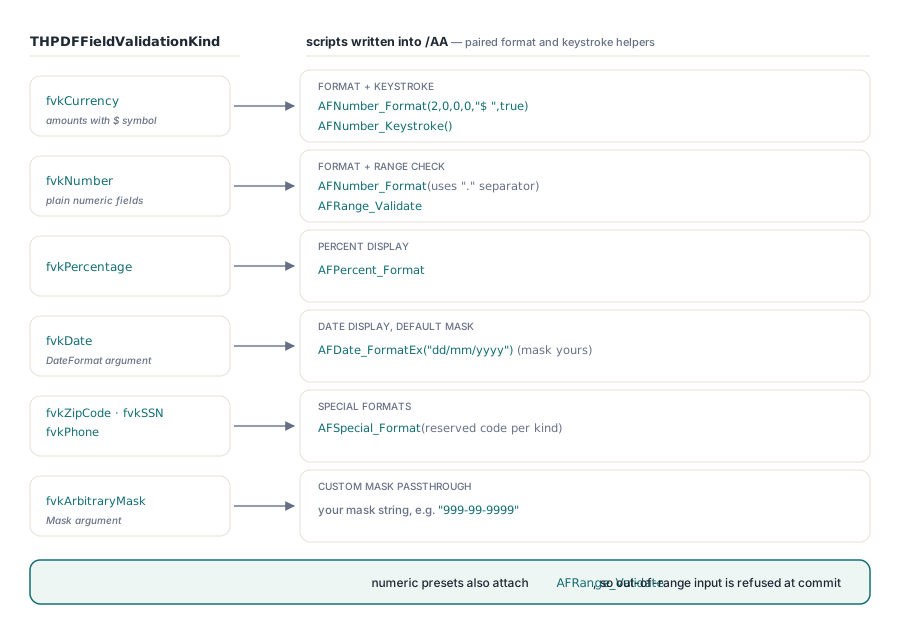
ApplyLoadedFieldValidation attaches the format, keystroke and validate scripts in one call, and the THPDFFieldValidationKind you pass decides which Acrobat helper it wires up. Pass fvkCurrency and HotPDF writes AFNumber_Format(2,0,0,0,"$ ",true) as the format script with the matching AFNumber_Keystroke; fvkNumber uses "." for the separator argument, fvkPercentage emits AFPercent_Format, and fvkDate emits AFDate_FormatEx("dd/mm/yyyy") unless you pass your own mask in the DateFormat argument. The special formats — fvkZipCode, fvkSSN and fvkPhone — map to AFSpecial_Format with the code Acrobat reserves for each, and fvkArbitraryMask takes a mask string through the Mask argument for anything those presets do not cover. For the numeric kinds HotPDF also attaches an AFRange_Validate script so out-of-range input is refused at commit
// Format the invoice date as ISO, the amount as currency, and mask a tax id
Pdf.ApplyLoadedFieldValidation(DateIdx,   fvkDate,          'yyyy-mm-dd', '');
Pdf.ApplyLoadedFieldValidation(AmountIdx, fvkCurrency,      '', '');
Pdf.ApplyLoadedFieldValidation(TaxIdIdx,  fvkArbitraryMask, '', '999-99-9999');
Pdf.EnsureLoadedFieldAppearanceStream(AmountIdx);
The AF helpers cover the common shapes so you never hand-write JavaScript for them. When a field needs logic no preset expresses — a checksum, a cross-field rule, a custom regex — attach the raw script yourself with the field-level action methods described in building AcroForm fields and actions with HotPDF, which take a JavaScript string directly. Both routes write into the same /AA dictionary, so a preset currency format on one field and a hand-rolled validate on another coexist in the same document
Why must you regenerate the appearance stream?
Because the value string and the pixels a viewer draws are two different things in PDF, and changing one does not change the other. A field stores its value in /V, but what a reader renders comes from the field appearance stream, /AP /N. Edit /V through the object graph and a strict viewer still shows the old appearance until something regenerates it. The form dictionary carries a /NeedAppearances flag that asks the viewer to rebuild every appearance on open, and Acrobat honors it — but browser-embedded renderers, mobile readers, print servers and thumbnail generators frequently ignore it and draw whatever stream is already present, or nothing at all. EnsureLoadedFieldAppearanceStream closes that gap by building the /AP /N Form XObject itself, from the field /DA, /V and /Rect, so the rendered value travels inside the file instead of depending on the viewer to redraw it
// Bake an appearance for every field before saving, so values render everywhere
Names := Pdf.GetLoadedFormFieldNames;
for i := 0 to High(Names) do
  Pdf.EnsureLoadedFieldAppearanceStream(i);
Pdf.SaveLoadedDocument('invoice-flat-appearance.pdf');
Where AF scripts stop working
Every AF* script depends on the viewer having a JavaScript engine, and most viewers do not have one. Acrobat and a handful of desktop products run these helpers; the PDF viewers built into Chrome, Edge, Firefox and the major mobile platforms, along with server-side rasterisers and print pipelines, run no form JavaScript at all. In those readers the calculation never fires and the format never applies — the field simply shows whatever appearance stream it was last saved with, which is exactly why baking /AP /N matters. Treat the AF* layer as a convenience for the subset of users on a script-capable reader, never as a guarantee. Any total that has to be correct on the server — an invoice amount you will bill against, a tax figure you will file — has to be recomputed on your side after the form comes back, because you cannot assume the reader that filled it ran a single line of your script
One more case is worth naming: forms that arrived as XFA. A dynamic XFA form carries its own calculation engine in an XML payload the AF* helpers know nothing about, so attaching AFSimple_Calculate to an XFA field accomplishes nothing. Flatten the XFA form down to a plain AcroForm first, as covered in XFA to AcroForm flattening in Delphi, and the three methods here then apply to the resulting AcroForm fields exactly as they do to any other loaded form
Auto-calculating and self-formatting AcroForms come down to three calls on a loaded document — attach the calculation, attach the format and validation, bake the appearance — followed by SaveLoadedDocument. The loaded-form API shown here is part of the HotPDF Delphi Component for Delphi and C++Builder, which documents the full THPDFFieldValidationKind and THPDFFieldCalcOp enumerations alongside the rest of the AcroForm surface