Two PDFs produced by the same report generator from the same data, one run apart, rarely match byte for byte. A binary diff lights up the cross-reference table, the object numbers and often the font programs, while both files print exactly the same pages. Comparing rendered pixels looks like the cure until somebody adds a cover sheet: from that point on, every page sits one position later than its counterpart, and a page-by-page pixel check reports the whole document as changed. A comparison worth automating has to answer two different questions, what changed inside the file and whether a reader would see it, and it has to know which page in one file corresponds to which page in the other
Why do two identical-looking PDFs differ byte for byte?
Most of the byte churn comes from bookkeeping a reader never sees. Object numbers are handed out in whatever order the writer happens to emit objects. Many generators build font subsets in the order glyphs are first used, so a slightly different traversal produces different glyph codes, and therefore different content stream bytes, for the same visible text. Cross-reference offsets move whenever anything earlier in the file changes length, which is almost always
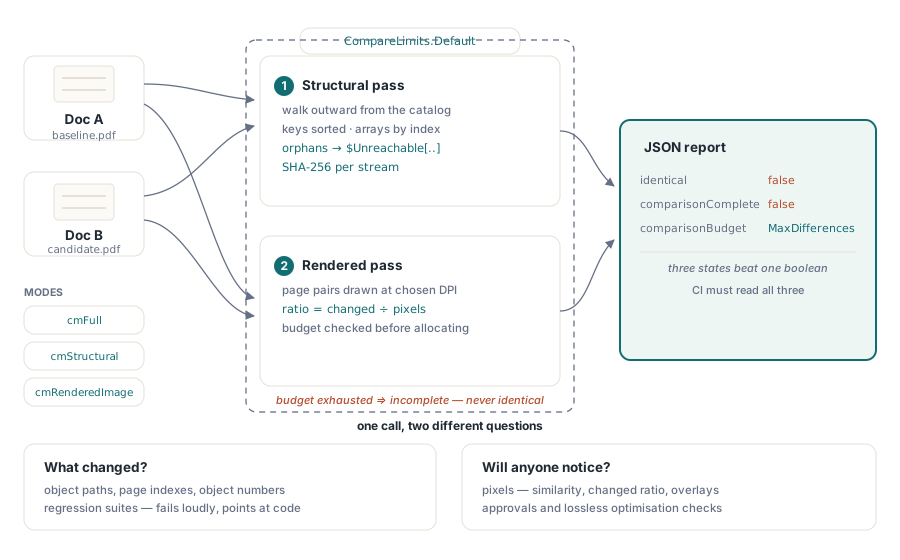
So object numbers are useless as identity across two files. THPDFDocComparison in HotPDF names every object by the path that first reaches it in a breadth-first walk from the document catalog. Dictionary keys are visited in byte order and array elements by index, which makes the walk deterministic: a font resource on the first page typically ends up as something like $Catalog/Pages/Kids[0]/Resources/Font/F1 in both files, whatever object number each generator gave it. Unusual bytes in a key are escaped as #xx, and a path longer than MaxPathBytes is cut short and finished with a hash of the full path, so two long paths that share a prefix still stay distinct
Each object then gets a SHA-256 signature over its own content. An indirect reference contributes only the fact that a reference sits there, never the object number it points to, and the target is queued to be signed on its own. Renumbering every object in a file therefore produces no differences at all. And when one font dictionary changes, the report names that font's path as objectChanged instead of flagging the page, the resource dictionary and the page tree above it. An object whose signature matches but whose path moved (a page shifted to a different branch of the page tree, say) shows up as objectMoved; the rest are objectInserted or objectDeleted
Objects that no path from the catalog reaches are still signed, under a synthetic path such as $Unreachable[42:0] that carries the object and generation number. Orphaned content is a real difference between two files even if no viewer will ever display it. Stream data is hashed in 64 KB chunks straight from the stream, and the stream position is put back afterward, so comparing two large files does not mean holding a copy of every stream in memory
Aligning pages when one document gains a cover
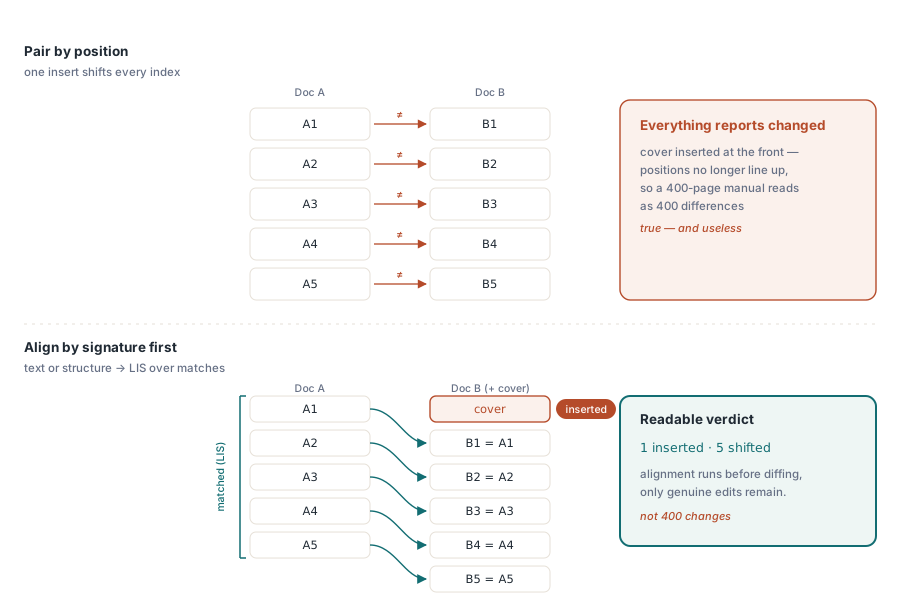
Pairing page 1 with page 1 and page 2 with page 2 is correct only until something is inserted. With a new cover at the front, positional pairing reports every page as changed, which is technically true and tells the reviewer nothing
Every mode that inspects pages aligns them first. Each page gets a signature from its extracted text; pages with no extractable text fall back to a signature of the page dictionary plus its content stream. Pages whose signatures match exactly are paired, and the comparison then takes the longest increasing subsequence of those pairs, ordered by their position in the second file. Pairs inside that subsequence merely shifted along with an insertion or deletion. Pairs outside it really were reordered and are reported as pageMoved. Whatever did not match at all is paired up in order as pageChanged, and any surplus becomes pageInserted or pageDeleted. For a 400-page manual with one new cover sheet, the page-level entries come down to a single pageInserted where positional pairing would have produced 400 changes. The object pass works by path, so the shifted page objects typically still appear there as objectMoved, and filtering on the type field separates them from real edits
Aligned pairs get one more check in the structural modes. The page dictionary is signed a second time without /Contents, /Resources and /Parent, and if that signature differs the pair is reported as pageChanged with the detail page metadata changed. That catches a page whose text is identical but whose /MediaBox or /Rotate moved, a change that text-based alignment alone would pair up and wave through
Running a structural comparison and reading the verdict
A comparison takes two loaded THotPDF instances and a mode, and returns a JSON report as an AnsiString. cmStructural runs the object and page walk, cmRenderedImage runs the pixel pass, cmFull runs both, and cmPageCount, cmPageText and cmObjectCount are lighter checks for smoke tests. Compare uses the default limits and options; CompareWithLimits and CompareWithOptions take your own
uses
  Classes, SysUtils, HPDFDoc, HPDFDocCompare;

function CompareFiles(const BaselineFile, CandidateFile: string): AnsiString;
var
  DocA, DocB: THotPDF;
begin
  Result := '';
  DocA := THotPDF.Create(nil);
  DocB := THotPDF.Create(nil);
  try
    if (DocA.LoadFromFile(BaselineFile) <= 0) or
       (DocB.LoadFromFile(CandidateFile) <= 0) then
      raise Exception.Create('Could not load one of the files');
    Result := THPDFDocComparison.Compare(DocA, DocB, cmStructural);
    with TFileStream.Create('diff.json', fmCreate) do
    try
      if Result <> '' then
        WriteBuffer(Result[1], Length(Result));
    finally
      Free;
    end;
  finally
    DocB.Free;
    DocA.Free;
  end;
end;
The report carries three top-level facts that a single boolean would blur together. identical is true only when no difference was recorded and the comparison finished. comparisonComplete says whether it finished. differencesTruncated says whether the list was cut short, while differenceCount keeps the true total and reportedDifferenceCount the number actually listed. When a traversal hits a limit, a comparisonBudget entry in the differences array says whether the page walk or the object walk was truncated
Several things set comparisonComplete to false: a truncated page or object traversal, an indirect reference that does not resolve in one of the files, more differences than MaxDifferences allows, a page whose structure (or, in cmPageText, whose text) could not be read, and an incomplete pixel pass. Every one of them also forces identical to false; the API does not report equality from a walk that stopped early. A CI gate therefore has to tell the two kinds of failure apart:
uses
  SysUtils, HPDFJobJSON;

// Returns True only for a finished comparison with no differences;
// prints the reason otherwise. The gate itself is your own code
function DiffGatePasses(const Report: AnsiString): Boolean;
var
  Parser: THPDFJSONParser;
  Root, Diffs, Item: THPDFJSONValue;
  I: Integer;
begin
  Parser := THPDFJSONParser.Create(Report);
  try
    Root := Parser.Parse;
  finally
    Parser.Free;
  end;
  try
    Result := Root.GetBool('identical');
    if Result then
      Exit;
    if not Root.GetBool('comparisonComplete') then
      Writeln('INCOMPLETE: a limit or unreadable input stopped the comparison');
    Writeln(Format('%d difference(s), %d listed',
      [Root.GetInt('differenceCount'), Root.GetInt('reportedDifferenceCount')]));
    Diffs := Root.GetArr('differences');
    if Diffs <> nil then
      for I := 0 to Diffs.ItemCount - 1 do
      begin
        Item := Diffs.Item(I);
        Writeln(Item.GetStr('type'), '  ', Item.GetStr('detail'), '  ',
          Item.GetStr('pathA'), ' -> ', Item.GetStr('pathB'));
      end;
  finally
    Root.Free;
  end;
end;
Treat "incomplete" as its own build outcome. A job that maps it onto "different" sends engineers hunting for a regression that is really a malformed input or a limit set too low, and a job that maps it onto "same" lets a truncated walk pass a release
What keeps the walk bounded on files you did not produce?
THPDFStructuralCompareLimits.Default is sized for real-world documents: 250,000 objects, 2,000,000 followed references, 250,000 pages, nesting depth 128, 10,000 listed differences, 64 MB read from any single stream and 512 MB from all streams together, 1 MB per string or name value, 4,096 bytes per path, and a 16 MB ceiling on the serialised report. A zero or negative field falls back to its default, so a partly filled record never turns into an unlimited one. The record also carries a CancellationToken and a Checkpoint event that the comparison checks between units of work, including while pages render
uses
  SysUtils, HPDFDoc, HPDFDocCompare, HPDFTypes;

function CompareForRelease(DocA, DocB: THotPDF;
  Token: THPDFCancellationToken): AnsiString;
var
  Limits: THPDFStructuralCompareLimits;
  Options: THPDFRenderedCompareOptions;
begin
  Limits := THPDFStructuralCompareLimits.Default;
  Limits.MaxDifferences := 200;              // keeps the listing short; differenceCount still counts all
  Limits.MaxTotalStreamBytes := 128 * 1024 * 1024;
  Limits.CancellationToken := Token;         // another thread may call Token.Cancel

  Options := THPDFRenderedCompareOptions.Default;
  Options.DPI := 150;                        // default is 72
  Options.ColorSpace := rccLuminance;        // compare brightness, ignore hue-only shifts
  Options.ColorTolerance := 2;               // deltas of 1-2 levels are not counted
  Options.MinimumSimilarity := 0.9995;
  Options.MaxChangedPixelRatio := 0.0005;
  Options.GenerateHeatmaps := True;
  Options.HeatmapDirectory := 'diff-overlays';

  try
    Result := THPDFDocComparison.CompareWithOptions(DocA, DocB, cmFull,
      Limits, Options);
  except
    on EHPDFOperationCancelled do
      Result := '';                          // cancelled: there is no report
  end;
end;
Cancellation raises EHPDFOperationCancelled out of the call instead of returning a partial report. A cancelled comparison has no report to hand back, and the exception is how the API says so. Render options get the same normalisation as limits. DPI is clamped to 2,400, ColorTolerance to 0–255, TileSize to 8–1,024, and a similarity or ratio threshold outside 0–1 (or NaN) quietly reverts to the default
The pixel pass estimates each page's bitmap size from its page dimensions and the requested DPI before rendering anything, and checks the real bitmap against MaxPixelsPerPage again afterward, so a page with bogus geometry cannot slip past the estimate. Cost grows with the square of DPI. For a document of US Letter pages, 612 by 792 points, at the default 72 DPI each page pair costs about 0.97 million pixels, and the default MaxTotalPixels of 500 million covers more than 500 pairs. At 300 DPI a single pair is about 16.8 million pixels, and the budget runs out after 29 pairs. The pass then records a renderBudget entry, marks that page budgetExceeded and stops, leaving renderComparisonComplete false
How similar is similar enough?
With default options the pixel pass demands an exact match: ColorTolerance 0, MinimumSimilarity 1.0 and MaxChangedPixelRatio 0. Staying strict by default keeps the loosening decision explicit: someone has to write it down, and a pipeline should relax the thresholds only after it has seen what anti-aliasing noise looks like in its own renders
Per pixel, the delta in rccRGB mode is the largest difference among the red, green and blue channels; in rccLuminance mode it is the difference in Rec. 709 luminance. A pixel counts as changed when its delta exceeds ColorTolerance. The similarity figure is a structural-similarity (SSIM) score computed over the luminance of the whole page at once. A pair is similar only when the changed-pixel ratio is at or below MaxChangedPixelRatio and the similarity is at or above MinimumSimilarity. Two gates, because a few hundred badly wrong pixels in a barcode and a faint tint across the entire page are different failures, and each workflow tolerates them differently. The threshold checks use unrounded values; the six decimal places in the JSON keep reports stable from run to run
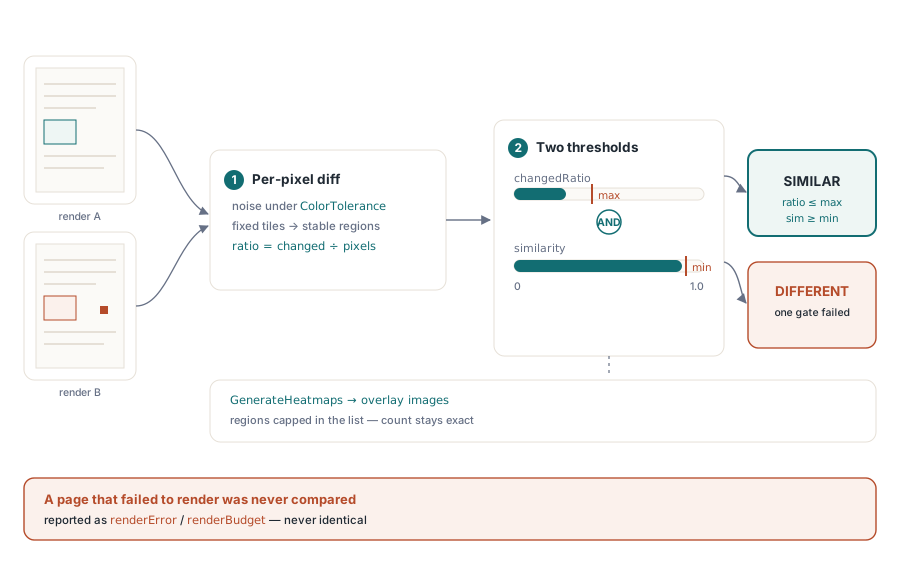
Changed pixels are grouped into regions on a grid of fixed tiles, 64 pixels square by default, joined through their four edge neighbours. Each region in changedRegions gives its bounding box, its changed-pixel count and its largest delta. At most MaxChangedRegions (256 by default) are listed; changedRegionCount still reports the true number, and when the list is cut changedRegionsTruncated is set and the pixel pass counts as incomplete. With GenerateHeatmaps on, every page that has changed pixels gets a PNG named like page-000003-diff.png in HeatmapDirectory: the page from the first file with changed pixels tinted from yellow (barely over tolerance) to red (maximum delta), and its path appears in the report as overlayPath
Failures are reported, never absorbed. A renderer exception, a missing bitmap or an invalid page size becomes a renderError entry with the message, the page entry gets status error, and renderComparisonComplete goes false. Two renders with different pixel dimensions get status sizeMismatch and a renderedImageSize difference listing both sizes. A page nobody managed to compare is never counted as identical
Where each mode belongs in a pipeline
The pixel pass pairs pages strictly by index, page i against page i, up to the shorter document. Page alignment runs in every mode except cmPageCount and cmRenderedImage. With an inserted cover, cmRenderedImage alone flags every page after it, and cmFull gives you the alignment from its structural half alongside those positional pixel results. Read the structural verdict first, and trust the pixel results only when the page lists line up
Run cmStructural on every build. It is cheap, it names the path, page index and object numbers involved, and an unexpected objectChanged points straight at the code that produced it. Keep cmFull with heatmaps for release candidates and for checking that an optimisation pass really was lossless, when someone is around to look at the overlays. cmPageText suits documents where only the wording matters. Markup-level review is another option: exporting PDF pages to SVG gives a text view that ordinary diff tools can read, and the checks in preflight report automation cover conformance questions that neither comparison mode tries to answer
Comparison, preflight and rendering all work on the same loaded THotPDF document, so one load can serve all three. Everything the component covers for Delphi and C++Builder developers is on the HotPDF Delphi PDF component page