A common way to set a heading in PDF is /F1 1 Tf 10 0 0 10 72 700 Tm (Total) Tj ( due) Tj: a font size of 1 and the real size carried by the text matrix. Feed that to a hand-rolled PDF-to-SVG converter and the second run often lands almost on top of the first. Suppose the five glyphs of 'Total' average half an em; the text origin should move 2.5 text-space units, which the matrix turns into 25 points. A converter that adds 2.5 straight to the matrix translation moves the pen a tenth of the way, and ' due' overprints the word before it
ISO 32000-1 §9.4.4 is explicit that displacements in text space go through the text matrix, so the update is e += tx*a and f += tx*b, never a plain addition to e. It is one of many places where PDF state has to be carried into SVG attributes at the exact moment an element is written, and the rest of this article walks through them
Exporting a loaded page with BuildLoadedPageSVG
HotPDF exports any page of a loaded document as a standalone SVG 1.1 file. THotPDF.BuildLoadedPageSVG takes a zero-based page index and returns the whole document as an AnsiString, or an empty string when the page cannot be exported; SaveLoadedPageAsSVG writes the same markup to a file and returns False on failure. Both have an overload with an EmbedFonts flag, covered further down
The exported page takes its size from the crop box. Width and height are written in points, and the viewBox uses PDF user units, so one unit in the SVG is one unit in the PDF. Paths, text runs, image XObjects, inline images, shadings, tiling patterns, clipping paths, Type 3 glyphs and nested Form XObjects all reach the output, and raster content travels as base64 PNG data URIs inside the file
var
  Pdf: THotPDF;
  I: Integer;
begin
  Pdf := THotPDF.Create(nil);
  try
    if Pdf.LoadFromFile('statements.pdf', '') <= 0 then
      Exit;                  // LoadFromFile returns the page count
    for I := 0 to Pdf.LoadedPageCount - 1 do
      if not Pdf.SaveLoadedPageAsSVG(I, Format('page-%d.svg', [I + 1])) then
        Writeln('Page ', I + 1, ' could not be exported');
  finally
    Pdf.Free;
  end;
end;
For build pipelines that should not need a compiled Delphi program, the HotPDF command line tool exposes the same export as HotPDFCLI export-svg <pdf-file> [-o prefix] [--pages range]. SVG is text, which makes it a good partner for the raster route in rendering a PDF page to a bitmap: the bitmap shows what the page looks like, and the SVG shows which objects drew it, in a form a text diff can read
Why a single page flip breaks glyphs and photographs
PDF user space grows upward from the lower-left corner; SVG grows downward from the top-left. Flipping the whole page once fixes every coordinate and, in the same stroke, mirrors every letter and every photograph. The other two mismatches are quieter. PDF scopes state with a stack (q pushes it, Q pops it), while SVG lets an element inherit whatever an ancestor group declared. And PDF expresses several things by convention: integers for caps and joins, a zero width that means 'thinnest visible line', operator variants that switch the winding rule
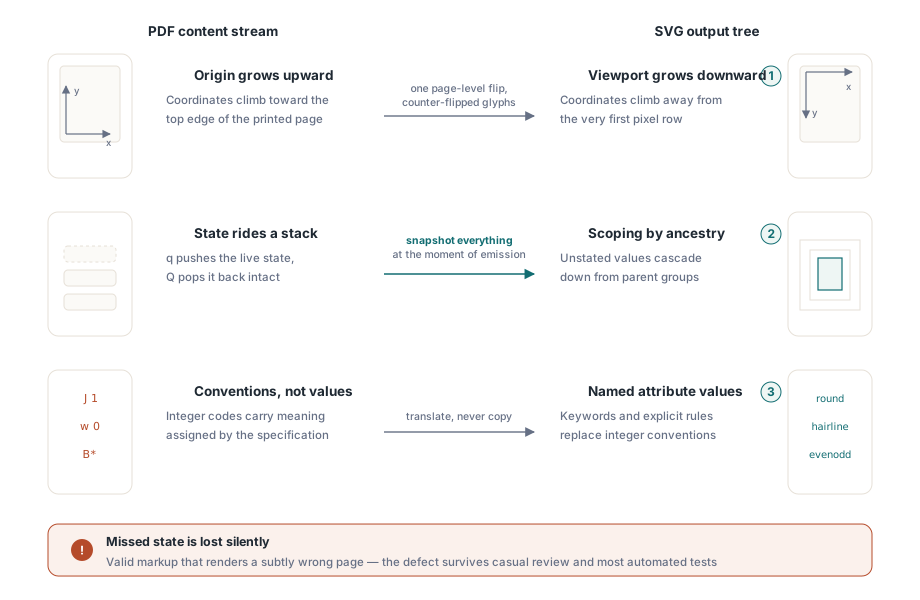
BuildLoadedPageSVG handles the flip with one page pre-transform and corrects text and images locally. Every text element carries the chain page pre-transform × CTM × text matrix × matrix(1,0,0,-1,0,0). The right-hand factor turns the glyphs upright again inside their own frame and leaves the baseline where the page flip put it. Because the correction is a matrix rather than a special case, rotated, mirrored and sheared text needs no extra code
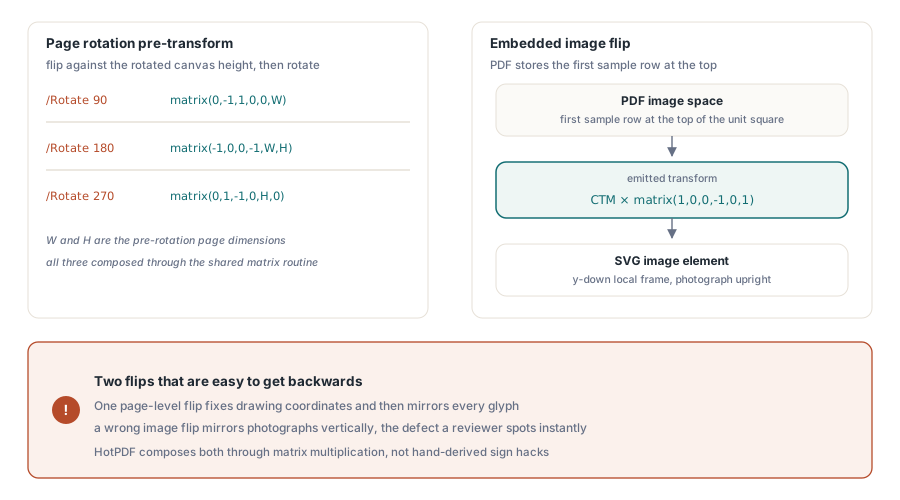
Images get a different factor. PDF image space puts the first sample row at the top of the unit square, while the SVG image element has its own y-down frame, so the emitted transform is the CTM right-multiplied by matrix(1,0,0,-1,0,1). Get the sign wrong and the vector content of a page is perfect while every photograph hangs upside down
Pages with a /Rotate entry add a rotation in y-up display space ahead of the flip: (0,-1,1,0,0,W) for 90 degrees, (-1,0,0,-1,W,H) for 180 and (0,1,-1,0,H,0) for 270, where W and H are the unrotated page size and the flip uses the height of the rotated canvas. The page box also need not start at the origin. On a page whose crop box is [100 100 712 892], the exporter moves the lower-left corner to (0,0) before rotating, the same step the raster renderer takes, otherwise the content lands a hundred units off the canvas
Text matrices and per-character positions
Each text run becomes one SVG text element whose x attribute lists a position for every character. Positions accumulate from the glyph advance plus the character spacing Tc, and word spacing Tw is added only after the single-byte code 32. A two-byte code that happens to equal 32 gets no word spacing, which is what ISO 32000-1 §9.3.3 prescribes and what CID-keyed fonts depend on. When one glyph stands for several characters, as a ligature does, the characters share its advance so that each still gets an x value of its own
Horizontal scaling and text rise are folded into the text rendering matrix as [Th 0 0 1 0 Trise] × Tm, following §9.4.4, so they scale and rotate together with a transformed text matrix. Kerning numbers inside a TJ array are thousandths of an em and are multiplied by Th like any other horizontal move
Two XML details matter. Every text element carries xml:space="preserve"; without it a viewer collapses runs of spaces and the x list falls out of step with the characters. And the file is UTF-8, so characters are encoded as UTF-8 explicitly instead of going through the system code page. Code points that XML 1.0 forbids (control characters below 0x20, surrogates, U+FFFE and U+FFFF) are replaced with U+FFFD. Text from complex script shaping takes the same route, since the shaper has already turned clusters into positioned glyphs before the content stream is written
Named fonts or embedded outlines
By default the text names its font: the exporter derives a family from /BaseFont and the font descriptor and adds a generic fallback such as Arial, sans-serif, and the viewer draws the text with an installed font. That keeps files small and the text fully live, but a page set in an embedded corporate typeface is drawn in a substitute font on any machine that lacks it, whose widths no longer match the per-character positions
Passing True for EmbedFonts writes the glyphs of embedded font programs as outlines in a defs block, shared between all their occurrences on the page. The original text is still written on top with zero fill opacity, so it can be selected and searched. Use True whenever the SVG leaves the machine that made it: a design hand-off, an archive, a visual diff on a CI agent. Use the default when the file stays inside an environment that has the fonts and size matters
procedure ExportOutlined(Pdf: THotPDF);
var
  Svg: AnsiString;
  Output: TFileStream;
begin
  // Glyph outlines from the embedded fonts, selectable text on top
  Svg := Pdf.BuildLoadedPageSVG(0, True);
  if Svg = '' then
    raise Exception.Create('Page 1 could not be exported');
  Output := TFileStream.Create('page-1-outlined.svg', fmCreate);
  try
    Output.WriteBuffer(Svg[1], Length(Svg));
  finally
    Output.Free;
  end;
end;
Render modes are honoured in both paths. Mode 1 strokes without filling, mode 2 fills and strokes, mode 3 is invisible but still advances the pen, and modes 4 to 7 add the glyphs to the clipping path. A stroked glyph needs one more correction: the line width lives in user space while the text element draws in text space, so the width is divided by the scale of the text matrix. Text emboldened with 2 Tr 0.25 w therefore keeps a quarter-point outline; left at the SVG default of one unit, it would look heavy
What the graphics state carries into each element
SVG presentation attributes do not follow PDF scoping, so every path is written with the full stroke state in force at that moment. Line cap 0, 1, 2 becomes butt, round, square; line join 0, 1, 2 becomes miter, round, bevel; the mitre limit, dash array and dash phase are written when set. A dash array with a negative entry, or a non-empty array with no positive entry, is ignored and the previous pattern stays; an empty array [] restores a solid line. The same values can arrive through an ExtGState dictionary, whose LW, LC, LJ, ML, ca and CA keys are applied as well
A zero line width in PDF means the thinnest line the device can draw. Copying it literally gives an invisible stroke, and copying it as 1 gives a line that grows with every zoom step. The exporter writes stroke-width="1" together with vector-effect="non-scaling-stroke", which keeps the hairline about one device pixel wide at any magnification. The star operators f*, B* and b* add fill-rule="evenodd", and their plain forms keep SVG's default nonzero winding
Q restores fill and stroke colour, opacity, line width, cap, join, mitre limit, dash array and phase, and the text state as well. ISO 32000-1 §9.3.1 makes text state part of the graphics state, so 2 Tr set inside q … Q must not stroke the text that follows the Q. Clipping follows §8.5.4: W only marks the path, and the clip takes effect after the painting operator, so re W f fills the rectangle first and clips afterwards. Each clip becomes a clipPath plus a wrapping group, and Q closes the groups opened since the matching q
Form XObjects behave as an implied q … Q. The exporter clips a form to its /BBox, saves the state on entry and restores it on exit, so a dashed border inside a stamp cannot leak into the page content after it. Tiling patterns map to the default space of the content stream that uses them (§8.7.2), the page or the form, regardless of the CTM when the pattern is painted. The EMF and WMF vector import runs a similar state model in the opposite direction, and SVG import as a Form XObject covers the reverse trip from SVG to PDF
Colour, shadings and the strings tests compare
Colour reaches the SVG through every PDF colour operator: g, rg, k and their stroking forms, and cs / scn with a named space from the page or form /ColorSpace resources. Separation, DeviceN, ICCBased, Indexed and Lab colours are resolved to RGB by the same colour-space code the page renderer uses. Selecting a space with cs starts from the initial colour §8.6.8 defines: black in the device spaces, tint 1.0 in Separation and DeviceN, index 0 in Indexed. SVG has no notion of inks, so a spot colour arrives as its RGB appearance and the ink name stays behind in the PDF. Proofing work that needs real separations belongs in the painting model described in rendering Separation and DeviceN spot colours
Axial and radial shadings become SVG gradients. The spec defaults /Extend to [false false], meaning nothing is painted before t0 or after t1, while SVG's pad spread paints the end colours outward. The exporter bridges that by adding a fully transparent stop at each end that does not extend. Function-based shadings are sampled into an image at about one sample per unit, and mesh shadings are rendered into an embedded image
Hex colours come out in upper case. A regression test that compares strings needs to expect #FF0000, and a test written against lower case will fail on output that is perfectly correct. Coordinates and widths are rounded to four decimal places and transform matrices keep nine significant digits, both with a full stop as the decimal separator, whatever the locale of the machine running the test
procedure CheckRedRectangle(Pdf: THotPDF);
var
  Svg: AnsiString;
begin
  Svg := Pdf.BuildLoadedPageSVG(0);
  // Assert is a check you add in your own test, not part of the export
  Assert(Pos(AnsiString('fill="#FF0000"'), Svg) > 0,
    'expected the red fill in uppercase hex');
  Assert(Pos(AnsiString('xml:space="preserve"'), Svg) > 0,
    'text elements keep their spaces');
end;
A string check like this one holds up when the input PDF is generated by your own code and the expected colours are known. For pages from outside, comparing the SVG of two builds against each other catches more than any hard-coded attribute. The rest of the toolkit for loaded documents, from rendering and editing to export, is described on the HotPDF Delphi PDF component page