HotPDF renders Separation and DeviceN spot colours on loaded PDF pages by resolving the colour space through HPDFResolveColorSpace, evaluating the tint-transform function with HPDFEvalTintTransform, and converting the result through the alternate space to RGB for the screen. Since v2.375.0 that pipeline evaluates all four PDF function types, including Type 4 PostScript calculators, so a press-ready file with Pantone inks displays its real colours instead of a placeholder. This article walks through how the pipeline works and, just as usefully, how it failed while we built it
The trigger case is always the same. A customer receives a PDF from a print shop: the headline is set in a named spot ink, the packaging artwork uses a two-ink DeviceN blend, and the body text is plain black. In Acrobat it looks perfect. In your Delphi application the headline renders black, or worse, does not render at all, and the customer files a bug against your software rather than the file. The file is fine. The renderer just does not speak the colour spaces the file uses
Why do spot colours render black in a PDF viewer?
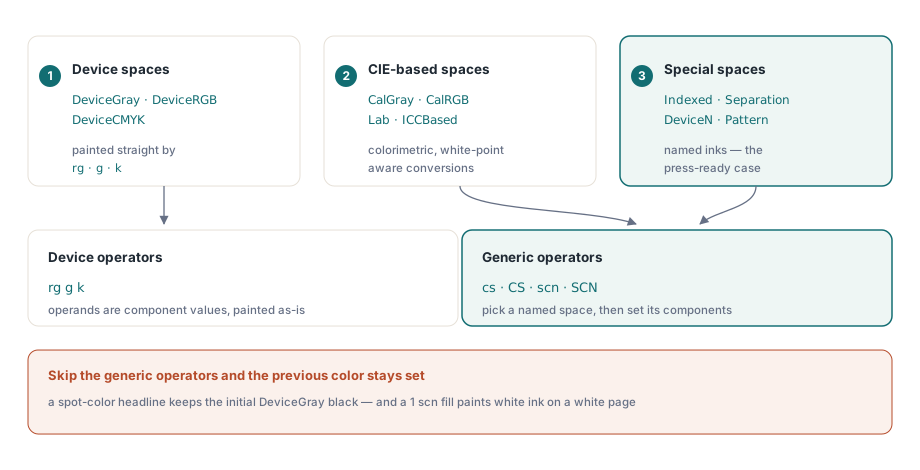
Spot colours render black, or vanish, when the renderer implements only the device colour operators (rg, g, k) and ignores the generic ones. ISO 32000-1 §8.6 defines three groups of colour spaces: device spaces (DeviceGray, DeviceRGB, DeviceCMYK), CIE-based spaces (CalGray, CalRGB, Lab, ICCBased), and special spaces (Indexed, Separation, DeviceN, Pattern). Everything outside the device group is selected with the generic operators: cs and CS pick a space by name from the page resource dictionary, then sc, SC, scn, and SCN supply the component values. A renderer that skips those operators keeps whatever colour was last set, which for a page that leads with its spot-colour headline is the initial DeviceGray black
HotPDF added the generic operator set to its page renderer in v2.333.0, together with a unified resolution path: every /ColorSpace resource entry, whether a bare name, an inline array, or an indirect reference, is parsed into one THPDFColorSpace record, and every fill or stroke colour request funnels through a single HPDFResolveColor call. The family enumeration shows the coverage at a glance
type
  THPDFColorSpaceFamily = (csfDeviceGray, csfDeviceRGB, csfDeviceCMYK,
                           csfIndexed, csfCalGray, csfCalRGB, csfLab,
                           csfICCBased, csfSeparation, csfDeviceN,
                           csfUnsupported);

function HPDFResolveColorSpace(Obj: THPDFObject): THPDFColorSpace;

function HPDFResolveColor(const CS: THPDFColorSpace;
  const Comps: THPDFColorComps; CompCount: Integer): THPDFRenderColor;
One design decision pays for itself repeatedly: csfUnsupported is a first-class family, not an error. A space the renderer cannot interpret degrades to a defined fallback instead of aborting the page, which matches how mainstream viewers behave and keeps a single exotic fill from blanking an otherwise renderable document
How does a tint transform turn one ink value into a real colour?
A Separation space carries three pieces of information: the ink name, an alternate colour space, and a tint-transform function. The array [/Separation /PANTONE485 /DeviceCMYK f] says: when the content stream writes 0.8 scn, feed the tint value 0.8 into function f and paint the resulting CMYK quadruple. DeviceN generalises this to N inks with an N-input function. The ink name itself is only advisory on screen; the tint transform is the entire rendering semantics, so a renderer that parses the space but skips the function has done nothing useful yet
HPDFEvalTintTransform is the function engine behind that step. Landed in v2.334.0, it evaluates Type 2 exponential functions (C0 + x^N * (C1 - C0) with Domain and Range clamping), Type 3 stitching functions (Bounds-selected sub-function recursion with Encode remapping), and Type 0 sampled functions with 8-, 16-, and 32-bit samples. Type 0 is the same lookup-table machinery we covered from the authoring side in the article on building Type 0 colour LUTs; the render side walks the identical structure in reverse, from decoded sample bytes back to component values
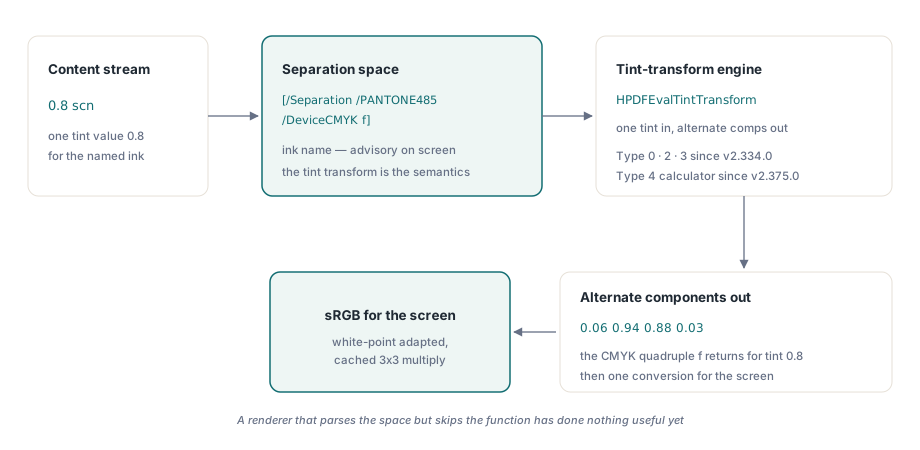
Type 4 PostScript calculator functions were the last holdout. Until v2.375.0 they degraded gracefully to a neutral placeholder; since v2.375.0 HPDFEvalPostScriptCalculator executes the full ISO 32000-1 §7.10.5 operator set on a bounded operand stack: arithmetic, comparison, boolean and bitwise operators, stack manipulation including roll, and if/ifelse conditionals. The corner semantics are stricter than they look. PostScript round rounds half toward the greater value, so Delphi's banker's-rounding Round cannot be used; the trigonometric operators work in degrees, with atan returning values in [0, 360); and exp is a two-operand power, not the natural exponential. The same evaluator also drives function-based gradient fills, which is why axial and radial shading rendering picked up calculator-driven ramps in the same release
// Evaluate a Separation/DeviceN tint transform (Type 0/2/3/4).
function HPDFEvalTintTransform(FuncObj: THPDFObject;
  const Inputs: THPDFColorComps; InputCount: Integer;
  out AltComps: THPDFColorComps): Boolean;

// Type 4 PostScript calculator, ISO 32000-1 7.10.5 operator set.
function HPDFEvalPostScriptCalculator(const Prog: TBytes;
  const Inputs: THPDFColorComps; InputCount: Integer;
  var Outputs: THPDFColorComps; OutCount: Integer): Boolean;
Honesty about precision: a software calculator evaluated in double precision will not match a RIP bit for bit, and clamping at the Range boundary can differ by a least significant bit from another implementation. For screen display and regression rendering that is irrelevant; if you are building colour-managed proofing, the tint transform is only the first stage and you still need a real CMM downstream
CalGray, CalRGB, Lab, and ICCBased without an ICC engine
The CIE-based families take the other branch of the same resolver. HotPDF converts Lab values through the standard Lab to XYZ to sRGB chain, including the 6/29 breakpoint cube in the inverse transfer function, and handles CalRGB with its per-channel gamma plus 3x3 linear matrix and CalGray with its single gamma. The performance-relevant detail is white point handling: the XYZ to sRGB conversion matrix is Bradford-adapted to the white point declared in the colour space and cached in the resolved THPDFColorSpace record, so per-pixel work stays a single 3x3 multiply no matter how exotic the declared illuminant is
ICCBased spaces get a deliberately pragmatic treatment. The PDF specification requires every ICCBased stream to declare an /Alternate space or an implied one via its component count /N, precisely so that viewers without a colour management engine can still render sensibly. HotPDF resolves ICCBased through that alternate, or guesses DeviceGray, DeviceRGB, or DeviceCMYK from /N being 1, 3, or 4 when the entry is absent, and never parses the profile bytes. That means no lcms dependency and no profile-lookup cost, at the price of colourimetric accuracy: an ICCBased space whose profile diverges strongly from its alternate will display the alternate rendering. For on-screen viewing and thumbnails this is the same trade every lightweight viewer makes, and it is the boundary to state plainly in your own documentation
The bug that made every named colour-space lookup miss
The v2.333.0 operator plumbing shipped with a defect that stayed invisible for forty-two releases: the cs and CS handlers looked up their operand, with its leading slash intact (/CS0), against resource dictionary keys stored without the slash (CS0). Every named colour-space lookup missed, one hundred percent of the time, and the code fell back silently to the default DeviceGray. The visible symptom was subtle in the worst way: a Separation fill of 1 scn became DeviceGray 1.0, which paints white, and white ink on a white page is not a rendering error anyone screenshots. The fix, in v2.375.0, was a shared name-normalisation helper applied at every operand-to-resource lookup
Two sibling defects fell out of the same investigation. First, indirect references to array-valued objects were returned unresolved: the renderer's document access had typed resolvers for streams and dictionaries only, so /CS0 5 0 R pointing at a standalone [/Separation ...] array came back as the raw reference and the space parsed as unsupported. Second, HPDFReadNumericArray enforced strict length semantics, requiring the PDF array to be at least as long as the supplied buffer. Reading a Type 2 function's /C0 and /C1 into a four-element buffer therefore failed for one- and three-component alternates, leaving both arrays zeroed, and every non-CMYK exponential tint rendered black until v2.376.0 introduced the lenient HPDFReadNumericArrayUpTo reader. The transferable lesson: any PDF key documented as holding a variable-length numeric array must be read with a fill-what-exists reader, because a fixed-size buffer with strict matching turns valid files into silent zeroes
How do you test spot-colour rendering without fooling yourself?
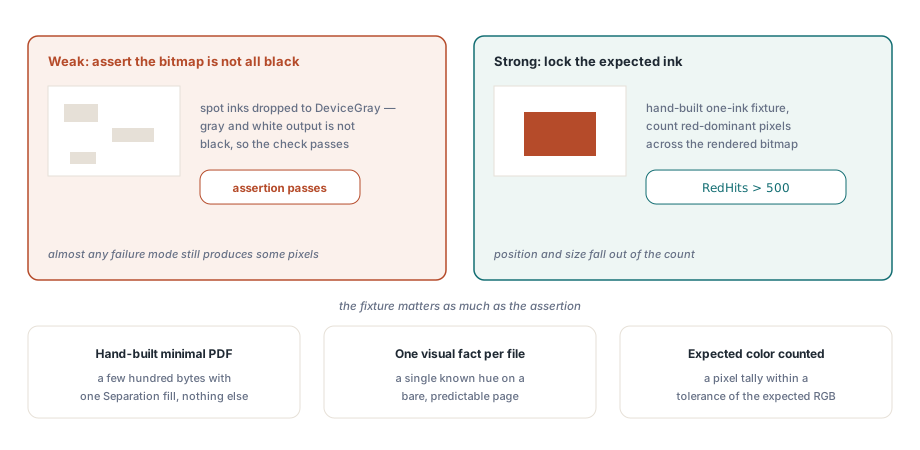
The uncomfortable question is why the test suite stayed green through all of this. The original regression, SeparationRendersDistinguishable, asserted only that the rendered bitmap was not entirely black. A pipeline that dropped every spot colour to DeviceGray produced grey and white output, which is not black, so the assertion passed while the entire feature was dead. Weak assertions of the form "not blank", "not all black", or "digest is nonzero" cannot distinguish a working renderer from a broken one, because almost any failure mode still produces some pixels
The assertion style that actually catches these failures locks the expected colour: render a hand-built minimal PDF whose Separation ink resolves to a known hue, then count pixels that are dominant in that hue. Rendering to a bitmap for inspection uses the same RenderLoadedPageToBitmap entry point described in the page-to-bitmap rendering guide
var
  Pdf: THotPDF;
  Bmp: TBitmap;
  X, Y, RedHits: Integer;
  Px: TColor;
begin
  Pdf := THotPDF.Create(nil);
  try
    if Pdf.LoadFromFile('spot-red-fixture.pdf', '') > 0 then
    begin
      Bmp := Pdf.RenderLoadedPageToBitmap(0, 96);
      try
        RedHits := 0;
        for Y := 0 to Bmp.Height - 1 do
          for X := 0 to Bmp.Width - 1 do
          begin
            Px := Bmp.Canvas.Pixels[X, Y];
            if (GetRValue(Px) > 180) and (GetGValue(Px) < 100) and
               (GetBValue(Px) < 100) then
              Inc(RedHits);
          end;
        // Lock the expected ink: demand a real area of red-dominant
        // pixels, never settle for "not all black".
        Assert(RedHits > 500);
      finally
        Bmp.Free;
      end;
    end;
  finally
    Pdf.Free;
  end;
end;
The fixture matters as much as the assertion. A hand-built PDF a few hundred bytes long, with one Separation fill and nothing else, leaves no ambiguity about what the expected output is; a real-world file exercises more code but cannot tell you which stage failed. We now treat expected-colour pixel counting as the minimum bar for any rendering smoke test, because it is the only assertion style that forced these defects into the open
Spot-colour and CIE colour-space rendering is part of the loaded-document pipeline in the HotPDF Delphi Component for Delphi and C++Builder, alongside the function engine, shading rendering, and the bitmap export paths shown above