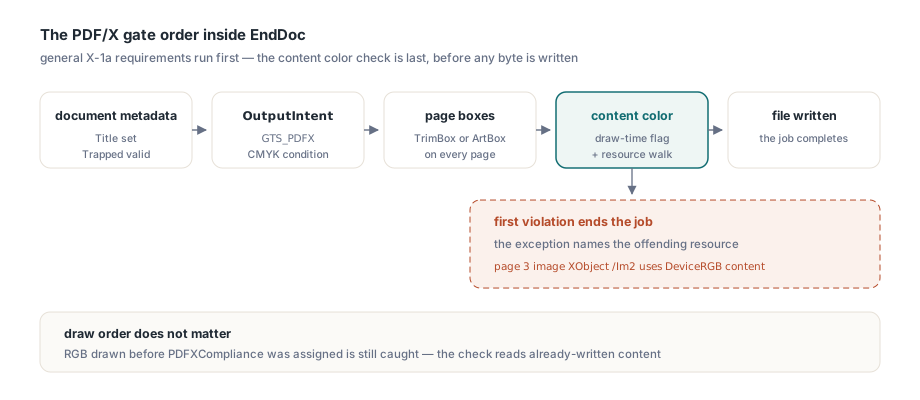
When PDFXCompliance is set to 'X-1a', HotPDF validates content colour at the very end of the job: EndDoc calls THotPDF.EnsurePDFX1aContentColorSpaces, which rejects any DeviceRGB, CalRGB or ICCBased RGB content anywhere on any page and raises an exception that names the offending resource. The file never gets written as a PDF/X-1a document that a print shop will bounce
That last part is the point. A PDF/X-1a file with one stray RGB logo looks perfectly fine on screen, passes a casual review, and then fails preflight at the printer two days before the press slot. Catching it in your Delphi build, with a message that tells you which page and which image, is a great deal cheaper than finding out from an annoyed prepress operator
Why does PDF/X-1a reject RGB content?
PDF/X-1a rejects RGB because the format promises that every colour is already final for one specific CMYK print condition. ISO 15930-1:2001 §6.2.3 limits content colour to DeviceCMYK, DeviceGray and spot colourants, meaning Separation and DeviceN spaces whose alternates are CMYK or Gray. The GTS_PDFX OutputIntent embedded in the file names that print condition, for example FOGRA39 coated offset, and the receiving workflow is entitled to send the numbers straight to the plates without any colour conversion
RGB breaks that contract. An RGB value describes a colour relative to a display or a working space, not an ink recipe, so somebody downstream would have to decide how to separate it, and X-1a exists precisely to take that decision away from the receiver. ISO 32000-1 §8.6 groups PDF colour spaces into device, CIE-based and special families, and the RGB members appear in more than one family: DeviceRGB is a device space, CalRGB and ICCBased with three components are CIE-based, and an Indexed or Separation space can hide an RGB base or alternate underneath. A checker that only looks for the rg operator misses most of them. The later PDF/X-1a:2003 edition (ISO 15930-4) keeps the same colour rule; note that HotPDF's 'X-1a' value writes the PDF/X-1a:2001 identification into the XMP packet
If your content really is RGB and should stay that way, X-1a is the wrong target. HotPDF scopes this check to 'X-1a' only, so 'X-3' and 'X-4', which allow ICC-based and calibrated colour, are unaffected
What EnsurePDFX1aContentColorSpaces actually checks
EnsurePDFX1aContentColorSpaces combines a draw-time flag with a recursive walk of every page's resources, and it runs last in the PDF/X gate. EndDoc first enforces the general PDF/X requirements: Title must be set, Trapped must be 'True', 'False' or 'Unknown', a GTS_PDFX OutputIntent must exist (EnsurePDFXOutputIntent), and every page needs a TrimBox or ArtBox (EnsurePDFXPageBoxes). Only after those pass does the colour check run
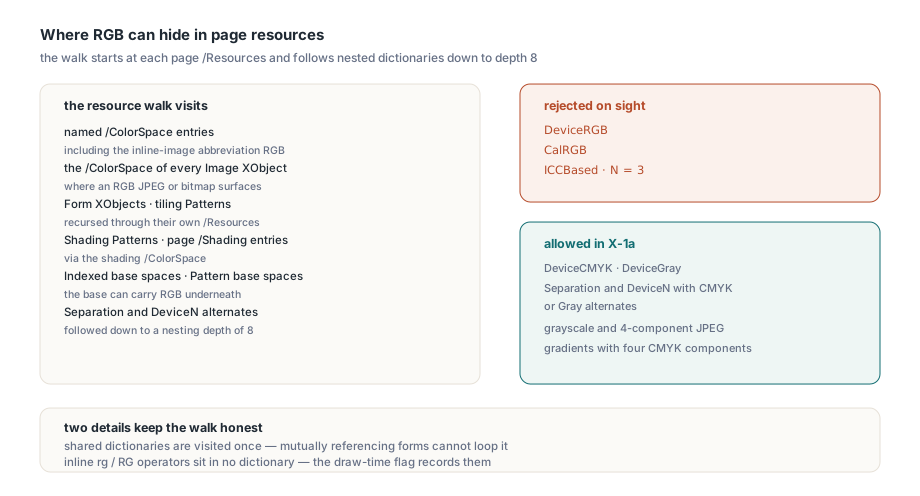
The first path is a document-wide flag. HotPDF's RGB colour setters, bitmap image embedding and annotation colour entries record DeviceRGB usage while you draw, which covers inline rg and RG operators that never appear in a resource dictionary. The second path walks each page's /Resources and inspects:
- Named colour spaces in
/ColorSpace, including the inline-image abbreviationRGBas a synonym for DeviceRGB - The
/ColorSpaceof every Image XObject - Form XObjects and tiling Patterns, by recursing into their own nested
/Resources - Shading Patterns and entries in the page
/Shadingdictionary, via the shading's/ColorSpace - Indexed base spaces, Separation and DeviceN alternates, and Pattern base spaces, followed down to a nesting depth of 8
Three things are rejected: DeviceRGB, CalRGB, and ICCBased spaces whose profile stream declares N = 3. Resource dictionaries shared between Form XObjects and patterns are visited once, so a mutually referencing set of forms does not send the walk into a loop. The method is public on THotPDF, but in normal use you never call it yourself, because EndDoc does it for you
Drawing an X-1a page in Delphi that passes the check
A conforming HotPDF X-1a document needs a CMYK OutputIntent, a TrimBox on each page, and colour set only through the CMYK, Gray and spot APIs. The skeleton below uses the FOGRA39 profile; AddPDFXOutputIntent takes the output condition identifier, an info string, the ICC profile stream, its component count, and the alternate space
var
  Pdf: THotPDF;
  Profile: TFileStream;
begin
  Pdf := THotPDF.Create(nil);
  try
    Pdf.FileName := 'brochure-x1a.pdf';
    Pdf.Title := 'Spring brochure, press edition';
    Pdf.Trapped := 'False';
    Pdf.PDFXCompliance := 'X-1a';
    Pdf.BeginDoc;

    Profile := TFileStream.Create('CoatedFOGRA39.icc', fmOpenRead or fmShareDenyWrite);
    try
      Pdf.AddPDFXOutputIntent('FOGRA39 (ISO 12647-2:2004)',
        'Coated FOGRA39 offset', Profile, 4, 'DeviceCMYK');
    finally
      Profile.Free;
    end;
    Pdf.CurrentPage.SetTrimBox(0, 0, 612, 792);   // required on every page

    Pdf.CurrentPage.SetCMYKFillColor(0, 0.5, 0.8, 0.1);
    Pdf.CurrentPage.Rectangle(72, 600, 468, 120);
    Pdf.CurrentPage.Fill;

    Pdf.CurrentPage.SetGrayFillColor(0.2);         // DeviceGray text
    Pdf.CurrentPage.SetFont('Arial', [], 14);
    Pdf.CurrentPage.TextOut(72, 560, 0, 'Spring catalog, press edition');
    Pdf.EndDoc;                                    // colour check runs here
  finally
    Pdf.Free;
  end;
end;
Every TColor-based call is a trap in this context. SetRGBFillColor, SetRGBStrokeColor and SetRGBColor all take a GDI colour and emit DeviceRGB, so a helper routine written years ago for screen-oriented reports will taint a print job the moment it is reused. Use SetCMYKFillColor, SetCMYKStrokeColor or SetCMYKColor with components in the 0 to 1 range, or the Gray equivalents
Spot colours and CMYK gradients
Spot colourants are allowed in X-1a as long as their alternate is CMYK or Gray. RegisterSeparation builds the Separation space and returns its resource name, and RegisterAxialGradient picks the shading colour space from the number of components you pass, with four components meaning DeviceCMYK
var
  SpotCS, Ramp: AnsiString;
begin
  // Spot ink with an approximate CMYK build as its alternate
  SpotCS := Pdf.RegisterSeparation('Corporate Red', 'DeviceCMYK',
    [0, 1, 0.8, 0.05]);
  Pdf.CurrentPage.SetFillColorSpace(SpotCS);
  Pdf.CurrentPage.SetFillColor([1.0]);           // 100% tint
  Pdf.CurrentPage.Rectangle(72, 420, 200, 80);
  Pdf.CurrentPage.Fill;

  // 4 components per stop: the shading is DeviceCMYK, not DeviceRGB
  Ramp := Pdf.RegisterAxialGradient(72, 300, 540, 300,
    [0, 0, 0, 0], [1, 0.6, 0, 0.2]);
  Pdf.CurrentPage.SetFillPattern(Ramp);
  Pdf.CurrentPage.Rectangle(72, 260, 468, 80);
  Pdf.CurrentPage.Fill;
end;
Pass three components to the same gradient call and you get a DeviceRGB shading, which the resource walk rejects under the name of the shading pattern. The same goes for a Separation registered with 'DeviceRGB' as its alternate: the spot name looks harmless, but the walk follows the alternate and finds RGB underneath. How such spot inks are composited when a viewer or RIP falls back to the alternate is covered in the article on rendering Separation and DeviceN spot colours in Delphi
Raster images need the same discipline. HotPDF pins Flate-compressed bitmaps to DeviceRGB, while a JPEG embedded with icJpeg keeps its own component count, so a four-component CMYK JPEG or a greyscale JPEG is fine and an ordinary RGB JPEG is not. Convert artwork to the press profile in your imaging pipeline before it reaches the PDF
Why does /DefaultRGB not rescue a PDF/X-1a file?
/DefaultRGB does not help X-1a because the rule is about what the press receives, not about whether the RGB is characterised. For PDF/A, HotPDF lets RegisterDefaultColorSpace('DefaultRGB', ...) absorb DeviceRGB usage: once a Default colour space maps DeviceRGB to an ICC profile, the content is device-independent and the PDF/A consistency check accepts it. Developers who have been through that workflow tend to try the same fix here
EnsurePDFX1aContentColorSpaces deliberately ignores that mapping. A characterised RGB value is still RGB, and the X-1a OutputIntent is a CMYK print condition, so somebody would still have to convert it. If you remember one difference between the two archival and print profiles, make it this one: PDF/A asks whether a colour is unambiguous, PDF/X-1a asks whether it is already ink
Drawing order, and the page setup that does not count
Because the check runs at EndDoc over already-written content, the order in which you set things up does not matter. RGB drawn before PDFXCompliance was assigned, or before the OutputIntent was registered, is still caught. That matters for code that builds pages in shared routines and decides on the output profile late, sometimes from a user setting chosen after half the document exists
Pdf.BeginDoc;
// ... OutputIntent and TrimBox as before ...
Pdf.CurrentPage.SetRGBFillColor(clRed);   // legacy helper, emits DeviceRGB
Pdf.CurrentPage.Rectangle(72, 72, 200, 100);
Pdf.CurrentPage.Fill;

Pdf.PDFXCompliance := 'X-1a';             // decided after drawing
Pdf.EndDoc;                               // still raises: DeviceRGB recorded
A draw-time flag has one trap worth knowing if you build a similar check yourself. Every new page is initialised with a black graphics state through SetRGBColor(0), which emits a 0 0 0 rg and 0 0 0 RG pair, and if that page-setup boilerplate were allowed to set the DeviceRGB flag, every document would look RGB-tainted, both to this check and to the PDF/A colour consistency check. HotPDF saves and restores the flag around that initialisation, so only colour you actually draw counts
How do you find the RGB content when EndDoc raises?
Read the location at the start of the exception message, because it tells you which of the two paths found the problem. The message has the form PDFXCompliance 'X-1a': <where> uses <what>, followed by the ISO 15930-1 reference and the advice to convert to CMYK or Gray or switch to X-3 or X-4. The validator raises a plain Exception on the first violation, so match on the text rather than on an exception class
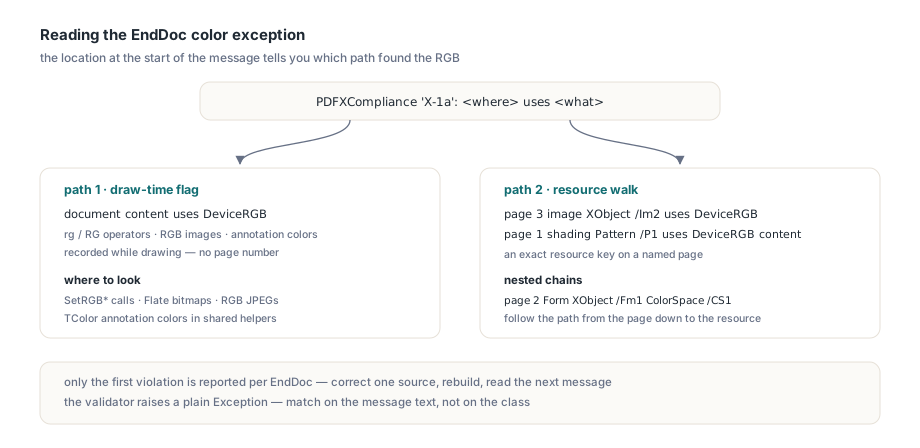
document content uses DeviceRGB (rg/RG operators, RGB images or annotation colours recorded during drawing)means the draw-time flag fired. There is no page number, because the flag is document-wide and is checked before the walk. Search your drawing code forSetRGB*calls, Flate-compressed bitmaps, RGB JPEGs andTColorannotation colourspage 3 image XObject /Im2 uses DeviceRGB contentorpage 1 shading Pattern /P1 uses DeviceRGB contentcomes from the resource walk and points to an exact resource keyuses an ICCBased RGB colour space (N=3)after aColorSpace /...location is the typical result of registering an sRGB profile withRegisterICCProfileand selecting it throughSetFillColorSpace, a path the draw-time flag does not see- Nested locations chain together, for example
page 2 Form XObject /Fm1 ColorSpace /CS1, so you can follow the path from the page down to the resource that carries the RGB space
try
  Pdf.EndDoc;
except
  on E: Exception do
  begin
    if Pos('X-1a', E.Message) > 0 then
      LogPrepressFailure(Pdf.FileName, E.Message);  // your own logger
    raise;
  end;
end;
Since only the first violation is reported, fixing a job with several RGB sources is iterative: fix, rebuild, read the next message. For batch jobs it pays to log the full message per file and keep a short list of known offenders, such as a logo bitmap or a chart helper that still takes TColor
Where the RGB gate fits in your preflight
EnsurePDFX1aContentColorSpaces is a targeted RGB gate that runs inside your build, and it pairs with a full PDF/X-1a preflight rather than replacing one. It covers the RGB families, through the resource walk from each page's /Resources and through the draw-time flag that HotPDF's colour setters maintain for inline rg and RG operators; nested colour spaces are followed to depth 8 as a guard against malformed cycles, and the first violation is reported per EndDoc. Other colour families such as Lab or CalGray are a matter for the full preflight, so run the finished file through an external validator as part of your build to get the complete conformance verdict. The broader picture of conformance output is in the guide to PDF/A, PDF/X and PDF/UA output with HotPDF, and wiring a validator into an unattended pipeline is covered in automating PDF preflight checks in Delphi
HotPDF is a native VCL PDF component for Delphi and C++Builder with PDF/X, PDF/A and PDF/UA output, CMYK and spot colour APIs, and ICC OutputIntent support. Details, licensing and the trial download are on the HotPDF Delphi PDF component product page