HotPDF Delphi Component rebuilds word spaces and line breaks in THotPDF.ExtractLoadedPageText from glyph geometry, not from space characters. A space goes in when the gap after a glyph's own width exceeds 0.15 of the text height, and a new line starts only when the text origin moves across the writing direction by more than half the text height. Since v2.768.3 the page text also includes text painted through Form XObjects and leaves out glyphs outside the visible crop area. The rest of this piece explains why each rule looks the way it does, because every one of them replaced a simpler rule that produced plausible but wrong output on real documents
The symptoms are familiar to anyone who has fed PDF text into a search index. A cover page extracts as PDFReferenceManualNovember4,1998, a tax form splits into 156 lines, a diagonal watermark arrives one character per line, and a trimmed proof leads with the printer's slug line that no viewer ever shows. None of these files is broken. Each one uses a perfectly legal way of placing text that a naive extractor misreads
Why does extracted PDF text lose its word spaces?
Extracted text loses word spaces because a PDF is never required to contain them. A producer can separate words by showing a space character, but it can just as well move the pen with a number inside a TJ array (ISO 32000-1 §9.4.3) or with a fresh Td (§9.4.2), and TeX output, many Distiller files and most justified layouts do exactly that. Before v2.766.76, HPDFAssemblePageText only looked at vertical movement, so a word break made by positioning simply vanished. The assembler now measures, along the previous glyph's writing direction, the distance from the end of that glyph's own width to the origin of the current glyph, and inserts one space when the distance exceeds 0.15 of the current glyph's box height, measured from ascent to descent in user space. No space is added when either side is already blank, and none between two CJK characters, because justification stretches ideographs apart without that stretch meaning a word boundary. The glyph records expose the same geometry, so you can reproduce the decision when a particular file puzzles you
uses
  SysUtils, HPDFDoc, HPDFContentStream;

procedure DumpWordGaps(Pdf: THotPDF; PageIndex: Integer);
var
  Glyphs: THPDFGlyphArray;
  I: Integer;
  Height, Gap: Double;
begin
  if not Pdf.ExtractLoadedPageGlyphs(PageIndex, Glyphs) then
    Exit;
  for I := 1 to High(Glyphs) do
  begin
    // ascent-to-descent height of the glyph box, in user space
    Height := Sqrt(Sqr(Glyphs[I].QuadX[3] - Glyphs[I].QuadX[0]) +
      Sqr(Glyphs[I].QuadY[3] - Glyphs[I].QuadY[0]));
    // horizontal text: gap from the previous glyph's own width end
    Gap := Glyphs[I].BaselineStartX - Glyphs[I - 1].GlyphEndX;
    if (Height > 0) and (Gap > 0.15 * Height) then
      Writeln(Format('U+%.4x gap %.2f height %.2f: space',
        [Glyphs[I].Unicode, Gap, Height]));
  end;
end;
Why measure from the glyph's own width instead of the pen position?
HotPDF measures word gaps from GlyphEndX / GlyphEndY because the pen position after a glyph already contains spacing that is not a gap. ISO 32000-1 §9.4.4 defines the horizontal displacement as the glyph width times the font size, plus character spacing Tc, plus word spacing Tw, all scaled by Tz. BaselineEndX / BaselineEndY hold that full displacement, while GlyphEndX / GlyphEndY hold only the font advance and Tz. The difference matters for producers that tighten tracking with a negative Tc and then hand the space back through a TJ adjustment after each glyph: measured from the pen position, the hand-back looks like a gap, and the Chinese term “95后” extracted as “9 5 后”. The threshold is tied to the glyph box height rather than to the Tf size for a similar reason. Word exports often write 1 Tf and carry the real size in a scaled Tm, so Tfs says 1 while the text is 10 points tall, and a rule keyed to Tfs would treat the two spellings of the same page differently
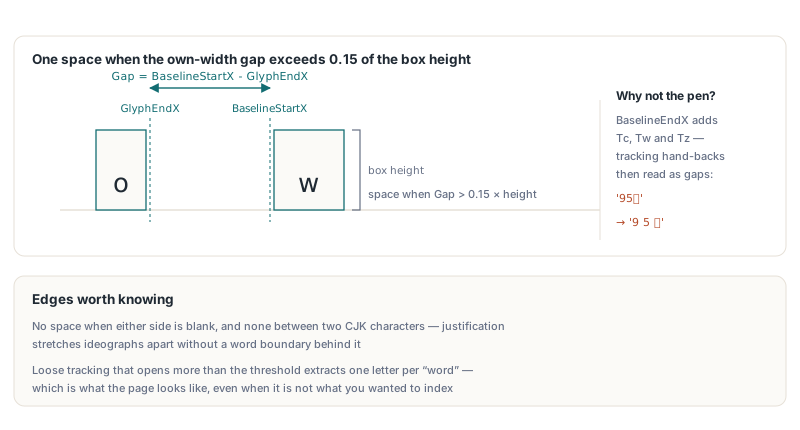
The rule has honest edges. A heading set with very loose tracking, where Tc alone opens more than 0.15 of the text height between letters, extracts with a space between every letter, which is what the page looks like but probably not what you wanted to index. Pieces drawn out of order on one baseline produce a negative gap and join without a space. Neither case is common in body text, and on a test corpus the change raised word matches against a reference extractor on 28 pages without lowering any
When does HotPDF start a new line in extracted text?
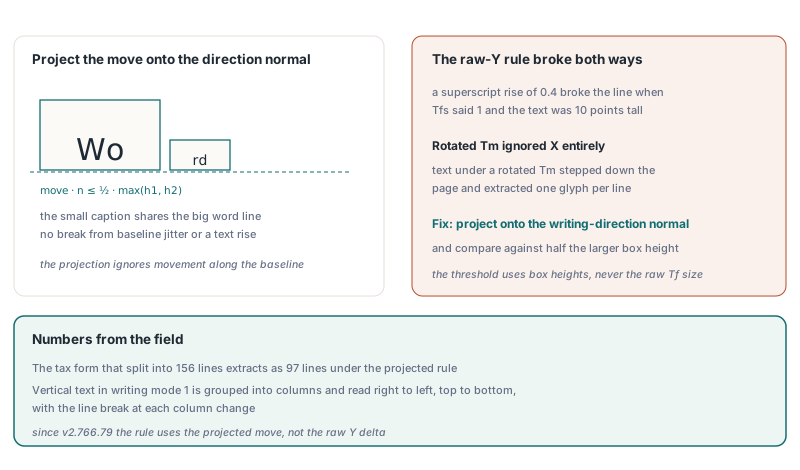
Since v2.766.79, a new line starts when the move from the previous glyph's origin to the current one, projected onto the normal of the previous writing direction, exceeds half the larger box height of the two glyphs. The earlier rule compared the raw Y move with half of Tfs, which failed in two directions. With 1 Tf and a scaled Tm the threshold shrank to half a unit, so a superscript raised by a text rise of 0.4 or ordinary baseline jitter broke the line. The rule also ignored X entirely, so text under a rotated Tm stepped down the page with every glyph and came out one glyph per line. Projecting onto the direction normal makes rotated runs behave like horizontal ones, and taking the larger of the two heights keeps a large sample word and its small caption on one line when they share a baseline. On the tax form mentioned above, the line count dropped from 156 to 97. Vertical text in writing mode 1 (§9.7.4.3) follows a separate path: those glyphs are grouped into columns, read right to left and top to bottom, with a line break at each column change
Which text does ExtractLoadedPageText include or leave out?
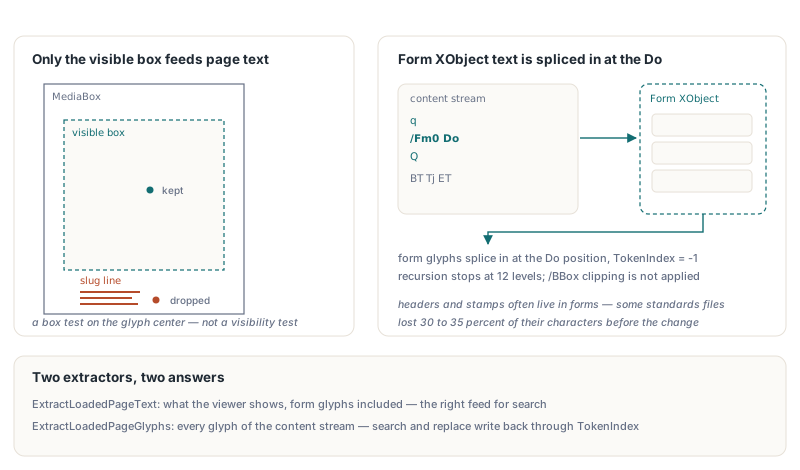
ExtractLoadedPageText returns the text a viewer shows. Since v2.766.80 it works from the visible glyphs only, dropping every glyph whose box centre falls outside GetLoadedPageVisibleBox, which is the CropBox clipped to the MediaBox (§14.11.2). That removes slug lines and other printer's marks set as text outside the trim area. ExtractLoadedPageGlyphs deliberately keeps returning every glyph of the page content stream, so you can still find that material when you need it. The filter is a box test, not a visibility test: text hidden by a clipping path, painted in white or covered by an image is still extracted
var
  Pdf: THotPDF;
  Glyphs: THPDFGlyphArray;
  PageText: UnicodeString;
  L, B, R, T: Single;
begin
  Pdf := THotPDF.Create(nil);
  try
    Pdf.LoadFromFile('trimmed-proof.pdf');
    if Pdf.GetLoadedPageVisibleBox(0, L, B, R, T) then
      Writeln(Format('Visible box: %.1f %.1f %.1f %.1f', [L, B, R, T]));
    // every glyph of the page content stream, slug line included
    if Pdf.ExtractLoadedPageGlyphs(0, Glyphs) then
      Writeln(Length(Glyphs), ' glyphs in the page content stream');
    // only what the page shows, with Form XObject text spliced in
    if Pdf.ExtractLoadedPageText(0, PageText) then
      Writeln(PageText);
  finally
    Pdf.Free;
  end;
end;
Text painted through Form XObjects is part of the page text since v2.768.3. Headers, stamps and watermarks very often live in forms, and some standards documents lost 30 to 35 percent of their characters before the change. THotPDF.InterpretContentWithForms records each Do together with the CTM in effect, interprets the form at its /Matrix times that CTM (§8.10.1), and splices the form's glyphs in at the position of the Do, recursing into nested forms. A form without its own /Resources borrows those of the stream that paints it, as §7.8.3 allows. Form glyphs carry TokenIndex = -1, and ExtractLoadedPageGlyphs still returns page-stream glyphs only, because search, replace and redaction write changes back through TokenIndex and would edit the wrong bytes if a form glyph slipped in. Two simplifications are worth knowing: form text is not clipped to the form's /BBox, and recursion stops at 12 levels rather than through cycle detection, so a malformed form that paints itself repeats its text until it reaches that cap
Why did text after a Q operator decode as garbage?
Text after Q could decode wrongly before v2.766.73 because the extractor saved only the CTM on q. The text state parameters, namely font, size, Tc, Tw, Tz, TL, rendering mode and rise, belong to the graphics state (§9.3.1), so Q must restore them along with everything else on the stack (§8.4.2). One industry report selected a two-byte Identity-H font inside q … Q and then showed one-byte WinAnsi text without a Tf of its own. The extractor kept the inner font, read the leaders and the word “Adobe” on the table of contents as two-byte codes, and dropped 15% of the page's characters. The interpreter's q/Q stack now holds the full text state. The extraction rules described here apply to every page, so a whole document can go to a file in one call
var
  Output: TFileStream;
  Pages: Integer;
begin
  Output := TFileStream.Create('report.txt', fmCreate);
  try
    // empty range = every page; form feed between pages; UTF-8 BOM
    Pages := Pdf.ExtractLoadedPagesTextToStream(Output, '', #12, True);
    Writeln(Pages, ' pages extracted');
  finally
    Output.Free;
  end;
end;
Which HotPDF text API should you use?
ExtractLoadedPageText stays in content-stream order, which is the right default for search and indexing; the decoding chain beneath it is covered in extracting text from loaded PDFs with HotPDF. For tagged documents whose authoring order matters, structure-order text extraction walks the structure tree instead of guessing from geometry, and for data locked in tables, typed table extraction across page breaks returns cells rather than lines. Full API reference and a trial download are on the HotPDF Delphi PDF Component product page