A cyan box sits on a yellow background, and the graphics state that paints it carries /op true and /OPM 1. On screen the overlap is flat cyan. On the press sheet the same overlap comes out green, because the RIP left the yellow plate alone and laid cyan on top of it. Both results follow the file to the letter; the screen render simply never asked what an imaging device does with that flag, so an approval made on screen covers a colour that never reaches the paper
Why does a page print differently from how it previews?
Overprint is an instruction to the output device about plates, and an RGB screen has no plates. ISO 32000-1 §8.6.7 defines what happens when the OP (stroke) or op (fill) entry of an ExtGState is true: the colorants that the current paint does not name keep whatever was already on their plate, instead of being erased to zero. A cyan object painted that way removes nothing from the yellow plate. A viewer that composites in RGB has nowhere to keep the yellow, so it paints cyan over the top and moves on
Neither output is broken. The disagreement is built into the two imaging models, and it stays invisible until somebody holds a printed proof next to the monitor. That is late in the job for a designer who set black text to knock out by mistake, or who left a white logo set to overprint and expected it to show
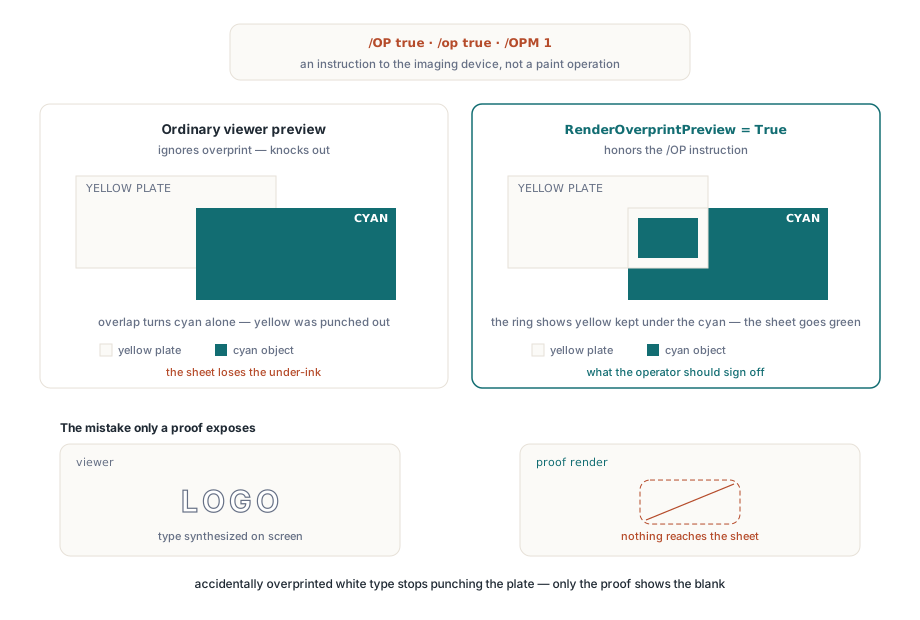
Turning on the proof with RenderOverprintPreview
HotPDF exposes the proof as one Boolean on the document, THotPDF.RenderOverprintPreview, which defaults to False. With it set, the bitmap render tracks the process plates under each overprinting paint and applies the §8.6.7 rules before writing the pixel, so overlaps show the ink combination the press would produce. Leaving the default off is right for ordinary viewing, because readers of an office PDF expect it to look the way their usual viewer shows it. Switch it on in the step whose output goes to a prepress operator
var
  Pdf: THotPDF;
  Device: THPDFBitmapRenderDevice;
  Proof: TBitmap;
begin
  Pdf := THotPDF.Create(nil);
  try
    Pdf.LoadFromFile('cover-cmyk.pdf');
    Pdf.RenderOverprintPreview := True;    // proof the plates, default is False
    Device := THPDFBitmapRenderDevice.Create;
    try
      if Pdf.RenderLoadedPageToDevice(0, 150, Device) then
      begin
        Proof := Device.TakeBitmap;        // the caller owns Proof from here
        try
          Image1.Picture.Assign(Proof);
        finally
          Proof.Free;
        end;
      end;
    finally
      Device.Free;
    end;
  finally
    Pdf.Free;
  end;
end;
The plate rules depend on the colour space of the overprinting paint, and they are worth knowing because each one explains a different surprise on a proof:
- DeviceCMYK under
/OPM 1: a component of zero leaves its plate untouched, a nonzero component replaces it. Cyan 100 / yellow 0 over a yellow background keeps the yellow and turns green - DeviceGray: the paint names the black plate only, so cyan, magenta and yellow underneath survive. A white DeviceGray logo set to overprint on a CMY background therefore disappears
- Separation and DeviceN: a colorant named
Cyan,Magenta,YelloworBlackreplaces that process plate directly,/Nonepaints nothing at all, and/Allwrites every process plate - Spot colorants: any other name is treated as a spot ink; its tint transform gives an alternate colour, which is multiplied over the process plates underneath, so the spot darkens what it covers instead of replacing it
The proof applies to filled and stroked paths and to text, including text in stroke render mode, where the stroke flag OP decides instead of op. Images, inline images and sh shadings continue through their full raster colour pipelines and paint with their ordinary opacity. In practice that covers what preflight reports flag most: overprinting rules, keylines, type and flat tints
Transparency stays live while the proof is on. A transparency group with knockout set still knocks out, and the group is composited in the same pass as the overprint rules, so a print-ready file with transparent artwork over an overprinting black background proofs both effects together. Getting one right and the other wrong would just produce a different wrong proof
The setting also takes part in the identity of cached renders. RenderLoadedPageToBitmapCached keys its entries on page, DPI and a variant built from render settings that include RenderOverprintPreview, and the disk tier uses the same variant. A viewer that flips between normal and proof preview gets two separate cache entries and never needs a call to InvalidateRenderedPageCache just because the toggle changed
The /OPM 0 trap in DeviceCMYK files
Here is the case that sends people looking for a bug. A file sets /op true on a DeviceCMYK cyan fill but leaves OPM at its default of 0, then the proof still shows cyan knocking out the yellow. The proof is correct. Under overprint mode 0, §8.6.7 says a DeviceCMYK paint sets all four process colorants, zeros included, so the zero yellow component replaces the yellow plate exactly as a knockout would. Overprint mode 0 only protects plates the paint does not name, which for a four-component CMYK colour means spot plates and nothing else
On the process plates that a composite proof shows, mode 0 and a plain knockout give the same pixels, so HotPDF paints those DeviceCMYK objects as ordinary knockouts. For a CMYK object to overprint other process inks, the ExtGState that carries /op true also needs /OPM 1. When a proof and the designer's intent disagree on a DeviceCMYK object, open that ExtGState and look for the OPM entry before suspecting anything else
The reverse surprise exists too. Under /OPM 1, CMYK white is four zeros, and four zeros under overprint leave every plate as it was. White type set to overprint vanishes on the sheet, and the proof shows it vanishing, which is the whole reason to run one
Three devices behind RenderLoadedPageToDevice
THotPDF.RenderLoadedPageToDevice(PageIndex, DPI, Device) is a single entry point whose target is decided by the device object you pass. It raises an exception for a nil device, treats a DPI below 1 as 150, and returns whatever the device reports from its Execute method. THPDFRenderDevice is the abstract base with two virtual members: Kind, which returns rdkBitmap, rdkDeviceContext or rdkEnhancedMetafile, and Execute(Document, PageIndex, DPI)
The three shipped devices own their output in different ways:
THPDFBitmapRenderDeviceholds aTBitmapin itsBitmapproperty and frees it in its destructor unlessTakeBitmaphas handed it to you firstTHPDFDeviceContextRenderDevice.Create(ADC, AWidth, AHeight)draws into anHDCyou already have and owns nothing; the constructor raises on a zero DC or a non-positive size, and no background is painted, so a screen DC needs its own white fillTHPDFMetafileRenderDeviceholds aTMetafileuntilTakeMetafiletransfers it. Text and vector paths stay scalable in the enhanced metafile, while image XObjects arrive rasterised
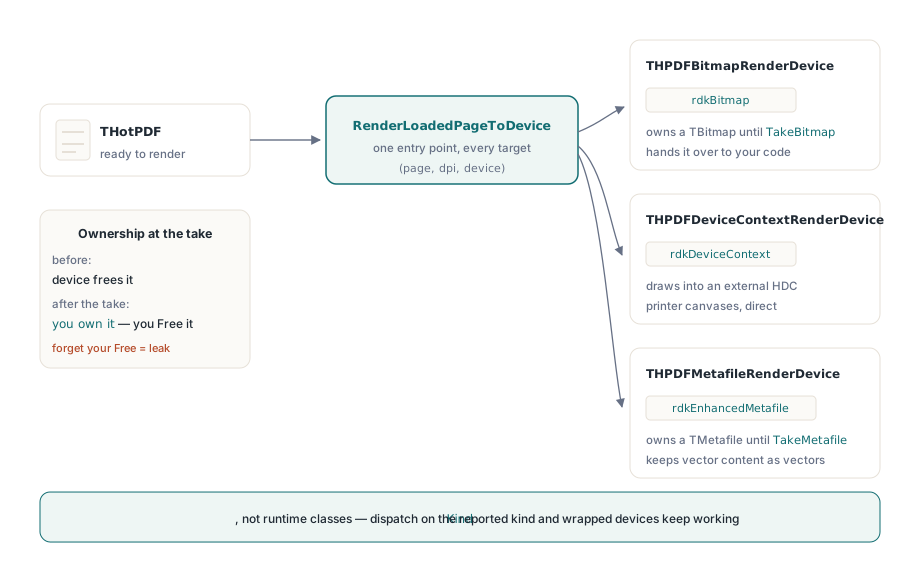
Ownership follows plain Delphi rules. Read the Bitmap or Metafile property when the object only needs to live as long as the device; call the Take method when it has to outlive it. Take the bitmap, free the device, forget the bitmap, and the leak grows with page count: invisible on a five-page sample, obvious on a five-hundred-page batch. Give each object its own try/finally and the question of who frees what answers itself
Dispatch on Kind in application code instead of testing is THPDFBitmapRenderDevice. Since Execute and Kind are public virtual methods, you can write your own device class, and code that checks the kind keeps working when one of yours stands in for a shipped device
Why does a printer render land in a corner?
The device-context path sizes the page from the DPI argument, not from the width and height you pass. The renderer scales PDF units by DPI / 72 and uses the height only to anchor the page origin at the bottom of the surface. Hard-code 300 and send the job to a 600 dpi printer, and the page comes out at half size, pushed to the bottom-left of the sheet. Printer resolution is a property of the driver, so ask the driver for it:
procedure PrintPage(Pdf: THotPDF; PageIndex: Integer);
var
  Device: THPDFDeviceContextRenderDevice;
  PrinterDPI, W, H, Tmp: Integer;
  L, B, R, T: Single;
begin
  if not Pdf.GetLoadedPageVisibleBox(PageIndex, L, B, R, T) then
    Exit;
  Printer.BeginDoc;
  try
    // ask the driver; 300, 600 and 1200 dpi are all common
    PrinterDPI := GetDeviceCaps(Printer.Handle, LOGPIXELSX);
    W := Round((R - L) * PrinterDPI / 72);
    H := Round((T - B) * PrinterDPI / 72);
    if (Pdf.GetLoadedPageRotation(PageIndex) mod 180) = 90 then
    begin
      Tmp := W; W := H; H := Tmp;            // swap for 90 / 270 pages
    end;
    Device := THPDFDeviceContextRenderDevice.Create(
      Printer.Canvas.Handle, W, H);
    try
      Pdf.RenderLoadedPageToDevice(PageIndex, PrinterDPI, Device);
    finally
      Device.Free;
    end;
  finally
    Printer.EndDoc;
  end;
end;
The width and height come from the page's visible box, the CropBox clipped to the MediaBox, at the printer's own resolution, and the caller swaps them for rotated pages before creating the device. That matches what the renderer expects when it anchors the origin
Overprint proofing does not travel down this path. The device-context and metafile devices emit GDI calls straight into the target, and the plate rules need the pixels already underneath each paint, which only the bitmap render has. For a paper proof, render the proof bitmap and stretch it onto the printer canvas. A small custom device keeps that behind the same entry point:
type
  // a device of your own: proof bitmap, then stretched onto the printer
  TPrinterProofDevice = class(THPDFRenderDevice)
  public
    function Kind: THPDFRenderDeviceKind; override;
    function Execute(Document: THotPDF; PageIndex, DPI: Integer): boolean;
      override;
  end;

function TPrinterProofDevice.Kind: THPDFRenderDeviceKind;
begin
  Result := rdkDeviceContext;
end;

function TPrinterProofDevice.Execute(Document: THotPDF;
  PageIndex, DPI: Integer): boolean;
var
  Proof: TBitmap;
  OldProof: Boolean;
begin
  OldProof := Document.RenderOverprintPreview;
  Document.RenderOverprintPreview := True;
  try
    Proof := Document.RenderLoadedPageToBitmap(PageIndex, DPI);
  finally
    Document.RenderOverprintPreview := OldProof;  // leave the caller's setting as it was
  end;
  Result := Proof <> nil;
  if Result then
  try
    Printer.Canvas.StretchDraw(
      Rect(0, 0, Printer.PageWidth, Printer.PageHeight), Proof);
  finally
    Proof.Free;
  end;
end;
Call it between Printer.BeginDoc and Printer.EndDoc with a DPI that gives the bitmap enough pixels for the sheet, around 200 to 300 for a letter-size proof. The stretch rectangle above fills the printable area; keep the page's aspect ratio in it if the page and the paper differ in shape
Where proofing fits next to preflight
The proof answers one question: which inks survive where objects overlap. It is composited on the same 24-bit RGB bitmap as any other render, so its colours show the ink combination rather than a measured sheet colour. Press conditions are a colour-management question, and the document handles them through ConfigureRenderICCWorkflow, which takes a proof profile, an output profile and a black point compensation flag, and ClearRenderICCWorkflow to drop them again
The most productive place for a proof render is next to the checks you already run. A preflight pass reports that black text is set to overprint; the proof render shows the operator what that does on the page; both land in the same report. Packaging work tends to mix overprint with spot inks, and the walkthrough of Separation and DeviceN spot color rendering covers the colorant side of the same page, including single-plate views through RenderLoadedPageSeparationPlate. The articles on rendering a PDF page to a bitmap and printing a loaded PDF through TPrinter cover the two device targets in their plain form
All of this runs in native Delphi and C++Builder code with no rendering DLL to ship next to the executable. The HotPDF Delphi component page lists the rendering and prepress features and has a trial build to run these examples against your own print files