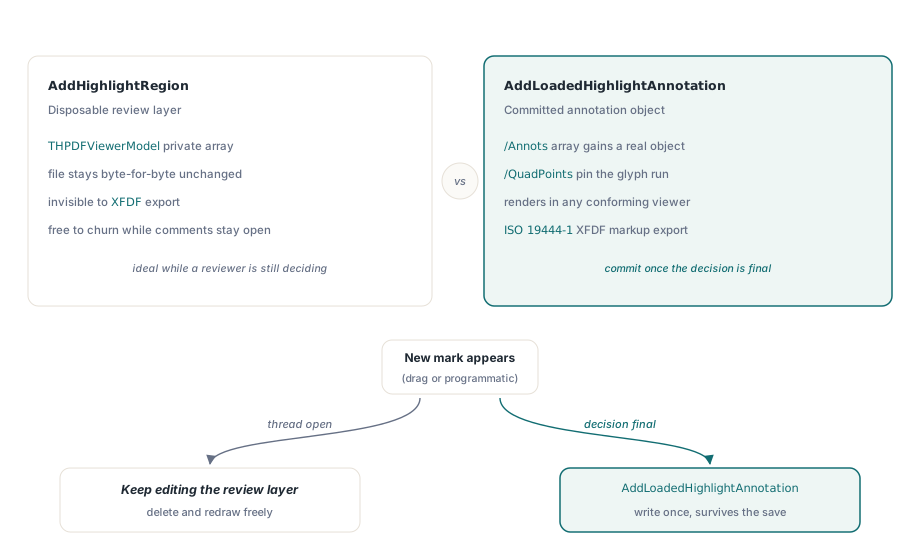
A rectangle drawn around a paragraph during review does not have to become a mark inside the PDF. HotPDF's THPDFViewerModel exposes AddHighlightRegion, a method that keeps every highlight as an in-memory record rather than a change to the loaded document, so a reviewer can mark up dozens of pages while the file on disk stays byte-for-byte what it was. Zoom to 6400%, rotate the page 90 degrees, switch from Fit Width to Fit Page, and the same rectangle still lands on the same paragraph, because the coordinate maths runs through the actual render geometry at the moment the mark was drawn
Review tooling built around a PDF viewer runs into this problem constantly. A redlining screen, a QA pass over generated invoices, an internal sign-off workflow: all of them need to let someone draw attention to a region of a page without every draft mark turning into a permanent change to the file, and without reaching for a full annotation subsystem just to show a coloured box while someone is still deciding whether the mark belongs. HotPDF answers that with a dedicated highlight layer that sits entirely on the Model side of the split described in building a custom PDF viewer with an MVC architecture in Delphi, which is also why the same highlight list can be driven from a unit test with no window handle in sight
What does HotPDF's AddHighlightRegion actually store?
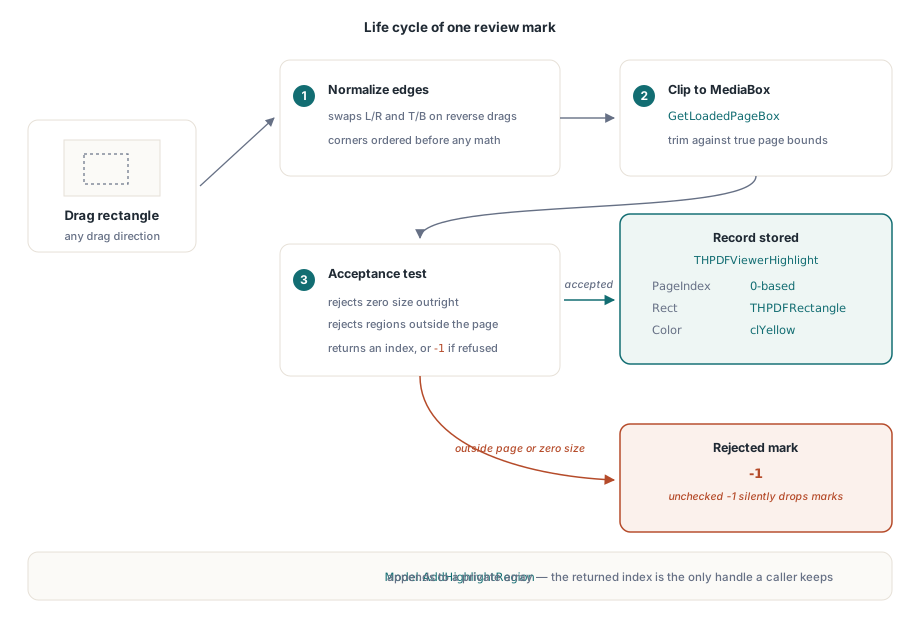
AddHighlightRegion stores exactly three things per mark: a zero-based page index, a THPDFRectangle in PDF user-space coordinates, and a TColor, all packaged as a THPDFViewerHighlight record inside THPDFViewerModel. Calling Viewer.HighlightRegion(PageIndex, PageRect, clYellow), or the equivalent Model.AddHighlightRegion, appends one of these records to a private array and returns its index, and that index is the only handle a caller gets back: there is no separate object, no reference-counted interface, nothing to free. Every other capability in this article, drawing the mark, remapping it after a zoom change, deleting it, is built on top of that one small record
Every rectangle gets normalised and clipped before it is accepted. AddHighlightRegion swaps the left and right edges if a reviewer drags from right to left, swaps top and bottom for an upward drag, then clips the result against the page's MediaBox retrieved through GetLoadedPageBox. A rectangle that ends up with zero width, zero height, or entirely outside the page is rejected outright: the method returns -1 and nothing is added to the list. That return value is not decorative: a batch of highlights rebuilt from an external review file, or from stale coordinates after a page was replaced, can quietly lose entries if the caller does not check for it
How does a highlight stay aligned after zoom or rotation?
A highlight stays aligned because HotPDF stores it in PDF page space and re-projects it into screen space on every repaint, rather than storing a screen rectangle that would go stale the moment the zoom level changes. THPDFViewerModel.PagePointToView and its inverse, ViewPointToPage, do that projection in two stages: first the page's own /Rotate entry, then the Viewer's independent ViewRotation, which never gets written back to the PDF and only affects what the Viewer displays. Undoing the transform on mouse release runs the same two stages in reverse, which is what lets a highlight drawn at high zoom on a page rotated 270 degrees land in exactly the right place after the reviewer resets the view back to Fit Page
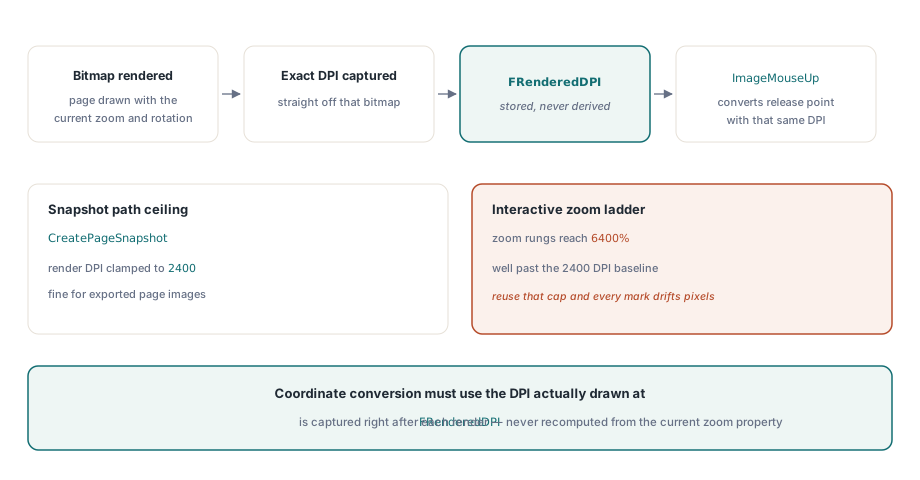
The DPI used for that projection matters as much as the rotation. HotPDF's Viewer captures the exact DPI of the bitmap currently on screen in FRenderedDPI right after each render, and ImageMouseUp passes that same value into ViewPointToPage so a mouse coordinate is always converted using the resolution it was actually drawn at, not a resolution recomputed from the current zoom property. CreatePageSnapshot and its relatives cap DPI to a 12 to 2400 range, but the interactive render path carries no such ceiling: the standard zoom ladder tops out at 6400%, which computes to well over 2400 DPI at the default 96 DPI baseline, so reusing a snapshot-style limit for coordinate mapping would shift every highlight by several pixels at the top of the zoom range. Two smaller defaults round out the interaction: a drag shorter than two pixels on either axis is treated as a click and produces no highlight, and highlighting cannot begin until at least one page has actually rendered, since FRenderedDPI starts at zero
Wiring interactive highlighting into a review screen
Turning on interactive highlighting is a three-property job on the THPDFViewer control itself: set InteractionMode to vimHighlight instead of the default vimBrowse, pick a HighlightColor, which defaults to clYellow, and handle OnMarqueeSelect to find out what the reviewer just drew. Everything else, capturing the mouse, drawing the dotted selection rectangle while the reviewer drags, converting the release point back to page space, calling AddHighlightRegion, happens inside the control before that event fires
type
  TReviewForm = class(TForm)
    Viewer: THPDFViewer;
    ReviewLog: TMemo;
    procedure FormCreate(Sender: TObject);
  private
    procedure ViewerMarqueeSelect(Sender: TObject; Shift: TShiftState;
      PageIndex: Integer; const PageRect: THPDFRectangle;
      HighlightIndex: Integer);
  end;

// PdfDoc is a THotPDF already loaded elsewhere on the form
procedure TReviewForm.FormCreate(Sender: TObject);
begin
  Viewer.PDFDocument := PdfDoc;
  Viewer.InteractionMode := vimHighlight;
  Viewer.HighlightColor := clLime;
  Viewer.OnMarqueeSelect := ViewerMarqueeSelect;
end;

procedure TReviewForm.ViewerMarqueeSelect(Sender: TObject; Shift: TShiftState;
  PageIndex: Integer; const PageRect: THPDFRectangle; HighlightIndex: Integer);
begin
  ReviewLog.Lines.Add(Format('page %d, mark #%d at (%.1f, %.1f)-(%.1f, %.1f)',
    [PageIndex + 1, HighlightIndex, PageRect.Left, PageRect.Bottom,
     PageRect.Right, PageRect.Top]));
end;
OnMarqueeSelect only fires for a drag that actually produced a highlight: a click too small to count as a drag clears the selection overlay immediately, and a drag that lands entirely outside the page reaches AddHighlightRegion but gets rejected there the same way a programmatic call would be, so the event stays silent either way. One implementation detail worth knowing if highlighting ever seems to stop responding at the edges of the control: mouse capture belongs to the THPDFViewer itself, a TScrollBox descendant, not to the internal TImage that shows the page bitmap, which is what lets a reviewer drag past the edge of the rendered page and still get a clean release
Adding, removing, and re-reading highlights from code
Highlights do not have to come from a mouse drag at all. Viewer.HighlightRegion(PageIndex, PageRect, Color), which funnels into the same Model.AddHighlightRegion the interactive drag calls internally, is public specifically so a review screen can rebuild highlights from data it already has: comments loaded from a database, results from a text search, or marks restored from a previous session. Because the coordinates are plain PDF user-space numbers, nothing about this path depends on a page having been rendered first, unlike the interactive drag, which needs FRenderedDPI to already hold a real value
var
  I: Integer;
  Item: TPriorComment;    // your own record: PageIndex + PageRect
  NewIndex: Integer;
begin
  for I := 0 to PriorComments.Count - 1 do
  begin
    Item := TPriorComment(PriorComments[I]);
    NewIndex := Viewer.HighlightRegion(Item.PageIndex, Item.PageRect, clAqua);
    if NewIndex < 0 then
      LogWarning('comment %d fell outside the page and was dropped', [I]);
  end;
end;
Removing a single highlight is where the array-backed storage shows through. RemoveHighlightRegion deletes one record and shifts every later record down by one position to close the gap, which means any index captured earlier, from an OnMarqueeSelect event or from a prior enumeration, is no longer trustworthy once something ahead of it in the list gets removed. OnHighlightChange fires on every add, remove, and ClearHighlightRegions call, but it carries no information about what changed, so the safe pattern is to treat it as a signal to rebuild whatever list a review panel is showing from HighlightCount and TryGetHighlightRegion, rather than to patch a cached index in place
procedure TReviewForm.ViewerHighlightChange(Sender: TObject);
var
  I: Integer;
  Mark: THPDFViewerHighlight;
begin
  MarkList.Items.Clear;
  for I := 0 to Viewer.Model.HighlightCount - 1 do
    if Viewer.Model.TryGetHighlightRegion(I, Mark) then
      MarkList.Items.AddObject(Format('page %d', [Mark.PageIndex + 1]),
        TObject(I));
end;
When should a mark become a real Highlight annotation instead?
A highlight region should become a real annotation the moment it needs to survive outside that one THPDFViewer instance. HotPDF also exposes AddHighlightAnnotation for a new page and AddLoadedHighlightAnnotation for an already-loaded document, and despite the near-identical name, this is a completely different mechanism: both write an actual ISO 32000-1 §12.5.6.10 text-markup annotation, PDF /Subtype /Highlight, into the page's /Annots array, with /QuadPoints marking the exact glyph run, and any conforming PDF viewer renders it once the file is saved, not just HotPDF's own. The same mechanism boundary decides whether a mark round-trips through XFDF: an annotation created with AddLoadedHighlightAnnotation is a normal PDF object that ExportLoadedAnnotationsToXFDF picks up and hands to Acrobat or another review tool as ISO 19444-1 markup, covered in importing and exporting PDF annotations as XFDF in Delphi, while a region added through AddHighlightRegion is invisible to that export because it was never written to the object graph at all: it exists only for as long as the THPDFViewerModel that created it does. The full family of markup and geometric annotation types available on a page, and how a rectangle places each one, is covered in the article on PDF annotations in Delphi with HotPDF, and the practical rule is simple: keep a mark disposable while a document is still being discussed, and commit it to an annotation once a decision is final
Where the highlight layer stops
The highlight layer, for its part, makes no attempt to look like a translucent highlighter pen: RefreshDocument draws every region as a two-pixel outline rectangle in its own colour on top of the cached page bitmap, the same way it draws search hits, rather than blending a coloured fill over the text underneath, so a classic yellow-wash look has to be painted in application code or deferred to a promoted annotation's own appearance stream. One capability worth reusing once a region exists is CreateCurrentPageRegionSnapshot, which takes the same THPDFRectangle a highlight already carries and renders just that area to a bitmap, useful for attaching a small preview image to a review comment without exporting the full page. A review build does not have to choose between the two mechanisms up front: default every new mark to a disposable THPDFViewerHighlight region for as long as a comment thread stays open, and only call AddLoadedHighlightAnnotation once a reviewer resolves it, which keeps the loaded PDF untouched during the back-and-forth that produces the most churn. The viewer control described here is part of the standard HotPDF Delphi Component for Delphi and C++Builder, alongside the rest of the annotation and form APIs referenced above