HotPDF round-trips multi-select list box values through FDF and XFDF by keeping the field value as an array from end to end. Since version 2.755.0, ExportLoadedFormToFDF, ExportLoadedInterchangeToFDF and ExportLoadedFormToXFDF write each selected option as its own FDF string or XFDF <value> element, and the matching import methods check every value against the field options and rebuild the /I selection indices before they change anything. Nothing gets glued into one string along the way
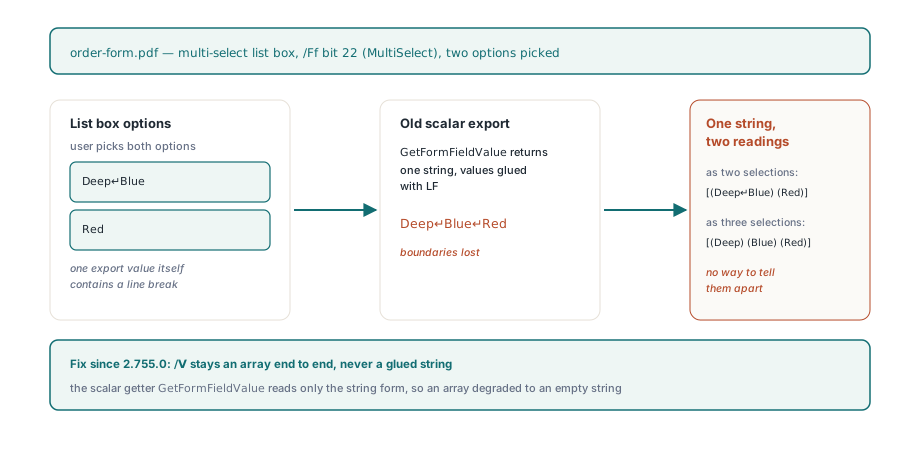
The failure this fixes is easy to reproduce. Take an order form with a multi-select list box of product options, let a user pick two of them, export the form data for a back-office system, then import the edited file back into the PDF. Before this change the list box came back empty or wrong. The reason is that one of the export values contained a line break, and the old path had flattened the selections into a single line-separated string. Getting multiple selections back out of that string was never reliable, and with an export value that itself contains a line break it cannot work at all
Why does joining multi-select values with line breaks break the round trip?
Joining the selections into one string throws away the boundaries between values, and a value can contain the separator, so no importer can split the string back correctly. ISO 32000-1 §12.7.4.4 allows the /V entry of a choice field to be either a single text string or an array of text strings, and a list box with the MultiSelect flag (bit 22 of /Ff) uses the array form once more than one option is picked. The same section defines /I as an array of zero-based option indices in ascending order, which viewers use to tell apart two options that happen to share an export value. In HotPDF the scalar getter GetFormFieldValue only reads the string form, so running an array through it degraded the export to an empty string, and the old XFDF import joined repeated <value> elements with LF. Picture an option exported as Deep, line feed, Blue: after joining, Deep\nBlue\nRed could be two selections or three, and the file gives no way to know which. The fix was to stop using a scalar in the middle of the round trip entirely
What do the exported FDF and XFDF files contain?
HotPDF writes a multi-select value as a typed array in FDF and as one <value> element per selection in XFDF, so the boundaries stay visible on disk. In FDF each item keeps the spelling it had in the source PDF: hexadecimal strings go out as hex, and literal strings are escaped by a single helper that turns CR and LF into \r and \n. In XFDF the root carries xml:space="preserve" as ISO 19444-1 requires, which means any whitespace inside a text element counts as data. HotPDF therefore writes the start tag, the escaped text and the end tag of each <value> in one piece, keeps indentation outside the element, and encodes CR, LF and TAB as character references so an XML parser applying line-ending normalisation cannot change the original bytes
![Export shapes HotPDF writes for a multi-select list box since 2.755.0: FDF carries one typed array per field with /V [(Deep line break Blue) (Red)] and a hex region value, while XFDF carries one value element per selection under xml:space preserve so whitespace counts as data](../../assets/media/HotPDF-MultiSelect-Fdf-Xfdf-Array-Shape.svg)
<!-- FDF: one typed array per field -->
<< /T (options) /V [(Deep\nBlue) (Red)] >>
<< /T (region) /V [<45553132>] >>
<!-- XFDF: one <value> per selection -->
<xfdf xmlns="http://ns.adobe.com/xfdf/" xml:space="preserve">
<fields>
<field name="options">
<value>Deep
Blue</value>
<value>Red</value>
</field>
</fields>
</xfdf>Two export edge cases are worth knowing before you write the calling code. First, ExportLoadedFormToFDF builds the complete FDF body in memory before it creates the target file (fixed in 2.755.1), so a value that cannot be exported, such as an array holding something other than strings, raises without truncating an existing file. Second, an empty selection on a list box that also offers an empty-string export value is ambiguous in XFDF, because <value/> could mean nothing is selected or that the empty option is selected. ExportLoadedFormToXFDF raises in that case rather than guess, and it raises before the target file is opened. FDF has no such ambiguity, since /V [] and /V [()] are distinct. Both FDF exporters also skip widget-only terminals that have no /T name, matching the XFDF exporter, because no importer could ever match those entries back to a field
var
  Pdf: THotPDF;
  Written: Integer;
begin
  Pdf := THotPDF.Create(nil);
  try
    if Pdf.LoadFromFile('order-form.pdf', '') > 0 then
    begin
      // Multi-select list boxes are written as /V [(...) (...)]
      Written := Pdf.ExportLoadedFormToFDF('order-form.fdf');
      try
        Pdf.ExportLoadedFormToXFDF('order-form.xfdf');
      except
        on E: Exception do
          // Empty selection plus an empty export option: XFDF cannot tell
          // them apart, and the existing .xfdf file is left untouched
          ShowMessage('XFDF export refused: ' + E.Message);
      end;
    end;
  finally
    Pdf.Free;
  end;
end;
How does HotPDF validate a multi-select value on import?
HotPDF accepts an imported array only when the target is a choice field with the MultiSelect flag set and every value in the array matches an export value in the field's /Opt array. Each option slot can be used once, so a list with two options that share the export value b accepts [<62> <62>] as two distinct selections and rejects a third b. The rebuilt /I follows /Opt order and not the order of the incoming values, as §12.7.4.4 requires ascending indices. HotPDF builds the new /V and /I as detached objects and assigns them only after every value has passed validation, so a rejected value never leaves half an array or stale indices behind. The copy is written to the field being imported rather than into a shared ancestor array, hex spellings arriving from FDF stay hex through the save, and fields whose calculations depend on the list box are marked for recalculation. If you only need to set a single value, setting one form field value in a loaded PDF goes through the scalar path, which by design does not handle multiple selections
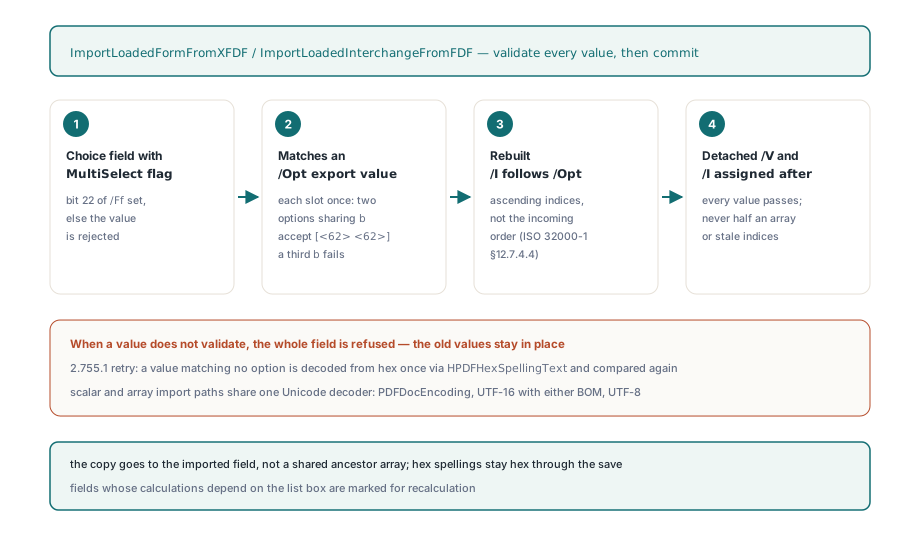
Some other tools write plain ASCII export values as hex strings without a byte order mark, for example <416272>, and then export XFDF by writing those hex digits out as text. A strict literal comparison on the way back fails, and the import aborts. Version 2.755.1 adds one retry: when a value does not match any option, HPDFHexSpellingText decodes the text as a hex payload and compares the result again. The retry only applies to input that would otherwise have raised, so it never changes a value that already matched. The same release also made the scalar and array paths use the same Unicode decoder, which understands PDFDocEncoding, UTF-16 with either byte order mark and UTF-8. Before that, one logical value could match on one path and fail on the other in documents that mixed encodings
Why can a valid FDF file still lose fields during parsing?
An FDF scanner that does not track hexadecimal strings can cut a field dictionary in half when a hex value ends right next to the dictionary terminator. In << /T (region) /V <416273>>> the first > closes the hex string, but a naive scanner reads it together with the next > as the end of the dictionary and silently drops the field. The file-level FDF importer already kept track of whether it was inside a hex string, and in 2.755.1 the array and dictionary scanners behind ImportLoadedInterchangeFromFDF do the same. A second issue concerns indirect references. An FDF file is a small PDF-syntax document with its own object numbering (ISO 32000-1 §12.7.7), so a value such as /V [11 0 R] refers to object 11 of the FDF file, not object 11 of the PDF you are filling. The simplified FDF parser in HotPDF does not resolve references inside the file, so it rejects such an array instead of reading whatever object 11 happens to be in the target document
File, stream and XFDF imports report errors differently
The three import routes validate the same way but report failures differently, and it is worth picking one on purpose. ImportLoadedFormFromFDF skips any field that fails validation and returns the number of fields it did apply, so a count lower than expected is the only sign of a problem. ImportLoadedInterchangeFromFDF and ImportLoadedFormFromXFDF raise at the first rejected field. Each field is committed on its own, so fields processed before the exception keep their new values. Treat none of these as a transaction over the whole exchange file: if you need all-or-nothing behaviour, discard the loaded document when an exception occurs instead of saving it
var
  Pdf: THotPDF;
  Source: TMemoryStream;
  Status: AnsiString;
  Info: THPDFFDFInterchangeInfo;
begin
  Pdf := THotPDF.Create(nil);
  Source := TMemoryStream.Create;
  try
    Source.LoadFromFile('order-form-reviewed.fdf');
    if Pdf.LoadFromFile('order-form.pdf', '') > 0 then
    try
      // Fields only; a value outside /Opt or a non-multi-select target raises
      if Pdf.ImportLoadedInterchangeFromFDF(Source, True, False, Status, Info) then
        Pdf.SaveLoadedDocument('order-form-filled.pdf');
    except
      on E: Exception do
        ShowMessage('Import rejected, nothing saved: ' + E.Message);
    end;
  finally
    Source.Free;
    Pdf.Free;
  end;
end;
Extending the XFDF callbacks without breaking existing callers
The array support in the lower-level XFDF unit lives in a separate record, THPDFXFDFArrayAccess, and in new overloads of HPDFXFDFExportFields and HPDFXFDFImportFields, not in extra fields added to the end of the existing THPDFXFDFAccess record. The reason is binary compatibility. Code that fills THPDFXFDFAccess as a local variable often sets only the slots it knows about and never clears the rest, so a new function pointer added to that record would contain stack garbage, and the library would take it for a real callback. With a separate record, old callers keep the old layout and the old overloads, and those overloads pass an all-nil array record internally. The original scalar import overload still joins repeated values with LF for compatibility, and only the array-aware overload keeps them apart. When you bind your own data store, start from Default(THPDFXFDFArrayAccess). Return True from GetFormFieldValueArray for any list-valued field, including one with nothing selected, and False to fall back to the scalar callback
uses HPDFXFDF;

// Plain function pointer, not "of object": Context carries your own store
function StoreGetSelections(Context: Pointer; FieldIndex: Integer;
  out Values: THPDFXFDFValueArray): Boolean;
begin
  Result := TFormStore(Context).IsListField(FieldIndex);
  if Result then
    Values := TFormStore(Context).Selections(FieldIndex);
end;

procedure ExportStore(Store: TFormStore; out Bytes: TBytes);
var
  Access: THPDFXFDFAccess;
  ArrayAccess: THPDFXFDFArrayAccess;
begin
  Access := MakeStoreAccess(Store);             // your existing scalar bindings
  ArrayAccess := Default(THPDFXFDFArrayAccess); // every unused slot is nil
  ArrayAccess.GetFormFieldValueArray := StoreGetSelections;
  HPDFXFDFExportFields(Access, ArrayAccess, Bytes);
end;
Multi-select exchange works on list boxes that already exist and have the MultiSelect bit set in /Ff. For how choice fields and their flag bits are created in the first place, see adding ListBox and other AcroForm fields to a loaded PDF. For comment markup that goes through the <annots> tree of XFDF, see XFDF annotation import and export in HotPDF. The full API reference and trial download are on the HotPDF Delphi PDF component page