HotPDF Component lays out CSS multi-column text when THPDFHTMLImporter.RenderHTML5 converts HTML to PDF in Delphi. The paged HTML engine resolves column-count and column-width against the content box, balances the last fragment of every multicol container with a binary search, fills earlier pages column by column to the page bottom, and supports column-fill, column-span: all and column-rule
The usual reason to want this is boring and real: a two-column product bulletin, a terms-and-conditions annex set in three narrow columns, or a release notes PDF that should look like the printed newsletter the marketing team already designed in HTML. Without column support the importer stacks every paragraph in one wide measure, the line length doubles, and the document reads like a log file. With it, the same stylesheet that drives the browser preview drives the PDF, and the hard part becomes pagination, which browsers mostly never have to think about on screen
How does HotPDF decide how many columns to use?
HotPDF resolves the column count with the same rules as the pseudo-algorithm in CSS Multi-column Layout Module Level 1 §3.4, applied to the content box width W after padding and borders are removed. A declared column-count is taken as is. When only column-width is given, the engine computes N = Trunc((W + gap) / (column-width + gap)) with a floor of one column. When both are present, the result is the smaller of the two, so the declared count can cap the derived count but never inflate it
A concrete case: a 483pt content box (A4 with 56pt side margins, rounded) and column-width: 140pt; column-gap: 12pt gives Trunc(495 / 152) = 3 columns, each (483 - 2 * 12) / 3 = 153pt wide. Adding column-count: 2 to the same rule drops it to two columns, because the minimum wins. The gap keyword normal resolves to 1em of the container font size, and that resolution happens at layout time rather than at parse time, so a font-size declared after column-gap in the same rule still produces the right gap
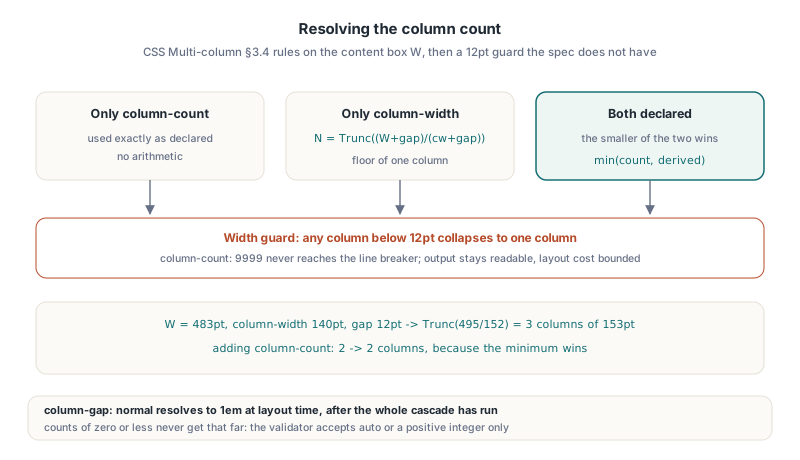
One guard is not in the specification, and it is there on purpose. After the column width is computed, any value below 12pt collapses the container back to a single column. A stylesheet that says column-count: 9999, whether by accident or because it came from an untrusted template, would otherwise produce thousands of columns with negative or microscopic widths and a line breaker that tries to fit one glyph per line. Falling back to one column keeps the output readable and the layout cost bounded. Zero or negative counts never get that far: the validator accepts only auto or a positive integer for column-count, and column-width and column-gap take auto or normal respectively, or a length in points or em
Rendering a multi-column HTML section to PDF in Delphi
Multi-column output needs no switch on the importer. THPDFHTMLImporter is created with the THotPDF document it draws into, BeginDoc must already have run, and the column properties arrive through the normal cascade, either in the markup or in the author stylesheet passed as the second argument of RenderHTML5
uses
SysUtils, HPDFDoc, HPDFHTMLImport;
procedure BuildBulletin(const FileName: string);
var
Pdf: THotPDF;
Importer: THPDFHTMLImporter;
Html, Css: WideString;
begin
Pdf := THotPDF.Create(nil);
Importer := THPDFHTMLImporter.Create(Pdf);
try
Pdf.FileName := FileName;
Pdf.BeginDoc;
Importer.Margin := 56;
Importer.BaseFontName := 'Arial';
Importer.BaseFontSize := 10;
Css := 'section.news { column-width: 140pt; column-gap: 12pt; ' +
' column-rule: 0.5pt solid #999999 } ' +
'section.news h2 { column-span: all }';
Html := '<section class="news">' +
'<p>Release 4.2 ships the new export pipeline...</p>' +
'<p>Licensing changes take effect on 1 March...</p>' +
'<h2>Known issues</h2>' +
'<p>Import of legacy archives & templates...</p>' +
'</section>';
if not Importer.RenderHTML5(Html, Css) then
raise Exception.Create('Nothing was emitted');
Pdf.EndDoc;
finally
Importer.Free;
Pdf.Free;
end;
end;Note the doubled escaping in the last paragraph: & inside the Pascal string is the HTML entity for an ampersand, which the importer decodes back to a single character. The rest of the cascade, budgets and resource callbacks behave exactly as described in the overview of HotPDF HTML5 paged-media import; columns are just one more layout mode inside the same profile
Balancing columns with a binary search
HotPDF balances columns by searching for the smallest column height at which a greedy fill still places every remaining line. The greedy pass is simple: walk the lines into column one until the next line would exceed the candidate height, then continue in column two, and so on. The search starts with the tallest single line as the lower bound and the sum of all line heights as the upper bound, halves the interval each round, and stops once the bounds are within 0.05pt
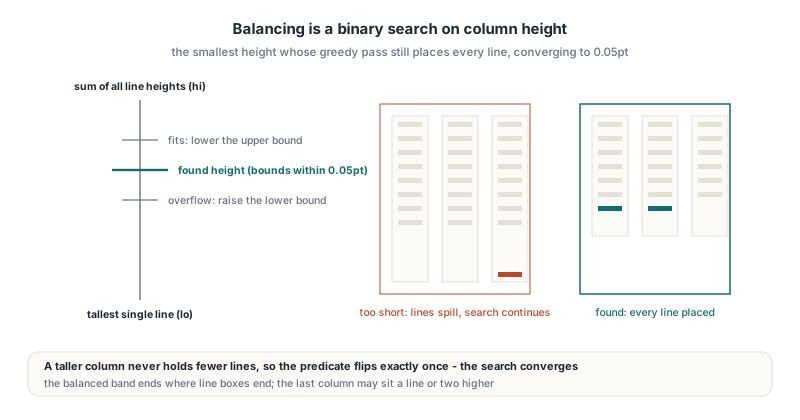
A binary search only works if the predicate is monotonic, and here it is: a taller column can never hold fewer lines than a shorter one, so "every line fits" flips from false to true exactly once as the height grows. That property is what guarantees convergence and guarantees that the final greedy fill at the found height consumes every line, rather than leaving an orphan line that would trigger a spurious extra page. It also explains a detail of the result: the balanced band is as short as the line boxes allow, not necessarily equal columns, because lines are indivisible and the last column may end a line or two higher than the others
What happens when columns cross a page break?
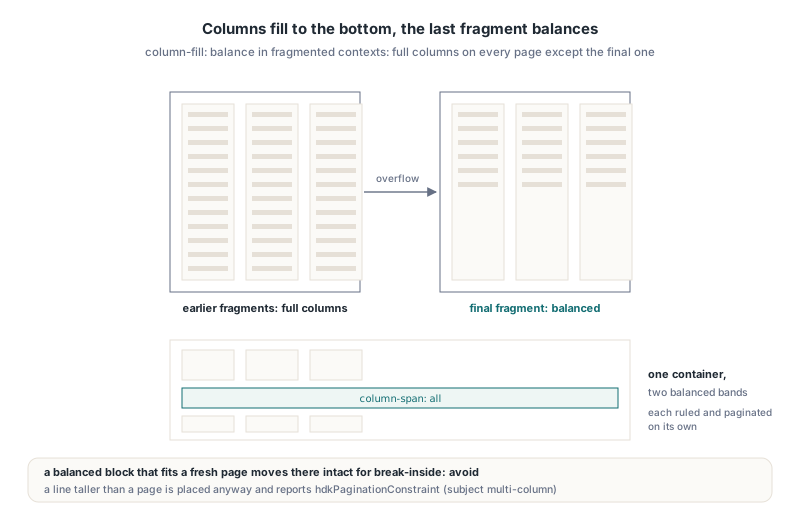
Columns that do not fit on the current page are filled sequentially to the page bottom, and only the final page fragment is balanced. This is the behaviour CSS Multi-column Layout Level 1 §7.1 prescribes for column-fill: balance in fragmented contexts, and it is what a printed newsletter looks like: full columns on every page except the last, where the remaining text is split evenly instead of leaving one tall column next to an empty one
Each page fragment goes through the same fragmenter independently. If the remaining lines fit into N columns of the available height, the fragment is balanced; otherwise every column fills to the page bottom and the loop starts a new page. The natural height of the whole container, which the engine uses for break-inside: avoid decisions and extent measurement, is the balanced band height with unlimited capacity, so a container that would fit on a fresh page as a balanced block is moved there intact rather than sliced. When a single line is taller than an entire page, the engine relaxes the constraint, places the line anyway at the top of a page, and reports an hdkPaginationConstraint diagnostic with the subject multi-column
column-fill: auto and fixed-height boxes
With column-fill: auto and a definite height, HotPDF fills columns in order, and each column height is the smaller of the remaining page space and the container height minus its padding and borders. The minimum matters more than it looks. Using only the remaining page space would let the first column swallow every line whenever the page has more room left than the box. Without a definite height, column-fill: auto falls back to balancing, as browsers do, since an unconstrained multicol container has no column height to fill to; the first implementation missed that fallback, and one of the 27 regression checks caught it
column-span: all and nested paragraphs
HotPDF supports column-span: all on direct children of a multi-column container, following CSS Multi-column Layout Level 1 §6.1. A spanning child splits the container into segments: the children before it form one column band, the spanning element renders across the full width, and the children after it start a new band. Each band is balanced, filled, ruled and paginated on its own, so a heading in the middle of a three-column section produces two balanced bands with a full-width heading between them, which is the layout people actually draw in mockups
Getting there required fixing a less visible problem first. A container like <div style="column-count:2"> with several <p> children used to render every paragraph in a single stacked column, because each paragraph was laid out as its own text block and the column declaration on the parent never applied. HotPDF now collects the text of nested block children into one flow for the container. The collector has to insert a hard break at every block boundary whilst doing so; skipping it concatenates the last word of one paragraph with the first word of the next on the same line, a bug that is easy to miss when the test text happens to end in punctuation
That merged flow has a deliberate scope. It is used only when the whole subtree is plain text flow. A container that holds form controls, images, tables, lists or <hr> anywhere inside it keeps the ordinary block route and renders in a single column, because the merged text collector cannot express their geometry. Tables in particular have their own pagination rules, covered in the article on rowspan handling and repeated table headers in HotPDF, and mixing them into a column band would break those guarantees
Where the column rule goes, and how to test it
HotPDF draws column-rule on the midline of each gap, at the right edge of a column plus half the gap, from the top to the bottom of the band on every page fragment, as CSS Multi-column Layout Level 1 §4 describes. The width defaults to 1pt. The colour defaults to the element text colour when it is not declared or is currentColor. The column-rule shorthand without a style keyword is treated as solid, matching how the border shorthand is commonly read, whilst none and hidden suppress the rule
Column geometry is observable without parsing the PDF. The OnLineLayout event on THPDFHTMLImporter fires once per drawn line with a THPDFHTMLLineLayout record, and because the engine draws each column separately, the X field of each line is the left edge of its column. Adjacent columns differ by exactly the column width plus the gap, which makes it easy to tell a 12pt gap from a 20pt gap in a regression test
type
  TColumnProbe = class
  public
    Lines: TStringList;
    constructor Create;
    destructor Destroy; override;
    procedure LineDrawn(Sender: TObject; const Line: THPDFHTMLLineLayout);
  end;

constructor TColumnProbe.Create;
begin
  inherited Create;
  Lines := TStringList.Create;
end;

destructor TColumnProbe.Destroy;
begin
  Lines.Free;
  inherited;
end;

procedure TColumnProbe.LineDrawn(Sender: TObject;
  const Line: THPDFHTMLLineLayout);
begin
  // PageIndex is zero-based; X is the left edge of the line's column
  Lines.Add(Format('page=%d x=%.1f y=%.1f %s',
    [Line.PageIndex, Line.X, Line.Y, string(Line.Text)]));
end;

// Wiring, before RenderHTML5:
//   Probe := TColumnProbe.Create;
//   Importer.OnLineLayout := Probe.LineDrawn;
Two practical notes from writing tests against this event. PageIndex is zero-based, which is the first thing a hand-written assertion tends to get wrong. And X includes alignment shifts, so for centred or right-aligned text compare column positions on left-aligned fixtures. The rule itself does not appear in the event; to assert its position, scan the uncompressed content stream for the vertical m and l operators
Limits and pitfalls worth knowing
A few behaviours are approximations, and they are better known before a layout review than after. Paragraph spacing inside a merged column flow is approximated by one line of the container line height at each block boundary, so per-paragraph margins inside a column band are not reproduced exactly. When column-span: all splits a container, each segment repeats the container padding and background box, which keeps the segments visually continuous but is not a single box in the strict CSS sense. Every column-rule-style value other than none and hidden passes validation, but the rule is stroked as a solid line
Unsupported values do not fail silently. Setting StrictCSS to True turns every diagnostic into an EHPDFHTMLUnsupportedCSS exception, whilst OnDiagnostic lets a batch job log them and carry on. Note that strict mode applies to the pagination diagnostic as well, so a document with a line taller than a page will raise under StrictCSS rather than quietly relax the constraint
procedure TReportJob.HtmlDiagnostic(Sender: TObject;
  const Diagnostic: THPDFHTMLDiagnostic);
begin
  case Diagnostic.Kind of
    hdkUnsupportedProperty, hdkUnsupportedValue:
      FLog.Add('CSS ' + Diagnostic.Subject + ': ' + Diagnostic.MessageText);
    hdkPaginationConstraint:
      FLog.Add('Layout relaxed (' + Diagnostic.Subject + '): ' +
        Diagnostic.MessageText);
  else
    FLog.Add(Diagnostic.MessageText);
  end;
end;

// Template authoring: fail fast on anything the engine would ignore
Importer.StrictCSS := FValidatingTemplate;
Importer.OnDiagnostic := HtmlDiagnostic;
Strict mode is the right setting whilst a template is being written, since a typo such as column-span: both is rejected immediately instead of silently letting the heading flow inside the columns. In production, logging through OnDiagnostic is usually the better trade, because one odd declaration in customer-supplied HTML should not cost the whole document. Identical diagnostics (same kind, subject and value) are reported once whilst they fit in the MaxDiagnostics list, which defaults to 256 entries, so a declaration the cascade visits for hundreds of elements does not flood the log
FAQ
Does HotPDF support the columns shorthand?
Yes. The columns shorthand accepts at most one positive integer count and one column length in either order, and auto resets both longhands. The resolved values follow the same count and width rules as the individual properties
Can a multi-column container hold images or tables?
It can hold them, but HotPDF then renders that container in a single column. Column flow is applied only when every descendant is plain text flow, because images, tables, lists and form controls need their own box geometry and pagination rules
Why does the last page show balanced columns while earlier pages are full?
That is the CSS rule for column-fill: balance in paged media: only the final fragment is balanced. Earlier pages fill each column to the page bottom so no space is wasted mid-document
Multi-column layout, the HTML5 paged-media profile and the rest of the HTML-to-PDF pipeline are part of HotPDF Component for Delphi and C++Builder, which also covers direct PDF drawing, forms, encryption and text extraction