A PDF form with field values but no appearance streams can come out of a Linux render job as blank boxes, the wrong font or alignment, or an EHPDFHeadlessRenderError reading "Widget field requires a name field type". HotPDF's headless renderer draws temporary appearances for text, button and choice widgets, inheriting /FT, /V, /DA and /Q through the field tree
Where a widget keeps its field settings
Most of the trouble starts with the split between a field and its widgets. The field dictionary holds the logical part of a form control: its type, value, flags and default appearance. The widget annotation holds what a page needs: /Rect, border, a pointer to its page. A field with one widget is usually merged into a single dictionary. When the same value has to show up on several pages, the widgets become kids of the field and often carry nothing but geometry and a /Parent reference. ISO 32000-1 §12.7.3.1 makes /FT, /Ff, /V and /DV inheritable along that chain (Table 220), and §12.7.3.3 adds just two variable-text attributes to the inheritable set in Table 222: /DA, which is required but may come from an ancestor, and /Q. The interactive form dictionary (Table 218) supplies document-wide defaults for /DA and /Q, plus /DR, the default resource dictionary in which /DA font names are looked up. /DR is not in Table 222; it belongs to the form as a whole. A renderer that reads only the widget dictionary finds no type, value or /DA in the file below and falls back to its own default font
1 0 obj  % catalog
<< /Type /Catalog /Pages 2 0 R
   /AcroForm << /Fields [10 0 R] /DA (/Helv 0 Tf 0 g) /Q 0
                /DR << /Font << /Helv 20 0 R /Cour 21 0 R >> >> >> >>
endobj
10 0 obj  % terminal field: type, value and appearance defaults live here
<< /FT /Tx /T (invoice_no) /V (INV-2026-0417)
   /DA (/Cour 10 Tf 0 0 0.6 rg) /Q 2
   /Kids [11 0 R 12 0 R] >>
endobj
11 0 obj  % widget on page 1: geometry only, corners given top-right first
<< /Type /Annot /Subtype /Widget /Parent 10 0 R
   /Rect [300 720 160 700] /F 4 /P 3 0 R >>
endobj
12 0 obj  % widget on page 2: geometry only
<< /Type /Annot /Subtype /Widget /Parent 10 0 R
   /Rect [160 60 300 80] /F 4 /P 4 0 R >>
endobj
HotPDF looks for each field entry on the widget and, failing that, climbs /Parent one dictionary at a time; the nearest value wins, and only /DA and /Q fall back to the AcroForm dictionary once the chain runs out. Expected for the file above: both widgets show INV-2026-0417 right-aligned in 10-point Courier, dark blue, and the document-wide /Helv 0 Tf never comes into play because object 10 has its own /DA. When a field comes out in 12-point black Helvetica instead, the obvious suspect is a Courier font missing from the Linux box. The size gives it away. That is what HotPDF draws when no /DA turns up on the widget, on any ancestor or in the AcroForm dictionary. So dump the widget, follow its /Parent by hand and find where the producer put the /DA, for instance on a field dictionary the widget never links back to
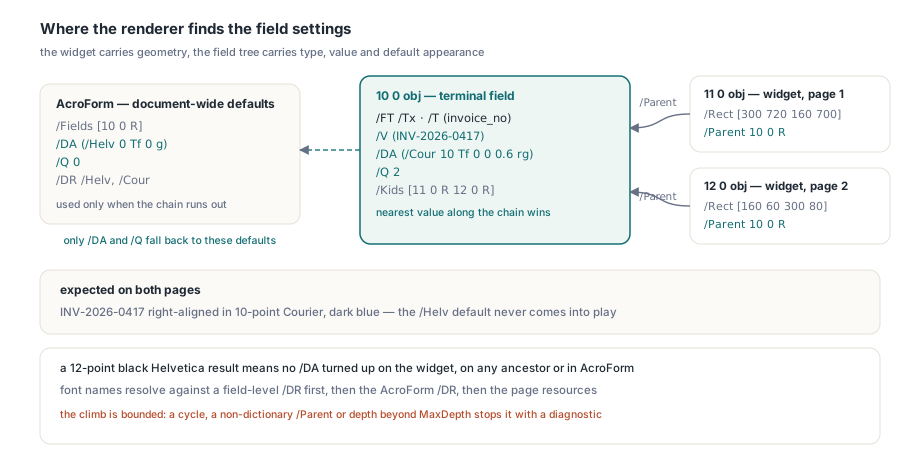
Font names from /DA resolve against a /DR on the widget or a parent field, the AcroForm /DR and the page's font resources, in that order. A field-level /DR is outside Table 222, but it is unambiguous when present, so HotPDF accepts it. The climb is bounded: a loop in the tree stops with "Widget field inheritance contains a cycle", a /Parent that is not a dictionary with "Widget Parent requires a dictionary", and a chain deeper than MaxDepth in the render options (32 by default) with "Widget field inheritance depth budget exceeded". The VCL component applies the same inheritance when it reads inherited AcroForm values and resets fields
How the headless renderer decides what to draw
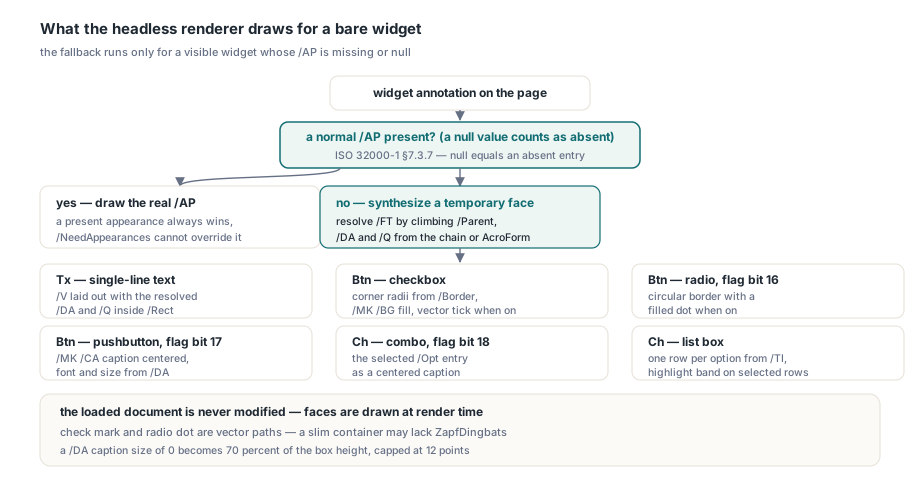
HPDFRenderHeadlessPagePNG and its file variant run the fallback only for a visible widget whose /AP is missing or null; ISO 32000-1 §7.3.7 says a null dictionary value is the same as an absent entry, and the renderer treats /AP null that way. A normal appearance that is present always wins, whatever /NeedAppearances says, so a stale appearance from an earlier fill keeps showing until something regenerates it. The loaded document is never modified. What gets drawn depends on the resolved field type and flags:
| Field | Synthesised appearance |
|---|---|
Single-line text, /FT /Tx | The string /V, laid out with the resolved /DA and /Q inside /Rect |
Checkbox, /FT /Btn | Rectangular border with corner radii from /Border, /MK /BG fill, and a stroked vector tick when on |
| Radio button, Btn with bit 16 | Circular border with a filled dot when on |
| Pushbutton, Btn with bit 17 | Rectangular border with the /MK /CA caption centred |
Combo box, /FT /Ch with bit 18 | The display text of the selected /Opt entry as a centred caption |
| List box, Ch with bit 18 clear | One row per option starting at /TI, with a highlight band behind every selected row |
The check mark and the radio dot are vector paths rather than ZapfDingbats glyphs, the way many generators draw them, because a slim Linux container may have no ZapfDingbats installed. Pushbutton and combo-box faces match what HotPDF's VCL appearance generator draws for the same field, so a form looks alike whichever side produced the image. A caption takes its font, size and colour from /DA; since caption layout does not auto-fit, a /DA size of 0 becomes 70 per cent of the box height, capped at 12 points. Checkbox and radio state comes from the widget's own /AS, falling back to the inherited /V, and any state other than Off draws the mark. Give every radio kid its own /AS. The parent's /V names the selected state for the whole group and cannot tell one kid from another
uses
  SysUtils, HPDFHeadlessDocument, HPDFHeadlessCairoDevice;

function RenderFormPage(const FileName, PngName: string; PageIndex: Integer;
  out Diagnostic: string): Boolean;
var
  Doc: THPDFHeadlessDocument;
  Options: THPDFHeadlessRenderOptions;
  Info: THPDFHeadlessRenderResult;
begin
  Result := False;
  Diagnostic := '';
  Doc := THPDFHeadlessDocument.Create;
  try
    Doc.LoadFromFile(FileName);
    Options := THPDFHeadlessRenderOptions.Default;  // RenderAnnotations = True, MaxDepth = 32
    Options.Usage := hruPrint;  // like a viewer print run: widgets without the Print flag are skipped
    try
      // PageIndex is zero-based
      Info := HPDFRenderHeadlessPagePNGFile(Doc.GetRenderAccess(PageIndex),
        PngName, Options);
      Diagnostic := Format('%d appearances drawn', [Info.Appearances]);
      Result := True;
    except
      on E: EHPDFHeadlessRenderError do
        // e.g. 'Widget field requires a name field type'; for a filled form, do not
        // retry with RenderAnnotations := False, which drops every widget and its value
        Diagnostic := E.Message;
    end;
  finally
    Doc.Free;
  end;
end;
The text-field fallback draws single-line fields that hold a string value. For any richer text layout, generate the appearance at fill time on the Windows side, where EnsureLoadedFieldAppearanceStream builds the missing /AP stream before the file is flattened or shipped; the Linux job then receives real appearance streams, and the headless renderer names any field it meets that still needs one. Judge Linux output by the Linux renderer, though. RenderLoadedPageToBitmap draws through the Windows GDI backend, which never runs this fallback, so a page that looks right there tells you nothing about what the Cairo device will produce from the same file
Field flag bits are numbered from one
ISO 32000-1 §12.7.3.1 states that bit positions in the /Ff word run from 1 at the low-order end to 32, and Tables 226, 228 and 230 all use that numbering. In Delphi, bit N is therefore 1 shl (N - 1). Shift by the bit number itself and every test moves one position up: 1 shl 16 written for "radio, bit 16" actually tests the pushbutton flag, and 1 shl 18 written for "combo, bit 18" tests Edit. Both wrong masks are real flags. The code compiles, runs, and sorts fields into the wrong kind
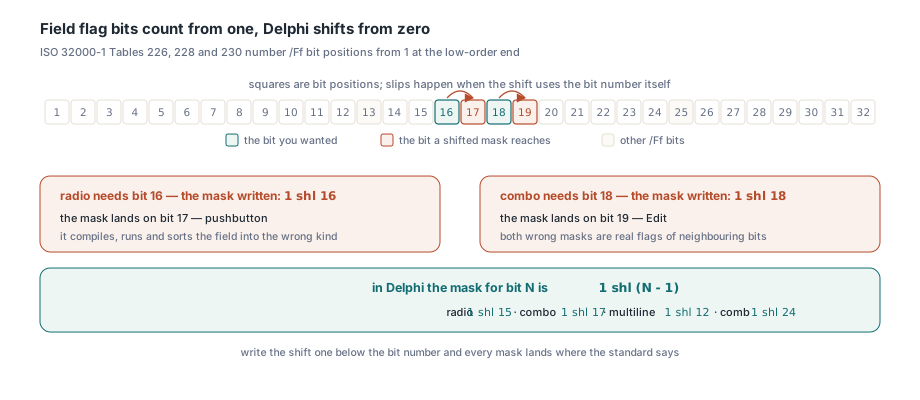
| Flag | Table | Bit | Delphi mask |
|---|---|---|---|
| Multiline | 228 (text) | 13 | 1 shl 12 = 4096 |
| Password | 228 (text) | 14 | 1 shl 13 = 8192 |
| Comb | 228 (text) | 25 | 1 shl 24 = 16777216 |
| RichText | 228 (text) | 26 | 1 shl 25 = 33554432 |
| Radio | 226 (button) | 16 | 1 shl 15 = 32768 |
| Pushbutton | 226 (button) | 17 | 1 shl 16 = 65536 |
| Combo | 230 (choice) | 18 | 1 shl 17 = 131072 |
uses
  Classes, SysUtils, HPDFHeadlessDocument;

const
  // ISO 32000-1 numbers Ff bits from 1 (low-order), so bit N is 1 shl (N - 1)
  TxMultiline   = 1 shl 12;  // bit 13
  TxPassword    = 1 shl 13;  // bit 14
  TxFileSelect  = 1 shl 20;  // bit 21
  TxDoNotScroll = 1 shl 23;  // bit 24
  TxComb        = 1 shl 24;  // bit 25
  TxRichText    = 1 shl 25;  // bit 26
  TxProducerLayout = TxMultiline or TxPassword or TxFileSelect or
    TxDoNotScroll or TxComb or TxRichText;

procedure ListTextFieldsForProducerAppearance(const FileName: string;
  Report: TStrings);
var
  Doc: THPDFHeadlessDocument;
  Field: THPDFHeadlessFormField;
  I: Integer;
begin
  Doc := THPDFHeadlessDocument.Create;
  try
    Doc.LoadFromFile(FileName);
    for I := 0 to Doc.FormFieldCount - 1 do
    begin
      // FieldType, Flags and MaxLength arrive already inherited from ancestors
      Field := Doc.GetFormField(I);
      if Field.FieldType <> 'Tx' then
        Continue;
      if (Field.Flags and TxProducerLayout) <> 0 then
        Report.Add(Format('%s: flags $%.8x, needs a producer /AP',
          [Field.Name, Field.Flags]))
      else if Field.MaxLength > 0 then
        Report.Add(Format('%s: /MaxLen %d, needs a producer /AP',
          [Field.Name, Field.MaxLength]))
      else if Field.Value = '' then
        Report.Add(Format('%s: blank, fill it or give it an /AP', [Field.Name]));
    end;
  finally
    Doc.Free;
  end;
end;
The scan reads field-level flags, which is where producers put them; the renderer also honours an /Ff on a separate widget, so treat the list as a planning aid and the render diagnostic as the final word. The blank check matters because a text field with no /V and no /AP has nothing to synthesise: the render stops with "A text-field widget without a value has no appearance to synthesize", and the cure is a value or an appearance before the file reaches the renderer
What "Degenerate appearance geometry" means
It means the rectangle or the appearance box has no area, and a reversed /Rect is not the cause. ISO 32000-1 §7.9.5 lets a rectangle name any two diagonally opposite corners, and its note tells processing software to be prepared to normalise them. A naive renderer that computes width as x2 - x1 gets a negative number from [300 720 160 700] and either rejects the annotation or mirrors its appearance. HotPDF swaps the coordinates into lower-left and upper-right order before any size check, for synthesised faces and existing /AP streams alike, so widget 11 above renders as if its corners were conventional. The error is raised only for an annotation that has an appearance stream when, after normalisation, the /Rect has zero width or height, or the stream's /BBox collapses to a line or a point under its /Matrix. When it appears, dump the widget's /Rect together with the stream's /BBox and /Matrix: one of the three has a zero extent
A widget with no /AP and a zero-area /Rect takes a different route: the fallback skips it and carries on with the page. ISO 32000-2 §12.5.2 exempts from the appearance requirement only Popup, Projection and Link annotations and a rectangle that collapses to a single point. A rectangle that is merely a line still owes an appearance under PDF 2.0; the renderer skips that one too, simply because there is no area to paint
When the field type cannot be found
"Widget field requires a name field type" means the renderer climbed from the widget as far as /Parent links went and found no /FT. The renderer starts from the page's /Annots array, so the upward /Parent link is its only route to the field. Loading walks the other way, down from the AcroForm /Fields array through /Kids, which is why LoadFromFile can succeed on a file whose page later fails to render. A typical cause is a widget listed in a field's /Kids that does not point back. ISO 32000-1 Table 188 gives some cover for that: it requires /Parent on a widget only when the widget is one of several children and says "absent otherwise", so a writer reading it literally drops the link for a field with one separate widget. ISO 32000-2 relaxed the same entry to "optional otherwise". We would write /Parent on every widget that is not merged with its field anyway. ISO 32000-2 allows it, and it is the only way a page-driven reader, ours or anyone else's, can reach the field. If you cannot fix the producer, merging a lone widget into its field dictionary gives the same result
A widget that links to its parent and finds a /DA somewhere on the way up renders correctly without any /AP in the HotPDF Delphi component's headless renderer, which makes the field tree, more than the appearance streams, the first thing to get right in a Linux form pipeline