HotPDF Component applies an FDF /Differences stream from Delphi through THPDFHeadlessDocument.SaveFDFDifferencesToFile: the method checks that the loaded PDF still matches a base revision you identify by exact byte length and SHA-256, appends the cumulative revision bytes exactly once, runs the result through encryption permission and DocMDP/FieldMDP admission, and publishes it atomically. Repeating the same submission is a byte-for-byte no-op
The workflow this exists for is unglamorous and common. You send a contract or an inspection form out as a PDF, somebody fills it in and signs it in their own viewer, and what comes back is not the PDF but an FDF file. Field values ride in /Fields, but the signed revision itself, the bytes the CMS signature actually covers, rides in /Differences. Get the merge wrong and you either break the signature or, worse, accept field values that no signature ever covered
What does an FDF /Differences stream actually carry?
An FDF /Differences stream carries raw incremental-update bytes for the target PDF, not an FDF-level history. ISO 32000-1 §12.7.7.3, Table 243 defines the Differences entry of the FDF dictionary as the incremental changes to the underlying PDF made since it was opened, in the same form as a PDF incremental update under §7.5.6: new and replaced objects, a cross-reference section and a trailer whose /Prev points back into the base file
The FDF container itself is the opposite. §12.7.7.1 forbids incremental updates to FDF files, so an FDF has a single trailer, only generation 0 objects and unique object numbers. HotPDF Component enforces exactly that in its FDF parser and never relaxes it to make /Differences easier. The incremental data lives inside one stream of a strictly non-incremental container, and keeping those two layers apart is half the job
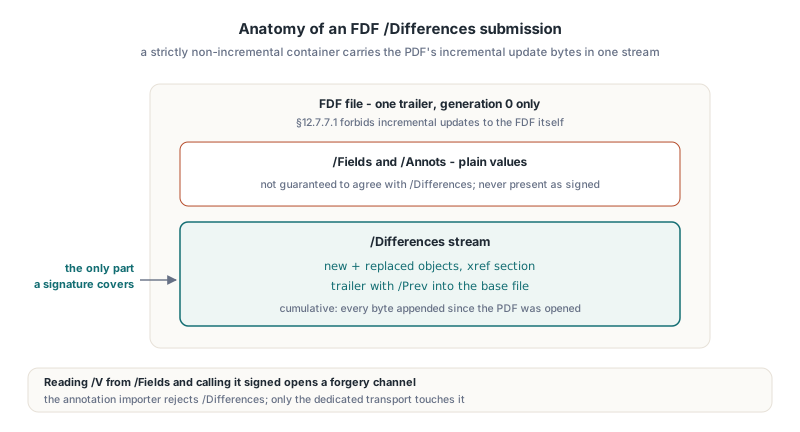
Two properties of the stream shape every design decision downstream:
- The stream is cumulative: it holds every byte appended since the target PDF was opened, so a second submission from the same session repeats the revision you already committed and adds the new one behind it
- The outer
/Fieldsand/Annotsentries of the same FDF are not guaranteed to agree with/Differences, so the field values you can read easily are not the data the signature covers
That second point deserves bluntness. If your import code reads /V from /Fields and treats the result as signed because a signature arrived in the same file, you have built a forgery channel. HotPDF Component keeps the paths separate on purpose: the FDF annotation importer rejects /Differences outright, and only the dedicated Differences transport touches it
Binding the append to an explicit base revision
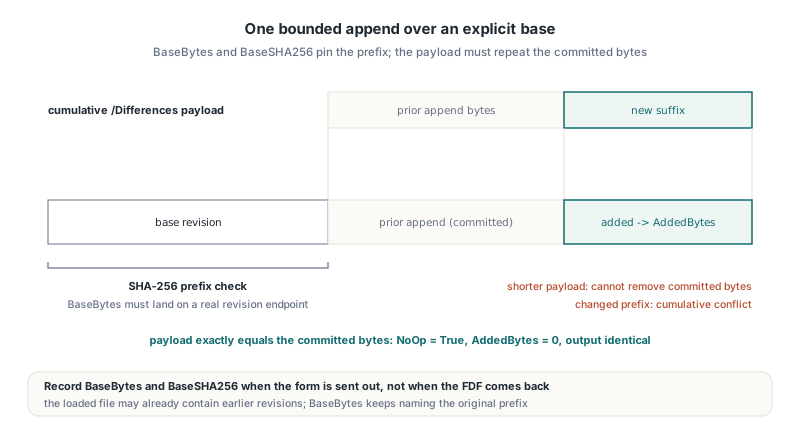
SaveFDFDifferencesToFile refuses to guess which revision the FDF belongs to. The caller passes BaseBytes, the exact length of the complete PDF revision the form was opened from, and BaseSHA256, its 64-digit hexadecimal SHA-256. The method rehashes that prefix of the loaded document, rejects a mismatch with "The loaded PDF does not match the explicitly selected base", and checks that the prefix ends at a real revision endpoint whose startxref points at its actual cross-reference data
The practical rule is to record both numbers when you send the form out, not when the FDF comes back. A small helper over the SHA256Init / SHA256Update / SHA256Final routines in HPDFCrypt is enough:
uses
  SysUtils, Classes, HPDFCrypt;

function PrefixSHA256Hex(const FileName: string; PrefixBytes: Int64): AnsiString;
var
  Stream: TFileStream;
  Ctx: TSHA256Context;
  Digest: TSHA256Digest;
  Buffer: array[0..65535] of Byte;
  Remaining: Int64;
  Count, I: Integer;
begin
  Stream := TFileStream.Create(FileName, fmOpenRead or fmShareDenyWrite);
  try
    if (PrefixBytes <= 0) or (PrefixBytes > Stream.Size) then
      raise EArgumentException.Create('Base length is outside the file');
    SHA256Init(Ctx);
    Remaining := PrefixBytes;
    while Remaining > 0 do
    begin
      Count := SizeOf(Buffer);
      if Remaining < Count then
        Count := Integer(Remaining);
      Stream.ReadBuffer(Buffer, Count);
      SHA256Update(Ctx, Buffer, Count);
      Dec(Remaining, Count);
    end;
    SHA256Final(Ctx, Digest);
  finally
    Stream.Free;
  end;
  Result := '';
  for I := 0 to High(Digest) do
    Result := Result + AnsiString(LowerCase(IntToHex(Digest[I], 2)));
end;

// At send time: the whole outgoing file is the base revision
// BaseLength := size of 'out\contract-0042.pdf' in bytes
// BaseHash   := PrefixSHA256Hex('out\contract-0042.pdf', BaseLength);
The loaded document does not have to be exactly the base. It may be the base plus revisions you already committed from earlier submissions, which is how the cumulative stream stays manageable: BaseBytes keeps naming the original prefix, and everything after it is treated as prior append bytes
Applying the Differences with SaveFDFDifferencesToFile
THPDFHeadlessDocument.SaveFDFDifferencesToFile takes the output file name, the FDF bytes, the base length and hash, an optional embedded-FDF selection and a THPDFFDFPackageOptions limit record, and returns a THPDFHeadlessFDFDifferencesResult. Inside, it opens the FDF as a THPDFFDFPackage and calls DecodeDifferences itself, so you pass the FDF file, not a pre-decoded stream. An empty Selection means the top-level FDF; a non-empty one walks into an embedded child FDF first
uses
  SysUtils, IOUtils, HPDFHeadlessDocument, HPDFHeadlessCMS, HPDFFDFPackage;

procedure CommitReturnedForm(const CurrentPdf, NextPdf, FdfFile: string;
  BaseLength: Int64; const BaseHash: AnsiString);
var
  Doc: THPDFHeadlessDocument;
  Policy: THPDFHeadlessCMSOptions;
  Selection: THPDFFDFChildSelections;
  Applied: THPDFHeadlessFDFDifferencesResult;
begin
  Doc := THPDFHeadlessDocument.Create;
  try
    Policy := THPDFHeadlessCMSOptions.Default;
    Policy.TrustedCAFile := 'trust\issuing-ca.pem';
    Doc.SetSignaturePolicyOptions(Policy);
    Doc.LoadFromFile(CurrentPdf);

    Selection := nil;  // top-level FDF, no embedded child
    Applied := Doc.SaveFDFDifferencesToFile(NextPdf,
      TFile.ReadAllBytes(FdfFile), BaseLength, BaseHash,
      Selection, THPDFFDFPackageOptions.Default);

    Writeln(Format('base %d, prior %d, total %d, added %d, no-op %s',
      [Applied.BaseBytes, Applied.PriorAppendBytes, Applied.TotalAppendBytes,
       Applied.AddedBytes, BoolToStr(Applied.NoOp, True)]));
  finally
    Doc.Free;
  end;
end;
The order of checks matters more than the call itself. After the base hash passes, the method compares the already committed append bytes, everything between BaseBytes and the end of the loaded file, against the start of the decoded payload. A submission that is shorter than what you already committed fails with "A cumulative submission cannot remove committed append bytes", and one that disagrees with it fails with "The cumulative Differences conflict with the committed revision". Only the remaining suffix is new, and only that suffix ends up in AddedBytes
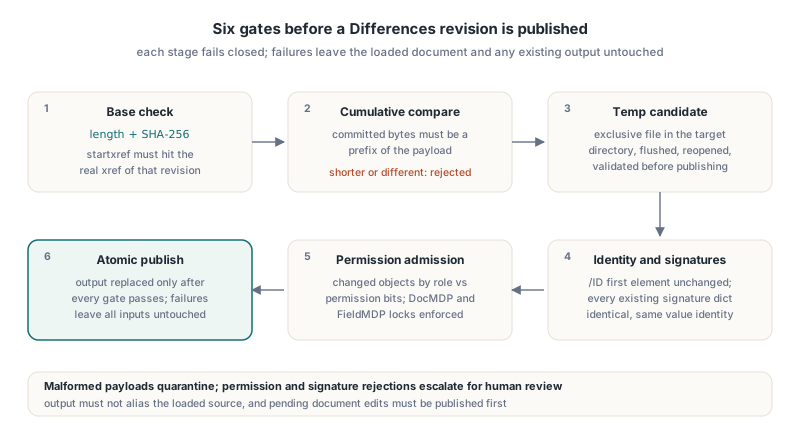
The assembled candidate is written to an exclusive temporary file in the target directory, flushed, reopened as an independent revision source, and validated before it replaces the output. Parsing, cancellation, policy, budget or publication failures leave both the loaded document and any existing output file untouched. Two preconditions catch people early: the output must not alias the loaded source, and the document must have no unsaved edits, because an opaque append would silently discard them ("Publish pending document edits before applying Differences")
Why is a repeated apply a byte-for-byte no-op?
A repeated apply of the same cumulative FDF is a no-op because every byte of its payload is already in the file. When the payload equals the prior append bytes exactly, SaveFDFDifferencesToFile reports NoOp = True and AddedBytes = 0, and the output it publishes is identical to the current PDF. That is a stronger guarantee than "append-only", and it is what makes retries after a network timeout or a crashed worker safe
// Rev 1 already committed into contract-0042-r1.pdf; the same FDF arrives twice
// (Doc, Again, Fdf, Selection, BaseLength and BaseHash declared as above)
Doc := THPDFHeadlessDocument.Create;
try
  Doc.LoadFromFile('store\contract-0042-r1.pdf');
  Again := Doc.SaveFDFDifferencesToFile('store\contract-0042-r1-retry.pdf',
    Fdf, BaseLength, BaseHash, Selection, THPDFFDFPackageOptions.Default);
  // Again.NoOp = True, Again.AddedBytes = 0,
  // and the retry file is byte-identical to contract-0042-r1.pdf
finally
  Doc.Free;
end;
Write your acceptance tests to match. Assert full byte equality between the retry output and the current revision, not merely that the file did not shrink. A test that only checks append-only behaviour will happily pass an implementation that appends the same revision a second time, which produces a valid-looking PDF with a duplicated update section that a later DocMDP audit has to explain
What admission checks run before the revision is published?
Before publication the candidate PDF has to pass identity, signature and permission checks, and none of them trust the outer FDF fields. The first element of the trailer /ID must survive unchanged, and every signature field already present in the loaded document must still exist with an identical signature dictionary and the same signature value identity. A Differences payload that drops, replaces or rewrites an existing signature fails with hdSignatureModificationUnsupported
Next come the authorisation layers. For a non-empty append on an encrypted document, the changed objects are classified by role (catalogue and pages, annotations, AcroForm fields, appearance streams) and checked against the authenticated user permission bits, so a revision that edits annotations needs the annotation permission, and so on. Then the candidate goes through the same certification and field-lock enforcement HotPDF Component uses elsewhere: a DocMDP certification signature (ISO 32000-1 §12.8.2.2) limits which kinds of change later revisions may make, and FieldMDP locks (§12.8.2.4) protect named fields. The DocMDP and FieldMDP revision analysis in HotPDF covers how those permissions are classified per revision
Error handling should separate "this FDF is malformed" from "this revision is not allowed", because the second case usually needs a human:
try
  Applied := Doc.SaveFDFDifferencesToFile(NextPdf, Fdf, BaseLength, BaseHash,
    Selection, THPDFFDFPackageOptions.Default);
except
  on E: EHPDFFDFPackageError do
    QuarantineFdf(FdfFile, 'No usable Differences stream: ' + E.Message);
  on E: EHPDFHeadlessDocumentError do
    case E.Code of
      hdPermissionDenied, hdSignatureModificationUnsupported:
        EscalateForReview(FdfFile, E.Message);
      hdLimitExceeded:
        QuarantineFdf(FdfFile, 'Over budget: ' + E.Message);
    else
      QuarantineFdf(FdfFile, E.Message);  // base mismatch, conflict, bad endpoint
    end;
end;
What the operation never does is as important as what it checks. SaveFDFDifferencesToFile never fetches the FDF /F file specification, so the PDF named inside the FDF cannot redirect the merge to some other file on disk or the network, and it never executes JavaScript or actions. Every input arrives explicitly: the loaded base, the FDF bytes and the trust material you configured
Windows transactions and the C ABI fdf.differences.apply
The same transport is available without writing headless code directly. THPDFWindowsFormDataTransaction.ApplyFDFDifferences takes the FDF bytes, base length, base SHA-256, selection, package options and a password, delegates to SaveFDFDifferencesToFile, and adds the transaction's byte accounting, rollback, cancellation and same-handle retry behaviour. For non-Delphi callers the C ABI exposes the JSON operation fdf.differences.apply, where base carries the length and hash:
{ "schemaVersion": 1, "type": "fdf.differences.apply", "format": "fdf",
  "base": { "bytes": 673, "sha256": "..." },
  "signaturePolicy": { "trustedCAPEM": "..." } }
The JSON reply reports baseBytes, priorAppendBytes, totalAppendBytes, addedBytes and noop, the same fields as THPDFHeadlessFDFDifferencesResult. The published acceptance gates for this transport run on Linux FPC 3.3.1, Windows Delphi 32-bit and 64-bit and Windows FPC 32-bit and 64-bit; each security target covers 21 cases with 1,244 native checks and 382 callback commands
Limits and fixture traps worth knowing
The Differences transport is deliberately narrow, and a few of its edges have bitten real test suites:
- The base must be a complete PDF revision. A length that lands mid-file, or whose
startxrefdoes not point at its actual cross-reference data, is rejected before any byte is copied - Signature fixtures need an indirect
/Lock. The Windows loaded-document permission reader rejects a signature field whose/Lockis an inline dictionary with "Signature field /Lock must be an indirect reference", even though some signing paths tolerate the inline form, so write the lock dictionary as its own object - A test CA made with a bare
openssl req -x509lacksCA:TRUEandkeyCertSign, so chain validation fails with a certificate verify error that looks like a library bug and is not - The outer
/Fieldsvalues are not merged by this call. If you also want them in the document, decide explicitly whether they are informational, and never present them as signed - The FDF itself stays non-incremental. An FDF file with multiple trailers, nonzero generations or duplicate object numbers is a malformed FDF, not a richer one
For the plain value side of FDF and XFDF, without signed revisions in the picture, the multi-select FDF and XFDF round trip in HotPDF and XFDF annotation import and export in Delphi are the better starting points
FAQ
Can I pass the decoded Differences stream instead of the FDF file?
No. SaveFDFDifferencesToFile parses the FDF you pass as a THPDFFDFPackage, applies the optional embedded selection and calls DecodeDifferences internally. Use THPDFFDFPackage.DecodeDifferences on its own when you want to inspect or archive the raw revision bytes, but hand the FDF file to the apply call
What happens when the client sends a second, larger cumulative FDF?
Load the PDF that already contains the first committed revision and keep the same BaseBytes and BaseSHA256. The method verifies that the new payload starts with exactly the bytes already committed, appends only the new suffix and reports it in AddedBytes, then runs the full permission and DocMDP/FieldMDP admission on the result
Does a successful apply mean the field values in /Fields are signed?
No. ISO 32000-1 does not require /Fields, /Annots and /Differences in one FDF to agree, and HotPDF Component does not reconcile them. What is signed is whatever the CMS signatures in the appended revision cover, so read signed values from the merged PDF, not from the FDF wrapper
The FDF Differences transport, the headless signature policy engine and the Windows form-data transactions all ship in HotPDF Component for Delphi, C++Builder and Free Pascal