HotPDF fills dynamic XFA forms in Delphi through TXFAWidgetRuntime, a host-neutral widget layer that treats every field edit as one transaction: snapshot, validate, calculate, reflow, then publish or roll back whole. It runs single-threaded inside your own VCL or FMX host, needs no Acrobat installed, and enforces every budget before it allocates anything
The scenario is familiar to anyone who has shipped document software into government or insurance work. A claims form or a tax return arrives as a PDF whose page content is a single "Please wait... if this message is not eventually replaced" notice, and every real field lives in an XFA packet that only Adobe Acrobat renders. Your users want to fill it inside your application. You cannot rasterise your way out either, because the form grows rows as data is entered, and the layout after the third row is not the layout that shipped in the file
Why dynamic XFA is still a problem worth solving
Dynamic XFA persists because deployed forms outlive the format that carried them. ISO 32000-1 §12.7.8 describes XFA as an /XFA entry on the AcroForm dictionary holding an XDP packet stream, and ISO 32000-2 deprecates the whole mechanism; deprecation removed it from the roadmap, not from the field, and forms authored against the XFA 3.3 specification are still issued and still legally binding. Static XFA can be reduced to ordinary widget annotations, and HotPDF does that when you call ApplyXFAAsAcroForm, with the trade-offs covered in flattening XFA forms into AcroForm fields. Dynamic XFA is a different animal: its occur ranges, growable text and calculate scripts make the field set a function of the data, so there is no fixed annotation list to flatten to until the user has finished typing. That is the gap TXFAWidgetRuntime fills, by keeping the XFA DOM live, recomputing layout after each accepted edit, and handing your host a flat array of positioned widgets to draw and hit-test
What does the runtime hand a host application?
It hands you geometry and state, and nothing that assumes a UI toolkit. TXFAWidgetRuntime exposes WidgetCount and Widgets[I] as TXFAWidgetState records carrying ID, Name, Kind, PageIndex, Bounds in PDF points, Value, EditValue and the Focused, Editing, ReadOnly, Valid flags, while painting, caret drawing and keyboard routing stay in your code. Widget identity is stable and ordinal: each widget gets an ID of the form name[n], where n counts prior occurrences of that field name in layout order, so the second row of a repeating subform is amount[1]. That identity is what survives a rebuild, and it is what FocusWidget, BeginEdit, DispatchEvent and HitTest all speak. For a document already open in a THotPDF instance, CreateLoadedXFAWidgetRuntime extracts the XDP packets, takes the first page box as the layout page size, and returns nil when the file carries no XFA at all
var
  Pdf: THotPDF;
  Runtime: TXFAWidgetRuntime;
  WidgetID: AnsiString;
  I: Integer;
begin
  Pdf := THotPDF.Create(nil);
  try
    Pdf.LoadFromFile('claim-dynamic.pdf');
    Runtime := Pdf.CreateLoadedXFAWidgetRuntime;   // nil when there is no /XFA
    if Runtime = nil then
      Exit;
    try
      for I := 0 to Runtime.WidgetCount - 1 do
        Memo1.Lines.Add(Format('%s p%d [%.1f %.1f %.1f %.1f] = %s',
          [string(Runtime.Widgets[I].ID), Runtime.Widgets[I].PageIndex,
           Runtime.Widgets[I].Bounds.Left, Runtime.Widgets[I].Bounds.Top,
           Runtime.Widgets[I].Bounds.Right, Runtime.Widgets[I].Bounds.Bottom,
           string(Runtime.Widgets[I].Value)]));
      // page-space hit test, topmost widget wins
      if Runtime.HitTest(0, 120.0, 96.0, WidgetID) then
        Runtime.BeginEdit(WidgetID);
    finally
      Runtime.Free;
    end;
  finally
    Pdf.Free;
  end;
end;
What has to be atomic when a field is committed?
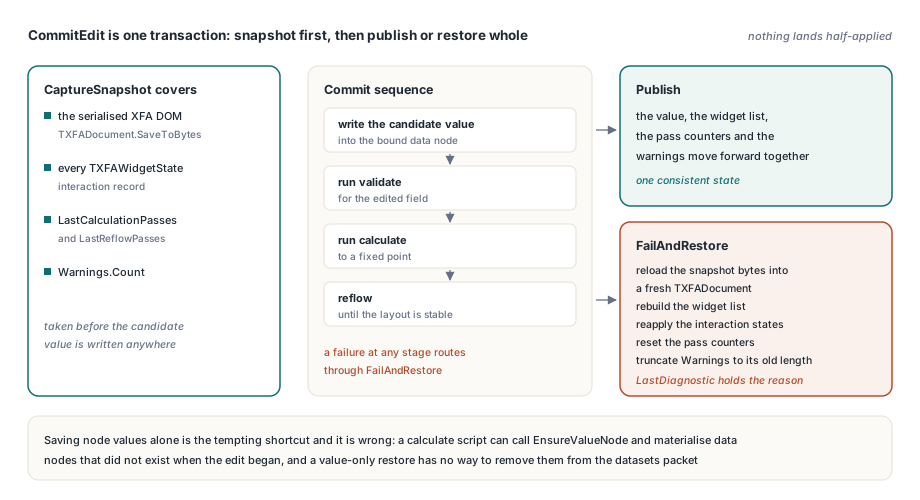
Everything the edit can touch, which is considerably more than the field value. CommitEdit calls CaptureSnapshot before it writes anything, and that snapshot covers four things: the serialised XFA DOM from TXFADocument.SaveToBytes, the full array of TXFAWidgetState interaction records, the LastCalculationPasses and LastReflowPasses counters, and the current Warnings.Count. Saving node values alone is the tempting shortcut and it is wrong, because a calculate script or an unresolved binding can call EnsureValueNode and materialise data nodes that did not exist when the edit began; a value-only restore has no way to remove them, so a rejected edit would leave permanent structural residue in the datasets packet. The commit sequence itself is strict — write the candidate value, run validate for the edited field, run calculate to a fixed point, then reflow until layout is stable — and any failure at any stage routes through FailAndRestore, which reloads the snapshot bytes into a fresh TXFADocument, rebuilds the widget list, reapplies the recorded interaction states, resets the counters and truncates Warnings back to its snapshot length. LastDiagnostic holds the reason on failure, and holds the literal XFA transaction rollback failed in the pathological case where the restore itself raises
function EditAmount(Runtime: TXFAWidgetRuntime;
  const AWidgetID: AnsiString; const AText: UnicodeString): Boolean;
var
  Current: UnicodeString;
begin
  Result := False;
  if not Runtime.BeginEdit(AWidgetID) then
    Exit;                                   // read-only, or no such widget
  Current := Runtime.Widgets[Runtime.FocusedIndex].EditValue;
  if not Runtime.ReplaceSelection(0, Length(Current), AText) then
  begin
    Runtime.CancelEdit;                     // bad range, or split surrogate
    Exit;
  end;
  Result := Runtime.CommitEdit;             // all-or-nothing
  if not Result then
    // document, widgets, counters and warnings are already back to the
    // pre-edit state; the focused widget is simply marked invalid
    ShowMessage(Runtime.LastDiagnostic);
end;
ReplaceSelection deserves a note of its own, because it is where malformed input is cheapest to reject. It refuses a selection that splits a UTF-16 surrogate pair, refuses replacement text containing an unpaired high or low surrogate, and refuses any result longer than MaxValueChars. Catching that at the keystroke layer means the transaction machinery never has to unwind a half-written astral-plane character
Rebuild into a private list, publish in one swap
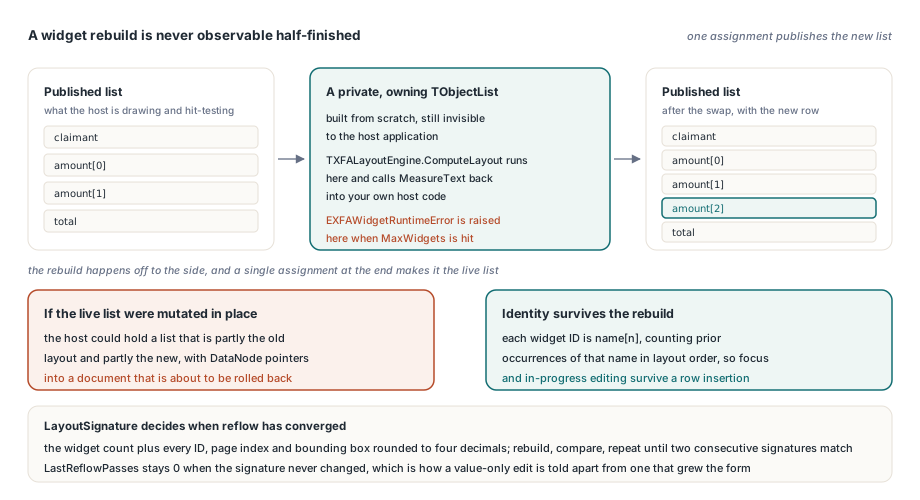
A widget rebuild must never be observable half-finished, so RebuildWidgets builds a completely separate owning TObjectList and swaps it into place with a single assignment at the end. The reason is not aesthetics: TXFALayoutEngine.ComputeLayout runs while the rebuild is in flight and calls back into host code through the MeasureText function you supplied, and it can raise EXFAWidgetRuntimeError when the widget limit is hit. If the runtime mutated its live list in place, either path would leave the host holding a list that is partly the old layout and partly the new, with DataNode pointers into a document that is about to be rolled back. Reflow convergence is then decided by LayoutSignature, a string built from the widget count plus every ID, page index and bounding box rounded to four decimals: CommitEdit rebuilds, compares signatures, and repeats until two consecutive signatures match or the pass budget is exhausted. When the signature never changed at all, LastReflowPasses stays 0, which is how you tell a value-only edit from one that actually grew the form, and interaction state is carried across each rebuild by widget ID, so focus and in-progress editing survive a row insertion
Why would a bound field read the wrong record?
Because the script ran without a data context. A field carrying an explicit <bind match="dataRef" ref="$record.actual"/> and a field named after that same data node are two different widgets pointed at one value, and a repeating subform with <occur max="2"/> produces several widgets that share a name and differ only in which data row they belong to; evaluate validation and calculation against the document root and every one of them resolves this to the first matching node in the whole datasets packet, so row two silently validates row one. HotPDF avoids that by storing the resolved DataNode on each widget entry when layout produces it, then threading that node through both HPDFXFAEvaluateFieldScript calls, for xfskValidate and xfskCalculate alike. The same context decides which node EnsureValueNode creates against when a calculation targets a binding that does not exist yet, and when no binding can be resolved the commit fails cleanly with XFA calculation target is not bound rather than writing into the wrong row. The FormCalc semantics behind those scripts echo what AcroForm documents get from the actions described in AcroForm format and calculate scripts, but the resolution rules here are XFA scoped rather than field-name scoped
Budgets are checked before side effects, not after
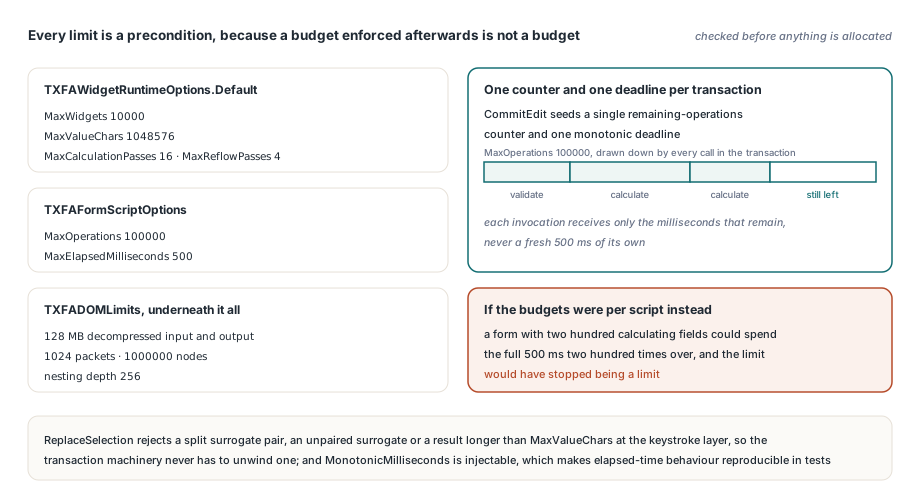
Every limit in the runtime is a precondition, because a budget enforced after the allocation already happened is not a budget. TXFAWidgetRuntimeOptions.Default ships MaxWidgets at 10000, MaxValueChars at 1048576, MaxCalculationPasses at 16 and MaxReflowPasses at 4, and the default TXFAFormScriptOptions carry MaxOperations at 100000 with MaxElapsedMilliseconds at 500. Underneath, the XFA DOM applies its own TXFADOMLimits: 128 MB caps on decompressed input and output, at most 1024 packets stitched together, 1000000 nodes, and a nesting depth of 256. Two details matter more than the numbers themselves. First, the script budgets are transaction-wide rather than per script: CommitEdit seeds a single remaining-operations counter and one monotonic deadline, and every validate and calculate invocation draws down that same counter and receives only the milliseconds still left, so a form with two hundred calculating fields cannot spend the full 500 ms two hundred times over. Second, the deadline comes from an injectable MonotonicMilliseconds function, which is what makes elapsed-time behaviour reproducible in a test suite instead of a coin flip on a busy build agent
var
  Options: TXFAWidgetRuntimeOptions;
  Runtime: TXFAWidgetRuntime;
begin
  Options := TXFAWidgetRuntimeOptions.Default;
  Options.MaxWidgets := 2000;                              // default 10000
  Options.MaxCalculationPasses := 8;                       // default 16
  Options.MaxReflowPasses := 2;                            // default 4
  Options.ScriptOptions.Limits.MaxOperations := 20000;     // whole transaction
  Options.ScriptOptions.Limits.MaxElapsedMilliseconds := 200;
  Options.MeasureText :=
    function(const AText: UnicodeString; const AFont: TXFAFontSpec;
      AMaxWidth: Double): TXFATextExtent
    begin
      Result := MeasureWithHostCanvas(AText, AFont, AMaxWidth);
    end;
  Runtime := TXFAWidgetRuntime.Create(XDPBytes, 612, 792, Options);
  try
    Runtime.OnLayoutChanged :=
      procedure
      begin
        RepaintAllPages;   // fired only when reflow actually moved widgets
      end;
    // ... drive the form ...
  finally
    Runtime.Free;
  end;
end;
Where the runtime stops, and why it says so out loud
The runtime is deliberately not a general XFA scripting engine. DispatchEvent handles the enter and exit activities natively by moving focus, and for every other activity carrying a script it refuses with a specific, stable diagnostic instead of pretending: scripts mentioning addInstance, removeInstance or instanceManager return XFA runtime does not support event-driven instance mutation, scripts touching .presence return the presence equivalent, and anything else returns XFA runtime does not support this event script. A predictable refusal you can branch on beats a partial emulation that works on your sample file and diverges on the customer's
The threading model is equally blunt: one runtime instance belongs to one thread, with no internal locking, because the layout engine reaches back into host measurement callbacks and a lock around that is a deadlock waiting for a repaint. Rich content inside fields follows the same conservative line as elsewhere in the library, where exData payloads are handled as described in XFA exData rich text and hyperlinks, and signature and button widgets come back as ReadOnly while unsupported UI kinds surface as xwkUnsupported rather than as an editable text box that quietly loses data
Put together, that is a workable answer to dynamic XFA in Delphi: keep the DOM live, make each edit a transaction that either lands completely or leaves nothing behind, bound every pass, and be explicit about what is out of scope. If you are evaluating this for a claims, tax or benefits workflow, the XFA runtime ships as part of the HotPDF Delphi PDF component, alongside the AcroForm, flattening and rendering paths those projects usually end up needing together