HotPDF can save a loaded document in a diagnostic form designed to be read and edited by a human, and then repair the file after you have edited it. SaveLoadedDocumentDiagnostic writes the document with deterministic dictionary ordering, every object as a normal indirect object, no object streams, no cross-reference stream and no linearisation. RepairDiagnosticDocument then rebuilds the byte offsets, stream lengths, cross-reference table and trailer that your edit invalidated
This pair exists for one workflow: understanding or fixing what is actually inside a PDF. Every developer who has debugged a rendering problem has wanted to open the file, change one number in one dictionary, and look at the result. In a normal PDF that is impossible, because the content is compressed into object streams and every byte you insert shifts offsets that a cross-reference table records exactly
What makes a diagnostic save different?
Six settings change together. Dictionary keys are written in deterministic order, so two saves of the same document produce comparable files. Diagnostic output mode annotates the structure. Full rewrite is forced, so nothing is carried over as an untouched incremental revision. Linearisation is off, since a linearised file is organised for a web viewer rather than for a reader. Cross-reference streams are off, so the table is plain text. And object streams are off, so no object is hidden inside a compressed container
The result is a file whose header carries a diagnostic marker alongside the usual %PDF- signature, and whose body you can page through in any editor. Objects appear one after another, dictionaries are legible, and content streams sit where you can find them. The repair tool checks for that marker and refuses files that lack it, because a normal PDF's compact structure is not something a byte-range repairer should attempt to interpret

uses
  HPDFDoc;

var
  Pdf: THotPDF;
begin
  Pdf := THotPDF.Create(nil);
  try
    if Pdf.LoadFromFile('invoice.pdf') <= 0 then
      Exit;
    // Readable, one object per block, nothing hidden in object streams
    Pdf.SaveLoadedDocumentDiagnostic('invoice-diagnostic.pdf');
  finally
    Pdf.Free;
  end;
end;
Why does editing break the file, and what has to be rebuilt?
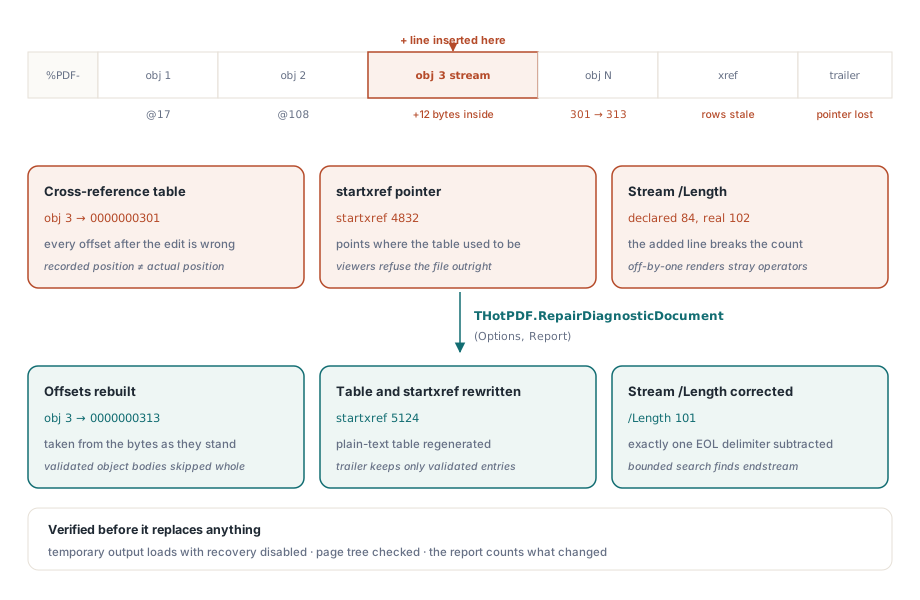
Three things in a PDF encode byte positions or byte counts. The cross-reference table maps every object number to a byte offset. The startxref value at the end of the file points at the table. And every stream dictionary carries a /Length saying how many bytes the stream body occupies
Change one character anywhere before the end of the file and the offsets after it are wrong. Add a line to a content stream and its /Length is wrong too. Most viewers will refuse the file, and the ones that recover it do so by scanning, which hides the mistake rather than fixing it. Repair rebuilds all three from what the bytes now actually say
var
  Options: THPDFDiagnosticRepairOptions;
  Report: THPDFDiagnosticRepairReport;
begin
  Options := THPDFDiagnosticRepairOptions.Default;
  Options.VerifyOutput := True;         // load the result before replacing

  if THotPDF.RepairDiagnosticDocument('invoice-diagnostic.pdf',
       'invoice-fixed.pdf', Options, Report) then
    Writeln(Format('%d objects, %d streams, %d lengths corrected, ' +
      '%d xref rows rebuilt, %d pages verified',
      [Report.ObjectCount, Report.StreamCount,
       Report.RepairedStreamLengthCount, Report.RebuiltXRefEntryCount,
       Report.VerifiedPageCount]))
  else
    Writeln(Format('repair failed (%d): %s',
      [Ord(Report.Status), string(Report.Diagnostic)]));
end;
Copy bytes, do not reserialise
The design decision that makes this tool trustworthy is that it never loads the document and writes it back out. It copies the byte ranges of objects it has validated, changes only the /Length values that are wrong, and rebuilds the table, trailer and startxref around them
Loading and reserialising would be far easier to implement and would quietly change things. Unknown object syntax would be normalised, string escapes would be rewritten in the writer's preferred form, and already-encoded stream payloads could be re-encoded. For a debugging tool that is unacceptable: you edited one number, and the diff should show one number, not a thousand incidental formatting changes. If you want to know exactly what changed between two files, that is a comparison problem, covered in comparing two PDF files by structure and pixels

The two parsing rules that prevent false objects
A byte-range scanner faces an obvious trap: text that looks like an object header can appear inside a stream payload or inside a string. A naive scan would emit a cross-reference row pointing into the middle of a content stream, and the resulting file would be broken in a new and more confusing way
HotPDF avoids this by skipping the entire byte range of each validated object, using its recorded end offset, so nothing inside an object body is ever considered a candidate. Between objects, only PDF whitespace and comments are permitted; anything else means the region is not understood and its bytes must not be pulled into the output
Stream lengths need equal care. The real payload length excludes the end-of-line delimiter that a writer inserts before endstream. When the declared length lands exactly on the marker, that declaration is accepted. When it does not, the repairer performs a bounded search for the endstream and endobj pair and subtracts exactly one delimiter, a CR, an LF or a CRLF. Getting this wrong by one byte produces a file that opens and renders a page with one stray operator at the end of its content stream
What the trailer is allowed to keep
The rebuilt trailer is not a copy of the old one. /Size, /Prev and /XRefStm all describe the previous file layout and are recomputed or dropped. Only entries whose targets have been validated survive: /Info, /ID and /Encrypt. And /Root must resolve to exactly one Catalog object — not zero, and not several, which is what a file assembled by copy-pasting object blocks tends to produce
Output safety is handled the way it should be for a tool that runs against files people care about. The result is written to a temporary file in the target directory, then verified by loading it through the normal path with cross-reference recovery disabled, so a file that only opens thanks to recovery counts as a failure. Only after the page tree verifies does the temporary file atomically replace the target. A failed repair never overwrites an existing output
Budgets and honest failure codes
Three limits bound the work: input bytes, candidate object count and maximum object number, defaulting to 8 GiB, two million and two million. The object-number ceiling matters more than it looks, because a sparse table with a few objects numbered in the billions would otherwise inflate the rebuilt cross-reference table enormously. Classic cross-reference tables also reject offsets that would need more than ten decimal digits, which is a format limit rather than an implementation choice
Failures report a specific status rather than a boolean: arguments invalid, source too large, not a diagnostic file, object limit exceeded, invalid object, duplicate object, missing catalog, invalid trailer, output error, or validation failed. Each maps to a different fix. A duplicate object means you pasted an object block twice. A missing catalog usually means the object holding /Type /Catalog was damaged. Validation failed means the structure is now consistent but the page tree does not load, which is typically a /Kids array edited out of step with its /Count
Two practical notes close the loop. Keep the diagnostic file, not just the repaired one, so the next edit starts from a readable base. And do not ship diagnostic output to end users: it is larger than a normal save because nothing is compressed into object streams, and the production route for a compact file is the ordinary save path described in object streams and incremental updates. When the goal is to find what is wrong rather than to change it, the automated route in preflight report automation answers faster than reading bytes
Diagnostic saving, repair, preflight and comparison all operate on the same loaded document model in Delphi and C++Builder; the complete feature list is on the HotPDF Delphi PDF component page