A CMYK JPEG that comes out of a PDF with muddy, shifted, or negative colours almost always means the decoder got one of two facts wrong: whether the samples were stored as YCCK and need converting, or whether they were stored inverted by Adobe convention. HotPDF's decoders honour the DCTDecode /ColorTransform parameter for three- and four-channel images, reject values the spec does not define, and let an Adobe APP14 marker inside the JPEG data take precedence over that dictionary entry, as ISO 32000-1 Table 13 requires. Two neighbouring rules belong to the same family of traps: multi-filter streams must carry stage-aligned /DecodeParms arrays, and JPEG 2000 images keep an explicit /Decode mapping
All three share a theme. The PDF already says what it means, and the trap is a renderer that answers a slightly different question
Why does a CMYK JPEG render inverted or washed out in a PDF?
A CMYK JPEG goes wrong in a PDF for one of two reasons, and they look different on screen. A negative image, where white paper turns black and light tints go dark, points at inverted storage. A washed-out or hue-shifted image, where skin turns green and blacks go grey while the K detail stays sharp, points at a colour transform applied when it should not have been, or skipped when it was required
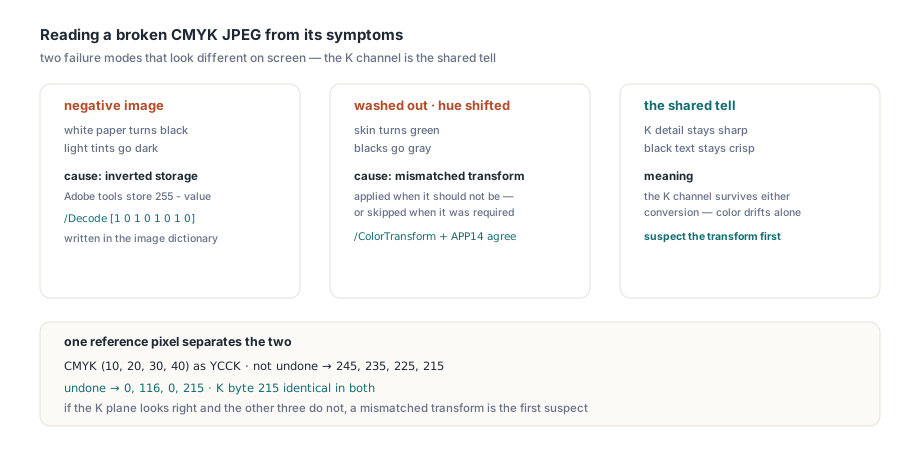
The transform problem comes from how JPEG compresses colour. Baseline JPEG compresses best when luminance is separated from chrominance, so encoders usually convert RGB to YCbCr before compression, and four-channel encoders convert CMY to YCC while passing K through untouched, which is the format called YCCK. The decoder has to undo exactly the conversion the encoder applied. Undo one that never happened, or skip one that did, and every pixel moves. The black channel survives either way, which is why a broken CMYK image often keeps crisp black text while everything else drifts
The inversion problem is historical. Photoshop and other Adobe tools write CMYK JPEGs with every sample stored as 255 - value, and they flag the file with an Adobe APP14 marker. Nothing in the JPEG standard says so; it is a convention, and every consumer has to know about it. In a PDF, the producer is expected to express the inversion in the image dictionary rather than leave it to guesswork
What does /ColorTransform tell the decoder?
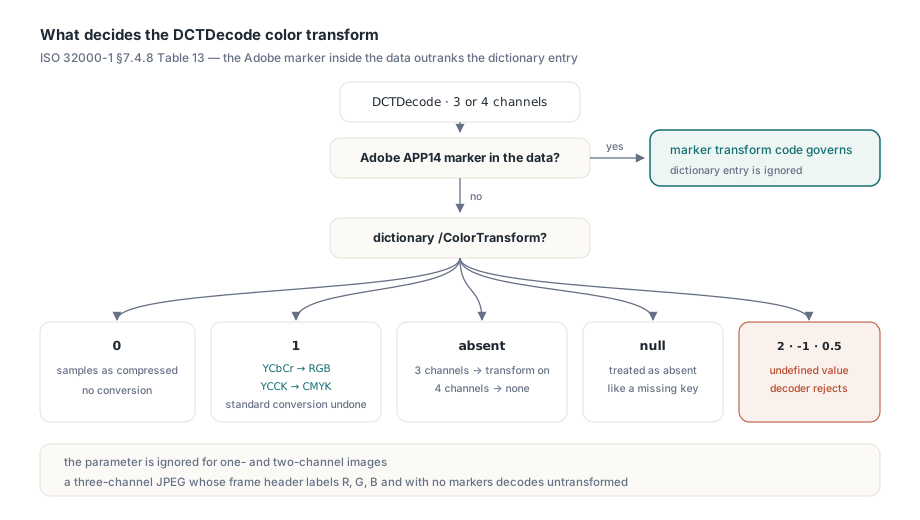
/ColorTransform is the PDF-level statement of which conversion the decoder must undo. ISO 32000-1 §7.4.8, Table 13, defines two values. Zero means no transformation: the decoder returns the samples as compressed. One means the encoder applied the standard conversion, so a three-channel image goes from YCbCr back to RGB and a four-channel image goes from YCCK back to CMYK. The parameter is ignored for one- and two-channel images. Table 13 also sets a precedence rule that is easy to miss: when the encoded data carries an Adobe marker with its own transform code, that code governs and the dictionary entry is ignored. Only a JPEG without that marker falls back to the dictionary, and when the entry is absent as well, a three-channel image defaults to the transform and a four-channel image defaults to none
The easy mistake is an image path that accepts the parameter dictionary but never hands it to the JPEG decoder. A one-pixel RGB JPEG holding the colour (128, 63, 31) exposes it at once: such a decoder returns [128, 63, 31] for both /ColorTransform 0 and /ColorTransform 1, while the correct answer for zero is the raw YCbCr triplet [79, 101, 163]
HotPDF applies the parameter at the byte level. HPDFDecodeHeadlessTerminalImage first walks the JPEG segment structure up to the start-of-scan marker and looks for an Adobe APP14 segment; bytes that merely resemble one inside a comment segment do not count. If the data carries the marker, its transform code decides and the dictionary value is ignored. If it does not, the decoder builds a private copy of the JPEG with an APP14 segment inserted just before the start-of-scan marker, carrying transform code 0, 1, or, for a four-channel image with value 1, the YCCK code 2. Whenever the effective transform of a three-channel image is 0, the copy also disarms the JFIF header, because a JFIF header on its own tells libjpeg-turbo to assume YCbCr. The caller's buffer is never touched, and when a segment is inserted, its 16 extra bytes are charged against the working-byte budget before the decoder allocates anything
Inserting only when no marker exists matters because of a libjpeg detail: it uses the last APP14 segment it sees. Insert a segment after an existing marker and an explicit dictionary value silently overrides a conflicting marker in the data, which is exactly backwards from Table 13. HotPDF applies the Table 13 order on the full image XObject path and on the inline image path alike
You can call the same terminal decoder directly when a single image looks wrong and you want to see its samples without rendering the page. The function lives in the HPDFHeadlessImageCodecs unit, takes the filter name, the encoded bytes, an optional parameter dictionary, and the geometry from the image dictionary, which must match the JPEG frame header
uses
  SysUtils, HPDFObjs, HPDFHeadlessImageCodecs;

// ColorTransform < 0 means "entry absent": let the JPEG markers decide
function DecodeDCT(const Encoded: TBytes; Width, Height, Channels,
  ColorTransform: Integer): TBytes;
var
  Parms: THPDFDictionaryObject;
begin
  Parms := nil;
  if ColorTransform >= 0 then
  begin
    Parms := THPDFDictionaryObject.Create(nil);
    Parms.AddNumericValue('ColorTransform', ColorTransform);
  end;
  try
    Result := HPDFDecodeHeadlessTerminalImage('DCTDecode', Encoded, nil, Parms,
      Width, Height, Channels, 8, 64 * 1024 * 1024, nil);
  finally
    Parms.Free;
  end;
end;
The decoder is strict about what counts as a legal value. An explicit -1, a 2, or a non-integer such as 0.5 raises EHPDFHeadlessImageError instead of falling back to a default, because a value the spec does not define gives the decoder nothing trustworthy to act on. The check stays in place even when an Adobe marker in the data makes the entry irrelevant, because an undefined value is a structural error in the document itself. A budget too small for the transformed copy fails the same way, with a message naming the working-byte budget
An explicit null is a different case, because it is not a value at all. ISO 32000-1 §7.3.9 says a dictionary entry whose value is null is equivalent to an absent entry, so /ColorTransform null falls through to the marker or to the component-count default exactly as if the key were missing. HotPDF treats it that way on every path, headless and VCL, stream and inline alike
One more default deserves a mention, because it is where HotPDF deliberately goes beyond the letter of Table 13. A three-component JPEG with neither a JFIF header nor an Adobe marker, whose frame header labels its components R, G and B, says in its own bytes that it holds RGB. Table 13 would still default it to the transform, but libjpeg and the readers built on it decode it untransformed, and so does HotPDF. The headless and VCL decoders both treat it that way, so red and blue stay where the data put them. An explicit dictionary 0 or 1 still overrides this inference
uses
  System.IOUtils;

var
  Jpeg, Stored, Converted, ByMarkers: TBytes;
begin
  // raw DCTDecode bytes of a 640 x 480 CMYK image, saved from the PDF stream
  Jpeg := TFile.ReadAllBytes('suspect-image.jpg');
  try
    // With an Adobe APP14 marker in the data, all three calls agree:
    // the marker decides and the dictionary value is ignored
    Stored    := DecodeDCT(Jpeg, 640, 480, 4, 0);   // no marker: samples as compressed
    Converted := DecodeDCT(Jpeg, 640, 480, 4, 1);   // no marker: YCCK undone to CMYK
    ByMarkers := DecodeDCT(Jpeg, 640, 480, 4, -1);  // no marker: four-channel default, none
    Writeln(Format('pixel 0: stored %d,%d,%d,%d  converted %d,%d,%d,%d',
      [Stored[0], Stored[1], Stored[2], Stored[3],
       Converted[0], Converted[1], Converted[2], Converted[3]]));
  except
    on E: EHPDFHeadlessImageError do
      Writeln('Decoder refused the image: ', E.Message);
  end;
end;
A four-channel reference pixel shows what to look for. A CMYK pixel of (10, 20, 30, 40) stored as YCCK comes back as [245, 235, 225, 215] when the YCCK conversion is not undone and as [0, 116, 0, 215] when it is. The K byte, 215, is identical in both. If the K plane looks right and the other three do not, a mismatched transform is the first suspect
The inverted CMYK convention belongs to /Decode
The HotPDF terminal decoder returns CMYK samples exactly as libjpeg-turbo produces them and does not flip them on the strength of an Adobe marker. The numbers above make the convention visible: 245, 235, 225, 215 are simply 255 minus 10, 20, 30, 40, the inverted form that Adobe-style encoders store. Turning that back into ink amounts is the job of the image dictionary, where a producer that embeds such a JPEG should write /Decode [1 0 1 0 1 0 1 0]. The renderer applies the /Decode array to every component, so a correctly written file prints correctly
The flip side is worth stating plainly. A PDF that embeds an Adobe-inverted CMYK JPEG without the matching /Decode array will render as a negative in HotPDF, because the file itself describes the image that way. Some viewers detect the APP14 marker and silently compensate. HotPDF does not add that heuristic, so the fix for such a file belongs in the software that wrote it
Why is one DecodeParms dictionary for two filters an error?
A stream whose /Filter is an array of several stages must supply /DecodeParms as an array of the same length, one parameter dictionary or null per stage. ISO 32000-1 §7.3.8.2, Table 5, states that rule, and HotPDF enforces it: a multi-filter stream that supplies one shared dictionary is reported as an invalid document instead of being decoded
The lenient alternative is worse than it looks. A decoder that checks the length only when /DecodeParms is already an array will, given a single dictionary and two filters, quietly reuse that dictionary at every stage. That is harmless when the dictionary is empty and destructive when it is not: a /Predictor 12 meant for the inner Flate stage would also be applied to the outer one, and the output becomes plausible-looking garbage rather than a clean error. Because the intent of such a file cannot be recovered, HotPDF refuses it, even in the empty case, such as a page content stream with /Filter [/FlateDecode /FlateDecode] and /DecodeParms << >>
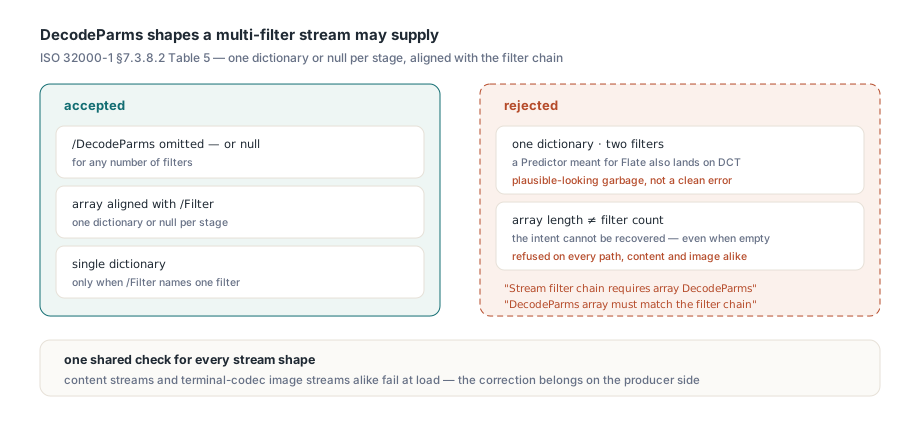
The accepted and rejected shapes are easy to enumerate:
- Accepted:
/DecodeParmsomitted, ornull, for any number of filters - Accepted: an array whose length equals the filter count, each entry a dictionary or
null - Accepted: a single dictionary when
/Filternames exactly one filter - Rejected: a single dictionary shared by two or more filters, with the diagnostic "Stream filter chain requires array DecodeParms"
- Rejected: an array whose length differs from the filter count, with "DecodeParms array must match the filter chain"
The same check runs for ordinary content streams and for image streams whose last filter is a terminal codec such as DCTDecode, so a malformed chain fails in the same place whatever the stream carries. The interaction with decompression limits is covered in the article on filter chain budgets and PDF decode bombs. From application code, the error surfaces when the page is rendered
uses
  SysUtils, HPDFHeadlessDocument, HPDFHeadlessCairoDevice;

var
  Document: THPDFHeadlessDocument;
  Options: THPDFHeadlessRenderOptions;
  Info: THPDFHeadlessRenderResult;
begin
  Document := THPDFHeadlessDocument.Create;
  try
    try
      Document.LoadFromFile('catalog-cmyk.pdf');
      Options := THPDFHeadlessRenderOptions.Default;
      Info := HPDFRenderHeadlessPagePNGFile(Document.GetRenderAccess(0),
        'page1.png', Options);
      Writeln('images=', Info.Images, ' decoded bytes=', Info.DecodedBytes);
    except
      on E: Exception do
        Writeln('Rejected: ', E.ClassName, ': ', E.Message);
    end;
  finally
    Document.Free;
  end;
end;
JPEG 2000 images keep their explicit /Decode
A JPEG 2000 image ignores /Decode only when its dictionary has no /ColorSpace and it is not an image mask. ISO 32000-1 §8.9.5 makes that conditional, and HotPDF follows it. Discarding /Decode for every non-stencil JPX image is the easy shortcut, and it makes an explicit inversion simply vanish: a DeviceGray JPX sample of 64 under /Decode [1 0] has to render as 191, not 64
Getting that one condition right is not enough on its own. Colour-space branches such as Lab and ICCBased that set default component ranges whenever the image is JPX would overwrite a legitimately applied array a second time, so the renderer records whether a valid /Decode array was actually applied, and fills in default ranges only when none was. Explicit Lab and ICCBased ranges therefore survive, and the codestream colour declaration still governs when the dictionary is silent. The decoder side of the format is described in the JPEG 2000 and JPXDecode article
Which decode paths follow these rules?
Both pipelines follow them. On the headless side that means THPDFHeadlessDocument loading, the shared stream decoder, and the Cairo-based page renderer behind HPDFRenderHeadlessPagePNGFile. On the VCL side it means loaded-image extraction into a TBitmap and VCL page rendering, which apply the same Table 13 order on full-image and reduced-region decoding alike, so a JFIF header cannot force YCbCr over an Adobe transform of 0, and an illegal value makes the image undecodable there too. Inline DCT images follow the same marker, null, default and rejection rules as image XObjects, with abbreviated and full key names alike, including a /DP << … >> dictionary and abbreviated filter arrays such as /F [/AHx /DCT], and an inline image with illegal parameters is skipped while the rest of the page renders. The guide to extracting images from a loaded PDF covers the rest of that API's filter handling
A few practical notes before you rely on this behaviour:
- JPEG decoding needs a compatible TurboJPEG library at run time;
HOTPDF_TURBOJPEG_LIBRARYoverrides the defaultturbojpeg.dllorlibturbojpeg.so.0 - Strict structural checks reject files that lenient readers open, notably the shared empty
/DecodeParmsdictionary, and the fix for those files is on the producer side
For a colour-managed print workflow, the practical takeaway is short. Write CMYK JPEGs with an explicit /ColorTransform that agrees with any Adobe marker in the data plus the /Decode array that matches their storage, give every multi-filter stream a stage-aligned /DecodeParms array, and expect HotPDF to hold files to what they actually say
The headless loader, stream decoders and Cairo page renderer shown here ship with the HotPDF Delphi PDF component for Delphi, C++Builder and Lazarus, alongside the classic VCL document engine