A user types Müller into a search box, gets nothing, copies the same name out of the PDF, pastes it back into the box, and suddenly gets hits. Check both strings in the debugger and Length returns 6 for the typed one and 7 for the pasted one. The typed word carries U+00FC, a single precomposed ü; the document stores a plain u followed by U+0308 COMBINING DIAERESIS. Both render as the same glyphs, and a code-unit comparison will never call them equal
Why do identical-looking strings compare unequal?
Unicode deliberately allows more than one encoding for the same abstract character, and calls the encodings canonically equivalent. Unicode Standard Annex #15 defines two normal forms that matter for search: NFC, which prefers precomposed code points, and NFD, which splits every precomposed character into a base letter plus its combining marks in a fixed order. Latin letters with diacritics exist in both shapes. So do Hangul syllables, which can appear as one precomposed syllable or as a run of two or three conjoining jamo
Which shape ends up in a PDF depends on the software that produced it, the platform it ran on, and sometimes on how a font's ToUnicode map was built. A document typed on one machine and edited on another can mix both forms on the same page. None of it is visible to the person searching. Their keyboard and input method usually produce NFC, so any decomposed content in the file becomes unsearchable from their side
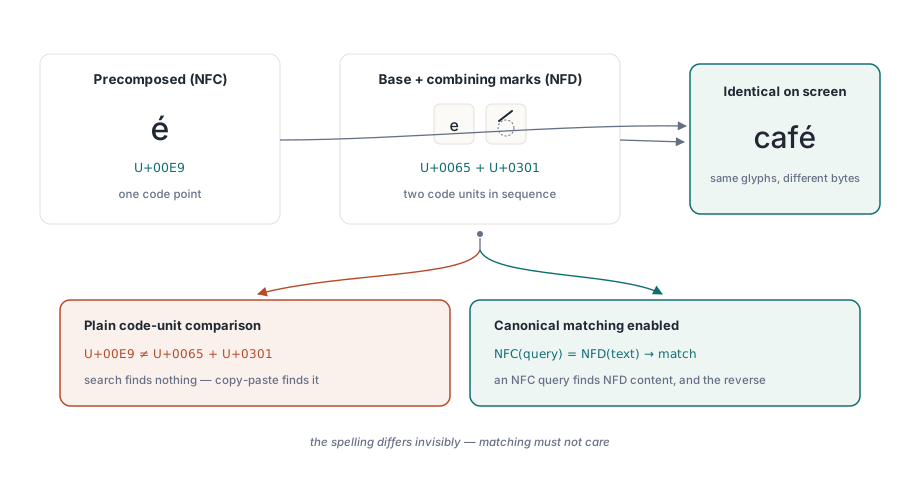
The obvious workaround is to throw the problem into the same bucket as case folding: lowercase both sides, strip accents, compare. That breaks for a structural reason. Case folding and accent stripping are one-to-one at the code-unit level, so the folded text has exactly the same length as the original and a match at position 17 in the folded copy is a match at position 17 in the extracted text. Normalisation changes lengths. One precomposed letter becomes two or three code units, a decomposed sequence collapses back into one, Hangul syllables expand into jamo, and after that transformation the positions you get back no longer point at the text you extracted
Searching with soCanonicalEquivalent in PDF Library for Delphi
In PDF Library for Delphi, the soCanonicalEquivalent member of TPDFlibSearchOptions makes SearchText compare canonical decompositions of the query and the page text, so an NFC query finds NFD content and an NFD query finds NFC content. The option is part of a set, which means it combines with soWholeWord, soCaseSensitive, soWildcards and soDiacriticInsensitive without any separate API:
uses
  SysUtils, Math, PDFlibrary;

var
  Lib: TPDFlib;
  Hits: array of TPDFlibSearchHit;
  Found, Stored, I: Integer;
  Slice: WideString;
begin
  Lib := TPDFlib.Create;
  try
    Lib.LoadFromFile('contracts.pdf', '');
    Lib.SearchContextChars := 24;      // fill ContextBefore / ContextAfter
    SetLength(Hits, 500);

    Found := Lib.SearchText('Bäcker',
      [soCanonicalEquivalent, soWholeWord, soGraphemeClusters],
      '', Hits);                       // empty page range = every page

    // Found counts every hit; only the first Length(Hits) were copied
    Stored := Min(Found, Length(Hits));
    for I := 0 to Stored - 1 do
    begin
      Slice := Copy(Hits[I].MatchText, Hits[I].MatchStart,
        Hits[I].MatchLength);
      Writeln(Format('page %d: [%s] %d code units, ...%s|%s|%s...',
        [Hits[I].Page, Slice, Hits[I].MatchLength,
         Hits[I].ContextBefore, Slice, Hits[I].ContextAfter]));
    end;
  finally
    Lib.Free;
  end;
end;
Two details in that loop trip people up. SearchText returns the total number of hits even when the buffer is smaller, so iterating up to Found - 1 on a large document walks off the end of a 500-element array; clamp with Min or switch to SearchTextEach, which hands each hit to a callback and needs no buffer at all. And MatchText is the whole text block that contained the match, with MatchStart as a 1-based index into it, so the matched word itself is the Copy shown above
Run that against a file that stores Bäcker decomposed and the printed length is 7, against an NFC file it is 6. Same query, same option set. The slice is always the text as it sits in the document
Where the hit lands in the original text
That last property is what makes normalised search usable for anything beyond a yes/no answer. PDF Library for Delphi records, for every code unit the normalizer produces, the start and end of the original UTF-16 range it came from. A recursive decomposition inherits the range of its parent, a composition merges the ranges of its inputs, and when a match is found the search scans the mapped interval for the smallest start and the largest end
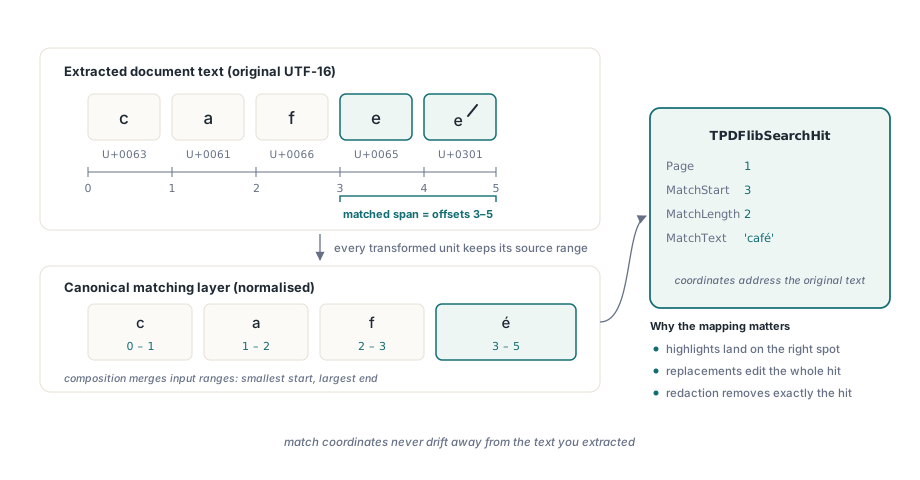
As a result, MatchStart, MatchLength, ContextBefore, ContextAfter and both replacement entry points address the extracted text the caller already has. A search that could say "there is a hit in this block" but not exactly where would be fine for a result count and wrong for everything else: highlights would drift by a character or two per accented letter, and a replacement would rewrite the wrong run of text
The normalizer ships inside the library. It carries compact tables for canonical decomposition, composition and canonical combining class from Unicode 15.1, applies the algorithmic rules for Hangul instead of table entries, and reorders combining marks stably during NFD. No external data file is loaded and no operating system normalisation call is made, so a Windows service, a Linux daemon and a Free Pascal build return identical hits for the same file. We prefer it that way even though the OS could do the work on Windows: a search index built on one server and queried on another should never disagree because the two machines ran different Unicode versions
The option is off by default, and that default is reasonable. Building the NFD text and its position map costs time, and a search over ASCII-only invoices never needs it. When soCanonicalEquivalent is set, each text block keeps two transformed copies, one with combining marks and one without, so a batch of queries over the same block normalises it once. Plain case folding stays on the cheaper one-to-one path
What goes wrong when a hit ends inside a character?
Canonical equivalence answers "is this the same text", but it says nothing about where a hit is allowed to stop. Search a decomposed café for cafe with soCanonicalEquivalent alone and the first four code units match; the combining acute that follows is left outside the hit. soWholeWord does not catch it, because its word characters follow identifier rules (ASCII letters, digits and underscore) and a combining mark counts as a boundary. The highlight covers cafe, and a replacement leaves a stray accent floating over whatever comes next
The same thing happens well beyond Latin accents. A flag emoji is two regional indicator code points. A family emoji is several people joined by zero-width joiners. A Devanagari conjunct is a consonant, a virama and another consonant, and a Vietnamese vowel can carry two stacked marks. Anything outside the Basic Multilingual Plane is a surrogate pair in UTF-16, and cutting one in half produces an unpaired surrogate that many text pipelines replace with U+FFFD
soGraphemeClusters requires both ends of every hit, literal or wildcard, to fall on extended grapheme cluster boundaries as defined by Unicode Standard Annex #29. The segmentation covers CR/LF pairing, control characters, Hangul syllable types, Extend and SpacingMark, Prepend, emoji ZWJ sequences, regional indicator pairs and Indic conjunct breaks, and it never places a boundary inside a surrogate pair. With the flag set, cafe no longer matches a decomposed café at all; add soDiacriticInsensitive if accent-blind matching is what you actually want
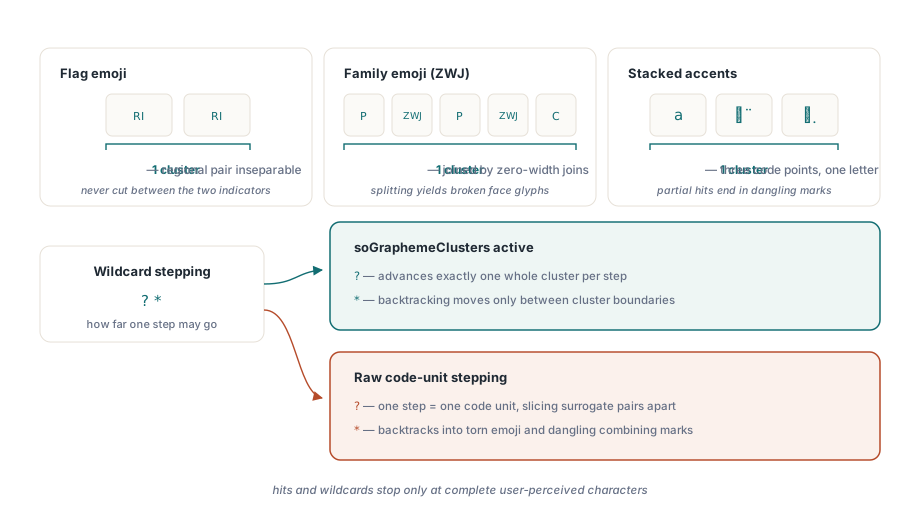
Wildcards are where the flag changes results most visibly. Under soCanonicalEquivalent the page text is compared in NFD, so côté becomes c o U+0302 t e U+0301 regardless of how the file stored it. Without soGraphemeClusters, the ? in c?té consumes exactly one code unit, the o, then expects a t and finds U+0302. No hit. With the flag, ? advances one whole cluster and the backtracking for * also moves only between cluster boundaries:
// "?" steps one user-perceived character, so this matches côté
// whether the PDF stored it precomposed or decomposed
Found := Lib.SearchText('c?té',
  [soWildcards, soCanonicalEquivalent, soGraphemeClusters], '', Hits);

// The replacement uses the same cluster-safe ranges, so it never
// splits an emoji or leaves an orphaned accent behind
Replaced := Lib.SearchAndReplaceTextInContent('naïve', 'plain',
  [soCanonicalEquivalent, soGraphemeClusters], '1-20');
if Replaced = 0 then
  Writeln(Lib.GetLastUnicodeReplacementDiagnostics)
else
  Lib.SaveToFile('contracts-edited.pdf');
SearchAndReplaceTextInContent rewrites the text inside the page content and returns the number of matches it replaced. When it returns zero, GetLastUnicodeReplacementDiagnostics says why, for example that a match could not be mapped back to the content that drew it. The other entry point, SearchAndReplaceText, accepts the same option set and draws the replacement over the matched block instead
Picking an option set per workload
Three combinations cover most applications. For an end-user search box inside a document viewer, use soCanonicalEquivalent plus soDiacriticInsensitive: both encoding forms match, and so do accented and unaccented spellings, which is what people expect after years of web search. For legal or compliance review, where a false positive costs someone an afternoon, use soCanonicalEquivalent with soCaseSensitive and soWholeWord and leave accent folding off, so equivalence stays exact while ignoring how the file happened to encode it
For anything that changes the document, add soGraphemeClusters every time. This is the one place we would not leave to taste. A search that returns a range one code unit short only misleads the person reading the results; a replacement or removal that uses the same range writes the mistake into the file, and nobody notices until the page is printed or extracted again. Removal that has to destroy content rather than cover it is its own topic, covered in true redaction and content removal
When several terms run against the same document, prefer SearchTextBatch. It evaluates every non-empty query while a page's text blocks are resident, so each page is extracted once and each block is normalised once, and every query carries its own option set:
var
  Queries: array[0..2] of TPDFlibSearchQuery;
  BatchHits: array of TPDFlibSearchBatchHit;
  Count, I: Integer;
begin
  Queries[0].Query := 'Müller';
  Queries[0].Options := [soCanonicalEquivalent, soDiacriticInsensitive];
  Queries[1].Query := '서울';                // Hangul: NFC or jamo in the file
  Queries[1].Options := [soCanonicalEquivalent, soGraphemeClusters];
  Queries[2].Query := 'Nguyễn';
  Queries[2].Options := [soCanonicalEquivalent, soCaseSensitive,
    soWholeWord, soGraphemeClusters];

  SetLength(BatchHits, 2000);
  Count := Min(Lib.SearchTextBatch(Queries, '', BatchHits),
    Length(BatchHits));
  for I := 0 to Count - 1 do
    Writeln(Format('query %d -> page %d',
      [BatchHits[I].QueryIndex, BatchHits[I].Hit.Page]));
end;
Hits come back ordered by page, then block, then query, and QueryIndex is the zero-based position in the array you passed. SearchTextBatchEach is the callback form for result sets you cannot size in advance. How text blocks are extracted in the first place is described in text search and page element enumeration
Scripts where canonical equivalence is not optional
For Korean, canonical equivalence decides whether a name is found at all, because precomposed syllables and decomposed jamo both turn up in real documents. Vietnamese stacks a tone mark on top of a vowel that may already carry a breve or circumflex, so its composition form depends entirely on the producer. For Devanagari, Bengali and the other Indic scripts, the conjunct rules decide whether a hit boundary lands somewhere a reader can recognise. Japanese and Chinese are comparatively easy on the search side, though the layout side is not, as covered in vertical writing for Japanese and Chinese
Our recommendation is blunt. If the corpus contains any language other than English, turn soCanonicalEquivalent on first and only turn it off after timing it on your own documents and finding the cost unacceptable. The failure it prevents lands on exactly the names your users search for most
The same Unicode-aware engine drives search, extraction, replacement and redaction from Delphi, C++Builder and Free Pascal; option sets, the batch API and the rest of the text toolkit are listed on the PDF Library for Delphi product page