PDF/E-1 is the archival profile for engineering documents, and PDFlibPas implements it as an author mode you switch on with SetPDFEMode plus a bounded preflight that reads content streams operator by operator. The profile is not PDF/A with a different label: it has its own identification namespace, its own lifecycle metadata requirement, and one rule that makes content validation stricter than any archival profile you have met
Engineering deliverables are why the profile exists. A drawing set that has to be readable and provably unchanged twenty years from now, with a revision history that survives, and with colour that means the same thing on the plotter in another building. Those requirements produce a specification whose demands sit mostly outside the page content, in metadata and colour management, which is exactly where a generic PDF writer gets them wrong
Its own identification, not a variation on PDF/A
The first thing to get right is that PDF/E-1 identification cannot be produced by adapting the PDF/A or PDF/X pattern. It uses a distinct XMP namespace, http://www.aim.org/pdfe/ns/id/, and the version value has to appear in two places: as a document information entry and as the namespace-qualified XMP property. Emitting only the XMP property, or only the information entry, produces a file that carries the intent and fails validation
The output intent has an equally specific shape. PDF/E-1 requires an embedded ICC profile with the subtype identifier ISO_PDFE1, and the profile must have a component count matching the device colour family the document actually uses. That last clause is where implementations quietly go wrong, because it means the intent cannot be chosen up front and then ignored
Why does device colour need a whole-document sweep?
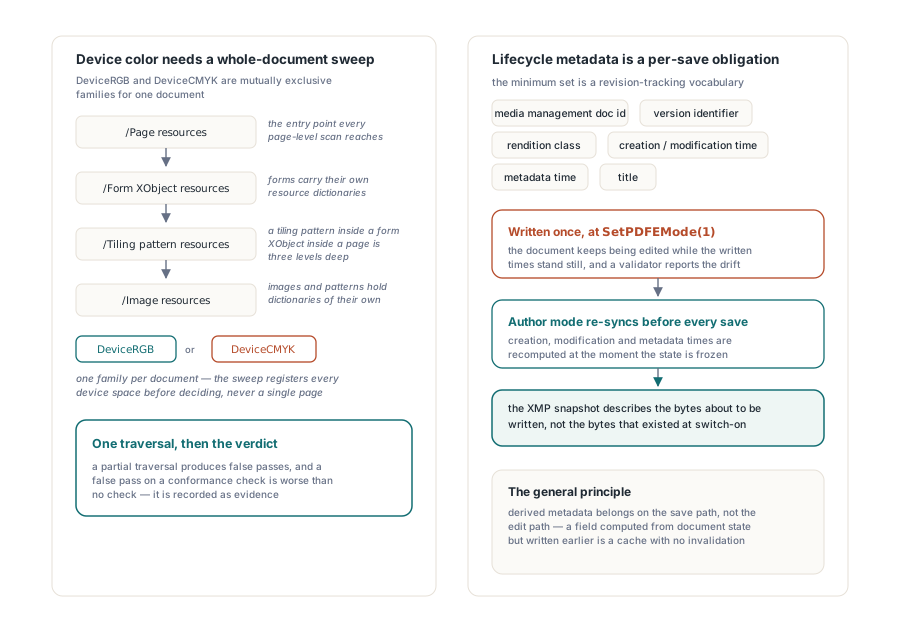
Because colour spaces hide in resource dictionaries that a page-level scan never reaches. PDF/E-1 treats DeviceRGB and DeviceCMYK as mutually exclusive families for a document, so validating the profile means knowing every device colour space anything in the file uses. A form XObject has its own resources. So does a pattern, and so does an image. A tiling pattern inside a form XObject inside a page is three levels deep, and a validator that checks only the top-level page resources will pass a document that uses both families
The sweep therefore registers colour spaces whilst walking pages, forms, images and patterns as one traversal, and only then decides whether the document is coherent and whether the output intent matches. The same reasoning drives the preflight architecture generally: partial traversal produces false passes, and a false pass on a conformance check is worse than no check, because it is recorded as evidence
var
  Lib: TPDFlib;
  Diag: WideString;
begin
  Lib := TPDFlib.Create;
  try
    Lib.LoadFromFile('assembly-drawings.pdf');

    if Lib.SetPDFEMode(1) = 0 then
      raise Exception.Create('PDF/E author mode was refused');

    // Author mode keeps the lifecycle metadata in step on every save.
    // Ask before saving whether the document would pass its own gate
    if not Lib.PDFEReadyForSave then
    begin
      Diag := Lib.GetPDFEDiagnostics;
      Writeln('PDF/E blockers: ', Diag);
      Exit;
    end;

    Lib.SaveToFile('assembly-drawings-pdfe.pdf');
  finally
    Lib.Free;
  end;
end;
Lifecycle metadata is a per-save obligation
PDF/E-1 asks for more than a document identifier. The minimum set includes the media management document identifier, a version identifier, a rendition class, creation time, modification time, metadata time and a title. That is a revision-tracking vocabulary, and it exists because an engineering deliverable is expected to be reissued rather than written once
The consequence for an implementation is that these fields cannot be set at document creation. If the modification time is written when you enable the mode and the document is edited afterwards, the XMP snapshot and the actual document state have drifted, and a validator comparing them reports an inconsistency nobody intended. Author mode therefore synchronises the fields immediately before every save, so the metadata describes the bytes about to be written rather than the bytes that existed when the mode was switched on
This is a general principle for conformance metadata and it is worth stating separately from PDF/E: derived metadata belongs on the save path, not the edit path. Any field computed from document state has to be recomputed at the moment the state is frozen, or it is a cache with no invalidation
The rule that makes content validation strict
PDF/E-1 does not allow the compatibility section operators to absorb unknown content. In ordinary PDF, BX and EX bracket a region in which a consumer must ignore operators it does not recognise, which is the escape hatch that lets a producer emit newer constructs without breaking older readers. Under PDF/E-1 that escape is closed, so any operator the preflight does not recognise is reported unconditionally, whether or not it sits inside a compatibility section
The effect on a validator is significant. It cannot skip regions it does not understand, which means the operand parser has to actually parse every operator in every content stream. That is where the bounds come in. The traversal is capped at 128 levels of nesting, one million objects and 64 MiB of content, and those limits are not performance tuning. A hostile or merely broken file can present an object graph with cycles or a nesting depth that turns a recursive validator into a stack overflow, and the limits are what keep a validation pass from becoming a denial-of-service vector. The same defensive posture is described in parsing untrusted PDFs safely
// Standalone validation of a file you did not produce, without loading
// it into a document instance
var
  Issues: TStringList;
  Stream: TFileStream;
  I: Integer;
begin
  Issues := TStringList.Create;
  Stream := TFileStream.Create('incoming.pdf', fmOpenRead or fmShareDenyWrite);
  try
    if CheckCompliancePDFE(Stream, '', 0, Issues) = 0 then
      for I := 0 to Issues.Count - 1 do
        Writeln('PDF/E: ', Issues[I]);
  finally
    Stream.Free;
    Issues.Free;
  end;
end;
What the save gate repairs and what it refuses
The gate splits its work into two stages, and the split is a usable design idea in its own right. First it normalises the things that are safely repairable: annotation print flags, the no-zoom and no-rotate flags on text annotations, and the appearance-generation flag on the form dictionary. These are settings with one correct value under the profile and no information content, so fixing them silently is right and refusing over them would be pedantry
Then it checks the constraints that cannot be repaired without changing what the document means: version, identification, encryption, output intent, device colour coherence and the presence of dynamic form content. A document failing any of those is refused, because inventing an output intent or picking a colour family on the author's behalf would produce a file that passes validation and misrepresents the content
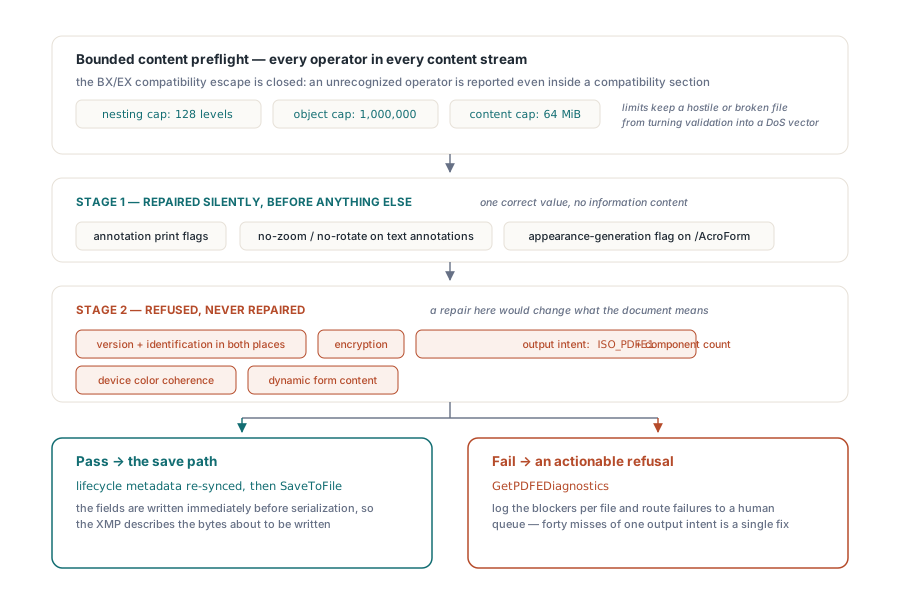
Reading the diagnostics back through GetPDFEDiagnostics before saving turns that refusal into an actionable list rather than a failed operation. In a batch pipeline, call it on every document, log the blockers per file, and route the failures to a queue a human looks at. That is far more useful than a save that raises, because the blockers usually cluster: forty documents failing for the same missing output intent is one fix, not forty
Choosing between the archival profiles
PDF/E-1 is the right target when the deliverable is engineering documentation with a revision lifecycle, and specifically when device colour coherence matters because the output goes to plotters and large-format printers. PDF/A is the right target when the goal is long-term readability of documents in general, and it is the profile with the widest validator support. The two are not interchangeable, and a document can satisfy one and fail the other
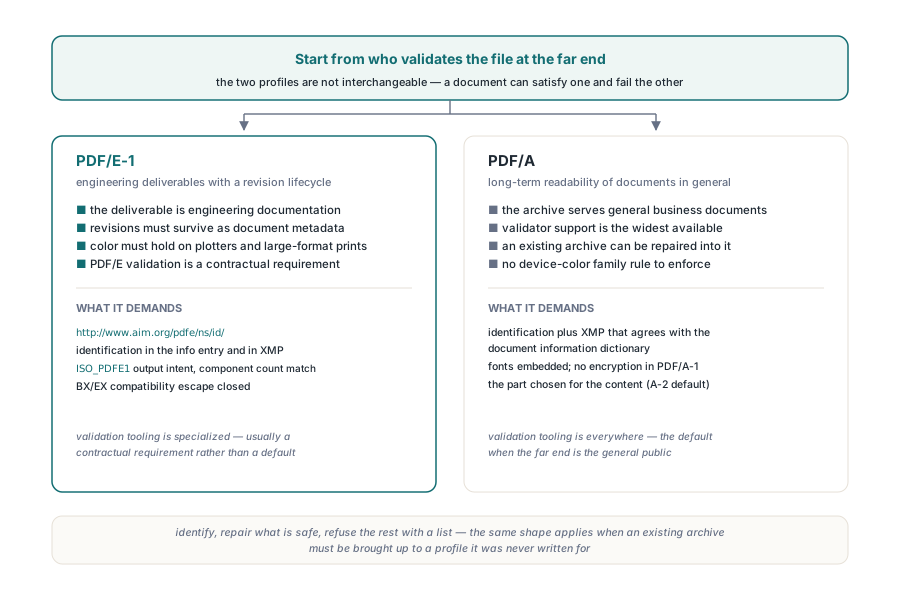
If you are choosing, start from who validates the file at the far end. PDF/A validation tooling is everywhere, and the corresponding preflight in PDFlibPas is described in PDF/A and PDF/UA preflight. PDF/E validation is more specialised and is usually a contractual requirement rather than a default. When an existing archive has to be brought up to a profile it was never written for, the metadata repair path in converting to PDF/A with metadata repair is the pattern to follow, and the same shape applies here: identify, repair what is safe, refuse the rest with a list
Author mode, the bounded content preflight and the standalone compliance check all ship with the PDFlibPas Delphi PDF library, so a document can be produced under the profile and independently verified afterwards through a separate code path, which is the only arrangement worth trusting for a conformance claim