PDFlibPas (PDF Library for Delphi) checks every object against a table of PDF version rules before it writes a file, and until recently that PDF version preflight mistook ordinary CAD measurement dictionaries for geospatial ones. A single-page CAD drawing loaded fine, then SaveToFile returned 0 with LastErrorCode 602 and demanded 1.7 ExtensionLevel 3. The corrected rules treat rectilinear /Measure dictionaries (/Subtype /RL) as plain PDF 1.6 and reserve the extension gate for real geospatial markers
The file came in through corpus admission: one page, one optional-content group, two rectilinear measurement viewports, the kind of output an architectural CAD package writes so that a viewer can read distances off a floor plan. Nothing about it was exotic, which is exactly why the refusal mattered. A preflight that blocks a valid file is worse than a slow one, because the caller gets an authoritative-looking diagnostic pointing at a feature the document does not contain. The fix took two parts: the spec reading behind one rule, and the realisation that the rule could not tell two dictionary types apart at the level it was looking
How does the PDFlibPas save-time version preflight work?
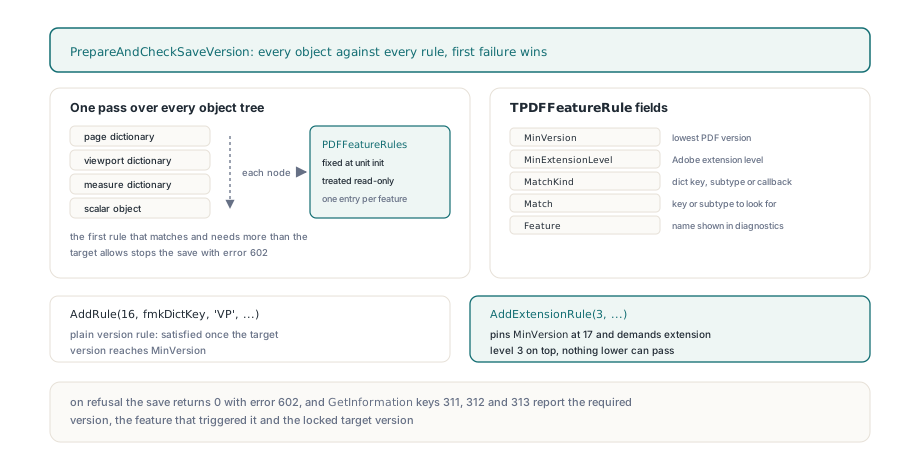
The save gate, PrepareAndCheckSaveVersion, compares every indirect object against PDFFeatureRules and fails on the first rule that both matches and needs more than the target allows. The target is the document version (or the version pinned by LockSaveVersion), plus the Adobe extension level declared under /Extensions /ADBE. Each TPDFFeatureRule record carries a MinVersion, a MinExtensionLevel, a MatchKind such as fmkDictKey or fmkDictSubtype, a Match string, a human-readable Feature name and an optional callback. AddRule registers a plain version rule; AddExtensionRule always pins MinVersion at 17 and adds an extension level on top, so an extension rule can only ever be satisfied by PDF 1.7 plus the right /Extensions entry. When the gate trips, the required version and feature name are kept for the caller, and GetInformation keys 311, 312 and 313 expose them
var
  Pdf: TPDFlib;
begin
  Pdf := TPDFlib.Create;
  try
    if Pdf.LoadFromFile('floor-plan.pdf', '') <> 1 then
      raise Exception.Create('load failed');
    if Pdf.SaveToFile('floor-plan-out.pdf') <> 1 then
      if Pdf.LastErrorCode = PDFLIB_ERROR_VERSION_COMPLIANCE then
        // 311: required version, 312: feature that triggered it,
        // 313: version the save target is locked at ('' when unlocked)
        Writeln('Needs ', Pdf.GetInformation(311),
          ' for ', Pdf.GetInformation(312),
          ', locked at [', Pdf.GetInformation(313), ']');
  finally
    Pdf.Free;
  end;
end;
Why did a plain CAD drawing fail with error 602?
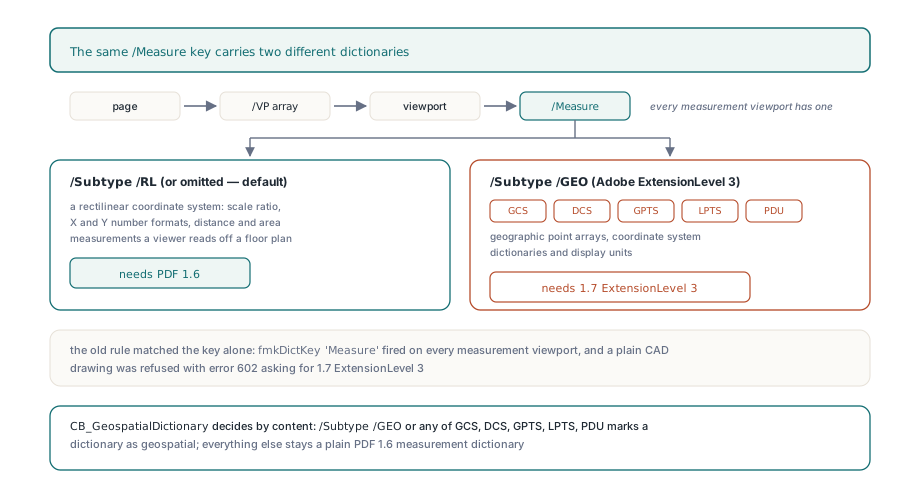
The rule table contained AddExtensionRule(3, fmkDictKey, 'Measure', '/Measure geospatial dictionary', Nil), which fired on any dictionary that merely had a /Measure key, and every measurement viewport has one. The page's /VP array holds viewport dictionaries, each viewport points at its measure dictionary through /Measure, and the key-presence match stopped there without looking at what the measure dictionary actually was. The load-time feature scan could then raise the document version number to 1.7, but it never writes an /Extensions declaration on behalf of an input file, so the save gate saw PDF 1.7 at extension level 0 and reported 1.7 ExtensionLevel 3. That refusal to invent an extension declaration is deliberate: the library does not quietly promote an input file to paper over a rule that is wrong
The spec is unambiguous about the rectilinear case. Measure dictionaries arrived in PDF 1.6, and ISO 32000-1 §12.9 gives /Subtype a default of RL, a rectilinear coordinate system described by its own set of entries: scale ratio, X and Y number formats, distance and area. Geospatial measurement is the later addition from Adobe Extension Level 3 on top of PDF 1.7, identified by /Subtype /GEO and carrying geographic point arrays, coordinate system dictionaries and display units, the structures walked in reading GeoPDF viewports, GPTS and LPTS arrays in Delphi. Both dictionaries hang off the same /Measure key, so any rule that stops at the key cannot be right for both. The distinguishing information sits one level down, in the measure dictionary itself
What does the corrected rule set still enforce?
The fix deletes the unconditional key rule and leaves the gates that describe real version requirements. A page carrying /VP or /UserUnit still needs PDF 1.6 through CB_PagePDF16Entries, a /PtData key still needs extension level 3, and CB_GeospatialDictionary decides whether a measure dictionary is geospatial by its content rather than by the key that reached it
// Removed: every dictionary with a /Measure key counted as geospatial
// AddExtensionRule(3, fmkDictKey, 'Measure', '/Measure geospatial dictionary', Nil);

AddRule(16, fmkCustom, '', 'Page PDF 1.6 entry /UserUnit /VP', CB_PagePDF16Entries);
AddExtensionRule(3, fmkDictKey, 'PtData', '/PtData geospatial dictionary', Nil);
AddExtensionRule(3, fmkCustom, '', 'geospatial measure dictionary', CB_GeospatialDictionary);

function CB_GeospatialDictionary(Obj: TPDFObject; const Ctx: TPDFRuleContext): Boolean;
var
  Dict: TPDFDictionary;
begin
  Result := False;
  if not (Obj is TPDFDictionary) then
    Exit;
  Dict := TPDFDictionary(Obj);
  Result := (Dict.StringValue('Subtype') = 'GEO') or
    (Dict.FindIndexByKeyName('GCS') >= 0) or (Dict.FindIndexByKeyName('DCS') >= 0) or
    (Dict.FindIndexByKeyName('GPTS') >= 0) or (Dict.FindIndexByKeyName('LPTS') >= 0) or
    (Dict.FindIndexByKeyName('PDU') >= 0);
end;
The shared Delphi and FPC regressions pin that boundary from both sides. A viewport whose measure dictionary omits /Subtype and one that spells out /RL both pass at PDF 1.6, the same page is still rejected at PDF 1.5, and feature detection no longer reports an extension for it. Adding a /GPTS array flips the verdict back to 1.7 ExtensionLevel 3, which passes once the extension level is declared, and a bare /Subtype /GEO dictionary is refused without it. The callback is conservative by design: a rectilinear dictionary that also carries a stray /GCS or /PDU key is treated as geospatial, since those keys have no meaning in the RL model
LockSaveVersion is where this change becomes visible to callers. TPDFlib.LockSaveVersion accepts '1.0' through '1.7', returns 0 for anything else, pins the document version, and stops writer-side calls from silently raising it, yet the save gate still runs against the locked value. With the corrected rules, a CAD file locked at 1.6 saves cleanly. A genuine GeoPDF locked at 1.6 still gets 602, which is the correct answer, and the geospatial authoring calls such as SetMeasureDictCoordinateSystem declare extension level 3 themselves when you build that content through the API
if Pdf.LockSaveVersion('1.6') <> 1 then
  raise Exception.Create('unsupported version string');
if Pdf.SaveToFile('floor-plan-16.pdf') <> 1 then
begin
  if Pdf.LastErrorCode = PDFLIB_ERROR_VERSION_COMPLIANCE then
    // Real content above 1.6, for example a GEO measure dictionary
    raise Exception.CreateFmt('Locked at 1.6 but %s needs %s',
      [string(Pdf.GetInformation(312)), string(Pdf.GetInformation(311))]);
end;
Pdf.UnlockSaveVersion;
Why was the version rule scan slower than it needed to be?
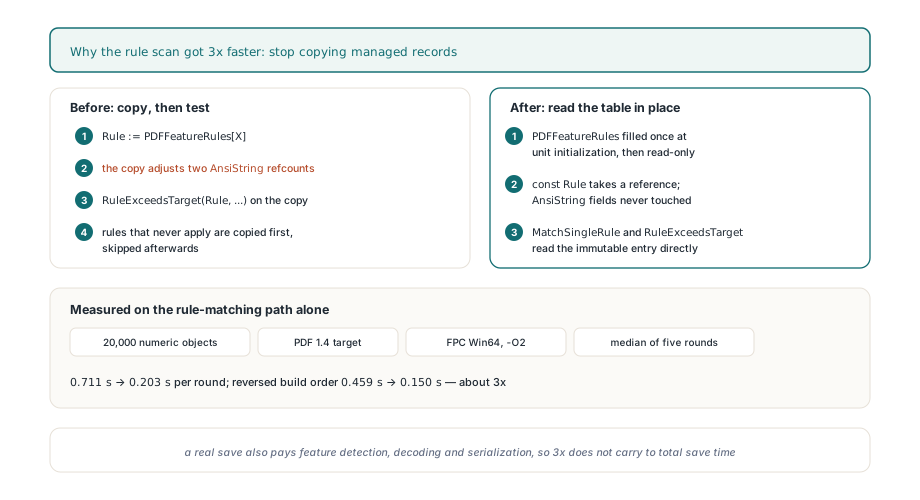
The scan copied every TPDFFeatureRule into a local record before testing it, and because the record holds two AnsiString fields, each copy adjusted two reference counts and released the previous values. The preflight visits every node of every object tree, scalars included, so that cost multiplied object count by rule count, and rules that did not even apply to the target version were copied first and skipped afterward. Since PDFFeatureRules is filled once at unit initialisation and treated as read-only, v3.539.17 passes table entries straight to MatchSingleRule and RuleExceedsTarget, whose const Rule parameters take a reference without touching the strings
// Before: a managed record copy per rule, per visited object
Rule := PDFFeatureRules[X];
if not RuleExceedsTarget(Rule, TargetVersion, TargetExtensionLevel) then
  Continue;

// After: const parameters read the immutable table entry in place
if not RuleExceedsTarget(PDFFeatureRules[X], TargetVersion, TargetExtensionLevel) then
  Continue;
if MatchSingleRule(Obj, Ctx, PDFFeatureRules[X]) then
begin
  RequiredVersion := RequiredVersionString(PDFFeatureRules[X]);
  FeatureName := PDFFeatureRules[X].Feature;
  Result := False;
  Exit;
end;
The measured effect is narrow and should be quoted that way. The benchmark checks an array of 20,000 numeric objects against a PDF 1.4 target ten times per round; built with FPC Win64 at -O2, the median of five rounds fell from 0.711 s to 0.203 s, and running the two builds in reverse order gave 0.459 s against 0.150 s. That is roughly a 3x gain on the rule-matching path alone. A real save also pays for deferred feature detection, object decoding and serialisation, so the ratio does not carry over to total save time. Rule order, callbacks, version thresholds and the first-failure diagnostic are unchanged, and no rule was cached across saves or skipped to get there
What should you check when a loaded PDF fails the version preflight?
Read keys 311 and 312 before touching the version. If the feature names a geospatial dictionary and the file only draws rectilinear measurements, that was this false positive, and a current build saves the file unchanged. If the feature is genuine, either declare the extension or lock to a version that honestly contains the content; raising the version just to silence the gate hides the question of whether downstream consumers can read what you ship. The same principle of bounded, evidence-backed checks drives the PDF/E-1 author-mode preflight for engineering documents, where CAD drawings meet a conformance standard rather than a version number
Version compliance checks, measurement and geospatial dictionaries, and save-version locking are all part of PDF Library for Delphi, the PDFlibPas toolkit for Delphi, C++Builder and Lazarus developers