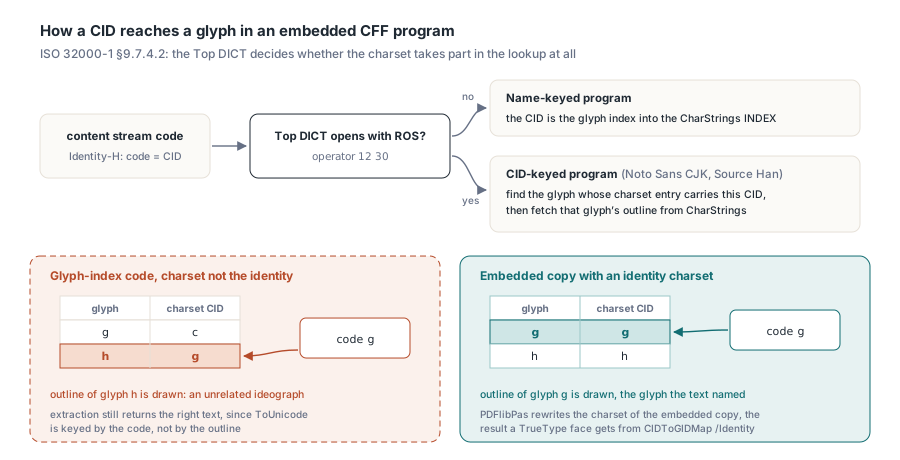
A Chinese invoice set in Noto Sans SC from its .otf file can open in mutool with unrelated ideographs where the customer name belongs, even though a TrueType face renders the same page correctly. The culprit is the font's CFF charset; PDFlibPas rewrites it to the identity in the embedded copy, so glyph-index codes reach the intended glyphs
Whether a font shows the problem depends on how it was built. A TrueType program embedded as a CIDFontType2 font gets a CIDToGIDMap of Identity, and the code in the content stream lands on the intended glyph. Most Latin OpenType fonts with CFF outlines are name-keyed, and a name-keyed CFF program uses the incoming CID directly as the glyph index. ISO 32000-1 even remarks, in §9.7.4.2, that CID and GID coincide in many fonts. Not in all of them. The large CJK families built as CID-keyed fonts — Noto Sans CJK and its Source Han siblings among them — carry their own CID numbering, and a writer that sends glyph indices straight into that numbering gets whatever glyph happens to own the matching CID
What a CID-keyed CFF program does with a CID
ISO 32000-1 §9.7.4.2 splits embedded CFF programs into two cases by looking at the Top DICT. If the Top DICT uses the CIDFont operators — in practice, it opens with ROS (operator 12 30: registry, ordering, supplement) — the reader takes the CID from the content stream, finds the glyph whose charset entry carries that CID, and only then fetches the outline from the CharStrings INDEX. Without CIDFont operators, the CID is the glyph index. The charset plays no part. Any reader that follows §9.7.4.2 as written will therefore draw the wrong glyph for a glyph-index code whenever the charset is not the identity, whichever viewer you switch to. The charset itself, defined in Adobe Technical Note #5176, comes in three layouts with two special cases:
- Format 0 stores one 2-byte SID or CID per glyph, in glyph order
- Format 1 stores ranges: a first CID followed by a 1-byte count of the glyphs that follow it with consecutive CIDs
- Format 2 is the same range layout with a 2-byte count, which suits fonts with long unbroken runs
- Glyph 0 is
.notdefand has no entry in any format; a charset offset of 0, 1 or 2 names one of the predefined charsets instead of pointing at data
So start by finding out which kind of font you have. Identity-H on the PDF side only says that a 2-byte code equals the CID. How that CID reaches a glyph lives entirely inside the font program. The function below reads the CFF table out of an .otf, walks the Top DICT looking for ROS, and checks whether the charset maps every glyph to a CID with the same number. It needs only the RTL
uses
  System.SysUtils, System.IOUtils;

type
  TCFFCharsetReport = record
    IsCFF, CIDKeyed, IdentityCharset: Boolean;
    CharsetFormat, GlyphCount: Integer;
  end;

{$RANGECHECKS ON}  // a truncated file raises ERangeError instead of misreading
function InspectOtfCharset(const FileName: string): TCFFCharsetReport;
var
  B: TBytes;
  NumTables, I, Cff, P, Dict, DictEnd, Unused1, Unused2: Integer;
  Op, Operand, CharsetOfs, CharStringsOfs, G, Left: Integer;

  function BE(Pos, Count: Integer): Integer;
  var
    K: Integer;
  begin
    Result := 0;
    for K := 0 to Count - 1 do
      Result := (Result shl 8) or B[Pos + K];
  end;

  // Returns the end of the INDEX at Pos and frames its first object
  function SkipIndex(Pos: Integer; out ObjStart, ObjEnd: Integer): Integer;
  var
    Count, OffSize, Base: Integer;
  begin
    Count := BE(Pos, 2);
    if Count = 0 then
    begin
      ObjStart := Pos + 2;
      ObjEnd := ObjStart;
      Exit(Pos + 2);
    end;
    OffSize := B[Pos + 2];
    Base := Pos + 2 + (Count + 1) * OffSize;  // offsets are 1-based from here
    ObjStart := Base + BE(Pos + 3, OffSize);
    ObjEnd := Base + BE(Pos + 3 + OffSize, OffSize);
    Result := Base + BE(Pos + 3 + Count * OffSize, OffSize);
  end;

begin
  Result := Default(TCFFCharsetReport);
  Result.CharsetFormat := -1;
  B := TFile.ReadAllBytes(FileName);
  if (Length(B) < 12) or (BE(0, 4) <> $4F54544F) then  // 'OTTO'
    Exit;
  Cff := -1;
  NumTables := BE(4, 2);
  for I := 0 to NumTables - 1 do
    if BE(12 + I * 16, 4) = $43464620 then               // 'CFF '
      Cff := BE(12 + I * 16 + 8, 4);
  if Cff < 0 then
    Exit;
  Result.IsCFF := True;
  P := SkipIndex(Cff + B[Cff + 2], Unused1, Unused2);    // Name INDEX
  SkipIndex(P, Dict, DictEnd);                           // Top DICT INDEX
  Operand := 0;
  CharsetOfs := 0;
  CharStringsOfs := 0;
  P := Dict;
  while P < DictEnd do
  begin
    Op := B[P];
    case Op of
      12:
        begin
          if B[P + 1] = 30 then
            Result.CIDKeyed := True;                     // ROS
          Inc(P, 2);
        end;
      0..11, 13..21:
        begin
          if Op = 15 then
            CharsetOfs := Operand
          else if Op = 17 then
            CharStringsOfs := Operand;
          Inc(P);
        end;
      28: begin Operand := SmallInt(BE(P + 1, 2)); Inc(P, 3); end;
      29: begin Operand := BE(P + 1, 4); Inc(P, 5); end;
      30:
        begin                                            // real number
          repeat
            Inc(P);
          until ((B[P] and $F) = $F) or ((B[P] shr 4) = $F);
          Inc(P);
        end;
      32..246: begin Operand := Op - 139; Inc(P); end;
      247..250: begin Operand := (Op - 247) * 256 + B[P + 1] + 108; Inc(P, 2); end;
      251..254: begin Operand := -(Op - 251) * 256 - B[P + 1] - 108; Inc(P, 2); end;
    else
      Exit;                                              // reserved byte
    end;
  end;
  if (not Result.CIDKeyed) or (CharsetOfs <= 2) or (CharStringsOfs <= 0) then
    Exit;
  Result.GlyphCount := BE(Cff + CharStringsOfs, 2);
  P := Cff + CharsetOfs;
  Result.CharsetFormat := B[P];
  if Result.CharsetFormat > 2 then
    Exit;
  Inc(P);
  Result.IdentityCharset := True;
  G := 1;                                                // .notdef has no entry
  while G < Result.GlyphCount do
  begin
    if BE(P, 2) <> G then
      Result.IdentityCharset := False;
    case Result.CharsetFormat of
      0: Left := 0;
      1: Left := B[P + 2];
    else
      Left := BE(P + 2, 2);
    end;
    Inc(P, Result.CharsetFormat + 2);
    Inc(G, Left + 1);
  end;
end;
A report with CIDKeyed = True and IdentityCharset = False describes the font this article is about: any writer that puts glyph indices into the content stream without accounting for that charset will draw the wrong glyphs with it. A name-keyed result, or a CID-keyed font whose charset already happens to be the identity, renders correctly under the same writer. That is how one CJK face in a product works and the next one does not. The loop compares only the first CID of each range. That is enough: a range covers consecutive glyphs carrying consecutive CIDs, so a range that starts on its own glyph index stays on it to the end
Glyph indices travel through the whole font dictionary
A PDF writer rarely has CIDs in hand. The cmap table and the shaping engine both return glyph indices, so the natural design writes those indices as 2-byte Identity-H codes and keys everything else on them: the /W width array, the /CIDSet bitmap that PDF/A asks for, and the ToUnicode CMap that lets extraction recover the source text. TrueType has an escape hatch. Table 117 offers CIDToGIDMap, but only for Type 2 CIDFonts; a CFF program lives in a CIDFontType0 font, which has no way to redirect a CID from the PDF side. That also rules out a trick some writers use with TrueType — giving a reused glyph a second "alias" CID past the end of the font, so that ToUnicode can attach different text to each use. In a CFF font that alias selects no glyph, and mutool reports that it cannot render it. Fonts that map U+4E00 and U+2F00 (KANGXI RADICAL ONE) to one outline are the usual case. If your document needs the two to extract differently, wrap the occurrence in a marked-content span with /ActualText (ISO 32000-1 §14.9.4), which a reader uses instead of the font's mapping
Rewriting the charset in place
There are two ways to reconcile glyph-index codes with a CID-keyed program. One translates every glyph index into the font's CID before writing it, which touches the content stream codes, the keys of /W, the bit positions in /CIDSet, the source codes in ToUnicode and every save-time subset. The other changes the one structure that disagrees, the charset, so that the font answers to glyph indices the way a name-keyed program would. The second route is the safer one. The shaper, the width table, the subsetter and the ToUnicode builder all keep working in glyph space, and the only code that has to understand CIDs is a short routine that runs once over the embedded copy of the font. PDFlibPas takes that route
The rewrite keeps the charset's format and its byte length. In format 0 each entry is overwritten with its own glyph index. In formats 1 and 2 only the first CID of each range changes, and the counts stay as they are. Nothing grows or shrinks. The Top DICT offsets to CharStrings, the Private DICTs, FDArray and FDSelect stay valid without re-encoding anything, and FDSelect — which assigns hinting dictionaries by glyph index — keeps every glyph in its original FD. Name-keyed programs, predefined charsets, CFF2 tables (they have no charset) and programs that do not parse are left alone. Three code paths run the rewrite:
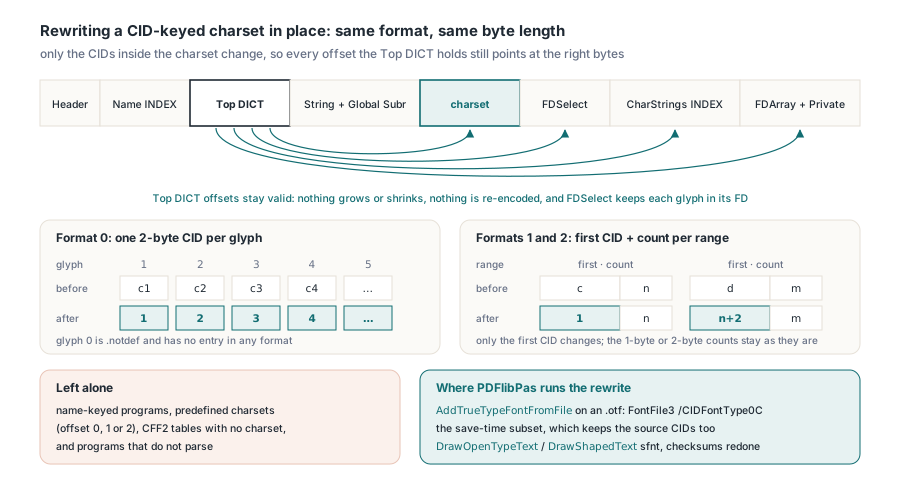
AddTrueTypeFontFromFileon an.otfembeds the bareCFFtable asFontFile3with subtypeCIDFontType0C, charset already rewritten- The save-time subset keeps the original glyph indices but also the source CIDs, so its charset is rewritten a second time
- The shaping companion behind
DrawOpenTypeTextandDrawShapedTextkeeps the whole sfnt; after the rewrite theCFFtable checksum is recomputed, and theheadtable'scheckSumAdjustmentbecomes0xB1B0AFBAminus the sum of the file - That adjustment is defined only for a single font, so a face taken from a collection gets the table checksum alone
uses
  SysUtils, PDFlibrary;

var
  Lib: TPDFlib;
  FontID: Integer;
begin
  Lib := TPDFlib.Create;
  try
    // A CFF-flavoured .otf is embedded as FontFile3 /CIDFontType0C;
    // the embedded copy gets an identity charset when it is CID-keyed
    FontID := Lib.AddTrueTypeFontFromFile('C:\Fonts\NotoSansSC-Regular.otf');
    if FontID = 0 then
      raise Exception.Create('the font file could not be read or parsed');
    Lib.SetTextSize(18);
    Lib.DrawText(56, 760, '季度报表:华东区销售汇总');
    Lib.DrawText(56, 730, '发票号码 2026-11-0187,金额 ¥12,480.00');
    if Lib.SaveToFile('noto-sc.pdf') <> 1 then
      raise Exception.CreateFmt('save failed, error %d', [Lib.LastErrorCode]);
  finally
    Lib.Free;
  end;
end;
Check the output by rendering it. Extraction will not show the problem. pdftotext and every other extractor read ToUnicode, which is keyed by the code in the content stream and knows nothing about which outline the font picks for it, so a page showing the wrong ideographs still extracts the right string. mutool draw -r 150 -o page%d.png noto-sc.pdf shows what the page really looks like, and for this DrawText path poppler's pdffonts noto-sc.pdf should list the font as CID Type 0C. Expected: both lines render in Noto Sans SC with the glyphs the source text names, and the same output appears in Ghostscript
Which embedding form needs PDF 1.6?
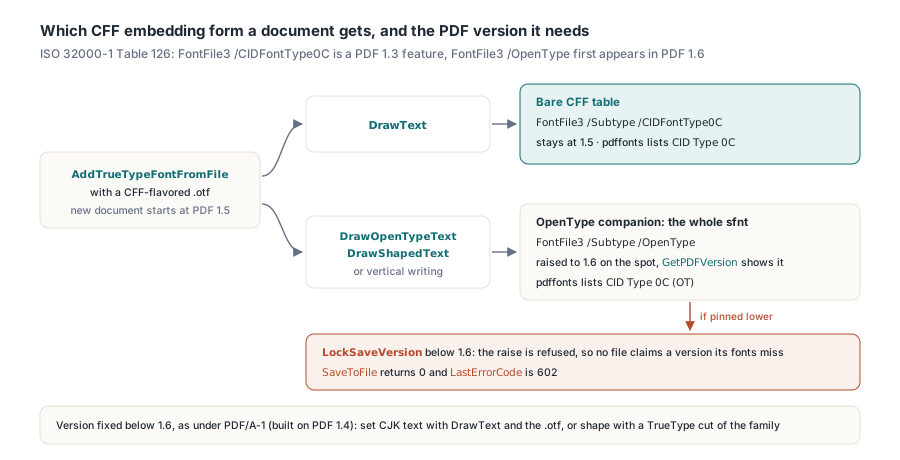
The OpenType one. Table 126 of ISO 32000-1 lists a FontFile3 stream of subtype CIDFontType0C as a PDF 1.3 feature, while subtype OpenType — the whole sfnt with its CFF table — first appears in PDF 1.6. New PDFlibPas documents start at version 1.5, which the bare-CFF DrawText path fits inside. The first DrawOpenTypeText, DrawShapedText or vertical-writing call with a CFF face creates an OpenType companion and raises the document to 1.6 on the spot, which GetPDFVersion reports immediately. A version lock changes that. If LockSaveVersion has pinned the document lower, the raise is refused and SaveToFile returns 0 with LastErrorCode 602, so no file claims a version its fonts do not meet. When a delivery profile fixes the version below 1.6, PDF/A-1 being the common case since it is built on PDF 1.4, set CJK text through DrawText with the .otf, or use a TrueType cut of the family for anything that needs shaping
var
  Lib: TPDFlib;
  FontID: Integer;
begin
  Lib := TPDFlib.Create;
  try
    FontID := Lib.AddTrueTypeFontFromFile('NotoSansSC-Regular.otf');
    Writeln('before: ', Lib.GetPDFVersion);      // Expected: 1.5
    if Lib.DrawOpenTypeText(56, 760, FontID, 18, '《年度报告》第三章', 0) = 1 then
      Writeln('after: ', Lib.GetPDFVersion);     // Expected: 1.6
    Lib.SaveToFile('shaped.pdf');  // Expected in pdffonts: CID Type 0C (OT)
  finally
    Lib.Free;
  end;

  Lib := TPDFlib.Create;
  try
    Lib.LockSaveVersion('1.5');
    FontID := Lib.AddTrueTypeFontFromFile('NotoSansSC-Regular.otf');
    Lib.DrawOpenTypeText(56, 760, FontID, 18, '《年度报告》第三章', 0);
    if Lib.SaveToFile('locked.pdf') = 0 then
      Writeln('save refused, error ', Lib.LastErrorCode);  // Expected: 602
  finally
    Lib.Free;
  end;
end;
Widths and ToUnicode keyed by the same numbers
Once the charset is the identity, the CID, the glyph index and the content stream code are one number. The widths follow it. ISO 32000-1 §9.7.4.3 indexes /W by CID itself, in groups of either a starting CID followed by an array of widths or a first CID, last CID and one shared width, with no /FirstChar offset of the kind simple fonts use. Any CID the array leaves out takes /DW, and Table 117 sets the default for /DW at 1000. Zero is wrong. A reader that falls back to 0 for unlisted CIDs collapses a line of ideographs onto itself. For an .otf loaded through AddTrueTypeFontFromFile, PDFlibPas writes a /W array that starts at CID 0 and lists every glyph's advance, next to an explicit /DW 1000. On the reading side, CJK text that extracts as garbage usually goes wrong in the codespace half of the same pipeline, and a PDF/UA font audit of widths, CharSet and CIDSet holds these arrays up against the embedded program
ToUnicode has a numbering rule of its own. A bfrange entry stores only the first destination string, and §9.10.3 requires that its last byte not be pushed past 255 by the length of the range, because a reader generates the following destinations by incrementing only that last byte. Consecutive glyphs mapping to U+4EFE, U+4EFF, U+4F00 and U+4F01 look like one range. They are not: a reader would decode the third as U+4E00. The PDFlibPas writer merges neighbouring glyph-to-Unicode pairs into one bfrange only when both the source codes and the destinations stay inside one block of 256, and splits the run otherwise. Vertical CJK setting goes through the same companion fonts, so vertical Japanese and Chinese text inherits the identity charset and these ToUnicode ranges without extra calls
Every face that InspectOtfCharset reports as CID-keyed with a non-identity charset is one where glyph-index codes and the font disagree. Embedded through PDFlibPas for Delphi, such a face keeps its outlines, offsets and charset length, and what changes is the CIDs in that one table, plus the checksums when the whole sfnt is kept