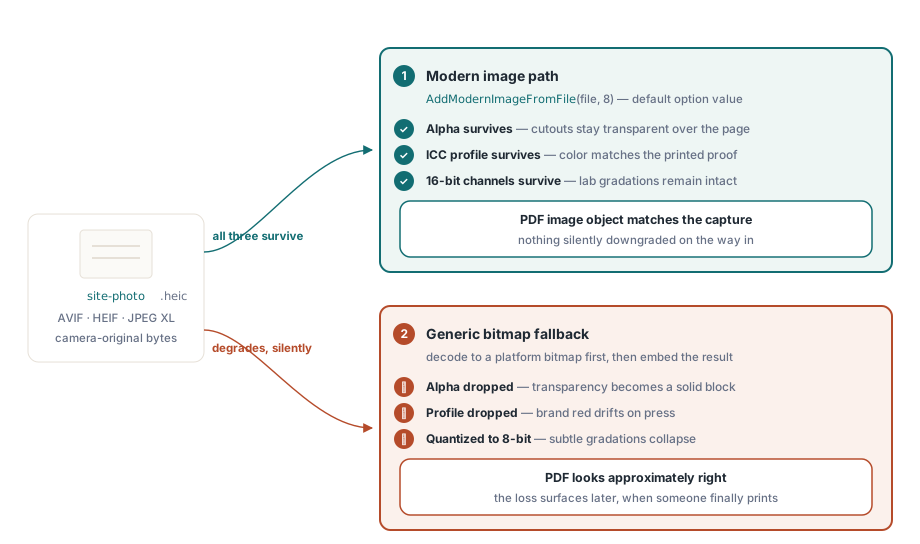
PDF Library for Delphi accepts AVIF, HEIF and JPEG XL images as input through AddModernImageFromFile and its stream and string variants, preserving alpha, the embedded ICC profile and 16-bit channels on the way into the PDF image object. Format detection happens on a bounded magic-number read, and decoding runs through a replaceable backend, so nothing external is invoked for a file that is not actually one of those formats
These formats arrived in document workflows through phones. iOS has produced HEIC by default for years, Android devices produce AVIF, and a field technician photographing a damaged part sends an image that a PDF report generator built in 2015 cannot open at all. The generic fallback path, decoding through a platform bitmap, reliably yields 8-bit colour and loses alpha and the colour profile along the way
What does the modern image path preserve that a bitmap conversion loses?
Three things, and each has a workflow that depends on it. Alpha survives, which matters for logos and product cutouts composited over page content. The ICC profile survives, which matters for anything that will be printed or colour-matched. And 16-bit channels survive, which matters for medical and scientific imagery where 8-bit quantisation destroys the very gradations the image was captured for
Passing an image through a platform bitmap loses all three in one step, and it does so silently: the resulting PDF looks approximately right, and nobody notices until a printer asks why the corporate red is wrong. Option value 8 on the modern image calls is the flag that keeps alpha, ICC and 16-bit channels together, and it is the default for those calls
Adding one to a page
The call returns an image identifier, which is then selected and drawn, or drawn and released in one step:
uses
  PDFlibrary, PDFlibModernImage;

var
  Lib: TPDFlib;
  ImageID: Integer;
begin
  Lib := TPDFlib.Create;
  try
    Lib.NewDocument;
    Lib.SetPageSize('A4');
    Lib.NewPage;

    // Options = 8 keeps alpha, ICC and 16-bit channels
    ImageID := Lib.AddModernImageFromFile('site-photo.heic', 8);
    if ImageID > 0 then
      Lib.DrawImageAndRelease(ImageID, 40, 40, 515, 340)
    else
      Lib.DrawText(40, 40, 'image could not be decoded');

    Lib.SaveToFile('inspection-report.pdf');
  finally
    Lib.Free;
  end;
end;
Detection precedes decoding and is deliberately narrow. The library reads a bounded header, recognises the ISO base media file format brands that identify AVIF and HEIF, and recognises both the raw and container signatures of JPEG XL, then restores the caller's stream position. An unknown or disguised input never reaches the external codec, which keeps a renamed executable from being handed to a decoder as if it were a picture
Where does the decoding actually happen?
Modern image formats are large, complex codecs, and putting one inside a PDF library would be an odd design choice. The default backend dynamically loads a deployable MagickWand module in-process and looks for it in a documented order: an explicit file or directory you set, environment variables, the executable directory, and the system search path
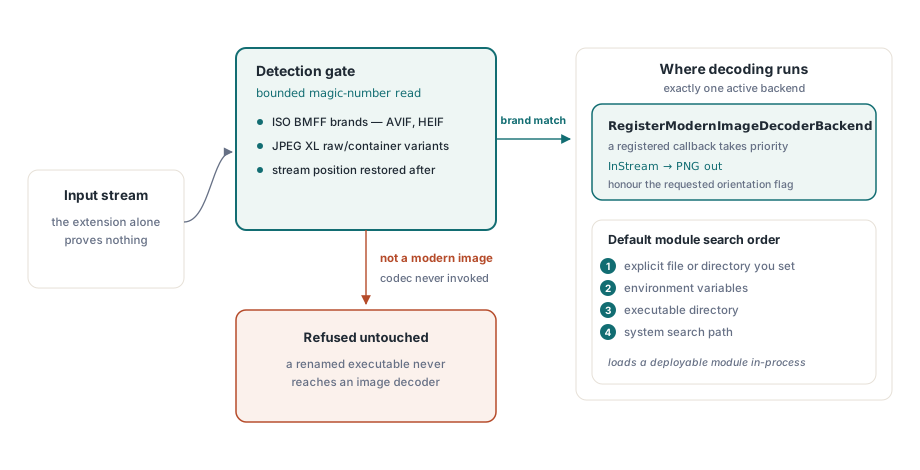
Applications that already ship a decoder, or that must not load an external module at all, register their own callback instead. The contract is small: read the input stream, write a PNG to the output stream, honour the requested orientation:
function MyDecoder(InStream, OutPNG: TStream;
  ImageFormat: TPDFlibModernImageFormat;
  ApplyOrientation: Boolean): Boolean;
begin
  // Decode InStream with your own codec and write PNG bytes to OutPNG
  Result := DecodeWithBundledCodec(InStream, OutPNG,
    ImageFormat, ApplyOrientation);
end;

begin
  RegisterModernImageDecoderBackend(MyDecoder);
  // ... add images ...
  ClearModernImageDecoderBackend;    // back to the default backend
end;
Deployment gets one convenience and one deliberate restraint. If the codec directory contains a modules\coders subdirectory, the library fills in the codec environment variables that such a layout needs, but only when the host application has not already set them. An application with its own runtime deployment strategy keeps it
Why PNG in the middle?
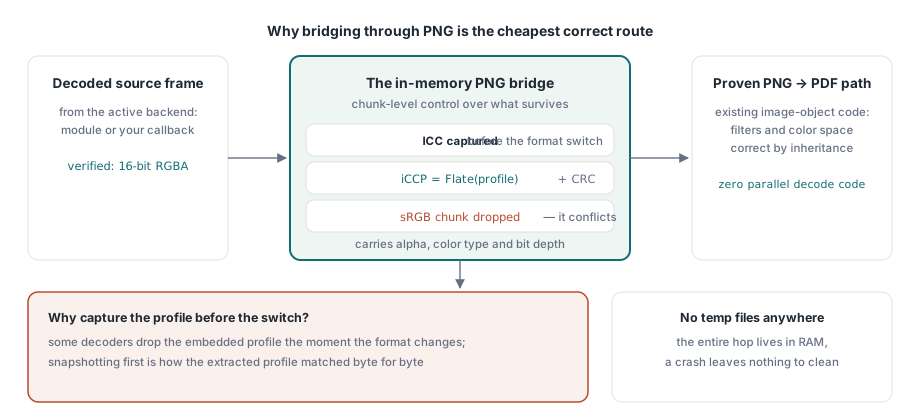
Bridging through an in-memory PNG rather than a raw pixel buffer looks like an extra step and is actually the cheapest correct one. PNG expresses everything that has to survive, alpha, colour type, bit depth and an embedded ICC profile, and the library already has a mature, well-tested path from PNG into a PDF image object with the right filters and colour space. Reusing it means modern formats inherit years of correctness work instead of getting a parallel implementation
The bridge is entirely in memory, so no temporary files are created and no cleanup is needed on a crash. One wrinkle needed explicit handling: some conversions drop the ICC profile when changing format. The backend therefore captures the source profile before the format switch, compresses it with Flate, builds a valid iCCP chunk with a recomputed CRC, and removes any sRGB chunk that would conflict with it. In testing, a decoded AVIF kept 16-bit RGBA with 16-bit alpha, and the profile extracted from the resulting PDF matched the source profile byte for byte at 60,960 bytes
Practical notes before you enable it in production
Check availability at startup rather than at the first photograph. ModernImageCodecAvailable reports whether a backend can be used, and SetModernImageCodecLibrary points at an explicit file or directory when your deployment places the codec somewhere non-standard:
Lib.SetModernImageCodecLibrary('C:\MyApp\codecs');
if Lib.ModernImageCodecAvailable = 0 then
  Log('modern image input unavailable - HEIC and AVIF will be refused');
Watch the file size of the result. A 16-bit RGBA image with an embedded profile is a large PDF image object, and a report with forty of them will be big. When the document is destined for screen viewing rather than print, downsampling before embedding is the right trade, and the general size levers are covered in PDF file size optimisation
Finally, decide colour policy deliberately. Keeping the source profile is correct for archival and print work; converting to a document-wide space is correct when a mixed set of photographs must look consistent, and the conversion route is described in recolouring a document to another colour space. If you need to confirm what actually landed in the file, the inspection path in text, image and font extraction reports the image objects a document carries
Modern image input, colour management and image optimisation are part of the same library for Delphi, C++Builder and Free Pascal; the complete feature list is on the PDF Library for Delphi page