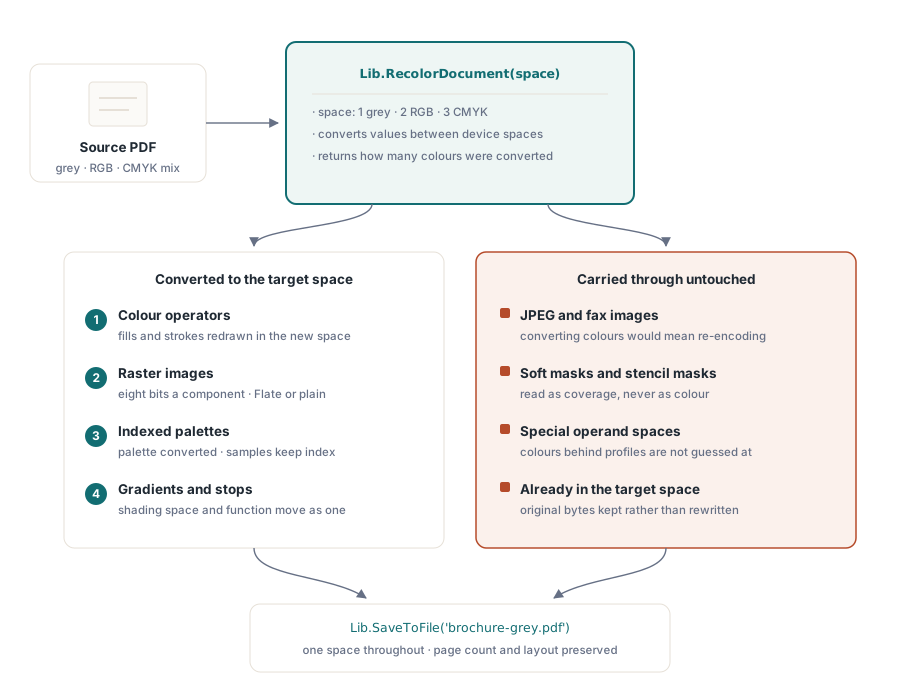
RecolorDocument moves a whole PDF into one colour space, and RecolorPage does the same for a single page. Both take 1 for grey, 2 for RGB and 3 for CMYK, and return how many colours were converted. Geometry, text and images stay exactly where they were; only the colour changes
This is the operation you want before sending work to a press that expects one space, or when a colour document has to become a grey one without being regenerated. The alternative — rebuilding the document from its source data in the target space — is only available when you still have the source data, which for anything received from outside you do not
What gets converted, and in what order
Colour operators first: the fills and strokes a page sets whilst drawing. A colour already in the target space is left alone, so a page whose colours need no change keeps its original bytes rather than being rewritten to identical values. That property matters more than it sounds on a large document, because untouched objects stay untouched in the file
Images come next, and they are the part that used to be missing. A document turned grey with only its operators converted still showed colour pictures on grey pages, which is worse than either extreme. An image is converted when it carries eight bits a component, a device colour space, and either no compression or plain Flate
Indexed images convert through their colour table: the palette is converted and every sample keeps the index it already held. That covers the palette images a screenshot or a chart is usually saved as, and it converts them whatever their samples are packed or compressed with, because the samples never change
var
  Lib: TPDFlib;
  Converted: Integer;
begin
  Lib := TPDFlib.Create;
  try
    Lib.LoadFromFile('brochure.pdf', '');
    Converted := Lib.RecolorDocument(1);       // 1 grey, 2 RGB, 3 CMYK
    Log(Format('%d colours converted', [Converted]));
    Lib.SaveToFile('brochure-grey.pdf');
  finally
    Lib.Free;
  end;
end;
Why is a JPEG left alone?
Because converting its colours would mean re-encoding it, and re-encoding is a different operation with different consequences. A JPEG or fax image keeps its own bytes: decoding, converting and recompressing would change the image data itself, introduce a second generation of lossy artefacts, and change the file size in ways the caller did not ask for
Soft masks and stencil masks are left alone for a different reason. Both are read as coverage rather than as colour, and converting one would leave the page showing the mask as a picture — a transparency mask rendered as grey artwork on top of the content it was supposed to be shaping. Leaving them is not a limitation to work around; it is the correct result
Colours set through an ICCBased, Separation, Indexed or Pattern space are also left as they stand at the operator level. Converting those without reading their profile would change how the page looks rather than preserve it, and a recolouring pass whose whole promise is preservation cannot start guessing at profiles
Gradients convert with the stops behind them
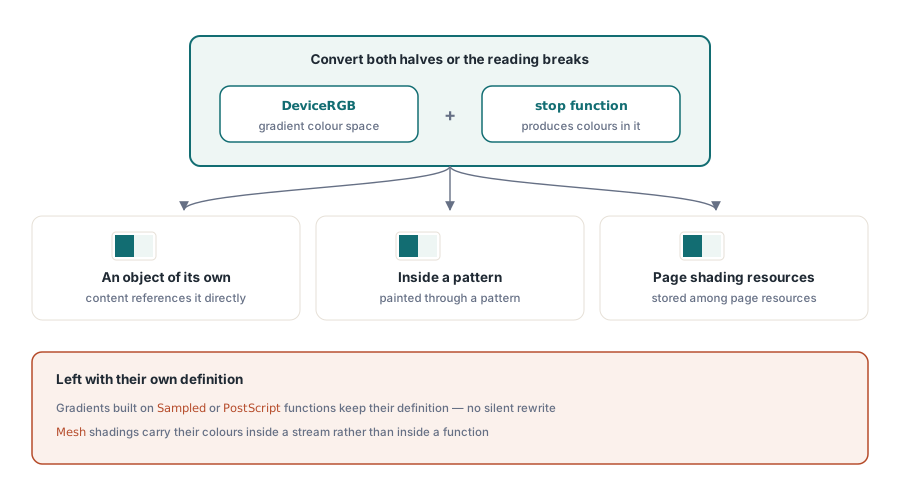
A gradient is a colour space plus a function that produces colours in it, and converting one without the other produces nonsense — a converted gradient whose stops were left behind reads as a channel mistaken for a grey level, which on a page looks like a band of the wrong colour entirely. The gradient's colour space and the stops behind it move together
Gradients are found wherever they live: given an object of their own, written inside the pattern that paints them, or sitting in a page's shading resources. That coverage matters because design tools distribute them differently, and a converter that only handled one placement would leave a document half converted with no obvious pattern to the failures
Two kinds are deliberately left as they stand. A gradient built from a sampled or PostScript function keeps its own definition, and so do the mesh types, which carry their colours in a stream rather than in a function. Rewriting either is a different operation from converting a colour, and doing it silently inside a recolour pass would be a surprise
// Convert a single page - useful when only the cover needs to change
Lib.SelectPage(1);
Lib.RecolorPage(3);          // this page to CMYK
Lib.SaveToFile('cover-cmyk.pdf');
Where recolouring fits before a press submission
Use it as a normalisation step, not as colour management. Recolouring converts values between device spaces; it does not apply an ICC profile, honour a rendering intent or simulate a press condition. For a job that has to hit a contract proof, the profile-driven workflow is the answer and recolouring is at most the step that gets everything into one space first
Where it earns its place is the ordinary production problem: a submission that must be grey and arrives with an RGB logo, an internal document that must not print in colour, a batch of files that has to be one space before a preflight step will accept them. Pair it with a check — the notes on PDF/A and PDF/UA preflight and on the compliance and signing workbench cover running the verdict as part of the same job
If the document also needs its vector artwork examined rather than converted, the walkthrough of vector graphics, shaders and gradients covers how those objects are built in the first place, which is useful context for understanding what a recolour pass can and cannot reach
PDF Library for Delphi is a native Pascal PDF library for Delphi, C++Builder and Lazarus with no external runtime, so a colour normalisation step runs inside your own service rather than shelling out to a converter — see the PDF Library for Delphi product page for the full document-processing API