"Hello World" 來自 Delphi HotPDF 元件
歡迎來到關於 Delphi HotPDF 元件 的 "HelloWorld" 演示程式!
關於 HotPDF 元件
HotPDF 元件是一個強大且多功能的 PDF 處理庫,專為 Delphi 和 C++Builder 開發者設計。這個全面的元件提供了一個廣泛的 API,使開發者能夠輕鬆、精確地建立、操作和修改 PDF 文件。
HotPDF 元件的關鍵特性:
- PDF 建立與生成: 從頭開始建立 PDF 文件,並完全控制佈局、格式和內容。
- 文本和圖形支援: 向 PDF 頁面新增文本、影像、形狀和複雜圖形。
- 多語言支援: 完全支援 Unicode,用於國際文本渲染。
- 字型管理: 嵌入字型,以確保不同系統上的文件外觀一致。
- 壓縮選項: 使用壓縮演算法來最佳化檔案大小。
- 安全特性: 文件加密、密碼保護和許可權控制。
- 文件處理: 合併、拆分和修改現有PDF文件。
- 表格和表單支援: 建立複雜表格和互動式表單。
HelloWorld.dpr 程式概述
好的。 HelloWorld.dpr 示例程式是學習 HotPDF 元件的絕佳入門。
最基本和最重要的功能:TexOut 函式。這個演示程式也展示了基本的 PDF 建立功能。
核心功能:
1. PDF 文件建立
該程式的 主要功能是生成包含多語言“Hello World”文本的 PDF 文件。 CreatePDF 該過程演示了:
- 元件初始化: 正確設定和配置 THotPDF 元件。
- 文件屬性: 設定後設資料,例如壓縮選項和字型嵌入。
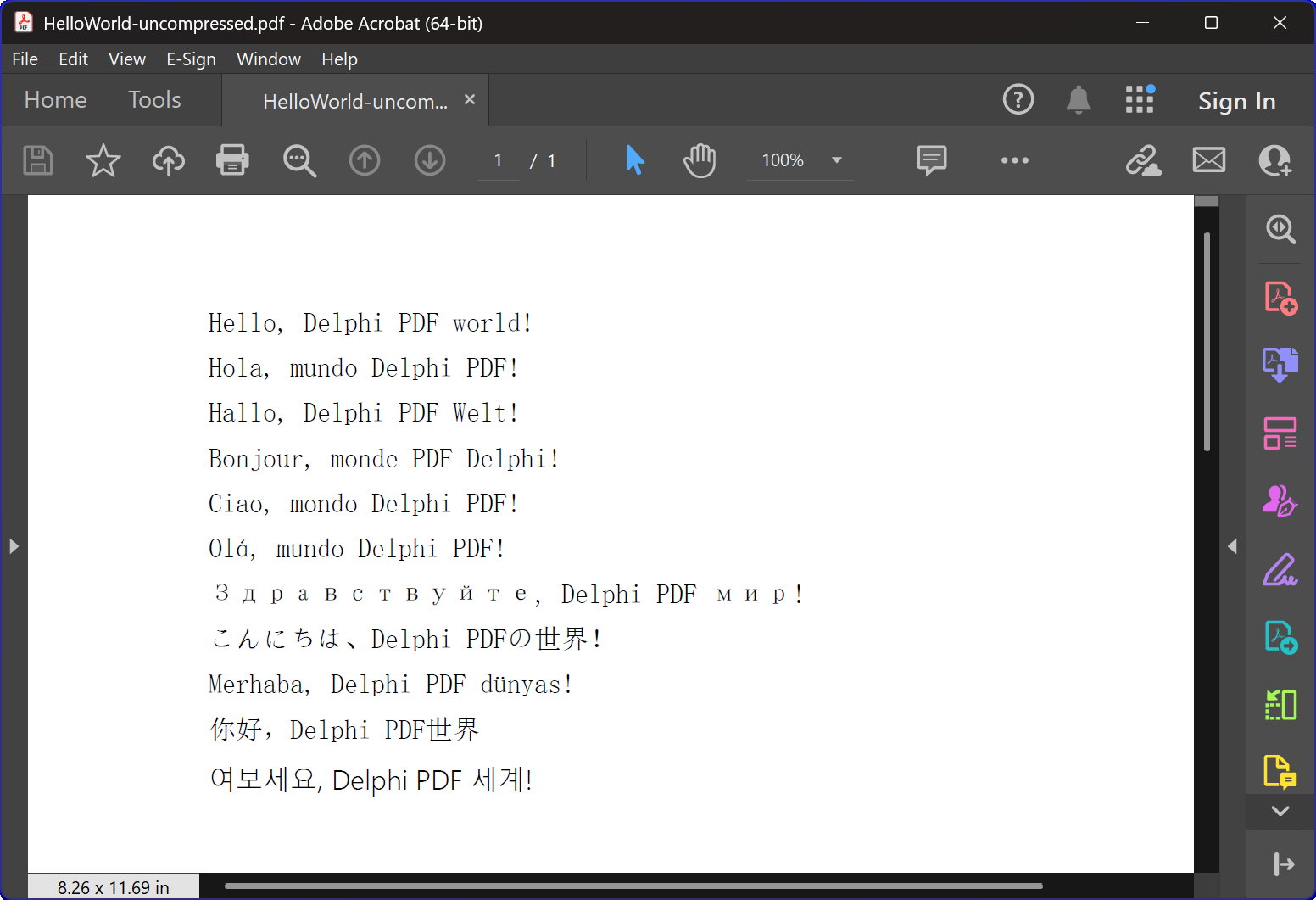
- 多語言文本渲染: 支援11種語言的文本顯示,包括英語、西班牙語、德語、法語、義大利語、葡萄牙語、俄語、日語、土耳其語、中文和韓語。
- 字型管理: 使用Arial Unicode MS字型以支援多語言顯示。
- 壓縮: 建立壓縮的PDF文件。
2. 視窗管理與系統整合。
該程式包含高階視窗列舉功能,演示了:
- 系統視窗列舉: 使用 Windows API
EnumWindows函式來遍歷所有頂級視窗 - 視窗標題匹配: 實現子字串匹配來識別目標應用程式
- 自動視窗關閉: 傳送
WM_CLOSE向關閉 PDF 檢視器的訊息,告知其可能存在開啟的檔案。 - 衝突預防: 確保在建立新的 PDF 檔案時不會發生任何檔案訪問衝突。
3. 錯誤處理與資源管理
該程式展示了最佳實踐,包括:
- 記憶體管理: 正確建立和銷燬元件例項。
- 異常安全: 使用 try-finally 塊以確保資源清理。
- 使用者反饋: 提供控制台輸出以告知使用者程式進度。
技術實現細節:
壓縮技術。
該程式建立包含 FlateDecode 壓縮的 PDF 文件。
字型處理策略。
該程式採用一種複雜的字型選擇策略:
- Arial Unicode MS: 適用於大多數語言,因為它具有廣泛的字元支援。
- 字型嵌入: 確保在不同系統上具有一致的外觀。
跨版本相容性。
程式碼包含條件編譯指令,以支援現代和舊版本的Delphi。
- XE2+ 支援: 使用名稱空間單元 (WinApi.Windows, System.SysUtils 等)。
- 遺留支援: 對於較舊的Delphi版本,會回退到傳統的單元名稱。
教學價值。
這個HelloWorld示例具有多種教學目的:
- 元件介紹: 提供了一個對HotPDF元件用法的簡單介紹。
- 最佳實踐: 演示了正確的資源管理和錯誤處理方法。
- 系統整合: 演示如何將 PDF 生成與 Windows 系統操作整合。
- 國際化: 演示如何在 PDF 文件中處理多語言文本。
快速入門。
要執行此示例程式:
- 確保 HotPDF 元件已正確安裝在您的 Delphi IDE 中。
- 開啟 HelloWorld.dpr 專案檔案。
- 編譯並執行程式。
- 該程式將自動建立一個帶有壓縮的 PDF 檔案。
- 檢查生成的文件,以檢視多語言文本的渲染效果。
原始碼。
以下是 HelloWorld 演示程式的完整、帶註釋的原始碼:
|
1 2 3 4 5 6 7 8 9 10 11 12 13 14 15 16 17 18 19 20 21 22 23 24 25 26 27 28 29 30 31 32 33 34 35 36 37 38 39 40 41 42 43 44 45 46 47 48 49 50 51 52 53 54 55 56 57 58 59 60 61 62 63 64 65 66 67 68 69 70 71 72 73 74 75 76 77 78 79 80 81 82 83 84 85 86 87 88 89 90 91 92 93 94 95 96 97 98 99 100 101 102 103 104 105 106 107 108 109 110 111 112 113 114 115 116 117 118 119 120 121 122 123 124 125 126 127 128 129 130 131 132 133 134 135 136 137 138 139 140 141 142 143 144 145 146 147 148 149 150 151 152 153 154 155 156 157 158 159 160 161 162 163 164 165 166 167 |
{************************************************************} // HotPDF PDF Component // Copyright(c)2007-2025, https://www.loslab.com {************************************************************} // HelloWorld Demo Program for HotPDF Component // This program demonstrates basic PDF creation capabilities // including multilingual text support and compression options {************************************************************} program HelloWorld; {$APPTYPE CONSOLE} // Console application type {$I ..\..\..\Lib\HotPDF.inc} // Include HotPDF configuration file uses // EurekaLog units for memory leak detection and debugging (optional) {$IFDEF EurekaLog} EMemLeaks, // Memory leak detection EResLeaks, // Resource leak detection EDebugJCL, // JCL debugging support EDebugExports, // Export debugging information EFixSafeCallException, // SafeCall exception handling EMapWin32, // Win32 mapping support EAppConsole, // Console application support EDialogConsole, // Console dialog support ExceptionLog7, // Exception logging {$ENDIF EurekaLog} // System units - different namespaces for XE2+ vs older versions {$IFDEF XE2+} WinApi.Windows, // Windows API functions WinApi.Messages, // Windows message constants System.SysUtils, // System utilities System.Classes, // Base classes (TStringList, etc.) Vcl.Graphics, // Graphics support {$ELSE} Windows, // Windows API functions (older Delphi) Messages, // Windows message constants (older Delphi) SysUtils, // System utilities (older Delphi) Classes, // Base classes (older Delphi) Graphics, // Graphics support (older Delphi) {$ENDIF} HPDFDoc; // HotPDF main component unit // Creates a compressed PDF file with multilingual "Hello World" text // Parameters: // FileName: Output PDF file name procedure CreatePDF(const FileName: string); var HotPDF: THotPDF; // Main HotPDF component instance begin // Create HotPDF component instance HotPDF := THotPDF.Create(nil); try // Configure PDF properties HotPDF.AutoLaunch := true; // Automatically open PDF after creation HotPDF.FileName := FileName; // Set output file name // Enable FlateDecode compression HotPDF.Compression := cmFlateDecode; // Enable FlateDecode compression WriteLn('Creating compressed PDF: ', FileName); HotPDF.FontEmbedding := true; // Embed fonts for better compatibility HotPDF.BeginDoc; // Start PDF document creation // Set Unicode font for multilingual text support // Arial Unicode MS supports most languages except Korean // procedure SetFont ( FontName: AnsiString; FontStyle: TFontStyles; ASize: Single; FontCharset: TFontCharset = DEFAULT_CHARSET; IsVertical: boolean = false); // DEFAULT_CHARSET: 1 - Font is chosen based on Name. If the described font is not available on the system, Windows will substitute another font HotPDF.CurrentPage.SetFont('Arial Unicode MS', [], 12, 1, False); // Display "Hello World" in multiple languages // TextOut parameters: (X, Y, Angle, Text) HotPDF.CurrentPage.TextOut(80, 50, 0, 'Hello, Delphi PDF world!'); // English HotPDF.CurrentPage.TextOut(80, 70, 0, 'Hola, mundo Delphi PDF!'); // Spanish HotPDF.CurrentPage.TextOut(80, 90, 0, 'Hallo, Delphi PDF Welt!'); // German HotPDF.CurrentPage.TextOut(80, 110, 0, 'Bonjour, monde PDF Delphi!'); // French HotPDF.CurrentPage.TextOut(80, 130, 0, 'Ciao, mondo Delphi PDF!'); // Italian HotPDF.CurrentPage.TextOut(80, 150, 0, 'Olá, mundo Delphi PDF!'); // Portuguese HotPDF.CurrentPage.TextOut(80, 170, 0, 'Здравствуйте, Delphi PDF мир!'); // Russian HotPDF.CurrentPage.TextOut(80, 190, 0, 'こんにちは、Delphi PDFの世界!'); // Japanese HotPDF.CurrentPage.TextOut(80, 210, 0, 'Merhaba, Delphi PDF dünyası!'); // Turkish HotPDF.CurrentPage.TextOut(80, 230, 0, '你好,Delphi PDF世界'); // Chinese HotPDF.CurrentPage.TextOut(80, 250, 0, '여보세요, Delphi PDF 세계!'); // Korean HotPDF.EndDoc; // Finalize and save the PDF document WriteLn('PDF created successfully: ', FileName); finally HotPDF.Free; // Clean up HotPDF component end; end; // Global variables for window enumeration and PDF creation var Title: String; // Individual title string (unused in current implementation) Titles: TStrings; // List of window titles to search for Window: HWND; // Window handle (unused in current implementation) WindowText: array [0 .. 255] of Char; // Buffer for window text (unused in current implementation) WindowTitle: String; // Window title string (unused in current implementation) I: Integer; // Loop counter (unused in current implementation) // Callback function for EnumWindows API // This function is called for each top-level window in the system // Parameters: // hWnd: Handle to the current window being enumerated // lParam: User-defined data (in our case, pointer to TStrings with target titles) // Returns: True to continue enumeration, False to stop function EnumWindowsProc(HWND: HWND; lParam: lParam): BOOL; stdcall; var Titles: TStrings; // List of target window titles I: Integer; // Loop counter WindowText: array [0 .. 255] of Char; // Buffer to store window text WindowTitle: String; // Current window's title as string begin Result := true; // Continue enumeration by default Titles := TStrings(lParam); // Cast lParam back to TStrings // Get the window title text if GetWindowText(HWND, WindowText, SizeOf(WindowText)) > 0 then begin WindowTitle := String(WindowText); // Convert char array to string // Check if window title contains any of our target strings for I := 0 to Titles.Count - 1 do begin // Use Pos function to check if target string is contained in window title if Pos(Titles[I], WindowTitle) > 0 then begin // Send WM_CLOSE message to close the window PostMessage(HWND, WM_CLOSE, 0, 0); Break; // Exit loop after finding first match end; end; end; end; // Main program execution begins here begin // Close any existing PDF files that might be open in PDF viewers // This prevents file access conflicts when creating new PDFs with same names Titles := TStringList.Create; try // Define list of window title substrings to search for // Any window containing these strings will be closed // This will close Adobe and Foxit PDF reader & editor and many other PDF apps Titles.CommaText := '"HelloWorld.pdf", "Foxit"'; // Enumerate all top-level windows and close matching ones // EnumWindows calls our callback function for each window EnumWindows(@EnumWindowsProc, lParam(Titles)); finally Titles.Free; // Clean up string list end; // Display program header WriteLn('=== HotPDF HelloWorld Demo ==='); WriteLn('This demo creates a compressed PDF file with multilingual text.'); WriteLn(''); // Create compressed PDF CreatePDF('HelloWorld.pdf'); // Display completion message WriteLn(''); WriteLn('PDF file created successfully!'); WriteLn('The PDF file uses FlateDecode compression for optimal file size.'); WriteLn(''); WriteLn('Press Enter to exit...'); ReadLn; // Wait for user input before closing console end. |