把 ERP 發票號碼加進 PDF/A-2b 檔案的 XMP,會換來一筆未宣告屬性的 finding;同一份封包放到 PDF/A-4 檔案裡卻合規。Part 1 到 3 為每個自訂屬性要求 pdfaExtension:schemas 描述,part 4 不要求,所以 PDFium Component for Delphi 的 PDF/A 驗證器會先讀 pdfaid:part 再挑規則集
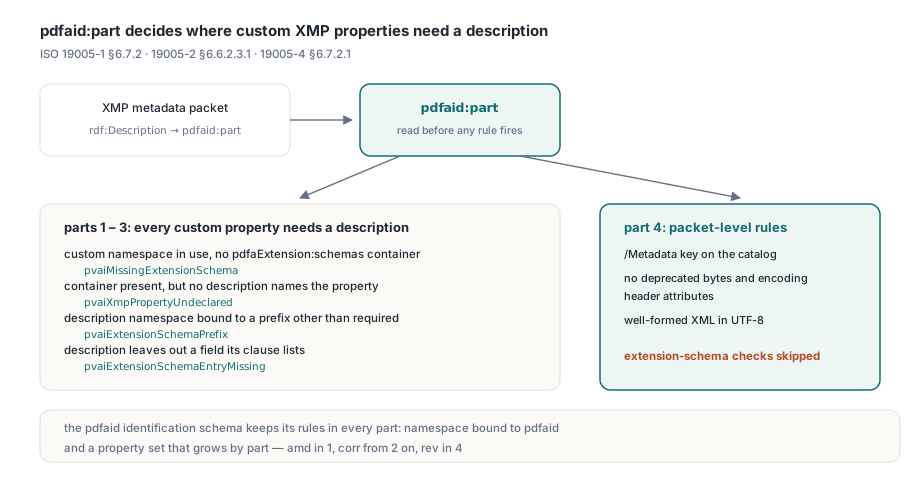
PDF/A part 1 到 3 對自訂屬性要求什麼?
一份描述其命名空間的資料,外加描述裡點名該屬性的一行。ISO 19005-1 §6.7.2 只允許 XMP 屬性來自預先定義的 schema,或來自符合 §6.7.8 的擴充 schema——後者要求每份描述都在同一個詮釋資料流裡;ISO 19005-2 §6.6.2.3.1 把這條規則帶進 part 2 與 3。描述不是空白支票:它經 pdfaProperty:name 一個一個點名屬性,所以描述了 inv:InvoiceNumber 又寫 inv:DueDate 的封包,會在第二個屬性上栽跟頭。PDFium Component 以四個 TPdfAValidationIssue 值回報這些情況,一個過失一筆 finding:改了前綴名,就只出前綴 finding
| Issue 值 | 何時回報 | 條款 |
|---|---|---|
pvaiMissingExtensionSchema | 使用了非預先定義的命名空間,而封包沒有 pdfaExtension:schemas 容器 | 19005-1 §6.7.8、19005-2 §6.6.2.3.1 |
pvaiXmpPropertyUndeclared | 容器存在,但裡面沒有任何描述點名該屬性 | 19005-1 §6.7.2、19005-2 §6.6.2.3.1 |
pvaiExtensionSchemaPrefix | 描述的命名空間綁到了非必需前綴 | 19005-1 §6.7.8、19005-2 §6.6.2.3.2 |
pvaiExtensionSchemaEntryMissing | 描述漏掉其表格所列的欄位 | 19005-1 §6.7.8、19005-2 §6.6.2.3.3 |
前兩個 finding 碰到哪個,看產生器。許多 PDF/A 寫入器早已在容器裡描述 pdfaid 識別 schema,PDFium Component 的 SaveAsPdfA 也在內,事後補加的欄位就落在有容器、無條目的旁邊。下面的常式只印擴充 schema 的 finding。預期:SaveAsPdfA 寫出的 PDF/A-2b 檔印出 pac2b 與 pvaiXmpPropertyUndeclared;沒有容器的 part 1 或 2 封包印出 pvaiMissingExtensionSchema;PDF/A-4 檔只印它那行合規結果
uses
  System.SysUtils, System.Classes, System.TypInfo,
  PDFium, FPdfPdfa, FPdfXmp;

const
  InvoiceNs = 'http://ns.example.com/invoice/1.0/';
  ExtensionIssues: TPdfAValidationIssues = [pvaiMissingExtensionSchema,
    pvaiXmpPropertyUndeclared, pvaiExtensionSchemaPrefix,
    pvaiExtensionSchemaEntryMissing];

procedure PrintExtensionIssues(Source: TStream);
var
  Res: TPdfAValidationResult;
  Issue: TPdfAValidationIssue;
begin
  Res := ValidatePdfAComplianceEx(Source, TPdfAValidationOptions.Default);
  Writeln(GetEnumName(TypeInfo(TPdfAConformance), Ord(Res.Conformance)));
  for Issue in Res.Issues * ExtensionIssues do
    Writeln('  ', GetEnumName(TypeInfo(TPdfAValidationIssue), Ord(Issue)));
end;

procedure ProbeCustomProperty(const FileName: string);
var
  Pdf: TPdf;
  Packet: TPdfXmpPacket;
  Output: TMemoryStream;
begin
  Output := TMemoryStream.Create;
  try
    Pdf := TPdf.Create(nil);
    try
      Pdf.FileName := FileName;
      Pdf.Active := True;
      Packet := Pdf.ReadXmpPacket;
      if Packet = nil then
        raise Exception.CreateFmt('%s has no XMP packet', [FileName]);
      try
        Packet.SetSimpleValue(InvoiceNs, 'inv', 'InvoiceNumber', 'INV-2026-0412');
        if not Pdf.SaveAsWithXmpPacket(Output, Packet) then
          raise Exception.Create('Saving the edited packet failed');
      finally
        Packet.Free;
      end;
    finally
      Pdf.Free;
    end;
    Output.Position := 0;
    PrintExtensionIssues(Output);
  finally
    Output.Free;
  end;
end;
預先定義集合在 XMP 2004 與 ISO 16684-1 之間挪動過
predefined 指什麼,part 1 與 part 2 各說各話。ISO 19005-1 §6.7.2 指向 2004 年 1 月的 XMP Specification,ISO 19005-2 §6.6.2.3.1 指向 ISO 16684-1,後者的清單更長。日常檔案裡的落差就出在 crs(Camera Raw 設定)、aux(額外 EXIF 資料)與 xmpDM(動態媒體)——PDF/A Competence Center 的 TechNote 0008 以註腳標明它們是 XMP 2005 規格新增的。crs:AutoBrightness 或 xmpDM:videoColorSpace 屬性在 part 1 底下需要描述,從 part 2 起就是預先定義。公開的 veraPDF 語料庫裡有只加一個這類屬性、其他什麼都不動的 PDF/A-1b 失敗檔,而 veraPDF 自家的測試檔產生器又在它的 PDF/A-2b 檔裡寫進 camera-raw 或動態媒體提示,對 part 號碼無感的檢查器必然錯一邊。宣告內容也挪過:photoshop:SupplementalCategories 在 2004 是 Text,在 ISO 16684-1 是 Text 的 bag,bag 形式過不了 PDF/A-1、在 PDF/A-2 卻正確
反方向的捷徑也走不通。把 TechNote 0008 十張 schema 表以外的東西全當擴充,會錯殺普通 xmpMM:History 條目用到的 sType 結構與 Identifier qualifier 命名空間,而 TechNote 0008 在 PDF/A-1 就允許那些 URI。PDFium Component 從 pdfaid:part 讀版本:用了 crs、aux 或 xmpDM 卻沒有描述區塊的 part 1 封包,得到 pvaiMissingExtensionSchema;part 2 封包則拿不到擴充 schema finding。輸出 PDF/A-1 時,把下游沒人讀的 camera-raw 與動態媒體屬性剝掉——完整的 crs 描述動輒幾十個條目,每個都是一個 entry-missing finding 的機會
schema URI 裡的必需前綴與結尾 # 號
XML 命名空間通常任由寫入器挑前綴。§6.7.8 對描述詞彙收回了這個自由,給每個結構一個 URI 和一個必需前綴:pdfaSchema、pdfaProperty、pdfaType 用於值型別,pdfaField 用於其欄位;ISO 19005-2 §6.6.2.3.2 重述了這四個。把 http://www.aiim.org/pdfa/ns/property# 綁到 nonpdfaProperty 是等價的 XML,照樣不通過;veraPDF 語料庫裡對應這條款的檔案,URI 個個正確、只改掉一個前綴。自家的 schema 是另一回事:pdfaSchema:prefix 記錄的是偏好前綴,inv 屬建議性質,但請保持與封包實際綁定的前綴一致
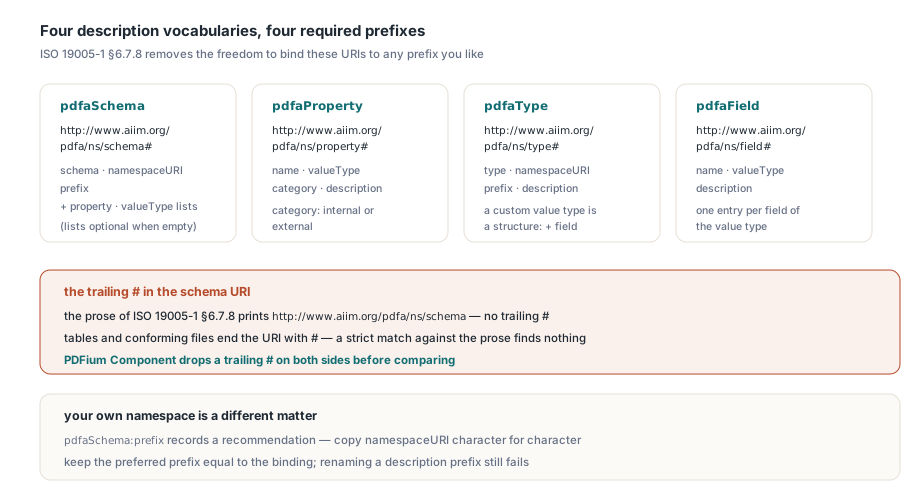
URI 有個怪癖。ISO 19005-1 §6.7.8 的正文印的是無結尾 # 的 http://www.aiim.org/pdfa/ns/schema,它的表格與合規檔案卻以該符號收尾,拿正文做嚴格比對一個都配不上。PDFium Component 比對前把兩側的結尾 # 都去掉。寫的時候用帶 # 的形式,自家的命名空間請一字不差抄進 pdfaSchema:namespaceURI。ISO 19005-2 §6.6.2.3.2 的結尾一句接著要求 §6.6.2.3.3 表格列出的每個欄位,缺一個就回報 pvaiExtensionSchemaEntryMissing:
- Schema(
pdfaSchema):schema、namespaceURI與prefix,加上property與valueType清單——沒東西可宣告的 schema 可以省略後兩者 - Property(
pdfaProperty):name、valueType、category與description,其中category是internal或external - Value type(
pdfaType):type、namespaceURI、prefix、description與field,缺一不可,因為自訂值型別本身是個結構 - Field(
pdfaField):name、valueType與description
結構化條目在 RDF/XML 裡該怎麼寫?
三種寫法都行,只要條目還是個結構。ISO 32000-2 §14.3.2 把詮釋資料流的文法交給 ISO 16684-1,後者以 RDF/XML 的子集寫 XMP。短形式把 rdf:parseType="Resource" 放在 rdf:li 上,欄位列在其下;長形式把它們包進巢狀的 rdf:Description——兩者指同一個匿名結構。第三種寫法把純文字欄位挪成 rdf:Description 的屬性。只有文字進得去:pdfaSchema:property 裝的是序列,必須留在元素裡。從短形式條目拔掉 rdf:parseType,產物就不是 RDF/XML 了:解析器接著期待 rdf:li 內是文字或單一節點元素,把 pdfaSchema:schema 當成 typed node,而節點元素不得含非空白文字——第一個欄位就把文法弄破。重組清單條目的 XSLT、或從字典重建這個區塊的範本,可能在保留每個元素的同時弄丟那個屬性。想親眼看到傷口,用與寫出者不同的另一個 RDF 解析器把輸出讀回來
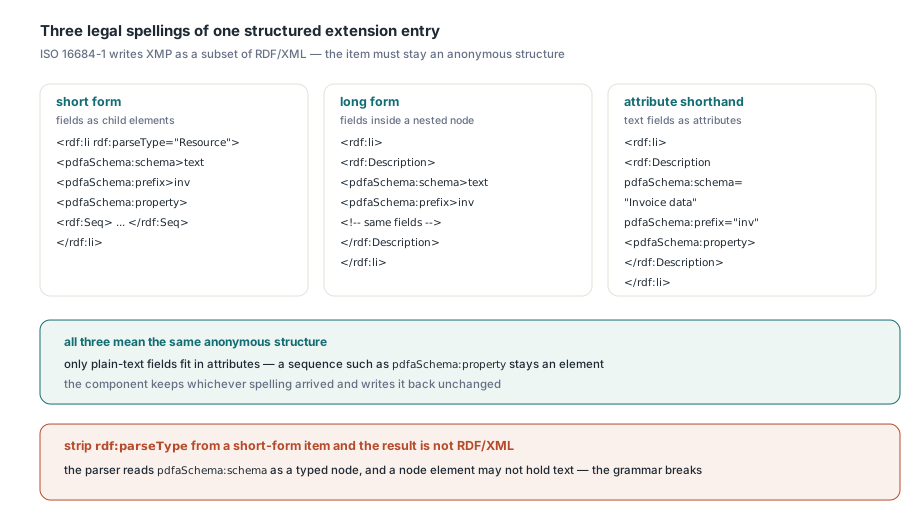
<!-- 短形式:完整描述的 invoice schema -->
<rdf:li rdf:parseType="Resource">
  <pdfaSchema:schema>Invoice data from the ERP</pdfaSchema:schema>
  <pdfaSchema:namespaceURI>http://ns.example.com/invoice/1.0/</pdfaSchema:namespaceURI>
  <pdfaSchema:prefix>inv</pdfaSchema:prefix>
  <pdfaSchema:property>
    <rdf:Seq>
      <rdf:li rdf:parseType="Resource">
        <pdfaProperty:name>InvoiceNumber</pdfaProperty:name>
        <pdfaProperty:valueType>Text</pdfaProperty:valueType>
        <pdfaProperty:category>external</pdfaProperty:category>
        <pdfaProperty:description>Invoice number assigned by the ERP</pdfaProperty:description>
      </rdf:li>
    </rdf:Seq>
  </pdfaSchema:property>
</rdf:li>

<!-- 長形式:同一個結構寫成巢狀節點 -->
<rdf:li>
  <rdf:Description>
    <pdfaSchema:schema>Invoice data from the ERP</pdfaSchema:schema>
    ...
  </rdf:Description>
</rdf:li>

<!-- 屬性簡寫:文字欄位改屬性,清單仍是元素 -->
<rdf:li>
  <rdf:Description pdfaSchema:schema="Invoice data from the ERP"
      pdfaSchema:namespaceURI="http://ns.example.com/invoice/1.0/"
      pdfaSchema:prefix="inv">
    <pdfaSchema:property>...</pdfaSchema:property>
  </rdf:Description>
</rdf:li>
來的是哪種寫法,PDFium Component 就保哪種。TPdf.ReadXmpPacket 回傳的 TPdfXmpPacket 裡,每個值都記錄其來源元素的 rdf:parseType——Resource、Literal 或 Collection,ToXml 原樣寫回;沒有記錄的結構離開時帶 rdf:parseType="Resource"。這個寫出器服務 SaveAsWithXmpPacket 與 NormalizePdfAMetadata——把Info 項目與其 XMP 對應值拉齊的那個呼叫——三種寫法的擴充區塊經過一次讀取加儲存的循環後,驗證結果不變。新條目請用短形式寫:每個欄位留在元素裡,編輯方式統一,也與 SaveAsPdfA 寫出的 pdfaid 條目一致
把您的描述加進既有的容器
新條目請併進既有的 rdf:Bag。每個封包一個容器:veraPDF 的 XMP 解析器拒收帶第二個 pdfaExtension:schemas 元素的封包(Duplicate property or field node 'pdfaExtension:schemas'),那些失敗落在一般詮釋資料規則上。每個屬性需要名稱、值型別、類別與描述——Factur-X 發票填的條目就是為了在擴充 schema 中宣告其 fx 屬性。下面的程式把短形式條目插到 </rdf:Bag> 之前——ToXml 會把容器寫在自己那一行。條目自己宣告 pdfaSchema 與 pdfaProperty,放哪裡都照樣解析
const
  ExtensionNs = 'http://www.aiim.org/pdfa/ns/extension/';
  ContainerEnd = '</rdf:Bag></pdfaExtension:schemas>';
  TopDescriptionEnd = '</rdf:Description>'#10' </rdf:RDF>';

function InvoiceSchemaItem: string;
begin
  Result := '<rdf:li rdf:parseType="Resource"' +
    ' xmlns:pdfaSchema="http://www.aiim.org/pdfa/ns/schema#"' +
    ' xmlns:pdfaProperty="http://www.aiim.org/pdfa/ns/property#">' +
    '<pdfaSchema:schema>Invoice data from the ERP</pdfaSchema:schema>' +
    '<pdfaSchema:namespaceURI>' + InvoiceNs + '</pdfaSchema:namespaceURI>' +
    '<pdfaSchema:prefix>inv</pdfaSchema:prefix>' +
    '<pdfaSchema:property><rdf:Seq><rdf:li rdf:parseType="Resource">' +
    '<pdfaProperty:name>InvoiceNumber</pdfaProperty:name>' +
    '<pdfaProperty:valueType>Text</pdfaProperty:valueType>' +
    '<pdfaProperty:category>external</pdfaProperty:category>' +
    '<pdfaProperty:description>Invoice number assigned by the ERP' +
    '</pdfaProperty:description>' +
    '</rdf:li></rdf:Seq></pdfaSchema:property></rdf:li>';
end;

// schema 條目描述 Uri 時回傳 True,不論它用哪種寫法
function DescribesNamespace(const V: TPdfXmpValue; const Uri: string): Boolean;
var
  Q: Integer;
begin
  for Q := 0 to High(V.Qualifiers) do      // 欄位以屬性形式放在 rdf:li 上
    if (V.Qualifiers[Q].Name = 'namespaceURI') and
       (string(V.Qualifiers[Q].Value) = Uri) then
      Exit(True);
  Result := (Pos('>' + Uri + '</', string(V.RawXml)) > 0) or    // 元素
    (Pos('namespaceURI="' + Uri + '"', string(V.RawXml)) > 0);   // 屬性
end;

// 回傳新封包;由呼叫者釋放
function WithInvoiceSchema(Packet: TPdfXmpPacket): TPdfXmpPacket;
var
  Xml: string;
  Index, J, P: Integer;
  HasContainer: Boolean;
begin
  HasContainer := Packet.TryGetProperty(ExtensionNs, 'schemas', Index);
  if HasContainer then
    for J := 0 to High(Packet.Properties[Index].Values) do
      if DescribesNamespace(Packet.Properties[Index].Values[J], InvoiceNs) then
        Exit(Packet.Clone);                // 已有描述
  Xml := Packet.ToXml;
  P := Pos(ContainerEnd, Xml);
  if P > 0 then
    Insert(InvoiceSchemaItem, Xml, P)      // 併入既有 bag
  else if HasContainer then
    raise EPdfXmpError.Create('Extension container uses an unexpected prefix')
  else
  begin
    P := Pos(TopDescriptionEnd, Xml);
    if P = 0 then
      raise EPdfXmpError.Create('Unexpected XMP packet layout');
    Insert('<pdfaExtension:schemas xmlns:pdfaExtension="' + ExtensionNs +
      '"><rdf:Bag>' + InvoiceSchemaItem + ContainerEnd + #10'  ', Xml, P);
  end;
  Result := TPdfXmpPacket.Parse(Xml);
end;

procedure TagInvoice(const SourceFile, TargetFile, InvoiceNo: string);
var
  Pdf: TPdf;
  Packet, Described: TPdfXmpPacket;
  Written: TFileStream;
begin
  Pdf := TPdf.Create(nil);
  try
    Pdf.FileName := SourceFile;
    Pdf.Active := True;
    Packet := Pdf.ReadXmpPacket;
    if Packet = nil then
      raise Exception.CreateFmt('%s has no XMP packet', [SourceFile]);
    Described := nil;
    try
      Packet.SetSimpleValue(InvoiceNs, 'inv', 'InvoiceNumber', InvoiceNo);
      Described := WithInvoiceSchema(Packet);
      if not Pdf.SaveAsWithXmpPacket(TargetFile, Described) then
        raise Exception.CreateFmt('Could not write %s', [TargetFile]);
    finally
      Described.Free;
      Packet.Free;
    end;
  finally
    Pdf.Free;
  end;
  Written := TFileStream.Create(TargetFile, fmOpenRead or fmShareDenyWrite);
  try
    PrintExtensionIssues(Written);         // 取自第一個程式清單
  finally
    Written.Free;
  end;
end;
預期:對 SaveAsPdfA 寫出的 PDF/A-1、-2 或 -3 來源檔,TagInvoice 印出合規行、四個擴充 schema 值一個都不出,發票條目以短形式待在 pdfaid 條目旁邊。第二遍執行不動 bag,不管既有條目用哪種寫法:DescribesNamespace 搜 RawXml,對空 rdf:li 上的屬性則搜 qualifiers。換了前綴的容器會丟例外——新建一個就是 veraPDF 拒收的重複。ERP 之後要加到期日時,擴充既有的 pdfaSchema:property 序列即可
PDF/A-4 到底檢不檢查擴充 schema?
不檢查。ISO 19005-4 §6.7.2.1 只留封包層級的規則:catalog 的 Metadata 鍵、已淘汰的 bytes 與 encoding 檔頭屬性、格式正確的 XML 與 UTF-8。未描述的屬性、放在 nonpdfaSchema 底下的描述、缺 pdfaSchema:schema 的描述,在 veraPDF 的 PDF/A-4 profile 底下全都照樣合規;PDFium Component 只有在 pdfaid:part 是 1、2 或 3 時才跑那四項擴充 schema 檢查。識別 schema 在哪個 part 都守自己的規則:part 4 的 §6.7.3 之下,其命名空間仍必須綁到 pdfaid,屬性集隨 part 增長——part、conformance,加上 2007 年 Amendment 1 起的 amd(part 1)、ISO 19005-2 §6.6.4 起的 corr、part 4 的 rev。前綴錯了回報 pvaiXmpIdPrefixWrong,多出名字回報 pvaiXmpIdPropertyUnknown,各 part 皆然
想在同一份文件上比較各 part,只改封包、其他什麼都別動:把命名空間綁定插進 XMP 內部,並在標籤之間刪掉等量的空白位元組,/Length、交叉參照偏移與 %PDF-2.0 檔頭才守得住。pypdf 重寫一遍,可能把 PDF/A-4 檔案還回來時檔頭變成 %PDF-1.3,那些失敗會把詮釋資料的結果埋掉。正式產出請連 PDF/A-4 封包也寫進描述:幾百位元組的成本,PDFium Component 的驗證器在 part 4 底下不會碰它,封包日後還能原封搬進 PDF/A-3 交付件