一個「朗讀」按鈕可以在一個下午的時間內展示出來,但隨後可能會耗費一整個星期。下午的版本提取頁面文字,將其交給 SAPI,然後獲取音訊。而這一星期則花費在如何讓該功能實用化上:語音不能凍結視窗、朗讀的單詞必須與音訊同步在頁面上亮起,且空白鍵必須能暫停整個過程。本文將使用 Delphi 針對原始 PDFium 文字 API 和 Windows 語音 API 建置該管線(pipeline),並提供快速版本所跳過的三個部分的實作程式碼:COM 生命週期僅執行一次而非每次朗讀執行、真實的語詞邊界事件,以及將 PDF 空間的語詞方框轉換為可繪製矩形的座標數學運算
法規背景可以用一句話概括:同步朗讀是 WCAG 2.1 對文件軟體要求的檢視器端部分,而 ISO 14289-1 (PDF/UA) 定義了其運作最佳的已標記檔案部分。如果您是基於 PDFium 元件進行建置,您可能根本不需要這個管線:該檢視器隨附一個內建的追蹤游標,只需一次呼叫即可將字元偏移量(character offset)對應到繪製的語詞高亮標示,這在逐詞 TTS 高亮標示文章中有所涵蓋。以下內容適用於您擁有整個檢視器應用程式並希望自行掌握管線的情況
一個執行緒轉譯,一個執行緒說話
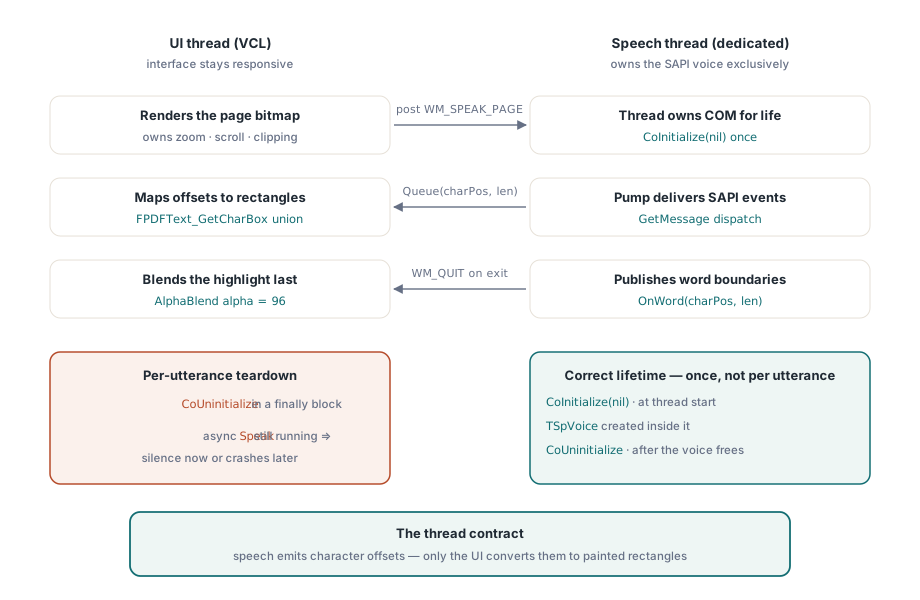
該架構是兩個執行緒和一個約定(contract)。UI 執行緒轉譯頁面點陣圖、擁有縮放和捲動狀態,並繪製高亮標示覆蓋層。專用的語音執行緒擁有 SAPI 語音,其他任何部分都不會觸碰它。這個約定很薄:語音執行緒將進度回報為字元偏移量,而 UI 執行緒將偏移量轉換為矩形
大多數 SAPI 範例都將每次朗讀封裝在 CoInitialize 和 CoUninitialize 中,而檢視器會立即顯示為什麼這是錯誤的。帶有 SVSFlagsAsync 的 Speak 在文字排入佇列時就會立即傳回,因此同一個常式的 finally 區塊中的 CoUninitialize 會在語音仍在說話時執行,從而拆除了擁有它的 COM 套間(COM apartment)。根據時間點的不同,您會在幾分鐘後遇到無聲、被截斷的朗讀或存取違規(access violation)。正確的生命週期是乏味的:在語音執行緒啟動時執行 CoInitialize 一次,在該套間內建立語音,並在釋放語音後、執行緒結束時執行 CoUninitialize 一次。絕非每次朗讀都執行
語音還需要一個訊息幫浦(message pump),這決定了它可以存在於何處。SpVoice 自動化物件透過建立它的執行緒的訊息佇列傳遞其事件。在 UI 執行緒上建立它,事件確實會到達(原因在於 VCL 會發送訊息幫浦),但每次緩慢的繪製都會延遲您的語詞邊界;在沒有訊息幫浦的工作執行緒上建立它,事件就永遠不會到達。一個擁有自己 GetMessage 迴圈的專用執行緒可以保持邊界延遲平穩,無論 UI 在做什麼
uses
  System.Classes, System.SyncObjs, Winapi.Windows, Winapi.Messages,
  Winapi.ActiveX, SpeechLib_TLB;

const
  WM_SPEAK_PAGE = WM_APP + 1;

type
  TSpeechThread = class(TThread)
  private
    FVoice: TSpVoice;
    FLock: TCriticalSection;
    FText: string;
    function NextUtterance: string;   // 在 FLock 鎖定下讀取 FText
    procedure VoiceWord(ASender: TObject; StreamNumber: Integer;
      StreamPosition: OleVariant; CharacterPosition, WordLength: Integer);
  protected
    procedure Execute; override;
    procedure TerminatedSet; override;
  public
    procedure SpeakPage(const AText: string);   // 可從 UI 執行緒安全呼叫
  end;

procedure TSpeechThread.Execute;
var
  Msg: TMsg;
begin
  CoInitialize(nil);                       // 一次,當執行緒啟動時
  try
    FVoice := TSpVoice.Create(nil);
    try
      FVoice.EventInterests := SVEWordBoundary or SVEEndInputStream;
      FVoice.OnWord := VoiceWord;
      // 在任何人張貼訊息之前,先強制建立這個執行緒的訊息佇列
      PeekMessage(Msg, 0, WM_USER, WM_USER, PM_NOREMOVE);
      while GetMessage(Msg, 0, 0, 0) do    // 收到 WM_QUIT 時結束
        if Msg.message = WM_SPEAK_PAGE then
          FVoice.Speak(NextUtterance, SVSFlagsAsync or SVSFPurgeBeforeSpeak)
        else
          DispatchMessage(Msg);            // 傳遞 SAPI 事件回呼
    finally
      FVoice.Free;
    end;
  finally
    CoUninitialize;                        // 一次,當執行緒結束時
  end;
end;

procedure TSpeechThread.TerminatedSet;
begin
  inherited;
  PostThreadMessage(ThreadID, WM_QUIT, 0, 0);   // 解除 GetMessage 的阻塞
end;
TerminatedSet 會傳送 WM_QUIT,以便在檢視器關閉時解除幫浦的阻塞。從 UI 執行緒呼叫的 SpeakPage 將文字儲存在受鎖定保護的欄位中並傳送 WM_SPEAK_PAGE,因為直接從另一個執行緒呼叫 FVoice 上的方法將是未封送處理(unmarshaled)介面上的跨套間 COM 呼叫。迴圈前的單行 PeekMessage 強制 Windows 建立該執行緒的訊息佇列,從而解決了 UI 執行緒提前傳送可能導致失敗的啟動競爭狀態
語詞邊界以字元偏移量的形式到達
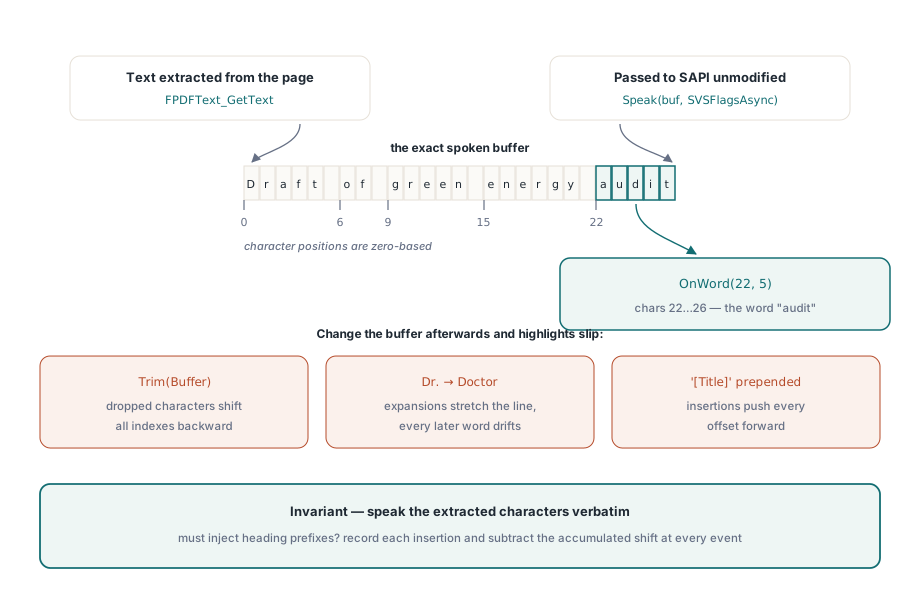
透過 IDE 的型別程式庫匯入器匯入一次 Microsoft Speech Object Library,您將獲得包含 TSpVoice 包裝器及其具型別事件的 SpeechLib_TLB。有兩個設定非常重要。EventInterests 應該縮小到您實際使用的事件,因為開啟任何多餘的興趣(interest)都會使每一頁的每個單字產生跨執行緒的事件通訊;SVEWordBoundary 驅動高亮標示,而 SVEEndInputStream 告訴您朗讀已結束。OnWord 處理常式接收 CharacterPosition 和長度,這些索引指向您傳遞給 Speak 的精確字串——這是語音緩衝區中的偏移量,而不是其他任何地方
最後一個子句是該功能所依賴的不變量:偏移量僅對語音正在讀取的字串有意義,因此請逐字朗讀您提取的精確文字。修剪空白、摺疊換行符或展開縮寫以獲得更好的發音,在第一次編輯後的每一次高亮標示都會偏移一個單詞。如果 UI 必須插入語音內容(如頁面公告、標題前綴),請記錄每次插入的位置和長度,並在對應之前從每個偏移量中減去累積的位移量
procedure TSpeechThread.SpeakPage(const AText: string);
begin
  FLock.Enter;
  try
    FText := AText;
  finally
    FLock.Leave;
  end;
  PostThreadMessage(ThreadID, WM_SPEAK_PAGE, 0, 0);
end;

procedure TSpeechThread.VoiceWord(ASender: TObject; StreamNumber: Integer;
  StreamPosition: OleVariant; CharacterPosition, WordLength: Integer);
begin
  // 在語音執行緒上執行;在不阻塞的情況下將偏移量交給 UI
  TThread.Queue(nil,
    procedure
    begin
      ViewerForm.HighlightWordAt(CharacterPosition, WordLength);
    end);
end;
此處 TThread.Queue 是正確的封送處理方式,而不是 Synchronize:在 UI 重繪時,處理常式絕不能停駐(park)語音執行緒,且如果邊界事件到達的速度快於螢幕繪製的速度,過時的高亮標示更新是無害的,因為下一個更新會覆蓋它。以相同的方式連接 OnEndStream 以清除高亮標示,並在連續閱讀模式下,載入下一頁的文字並傳送下一次朗讀
從字元偏移量到螢幕上的像素
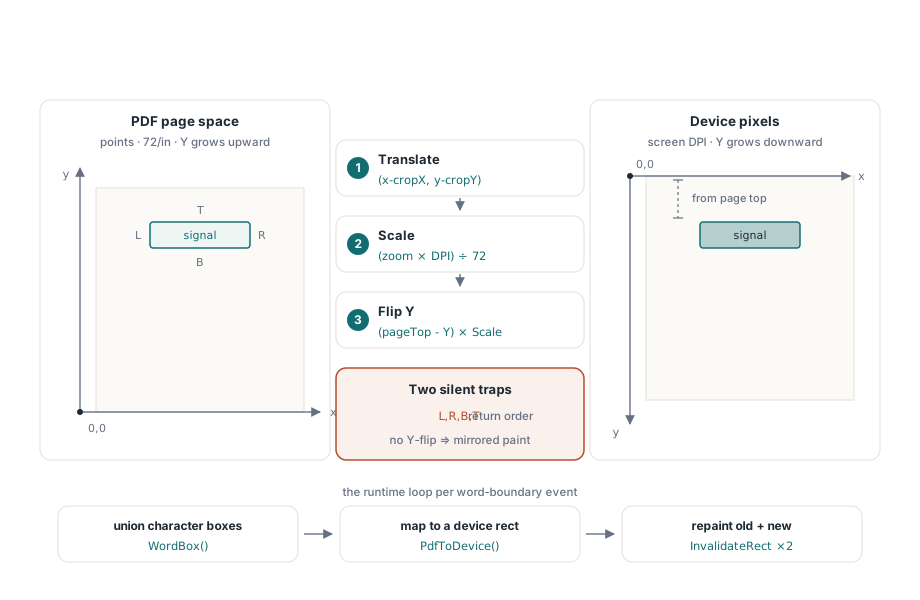
PDFium 報告每個字元的幾何結構。FPDFText_GetCharBox 按照 left、right、bottom、top 的順序填滿四個 double 類型值,這在文字 API 中引起的隱蔽 Bug 比其他任何地方都多(這與 Windows 的 left、top、right、bottom 順序不同),而且它是在頁面空間中報告它們的:PDF 點數(每英吋 72 點),原點在左下角且 Y 軸向上增加。語詞的方框是其字元方框的聯集,而到裝置像素的轉換分為三個步驟:按頁面原點進行平移、按縮放比例乘以螢幕 DPI 除以 72 進行縮放,並翻轉 Y 軸
uses
  System.Math;

type
  TPdfRectF = record
    Left, Top, Right, Bottom: Double;    // PDF 點數,原點在左下角
  end;

function TViewerForm.WordBox(CharIndex, CharCount: Integer): TPdfRectF;
var
  i, LastChar: Integer;
  L, T, R, B: Double;
begin
  Result.Left := MaxDouble;   Result.Bottom := MaxDouble;
  Result.Right := -MaxDouble; Result.Top := -MaxDouble;
  LastChar := Min(CharIndex + CharCount, FPDFText_CountChars(FTextPage)) - 1;
  for i := CharIndex to LastChar do
  begin
    // 參數順序是 left、right、bottom、top - 並非 Windows 的順序
    FPDFText_GetCharBox(FTextPage, i, @L, @R, @B, @T);
    Result.Left   := Min(Result.Left, L);
    Result.Right  := Max(Result.Right, R);
    Result.Bottom := Min(Result.Bottom, B);
    Result.Top    := Max(Result.Top, T);
  end;
end;

function TViewerForm.PdfToDevice(const W: TPdfRectF): TRect;
var
  Scale: Double;
begin
  // 每英吋 72 個 PDF 點;FZoom 是檢視器的縮放比例
  Scale := FZoom * FScreenDpi / 72.0;
  Result.Left   := Round((W.Left  - FPageLeft) * Scale) - FScrollX;
  Result.Right  := Round((W.Right - FPageLeft) * Scale) - FScrollX;
  // PDF 的 Y 從底部邊緣向上增加;裝置的 Y 向下增加
  Result.Top    := Round((FPageTop - W.Top)    * Scale) - FScrollY;
  Result.Bottom := Round((FPageTop - W.Bottom) * Scale) - FScrollY;
end;
FPageTop 是來自 FPDF_GetPageHeight 的以點為單位的頁面高度,而 FPageLeft 對於大多數文件為零,但當頁面定義了裁剪框(crop box)時,它來自裁剪框,因此請從 FPDF_GetPageBoundingBox 中讀取兩者,而不是進行假定。Y 軸翻轉是手動實作版本容易出錯的地方:裝置矩形的頂部來自從頁面頂部向下量測的 PDF 方框頂部。如果搞反了,每個高亮標示都會鏡像繪製到頁面的錯誤另一半中
procedure TViewerForm.HighlightWordAt(CharIndex, CharCount: Integer);
var
  Old: TRect;
begin
  if CharCount <= 0 then Exit;
  Old := FHighlightRect;
  FHighlightRect := PdfToDevice(WordBox(CharIndex, CharCount));
  InvalidateRect(PageBox.Handle, @Old, False);             // 清除舊的單字
  InvalidateRect(PageBox.Handle, @FHighlightRect, False);  // 繪製新的單字
end;

procedure TViewerForm.PageBoxPaint(Sender: TObject);
var
  Blend: TBlendFunction;
begin
  PageBox.Canvas.Draw(0, 0, FPageBitmap);      // 一律先呈現頁面
  if FHighlightRect.IsEmpty then Exit;

  Blend.BlendOp := AC_SRC_OVER;
  Blend.BlendFlags := 0;
  Blend.SourceConstantAlpha := 96;             // 約 38% 不透明度
  Blend.AlphaFormat := 0;                      // 常數 Alpha,沒有逐像素資料
  Winapi.Windows.AlphaBlend(PageBox.Canvas.Handle,
    FHighlightRect.Left, FHighlightRect.Top,
    FHighlightRect.Width, FHighlightRect.Height,
    FHighlightBrush.Canvas.Handle, 0, 0, 1, 1, Blend);
end;繪製處理常式每次都先繪製頁面點陣圖,然後繪製高亮標示,因此覆蓋層永遠不需要自行擦除;使舊的和新的矩形無效可以保持重繪區域很小,即使在快速說話率下也是如此。FHighlightBrush 是一個 1x1 的 TBitmap,在啟動時填滿一次高亮標示顏色(例如 FHighlightBrush.Canvas.Pixels[0, 0] := $0032C8FF 表示琥珀色),AlphaBlend 將其拉伸到目標矩形上,因此不會每訊框分配任何記憶體,且將 SourceConstantAlpha 設定為 96 可以讓語詞在著色下保持清晰可讀。在反相和高對比度顯示模式下測試顏色;低視力使用者看不見的覆蓋層對於正是為其建置的人而言是不存在的
閱讀順序是文字 API 無法解決的部分
FPDFText_GetText 傳回字元的順序是從內容串流中導出的,並經過了一些空間清理,對於單欄報表而言,該順序運作良好。但它沒有義務在其他任何地方都是正確的。雙欄通訊(two-column newsletter)可能會直接橫跨兩欄閱讀、側邊欄可能會中斷句子的中間子句,而頁尾可能會出現在頁面中間。用以修復此問題的資訊——已標記 PDF 攜帶且 PDF/UA 強制要求的 ISO 32000-1 §14.8 的邏輯結構樹(logical structure tree)——根本不會被原始文字頁面呼叫所諮詢。如果您需要具有明確來源訊號的結構感知順序,這在更高層級是一個已解決的問題:PDFium 元件的讀取 API 傳回 Source 欄位為 rosStructure 或 rosHeuristic 的內容,且無障礙 PDF 閱讀器文章對此進行了介紹。在原始 API 層級,可辯護的立場是將提取順序視為估計值,並在 UI 中進行說明,且在迴歸測試集中保留一份多欄文件和一份僅包含影像的掃描件,以便這兩種失效模式都能保持可見
檢視器本身必須是可透過鍵盤操作的
語音輸出並不能免除檢視器對鍵盤存取的要求;最有可能使用朗讀功能的人最不可能去拿滑鼠。為頁面面板提供 TabStop := True 和可見的焦點矩形(focus rectangle),然後處理三個按鍵:空白鍵切換 FVoice.Pause 和 FVoice.Resume,而向左與向右鍵透過帶有負計數的 FVoice.Skip('Sentence', 1) 進行跳轉以返回。SAPI 的 Skip 僅理解句子粒度,因此語詞級別的跳轉意味著使用 SVSFPurgeBeforeSpeak 清除播放,並從您上次追蹤的語詞偏移量重新開始朗讀——這很廉價,因為高亮標示程式碼已經儲存了該精確的偏移量。讓每個播放控制控制項保持為帶有標題的真實 TButton,以便螢幕閱讀器(screen readers)進行播報
這就是整個管線,全部都是針對原始 PDFium 文字 API:一個在應用程式生命週期內擁有 COM 和語音的語音執行緒、作為字元偏移量封送處理給 UI 的邊界事件,以及將每個字元的頁面空間方框轉換為螢幕上的一個混合矩形。如果您不想自己幾何結構和追蹤,適用於 Delphi 的 PDFium 元件提供了逐詞方框、追蹤游標、自動捲動跟隨和句子級別的閱讀單元作為元件屬性,其朗讀展示程式僅將本文的管線簡化為幾次呼叫