要求一條管線依作者、公司或最後修改日期路由一萬份試算表,它能做的最糟的事,就是完整開啟每一份活頁簿。答案就搭在檔案的文件屬性裡,也就是 Office 世界所稱的文件摘要資訊:那層 Windows Search 為之建立索引、SharePoint 據以歸檔、而 Excel 在其屬性對話框中顯示的中繼資料。那層資料至多只有幾 KB,並在兩種 Excel 格式中都位於有文件記載的地方。訣竅是在 Delphi 中抵達它,而不為你不需要的百萬個儲存格付費
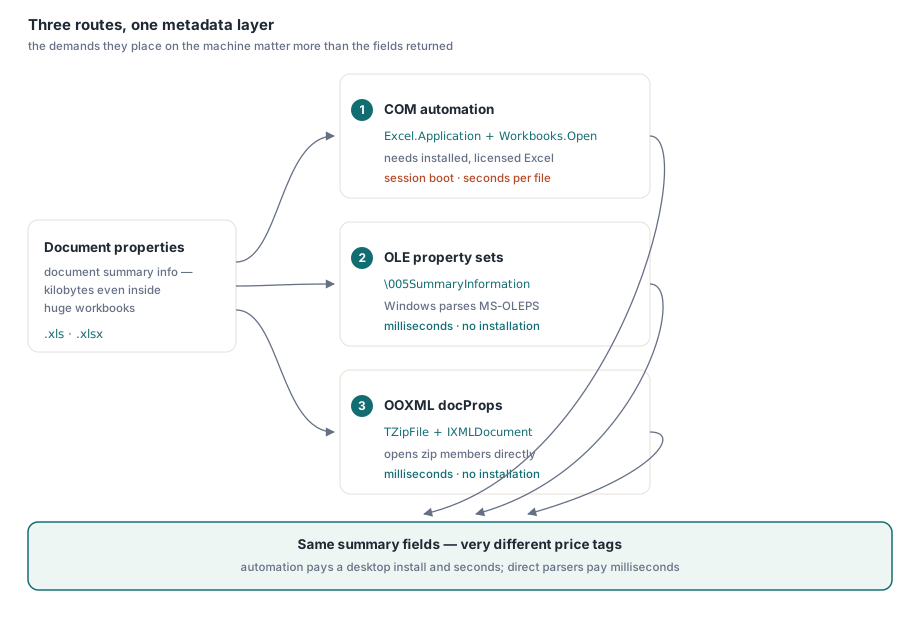
有三條真實的路徑,它們的差異不在於回傳什麼,而在於對執行它們的機器要求什麼。COM 自動化驅動 Excel 本身,什麼都讀,但以桌面級的代價。.xls 格式把它的屬性放在 Windows 會替你解析的 OLE 屬性集串流裡。.xlsx 格式把它們放在 zip 內的兩個小型 XML 部分裡,而 Delphi RTL 自己就能開啟。每一條路的工作程式碼如下,成本坦白陳述
路徑 1:COM 自動化什麼都讀,但以桌面級代價
自動化是唯一透過單一物件模型擁有完整涵蓋的路徑:標準的摘要集、帶有 Company 與 Manager 的延伸集,以及使用者自訂屬性,全部可透過 BuiltinDocumentProperties 與 CustomDocumentProperties 抵達。一切都以 OleVariant 到達,而這個 API 有一個在它咬人之前值得知道的習慣:一個從未被指派的內建屬性,不會以空白回來,而是在你碰 Value 的那一刻引發 EOleException。下面的輔助函式把那當作「未設定」而非失敗
uses
  System.SysUtils, System.Variants, System.Win.ComObj;

procedure ReadPropertiesViaCom(const FileName: string);
var
  Excel, Book, Builtin, Custom: OleVariant;
  I: Integer;

  function BuiltinProp(const Name: string): string;
  begin
    try
      Result := VarToStr(Builtin.Item(Name).Value);
    except
      on EOleError do
        Result := '';   // property 存在但從未指派
    end;
  end;

begin
  Excel := CreateOleObject('Excel.Application');
  try
    Excel.DisplayAlerts := False;
    Book := Excel.Workbooks.Open(FileName, 0, True);   // read-only
    try
      Builtin := Book.BuiltinDocumentProperties;
      Writeln('Author : ', BuiltinProp('Author'));
      Writeln('Title  : ', BuiltinProp('Title'));
      Writeln('Subject: ', BuiltinProp('Subject'));
      Writeln('Company: ', BuiltinProp('Company'));
      Writeln('Manager: ', BuiltinProp('Manager'));

      Custom := Book.CustomDocumentProperties;
      for I := 1 to Custom.Count do
        Writeln(VarToStr(Custom.Item(I).Name), ' = ',
          VarToStr(Custom.Item(I).Value));
    finally
      Book.Close(False);
    end;
  finally
    Excel.Quit;   // 在每條路徑上都要走到這裡,否則 EXCEL.EXE 會留在背景
    Excel := Unassigned;
  end;
end;
現在來算帳。Excel 必須安裝在執行這段程式碼的每一台機器上,這本身就排除了大多數伺服器,而微軟的支援政策明確指出,Office 既非為無人值守的伺服器端自動化而設計,也未為此授權。CreateOleObject 啟動一個完整的 EXCEL.EXE,而 Workbooks.Open 解析整份活頁簿,所以預期在第一個屬性回來之前,每份檔案大約要兩到四秒。而圍繞 Quit 的 try..finally 不是裝飾:一個在 CreateOleObject 與 Quit 之間逃出的例外,會留下一個持有該檔案鎖的孤兒 EXCEL.EXE,直到下一次執行對它失敗之前都看不見。在一個批次中重用一個 Excel 執行個體能攤提啟動成本,卻也集中了風險,因為隱藏桌面上的一個迷途對話框,會卡住排在它後面的每一份檔案
路徑 2:.xls 把屬性存放在 OLE 屬性集串流裡
一份 BIFF8 活頁簿是一個 OLE 複合檔案,一個由 storage 與串流組成的微型檔案系統。儲存格資料住在 Workbook 串流裡;中繼資料則住在它旁邊的兩個屬性集串流裡,其名稱以控制字元 #5 開頭:\005SummaryInformation 供經典欄位,\005DocumentSummaryInformation 供延伸與自訂欄位。每個裡面坐著一個 MS-OLEPS 配置的二進位屬性集,其區段以格式識別碼(FMTID)為索引鍵,屬性以整數屬性 ID 為索引鍵。摘要區段是 FMTID {F29F85E0-4FF9-1068-AB91-08002B27B3D9},其中 PIDSI_TITLE 是 $02、PIDSI_AUTHOR 是 $04;Company($0F)與 Manager($0E)住在文件摘要區段,而自訂屬性則在一個名稱字典之後的第二個區段裡
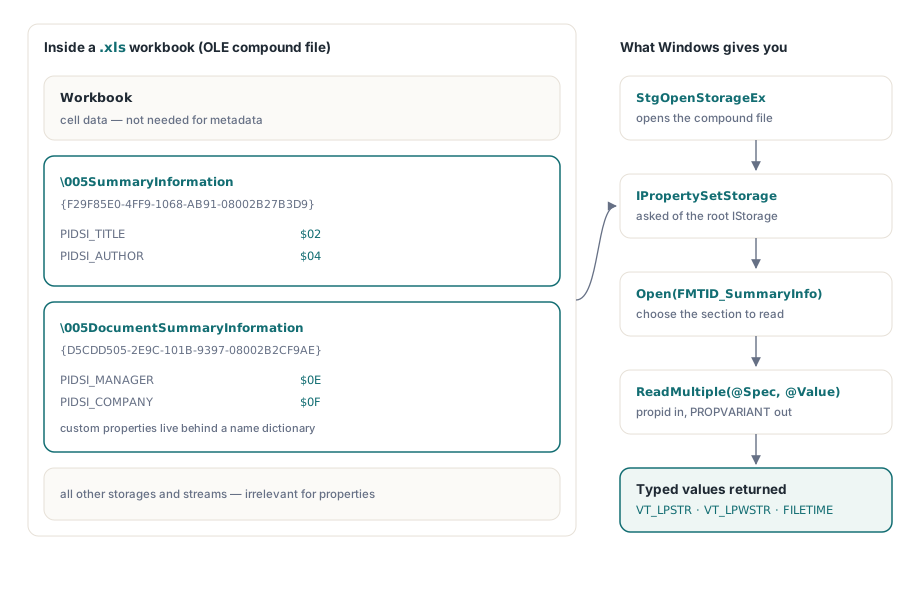
好消息是,在 Windows 上你絕不自己解析那些位元組。結構化儲存透過 IPropertySetStorage 公開那些串流,而以下程式碼如所示對照隨附的 RTL 單元即可編譯
uses
  System.SysUtils, Winapi.Windows, Winapi.ActiveX, System.Win.ComObj;

const
  FMTID_SummaryInfo: TGUID = '{F29F85E0-4FF9-1068-AB91-08002B27B3D9}';
  PIDSI_TITLE    = $02;
  PIDSI_AUTHOR   = $04;
  STGFMT_STORAGE = 0;

function ReadXlsSummaryString(const FileName: string; PropId: TPropID): string;
var
  Unk: IUnknown;
  Stg: IStorage;
  PropSetStg: IPropertySetStorage;
  PropStg: IPropertyStorage;
  Spec: TPropSpec;
  Value: TPropVariant;
begin
  Result := '';
  OleCheck(StgOpenStorageEx(PWideChar(FileName),
    STGM_READ or STGM_SHARE_DENY_WRITE, STGFMT_STORAGE, 0, nil, nil,
    @IID_IStorage, Unk));
  Stg := Unk as IStorage;
  PropSetStg := Stg as IPropertySetStorage;
  OleCheck(PropSetStg.Open(FMTID_SummaryInfo,
    STGM_READ or STGM_SHARE_EXCLUSIVE, PropStg));
  Spec.ulKind := PRSPEC_PROPID;
  Spec.propid := PropId;
  if PropStg.ReadMultiple(1, @Spec, @Value) = S_OK then  // S_FALSE: not present
  try
    case Value.vt of
      VT_LPSTR:  Result := string(AnsiString(Value.pszVal));
      VT_LPWSTR: Result := Value.pwszVal;
    end;
  finally
    PropVariantClear(Value);
  end;
end;

// usage: Writeln('Author: ', ReadXlsSummaryString('ledger.xls', PIDSI_AUTHOR));
關於這段程式碼隱藏了什麼,要說句誠實的話。字串可以以 VT_LPWSTR 或 VT_LPSTR 到達,而在 ANSI 的情況下,位元組是以屬性集自己的字碼頁編碼的——該字碼頁本身儲存為該區段的屬性 1——所以上面的轉型只有在該字碼頁與系統相符時才精確。時間戳記以 VT_FILETIME(UTC)回來。自訂屬性意味著開啟使用者定義區段,FMTID {D5CDD505-2E9C-101B-9397-08002B2CF9AE},並走過它的名稱字典。IPropertySetStorage 在 Windows 上吸收了這一切;為一個沒有結構化儲存的環境寫自己的 MS-OLEPS 解析器,是一項真正的專案,而不是一個下午
路徑 3:.xlsx 把 docProps 作為 XML 存放在 zip 內
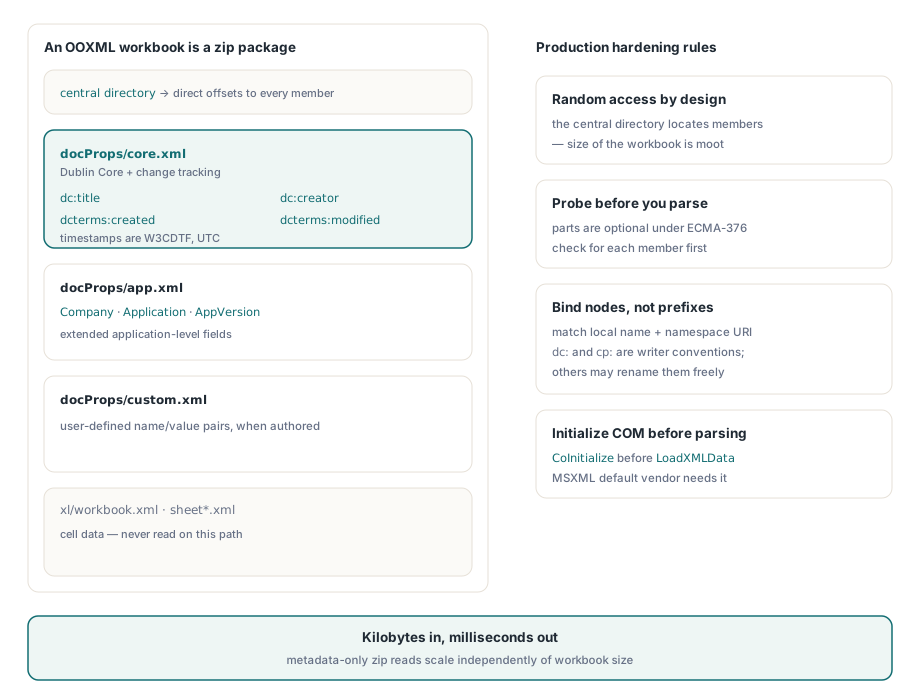
這是多數管線實際需要的路徑,因為新檔案幾乎二十年來都是 .xlsx。一個 OOXML 活頁簿是一個 zip 封包,而它的屬性依用途分到小型部分裡:docProps/core.xml 持有 Dublin Core 欄位、dc:title、dc:creator、cp:lastModifiedBy,加上作為 UTC 中 W3CDTF 時間戳記的 dcterms:created 與 dcterms:modified;docProps/app.xml 持有如 Company 與 AppVersion 等應用程式層級欄位;docProps/custom.xml 則持有自訂屬性。因為 zip 的中央目錄直接定位每個部分,讀取它們無論活頁簿多大都只花幾 KB。隨附 RTL 中的 TZipFile 與 IXMLDocument 能完成全部工作
uses
  System.SysUtils, System.Classes, System.Zip, Xml.XMLDoc, Xml.XMLIntf;

const
  NsDC    = 'http://purl.org/dc/elements/1.1/';
  NsTerms = 'http://purl.org/dc/terms/';
  NsCore  = 'http://schemas.openxmlformats.org/package/2006/metadata/core-properties';
  NsApp   = 'http://schemas.openxmlformats.org/officeDocument/2006/extended-properties';

function PartToXml(Zip: TZipFile; const PartName: string): IXMLDocument;
var
  Bytes: TBytes;
begin
  Zip.Read(PartName, Bytes);
  Result := LoadXMLData(TEncoding.UTF8.GetString(Bytes));
end;

function Field(const Doc: IXMLDocument; const LocalName, Ns: string): string;
var
  Node: IXMLNode;
begin
  Node := Doc.DocumentElement.ChildNodes.FindNode(LocalName, Ns);
  if Node <> nil then
    Result := Node.Text
  else
    Result := '';
end;

procedure ReadXlsxProperties(const FileName: string);
var
  Zip: TZipFile;
  Doc: IXMLDocument;
begin
  Zip := TZipFile.Create;
  try
    Zip.Open(FileName, zmRead);
    if Zip.IndexOf('docProps/core.xml') >= 0 then
    begin
      Doc := PartToXml(Zip, 'docProps/core.xml');
      Writeln('Title   : ', Field(Doc, 'title', NsDC));
      Writeln('Creator : ', Field(Doc, 'creator', NsDC));
      Writeln('Modifier: ', Field(Doc, 'lastModifiedBy', NsCore));
      Writeln('Modified: ', Field(Doc, 'modified', NsTerms));  // W3CDTF, UTC
    end;
    if Zip.IndexOf('docProps/app.xml') >= 0 then
    begin
      Doc := PartToXml(Zip, 'docProps/app.xml');
      Writeln('Company : ', Field(Doc, 'Company', NsApp));
      Writeln('App     : ', Field(Doc, 'Application', NsApp), ' ',
        Field(Doc, 'AppVersion', NsApp));
    end;
  finally
    Zip.Free;
  end;
end;
有兩個細節讓這在正式環境中保持穩健。第一,這些部分是選用的:一個完全沒有 docProps 的最小封包,在 ECMA-376 之下是完全有效的,這也是為什麼程式碼用 IndexOf 探測,而非假設它存在。第二,如上面的 FindNode 所做,依本機名稱與命名空間 URI 比對元素,絕不依字面前置詞;dc: 與 cp: 是 Excel 寫入器的慣例,而由其他產生器產生的檔案可以自由挑選不同的前置詞。一則環境注意事項:預設的 IXMLDocument 供應商是 MSXML,所以主控台應用程式或工作者執行緒必須在 LoadXMLData 之前呼叫 CoInitialize,否則第一次解析會以一個 COM 錯誤告終
成本表,以及程式庫何時勝過兩個解析器
在一台普通的開發機上量測,COM 路徑在每次為每份檔案建立自動化工作階段時,每份檔案大約落在兩到四秒,幾乎全是 EXCEL.EXE 啟動加上一次完整活頁簿解析,而且它在任何執行之處都需要一個已安裝、已授權的 Excel。兩條直接路徑只讀中繼資料容器,每份檔案在個位數毫秒內完成,而且除了 Delphi 執行檔已經連結的東西之外,什麼都不需要安裝。在一份一萬個檔案的共用上,那就是大半天與不到一分鐘的差別,而且不附帶任何 Office 部署問題
直接路徑的麻煩在於有兩條。一條接受兩種格式的管線,維護著兩個帶有兩種互不相交失敗模式的解析器——一邊是字碼頁與 PROPVARIANT 型別,另一邊是命名空間與選用部分——而兩者都不讀對方的格式。那個維護負載,正是一個原生程式庫的理由:HotXLS,losLab 在 Windows 上供 Delphi 與 C++Builder 使用的 Object Pascal 試算表程式庫,把相同的欄位公開為普通的活頁簿屬性——Title、Author、Company、Created 等等——由 Open 為 .xls 與 .xlsx 一併填入,沒有 Excel 安裝,也沒有上面任何的容器配管。它把讀取屬性作為一次完整活頁簿開啟的一部分,而非一次僅中繼資料的探測,所以它適合那些反正會接著碰觸儲存格資料的管線;兩個外觀層上的完整屬性表面(包含寫入端)涵蓋於我們關於以 HotXLS 設定 Excel 文件屬性的文章中
註:完整的 Excel 解析與中繼資料抽取工具,可在HotXLS Delphi VCL Component 取得