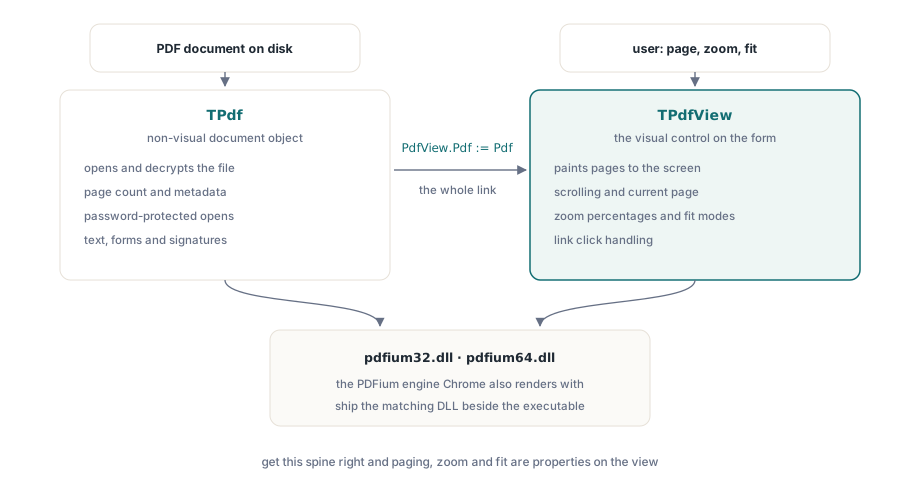
在 Delphi 里搞个 PDF 查看器,说白了就是摆上俩组件,再把它俩拿线连起来的事儿。TPdf 攥着文档的大权:开文件、解密全归它管,别人要是问页数啊、元数据啥的,也得找它。而 TPdfView 就是那个负责抛头露面的视觉控件:把页面糊到屏幕上,管好滚动条,扯大拉小(缩放),还有记着用户现在正盯着哪一页。PDFium 组件肚子里装的,跟 Chrome 浏览器用的是同一个渲染引擎;所以它画出来的字、抗锯齿的边缘,还有涂出来的颜色,跟你用户在网页上看到的一模一样。这活儿的难点压根就不在渲染上,而是怎么把文档跟视图死死绑在一起;怎么在遇到烂文件或是加密门神时做到处变不惊(不崩);还有,怎么给用户配齐那些能让这玩意看起来像个正经查看器的把手:翻页、缩放,还有一键适应窗口
咱们这就顺着你真枪实弹干活的步骤,把这套架子搭起来。这里头讲的全是一页一页单飞(单页渲染)的套路,因为绝大部分的文档活儿图的就是这个。要是你非得把几百页纸跟卷轴一样连起来一起滚(连续滚动),那可是另一种排兵布阵的法子,不在咱们今天聊的道上
把 TPdf 跟 TPdfView 穿上一条裤子
在窗体上丢个 TPdf,再丢个 TPdfView,然后指着文档告诉视图:“诺,以后你就画这个”。就这一句赋值,就把那个只管闷头干活的文档对象和那个在前面卖脸的控件,死死地拴在一根绳上了
procedure TFormMain.FormCreate(Sender: TObject);
begin
  // Pdf 和 PdfView 在设计期放置。
  PdfView.Pdf := Pdf;                 // 视图绘制此文档所持有的任何内容
  PdfView.FitMode := pfmFitWidth;     // 让用户从一个合理的缩放比例开始
end;
不过在跑这套行头之前,你的机器上必须得带着 PDFium 的原生库。PDFium 组件会根据你是啥平台,去叫 pdfium32.dll 或者是 pdfium64.dll 来干活;要是它摸不着这 DLL 门在哪里,那文档打死也开不了。把跟你身子骨(平台)配对的 DLL 扔在执行文件的窝里,或者塞进系统加载器能找着的地方。至于那些带着 V8 尾巴的胖子版本,那全是为了应付那些肚子里藏了 JavaScript 还要你去跑的 PDF 准备的;一个本本分分的查看器压根就用不上这玩意,所以除非你真有啥说得出口的理由,否则老老实实拿标准版的 DLL 就行了
别太天真:防着烂文件(安全加载)
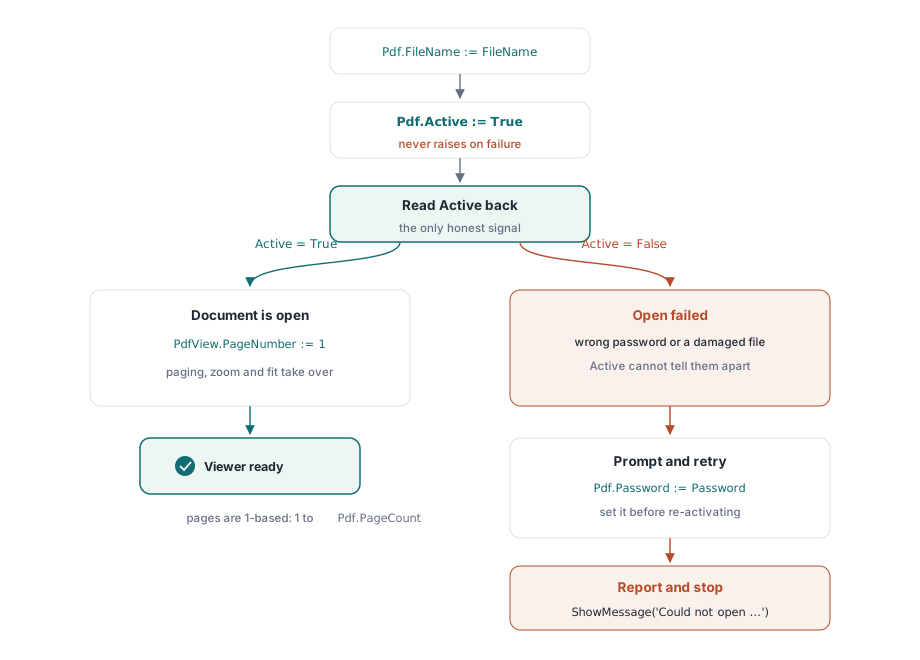
碰上开文件,本能的反应就是拿 try/except 把它包成个大粽子,指望它一抛异常咱就知道砸锅了。在这儿你可千万别信这个本能,信了你这查看器平时看着挺欢,一碰上破文件绝对让你懵逼。你给 Active := True 下令去开门,要是里头搞砸了,它是绝对不会把异常抛到你脸上的。PDFium 组件自己把这破事全咽下去了,然后让 Active 老老实实地装死变成 False;所以你想知道到底开了门没有,唯一能信的招儿,就是下完令以后,亲眼去瞧瞧那属性变了没
procedure TFormMain.OpenDocument(const FileName: string);
begin
  Pdf.FileName := FileName;
  Pdf.Active := True;                 // 从不抛异常;失败时 Active 保持为 False
  if not Pdf.Active then
  begin
    ShowMessage('Could not open ' + FileName);
    Exit;
  end;
  PdfView.PageNumber := 1;            // 视图跟踪自己的当前页
  UpdatePageLabel;
end;这里有两个坑得拿大红笔圈出来。头一个就是,PageNumber 这玩意儿两头都有,而且各算各的账。Pdf.PageNumber 记的是文档自己以为翻到哪了;而 PdfView.PageNumber 才是屏幕上实打实糊着的那一页,你要是想带着用户往后翻,拨的就是这个数。拨了这头,那头可不会跟着动,所以一个正经的查看器,方向盘永远是攥在视图(view)的这个属性上。第二点就是那从 1 开始的数法:页码可是从 1 一路数到 Pdf.PageCount 的,从来没有 0 这号人物,这规矩绝对能把那些被零索引(zero-based arrays)惯坏的家伙坑出一脸血
对付上了锁的文件(加密)
加密文件走的也是这同一扇门。要是你在唤醒它之前就把密码乖乖递上去了,它开门的时候就顺手解密了;要是密码不对或者干脆没给,那 Active 就跟碰上烂文件一样,死死钉在 False 上。所以补救的套路就是:去找用户要密码,拿着密码再去敲一次门
procedure TFormMain.OpenWithPassword(const FileName: string);
var
  Password: string;
begin
  Pdf.FileName := FileName;
  Pdf.Active := True;
  if not Pdf.Active then
  begin
    if InputQuery('Password required', 'Password:', Password) then
    begin
      Pdf.Password := Password;       // 必须在 Active := True 之前设置
      Pdf.Active := True;
    end;
    if not Pdf.Active then
    begin
      ShowMessage('Unable to open the document.');
      Exit;
    end;
  end;
  PdfView.PageNumber := 1;
end;
因为不管是对付烂密码还是烂文件,它装死的姿势都一模一样(不抛异常),光看 Active 你根本分不出到底是遇上哪个极品。放在查看器这种糙活里,这完全无所谓:用户要么把真密码掏出来,要么只能面对开不开门的残酷现实,反正弹出来的消息闭着眼睛糊弄过去也一样
翻开下一页(导航)
文档一旦门开了,所谓翻页,就是在 Pdf.PageCount 画的圈子里,去给 PdfView.PageNumber 做加减法。这里头唯一能算得上技术活的,就是夹住它(clamping),别让那些手欠的家伙把页码给拨到圈外去;顺带在翻到头尾的时候,把那些翻页按钮给废了(禁用)
procedure TFormMain.GoToPage(NewPage: Integer);
begin
  if not Pdf.Active then
    Exit;
  if NewPage < 1 then
    NewPage := 1
  else if NewPage > Pdf.PageCount then
    NewPage := Pdf.PageCount;
  PdfView.PageNumber := NewPage;
  UpdatePageLabel;
end;

// 四个导航按钮各自简化为一次调用
procedure TFormMain.FirstClick(Sender: TObject);  begin GoToPage(1); end;
procedure TFormMain.PrevClick(Sender: TObject);   begin GoToPage(PdfView.PageNumber - 1); end;
procedure TFormMain.NextClick(Sender: TObject);   begin GoToPage(PdfView.PageNumber + 1); end;
procedure TFormMain.LastClick(Sender: TObject);   begin GoToPage(Pdf.PageCount); end;
那个带框的“跳到第 N 页”,说白了也就是从里头掏个整数出来,去喂这个 GoToPage;加了夹板以后,就算用户脑子抽筋,对着个十页的文件敲个 9999 进去,它也照样能老老实实接住。千万要留着 UpdatePageLabel 作为唯一一个往外头吐“第 3 页,共 12 页”这种话的传声筒,这样它播报的进度才永远不会跟视图里画的对不上号
缩放:实打实的百分比和自作主张的适应模式
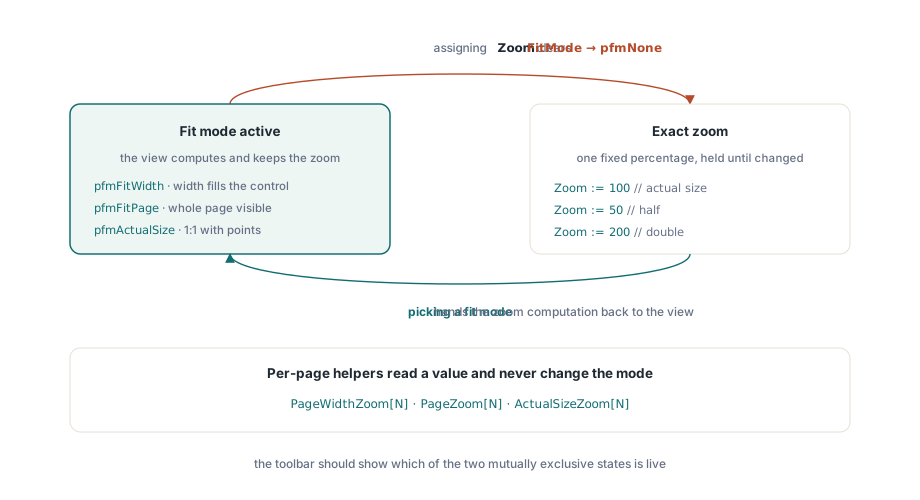
TPdfView 身上的缩放有两种路数,它俩不仅同台竞技,还互相拆台;你要是搞不懂它俩怎么掐架的,弄出来的缩放把手绝对能跟用户打起来。直来直去的那路就是 Zoom 属性,直接往里扔百分比,100 就是不增不减的真身。另一路叫 FitMode,那是你把权交出去,让视图自己去拨算盘,就算窗体被人扯来扯去,它也能自己盯着办
// 固定倍率
PdfView.Zoom := 100;     // 实际大小
PdfView.Zoom := 50;      // 一半
PdfView.Zoom := 200;     // 两倍

// 让视图将页面调整为窗口大小,并在调整大小时保持
PdfView.FitMode := pfmFitWidth;   // 页面宽度填满控件
PdfView.FitMode := pfmFitPage;    // 整页可见
PdfView.FitMode := pfmActualSize; // 与文档的点 1:1
坑人的地方就在这儿:你要是敢亲手去拨 Zoom 的数字,它立马就会把 FitMode 给踹回 pfmNone。这不是啥见鬼的 bug,这是天经地义的规矩:要是用户非得点名要个精准的 150%,那视图还怎么可能同时去伺候那个“适应宽度”的差事?这俩命令摆明了就是水火不容。所以反映在你那个界面上就是:“放大”按钮和“适应页面”按钮是势不两立的死对头,你的工具栏最好能把现在是谁在当家给亮出来。用户要是点了适应页面,你就去拨 FitMode;要是点了具体的数字放大,你就去塞 Zoom,至于它把适应模式给踹了的事,随它去
要是你非得自己去算那个适应的比例(比如你想用算出来的数去把缩放滑块的起步价给定死),那几个带页码的帮手能直接把数报给你,而且绝对不碰你的模式开关。拿 PageWidthZoom[N]、PageZoom[N] 和 ActualSizeZoom[N],就能掏出要是你想把第 N 页塞满宽度、露全脸或者一比一放出来的百分比
// 用当前页的适应宽度值初始化缩放读数
var
  FitPercent: Double;
begin
  FitPercent := PdfView.PageWidthZoom[PdfView.PageNumber];
  ZoomEdit.Text := Format('%.0f%%', [FitPercent]);
end;
一个正经的查看器到底还得装点啥
上面那个拿几十行代码攒出来的玩意,其实已经能把绝大多数文档车间里的粗活给干完了:开文件、抗住烂文件不死、糊页面、翻页,还能手动或者自适应地玩缩放。PDFium 把那些啃骨头的硬活全在底下不声不响地扛了:嵌进去的字体它帮你找着,批注和表单它老老实实按位置画好,而且你看到的跟那些用 Chrome 的大爷们看到的一模一样,毕竟它俩肚子里转的是同一个引擎
剩下的那些玩意,不过是锦上添花,动摇不了筋骨。想搞文字选中或者搜字?那全都是去 PDFium 早就搭好的文本层(text layer)里捞现成的;要看啥 Pdf.Title 还有 Pdf.Author 的元数据?那就隔着一个属性的事;至于旋转或者转黑白(grayscale),也就是你让它把页面画成位图时,顺手递个渲染选项(render options)过去。这些花拳绣腿,谁也改变不了你亲手搭起来的这副骨架:一个文档对象,一个视图,加上那套“先加载再导航”的脉络。只要这副骨架立住了,剩下的全当是搞装修(decoration)了
这篇里满天飞的 TPdf 和 TPdfView 组件,全都是 Delphi 和 C++Builder 那一套 PDFium Component 的兵马,你要是想扒光它的底细看全套大典,去产品老家看就行了