Strip away the page descriptions and you are left with a thin layer of structure that no one prints but every reader, indexer, and archival system depends on. A page object knows nothing about the chapter it belongs to, the author who wrote it, or the footnote that links elsewhere. That knowledge lives one level up, in three structures attached to the document catalog: the metadata streams, the outline tree, and the per-page annotation arrays. They share a trait that makes them easy to get wrong. None carry visible marks on the page, so a file can render perfectly and still be missing its bookmarks, contradicting its own author field, or pointing a link at a page object that no longer exists.
This is the layer a PDF library exposes as document properties, bookmark APIs, and link or annotation calls, and the layer a search crawler reads to decide what your document is about. The object model underneath it is covered in the walkthrough of PDF document structure. Here the focus is strictly on what hangs off the catalog.
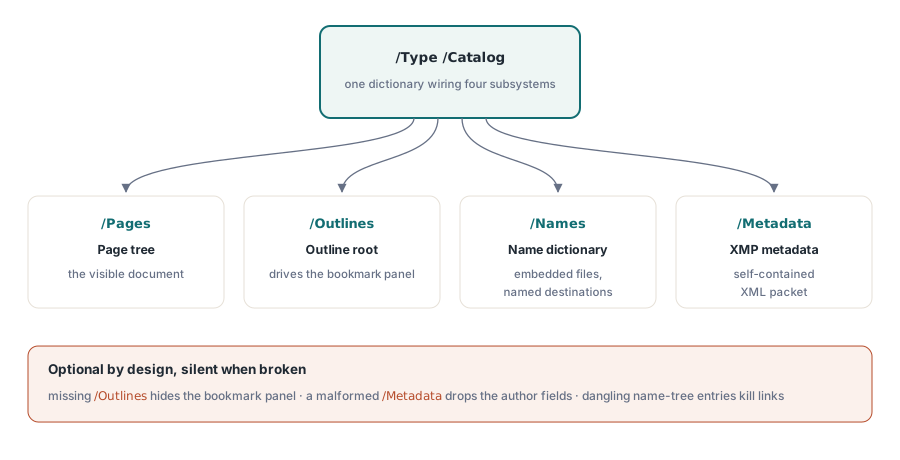
All three structures attach at the catalog. A complete catalog wiring them together looks like this:
1 0 obj
<< /Type /Catalog
/Pages 2 0 R
/Outlines 3 0 R
/Names << /EmbeddedFiles 4 0 R >>
/Metadata 5 0 R
>>
endobj
Four entries, four independent subsystems. /Pages is the visible document; /Outlines is the bookmark tree; /Metadata points at the XMP stream; /Names reaches the document-wide name dictionary, which among other things holds embedded file attachments. Each is optional, and a reader that finds none of them still shows the pages. That optionality is exactly why the navigation layer is the first thing to rot when a file is edited by tools that only understand pages.
Two metadata stores that disagree
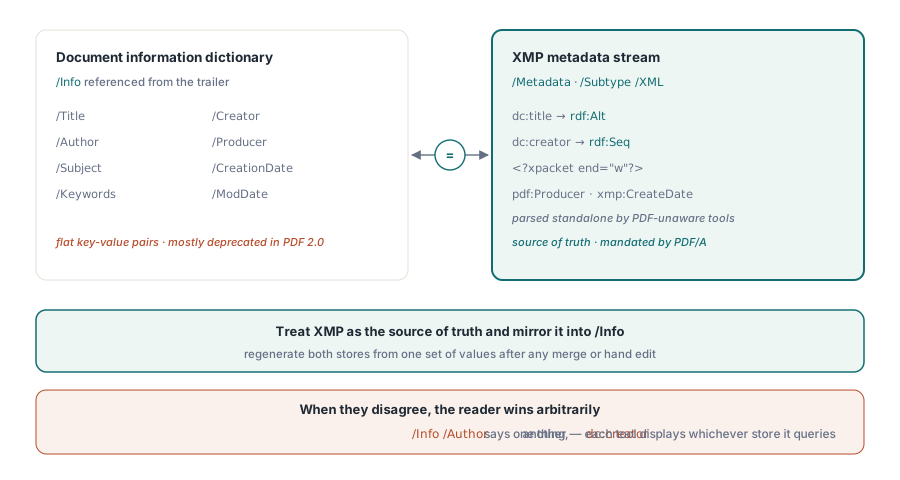
PDF carries document metadata in two places at once, and the trouble starts when they say different things. The original mechanism is the document information dictionary, referenced by /Info in the trailer: a flat set of key-value pairs for /Title, /Author, /Subject, /Keywords, /Creator, /Producer, and the two dates. It is simple and every viewer reads it. PDF 2.0 deprecates most of it in favor of the second mechanism, the XMP metadata stream.
XMP is a self-contained XML document, written in RDF, stored as a stream the catalog reaches through /Metadata and marked /Type /Metadata /Subtype /XML. Unlike the Info dictionary buried inside the PDF object structure, an XMP packet is designed to be extracted and parsed on its own by tools that know nothing about PDF. Here is a representative packet:
5 0 obj
<< /Type /Metadata /Subtype /XML /Length 1235 >>
stream
<?xpacket begin="" id="W5M0MpCehiHzreSzNTczkc9d"?>
<x:xmpmeta xmlns:x="adobe:ns:meta/">
<rdf:RDF xmlns:rdf="http://www.w3.org/1999/02/22-rdf-syntax-ns#">
<rdf:Description rdf:about=""
xmlns:dc="http://purl.org/dc/elements/1.1/"
xmlns:xmp="http://ns.adobe.com/xap/1.0/"
xmlns:pdf="http://ns.adobe.com/pdf/1.3/">
<dc:title><rdf:Alt><rdf:li xml:lang="x-default">Quarterly Report</rdf:li></rdf:Alt></dc:title>
<dc:creator><rdf:Seq><rdf:li>A. Author</rdf:li></rdf:Seq></dc:creator>
<xmp:CreateDate>2026-06-16T10:46:27+08:00</xmp:CreateDate>
<xmp:CreatorTool>Reporting Service 4.2</xmp:CreatorTool>
<pdf:Producer>losLab PDF Library</pdf:Producer>
</rdf:Description>
</rdf:RDF>
</x:xmpmeta>
<?xpacket end="w"?>
endstream
endobj
Three details in that block decide whether the metadata survives contact with real tooling. The xpacket processing instructions are not decoration: they frame the packet so an extractor can find it inside a larger byte stream, and a writer that omits the closing <?xpacket end="w"?> produces a file that opens fine but trips strict validators. The property datatypes matter too. dc:title is a language alternative wrapped in rdf:Alt, while dc:creator is an ordered list and takes rdf:Seq; emitting either as a bare text node is the single most common XMP mistake, tolerated by most viewers right up until the one that does not. The namespace prefixes are conventional, but the URIs they bind to are normative: a parser keys off the URI, not the prefix.
The hard rule with two stores is that they must agree. If /Info says the author is one person and dc:creator names another, you have shipped a document that answers the same question two ways, and which answer wins depends on which field the consuming tool reads. A library usually writes both for you, but the moment you edit one by hand, or merge files from different generators, the two drift apart. Treat the Info dictionary as legacy compatibility and XMP as the source of truth, and regenerate both from one set of values rather than patching them independently. For PDF/A this becomes a conformance requirement: ISO 19005 mandates XMP and forbids any Info property that contradicts its XMP counterpart.
The outline tree behind the bookmark panel
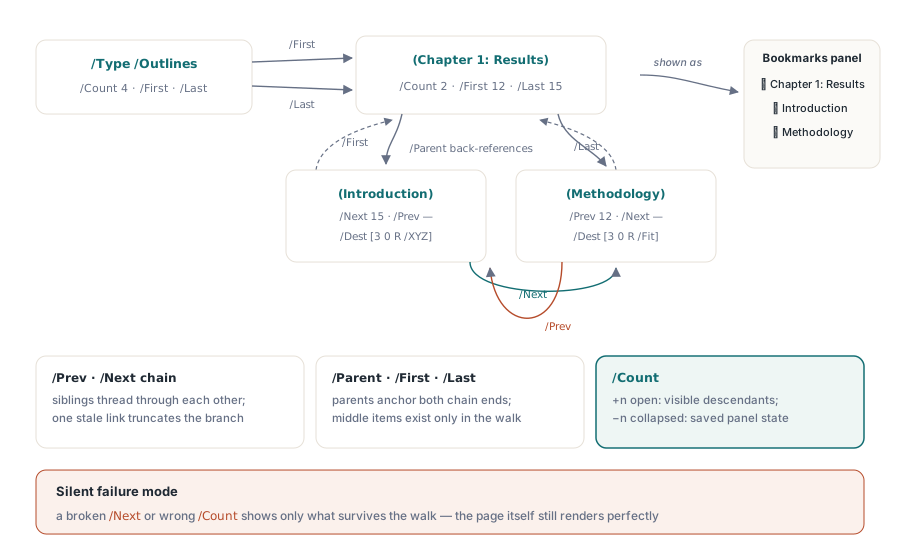
What a viewer shows as a bookmarks panel is, in the file, a doubly linked tree of dictionaries called the document outline. The catalog points at a root outline dictionary through /Outlines; the root points at its first and last top-level items; and every item is threaded to its neighbors and its parent. There is no array of bookmarks anywhere. The whole structure is reconstructed by following references, which is precisely why a single broken link can make an entire branch vanish from the panel without any error.
8 0 obj % the outline root
<< /Type /Outlines /Count 4 /First 9 0 R /Last 9 0 R >>
endobj
9 0 obj % top-level: a chapter
<< /Title (Chapter 1: Results)
/Parent 8 0 R /Count 2
/First 12 0 R /Last 15 0 R >>
endobj
12 0 obj % first child
<< /Title (Introduction)
/Parent 9 0 R /Next 15 0 R
/Dest [3 0 R /XYZ 72 720 0] >>
endobj
15 0 obj % second child, last sibling
<< /Title (Methodology)
/Parent 9 0 R /Prev 12 0 R
/Dest [3 0 R /Fit] >>
endobj
Read the links and the invariants become obvious. Every item points back to its /Parent. Siblings form a chain through /Prev and /Next, the first item omitting /Prev and the last omitting /Next. A parent names its first and last children through /First and /Last, and the children in between are reachable only by walking the sibling chain. Get one wrong and the failure is silent: a stale /Next truncates a chapter, a parent whose /Last does not terminate the chain leaves items orphaned, and the viewer renders whatever it can reach.
The /Count field carries a piece of state that surprises people. On the root and on any expanded item it holds the number of descendants currently visible; on a collapsed item it is a negative number whose magnitude is how many descendants would appear on expansion. So /Count is not a fixed structural fact about the tree, it is the saved open or closed state of the panel, and a generator that hard-codes it as a positive total reopens every branch the author meant to leave shut.
Each item earns its place by pointing somewhere. The /Title is what the panel shows; the /Dest is where a click lands. A destination can be inline in the item, as above, or a name that resolves through the document's name dictionary, which is the better choice when many bookmarks and links target the same spots, because you fix a moved target in one place. A library generally hides this tree behind an outline-root handle and methods that add child entries; in HotPDF the document exposes an OutlineRoot of type THPDFDocOutlineObject and threads the /Prev, /Next, /Parent, and /Count links for you as you append items. That is worth taking advantage of, because hand-maintaining those invariants across edits is where outlines break.
Destinations: the grammar of where a click goes
Both bookmarks and link annotations point at destinations, and a destination is more than a page number. It is an array that names a page object and then specifies, through a verb in the second slot, how the viewer should frame it. The most common and the most abused is /XYZ, of the form [page /XYZ left top zoom]. Its three operands are independent, and any may be null to mean "leave this as the reader had it." So [page /XYZ null null null] jumps to the page without touching scroll position or zoom, usually what you want from a "go to page" link. The numbers are in default user space, measured from the bottom-left with y increasing upward, the same coordinate system the page content uses. Authors arriving from screen layout reflexively measure from the top and send the reader to the wrong end of the page.
The /Fit family trades precise positioning for resilience. [page /Fit] scales the whole page into the window, [page /FitH top] fits the page width with a given top edge, and [page /FitR l b r t] zooms a rectangle to fill the view. Because these compute scale from page geometry rather than fixed coordinates, a /Fit destination still does the sensible thing after the page is resized, whereas an /XYZ destination with a baked-in zoom can leave the reader staring at the margin. For a table of contents, /FitH with the section's top coordinate ages better than /XYZ with a guessed zoom.
Annotations: everything interactive that is not page content
An annotation is an object that overlays the page without being part of its content stream. Links, sticky notes, highlights, form widgets, file-attachment icons, stamps: all are annotations, listed in the /Annots array of the page they sit on. Removing an annotation from that array removes it from the page even though the underlying content is untouched. That is the whole point: annotations are an editing layer, separate from the marks they sit over.
Every annotation shares a small spine. /Subtype names the kind, /Rect gives its bounding box in page coordinates, and /Contents holds text that doubles as the accessible description. The link annotation is the case worth studying, because it comes in two forms: a bare destination, and an action.
12 0 obj % link to a destination
<< /Type /Annot /Subtype /Link
/Rect [100 200 300 250]
/Border [0 0 0]
/Dest [5 0 R /XYZ null null null] >>
endobj
13 0 obj % link that runs an action
<< /Type /Annot /Subtype /Link
/Rect [50 50 200 100]
/Border [0 0 0]
/A << /Type /Action /S /URI /URI (https://www.example.com) >> >>
endobj
The /Rect is a hotspot; clicking inside it sends the reader to the destination, reusing the same grammar the outline uses. The /Border [0 0 0] is doing real work, suppressing the ugly default rectangle viewers draw around links. The second form swaps the bare /Dest for an /A action, whose /S subtype selects the behavior: /GoTo within this file, /GoToR for another file, /URI for a web address, /Launch to run an external program. That last one deserves suspicion. A /Launch that starts an executable is the behavior that makes PDFs a malware vector, so conforming viewers block it or prompt loudly and the link fails for most readers. Reach for /URI and /GoTo and leave /Launch alone.
Markup annotations such as highlights and sticky notes, and shape annotations such as /Square, add a wrinkle: their on-screen look is not implied by their type. A viewer renders its own version unless you pin the appearance with an appearance stream, the /AP entry, which references a form XObject holding the drawing operators. Skip it and the same highlight can look different in two readers, or before and after an editor round-trip. For anything whose exact look is part of the document, supply the /AP. File attachments, incidentally, reuse this same machinery: an embedded file stream and a file specification dictionary, surfaced either as a /FileAttachment annotation or through the /EmbeddedFiles name tree under the catalog's /Names.
Where this layer breaks, and how to catch it
The recurring failure across all of this is the dangling reference. Bookmarks stop appearing when the catalog has no /Outlines entry or a sibling chain breaks mid-tree; metadata is ignored when the XMP stream lacks its /Type /Metadata /Subtype /XML marking or the xpacket wrapper is malformed. In every case the page content is fine, so a casual open looks correct and the defect surfaces only in the panel that no one checked.
Two cheap habits catch most of it. Open the finished file in a real viewer and click through the bookmarks panel and a sample of links, which exercises the reference graph the way a reader will. Then read the metadata back with a separate tool and confirm the Info dictionary and the XMP agree, the one disagreement no amount of clicking reveals. Generate this layer through a library that owns the link bookkeeping and most of these traps never open. The HotPDF Component for Delphi and C++Builder exposes the outline, annotation, and metadata structures through document-level APIs, so you describe the bookmark hierarchy and the links and let it thread the references. For the object model these structures attach to, the technical overview of PDF file structure covers the catalog and cross-reference table they depend on.