一份 PDF 进入生产边界后——例如打印队列、归档入口或客户上传入口——应该先经过审计再让任何渲染逻辑执行 一个 PDF 可能携带启动动作去执行外部程序、在打印下仍然模糊的低分辨率图像、要求密码才能打开却又强制加密、或者声明了自己是 PDF/A 但并未满足要求的元数据。把这类文件在进入工作流前做规则化检查的过程就是预检,PDFium C API 让 Delphi 可以直接实现这些检查,不需要先渲染页面就能完成
本文直接给出可落地的检查代码,包括四类审计器:交互动作、资源指标、安全状态和标准声明。每个审计都向一个共享结果列表追加记录。若你只关心完整的可执行流水线,PDFium Component 已内置一个可复用的预检引擎,批处理预检 CLI 文档描述了批处理外壳
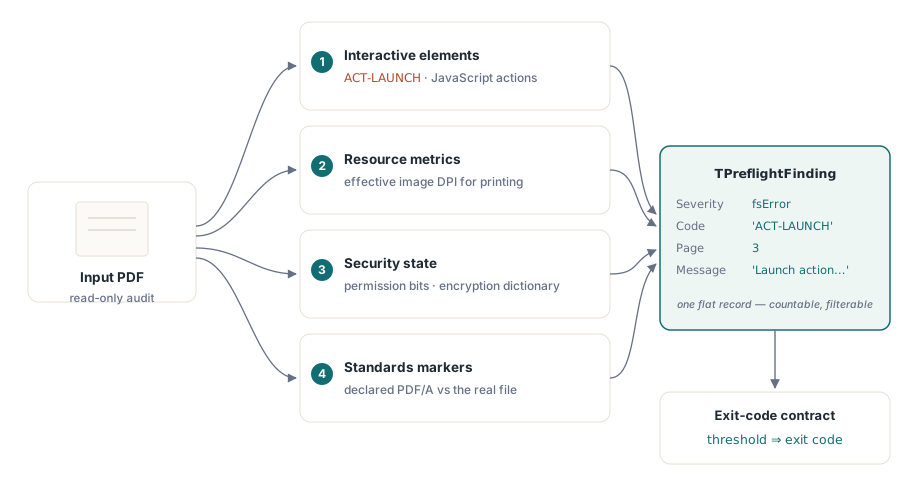
审计记录与退出码约定
每个检查都写入同一扁平记录类型,因为让每个检查自己输出可读文本会导致结果无法计数、过滤和分级,四个字段就够用
uses
  System.SysUtils, System.Math, System.IOUtils,
  System.Generics.Collections, pdfium_lib;

type
  TFindingSeverity = (fsInfo, fsWarning, fsError);

  TPreflightFinding = record
    Severity: TFindingSeverity;
    Code: string;       // 稳定的机器键,例如 'ACT-LAUNCH'
    Page: Integer;      // 1-based;0 表示文档级别
    Message: string;    // 面向人类;版本之间可自由改写
  end;

  TFindings = TList<TPreflightFinding>;

procedure Add(Findings: TFindings; Severity: TFindingSeverity;
  const Code: string; Page: Integer; const Msg: string);
var
  F: TPreflightFinding;
begin
  F.Severity := Severity;
  F.Code := Code;
  F.Page := Page;
  F.Message := Msg;
  Findings.Add(F);
end;
下游逻辑按 Code 而非 Message 聚合与分发,Message 可在发布之间改写不影响机器逻辑。退出码保持与批处理文章一致:0 表示无发现,1 表示有发现,2 表示无法执行审计,因为文件解析失败或需要密码。必须保留 2:一批损坏文件是上游解析器失败,不应与合规性问题混淆
交互式元素:脚本、启动目标与外部链接
PDFium 按整数类型返回每个动作,fpdf_doc.h 给出的常量应严格对齐,否则扫描器会出现“编译通过却始终零告警”的静默盲区。真实枚举是 PDFACTION_UNSUPPORTED = 0、PDFACTION_GOTO = 1、PDFACTION_REMOTEGOTO = 2、PDFACTION_URI = 3、PDFACTION_LAUNCH = 4、PDFACTION_EMBEDDEDGOTO = 5,而且不存在 JavaScript 常量。文档级脚本不是链接动作,FPDFAction_GetType 不会返回它们,文档级脚本来自单独的一套 API 调用。若按假想的 JavaScript 常量匹配动作类型,代码依然能编译、运行,但始终拿不到结果
const
  PDFACTION_GOTO         = 1;   // in-document jump: harmless
  PDFACTION_REMOTEGOTO   = 2;   // 跳转到另一个本地文件
  PDFACTION_URI          = 3;   // 打开外部 URL
  PDFACTION_LAUNCH       = 4;   // 启动外部程序
  PDFACTION_EMBEDDEDGOTO = 5;   // 跳转到嵌入文件

function ActionTarget(Doc: FPDF_DOCUMENT; Action: FPDF_ACTION;
  AType: ULONG): string;
var
  Buf: array[0..2047] of AnsiChar;
begin
  FillChar(Buf, SizeOf(Buf), 0);
  if AType = PDFACTION_URI then
    FPDFAction_GetURIPath(Doc, Action, @Buf, SizeOf(Buf))
  else
    FPDFAction_GetFilePath(Action, @Buf, SizeOf(Buf));
  Result := string(UTF8String(PAnsiChar(@Buf)));
end;

procedure AuditPageActions(Doc: FPDF_DOCUMENT; Page: FPDF_PAGE;
  PageNo: Integer; Findings: TFindings);
var
  StartPos: Integer;
  Link: FPDF_LINK;
  Action: FPDF_ACTION;
  AType: ULONG;
begin
  StartPos := 0;
  while FPDFLink_Enumerate(Page, @StartPos, @Link) <> 0 do
  begin
    Action := FPDFLink_GetAction(Link);
    if Action = nil then
      Continue;                 // 仅目标链接,无需标记
    AType := FPDFAction_GetType(Action);
    case AType of
      PDFACTION_LAUNCH:
        Add(Findings, fsError, 'ACT-LAUNCH', PageNo,
          'Launch action targets "' + ActionTarget(Doc, Action, AType) + '"');
      PDFACTION_URI:
        Add(Findings, fsWarning, 'ACT-URI', PageNo,
          'link opens ' + ActionTarget(Doc, Action, AType));
      PDFACTION_REMOTEGOTO, PDFACTION_EMBEDDEDGOTO:
        Add(Findings, fsWarning, 'ACT-XFILE', PageNo,
          'cross-file destination "' + ActionTarget(Doc, Action, AType) + '"');
    end;                        // PDFACTION_GOTO 按设计保持静默
  end;
end;

procedure AuditDocumentBehaviors(Doc: FPDF_DOCUMENT; Findings: TFindings);
var
  N: Integer;
begin
  N := FPDFDoc_GetJavaScriptActionCount(Doc);
  if N > 0 then
    Add(Findings, fsError, 'JS-DOC', 0,
      Format('%d document-level JavaScript action(s) run on open', [N]));
  N := FPDFDoc_GetAttachmentCount(Doc);
  if N > 0 then
    Add(Findings, fsWarning, 'ATT-EMB', 0,
      Format('%d embedded file attachment(s)', [N]));
end;
严重性是策略化定义:启动动作是错误,因为一次点击可能执行任意程序,不是任何发票都需要的能力;URI 外链是警告,大多数文件会出现,但显示文本和实际目标可能不一致,所以最好让审核者无需点击即可看到目标。文内 GoTo 跳转是结构行为,不应上报,避免审计结果充满目录噪声
资源指标:有效图像 DPI
图像本身没有“DPI”概念,只有像素与放置矩形。矩形使用 PDF 点为单位,1 英寸等于 72 点,有效 DPI 本质是像素除以放置尺寸。相同的 600×400 图片,在缩略图中很清晰,放成整页却可能模糊,审计时必须同时拿到元数据中的像素尺寸和对象边界矩形
procedure AuditPageImages(Page: FPDF_PAGE; PageNo: Integer;
  Findings: TFindings);
var
  I, ObjCount: Integer;
  Obj: FPDF_PAGEOBJECT;
  Meta: FPDF_IMAGEOBJ_METADATA;
  L, B, R, T: Single;
  WidthPt, HeightPt, DpiX, DpiY, EffDpi: Double;
begin
  ObjCount := FPDFPage_CountObjects(Page);
  for I := 0 to ObjCount - 1 do
  begin
    Obj := FPDFPage_GetObject(Page, I);
    if FPDFPageObj_GetType(Obj) <> FPDF_PAGEOBJ_IMAGE then
      Continue;
    if FPDFImageObj_GetImageMetadata(Obj, Page, @Meta) = 0 then
      Continue;
    if FPDFPageObj_GetBounds(Obj, @L, @B, @R, @T) = 0 then
      Continue;

    WidthPt  := R - L;              // 页面上的放置尺寸,单位为点
    HeightPt := T - B;
    if (WidthPt <= 0) or (HeightPt <= 0) or
       (Meta.Width = 0) or (Meta.Height = 0) then
      Continue;

    // 72 points = 1 inch, so placed inches = points / 72, and
    // effective DPI = source pixels / placed inches.
    DpiX := Meta.Width  / (WidthPt  / 72.0);
    DpiY := Meta.Height / (HeightPt / 72.0);
    EffDpi := Min(DpiX, DpiY);      // 较差的轴决定打印质量

    if EffDpi < 150.0 then
      Add(Findings, fsWarning, 'IMG-LOWRES', PageNo,
        Format('image %dx%d px placed at %.1fx%.1f pt = %.0f DPI effective',
          [Meta.Width, Meta.Height, WidthPt, HeightPt, EffDpi]))
    else if EffDpi > 600.0 then
      Add(Findings, fsInfo, 'IMG-BLOAT', PageNo,
        Format('image is %.0f DPI at placed size; resampling would ' +
          'shrink the file with no visible loss', [EffDpi]));
  end;
end;
阈值是策略而非物理事实:150 DPI 通常是可见像素化下限,300 DPI 常见为商业打印目标,600 DPI 以上一般只增大体积不提升可见画质,所以记为信息级肥胖而非错误。FPDFPageObj_GetBounds 返回的是轴对齐框,旋转图片时会低估真分辨率;FPDF_IMAGEOBJ_METADATA 中的 horizontal_dpi 与 vertical_dpi 会基于完整变换矩阵计算,二者对比可快速检测旋转情况。相同像素到页面映射也用于反向渲染,在 PDF 页面导出 JPEG 文章中有完整说明
安全状态:加密与权限位
PDF 加密中用户口令和所有者口令职责不同。用户口令负责解密文件本身,缺失时 FPDF_LoadDocument 返回 nil 且 FPDF_GetLastError 报 FPDF_ERR_PASSWORD;所有者口令通常只影响权限位,文件可在无凭据下打开。加载步骤本身是第一道安全闸门,决定退出码语义:用户口令文件应为代码 2,不可继续审计;所有者口令文件可继续扫描并给出发现
const
  FPDF_ERR_PASSWORD = 4;

function AuditSecurity(const FileName: string;
  Findings: TFindings): FPDF_DOCUMENT;
var
  Perms: ULONG;
  Revision: Integer;
begin
  Result := FPDF_LoadDocument(PAnsiChar(AnsiString(FileName)), nil);
  if Result = nil then
  begin
    if FPDF_GetLastError() = FPDF_ERR_PASSWORD then
      Add(Findings, fsError, 'SEC-USERPW', 0,
        'user (open) password required; audit cannot proceed')
    else
      Add(Findings, fsError, 'DOC-BROKEN', 0, 'file failed to parse');
    Exit;
  end;

  Revision := FPDF_GetSecurityHandlerRevision(Result);
  if Revision >= 0 then       // -1 表示文件未加密
  begin
    // 使用空密码打开但文件仍加密:仅设置了所有者密码
    // 任何人都可以读取,但权限位会限制符合规范的
    // 阅读器允许执行的操作。未加密文件会报告所有
    // 位已设置,因此必须先检查修订版本
    Perms := FPDF_GetDocPermissions(Result);
    Add(Findings, fsInfo, 'SEC-ENC', 0,
      Format('encrypted, security handler revision %d', [Revision]));
    if (Perms and 4) = 0 then      // bit 3: print
      Add(Findings, fsWarning, 'SEC-NOPRINT', 0,
        'printing is not permitted');
    if (Perms and 16) = 0 then     // bit 5: copy / extract content
      Add(Findings, fsInfo, 'SEC-NOCOPY', 0,
        'content extraction is not permitted');
    if (Perms and 2048) = 0 then   // bit 12: high-resolution print
      Add(Findings, fsWarning, 'SEC-LOWPRINT', 0,
        'only low-resolution printing is permitted');
  end;
end;
这些掩码来自 ISO 32000-1 表 22:/P 的 bit 3 是 4,bit 5 是 16,bit 12 是 2048。是否拦截要按业务策略决定,打印服务通常应在 intake 阶段即拦截 SEC-NOPRINT,而归档流程则更常把 SEC-ENC 自身作为入库阻塞。前者是业务路由策略,后者是后续标准校验前的分离点
标准标记:读取 PDF/A 声明
PDF/A 合规通常在 XMP 中声明为 pdfaid:part(1 到 4)和 pdfaid:conformance(b 表示视觉忠实度,a 表示完整结构化标记)。PDFium C API 不提供直接 XMP 读取,FPDF_GetMetaText 只读 Info 字典,无法看到 XMP 标识。ISO 19005 规定 XMP 流必须是未压缩的,目的是让工具在不完整解析器情况下也能定位。于是可用原始字节扫描识别声明;若声明藏在压缩流中,说明它已经违背了自己声明的标准
function PdfAClaim(const FileName: string): string;
var
  Bytes: TBytes;
  S: RawByteString;
  P, Limit: Integer;
begin
  Result := '';                     // empty = no PDF/A claim present
  Bytes := TFile.ReadAllBytes(FileName);
  if Length(Bytes) = 0 then
    Exit;
  SetString(S, PAnsiChar(@Bytes[0]), Length(Bytes));
  P := Pos('pdfaid:part', S);       // XMP 标识架构
  if P = 0 then
    Exit;
  // Handles both <pdfaid:part>2</pdfaid:part> and pdfaid:part="2":
  // 取属性名称后的第一个数字
  Limit := Min(P + 32, Length(S));
  Inc(P, Length('pdfaid:part'));
  while (P <= Limit) and not (S[P] in ['1'..'4']) do
    Inc(P);
  if P <= Limit then
    Result := 'PDF/A-' + Char(S[P]);
end;
这类发现通常作为信息级:声明只是声明,不是文件属性本身。XMP 一行 XML 任何生成器都能写入。真正的合规性要看字体嵌入、设备无关颜色和受禁特性等全部规则。声明检测的价值是把文件路由到真正的验真流程,PDFium Component 内建预检能同时覆盖 PDF/A、PDF/UA、PDF/X,在 批处理 CLI 文章中给出了可交付报告的接线方式
问题文件的实际运行
执行顺序固定为:先做安全状态,因为它决定是否进入审计,再做文档级行为、标准声明,最后按页检查动作与图像
function AuditFile(const FileName: string; Findings: TFindings): Integer;
var
  Doc: FPDF_DOCUMENT;
  Page: FPDF_PAGE;
  I: Integer;
  Claim: string;
begin
  Doc := AuditSecurity(FileName, Findings);
  if Doc = nil then
    Exit(2);                        // audit failure, not a verdict
  try
    AuditDocumentBehaviors(Doc, Findings);
    Claim := PdfAClaim(FileName);
    if Claim <> '' then
      Add(Findings, fsInfo, 'STD-PDFA', 0,
        Claim + ' conformance claimed (declaration only, not validated)');
    for I := 0 to FPDF_GetPageCount(Doc) - 1 do
    begin
      Page := FPDF_LoadPage(Doc, I);
      if Page = nil then
      begin
        Add(Findings, fsError, 'PAGE-BROKEN', I + 1, 'page failed to parse');
        Continue;
      end;
      try
        AuditPageActions(Doc, Page, I + 1, Findings);
        AuditPageImages(Page, I + 1, Findings);
      finally
        FPDF_ClosePage(Page);
      end;
    end;
  finally
    FPDF_CloseDocument(Doc);
  end;
  if Findings.Count > 0 then
    Result := 1
  else
    Result := 0;
end;
以下是一个外部机构返回的样例输出
> preflight_audit brochure_final.pdf
brochure_final.pdf: 5 finding(s)
  [ERROR]   ACT-LAUNCH   page 3   Launch action targets "..\tools\setup.exe"
  [ERROR]   JS-DOC       doc      2 document-level JavaScript action(s) run on open
  [WARNING] IMG-LOWRES   page 7   image 412x287 px placed at 396.0x275.8 pt = 75 DPI effective
  [WARNING] SEC-NOPRINT  doc      printing is not permitted
  [INFO]    STD-PDFA     doc      PDF/A-2 conformance claimed (declaration only, not validated)
exit code 1
每一行都值得单独处理,但组合后的结论才是业务决策。这个文件同时声明 PDF/A-2、含有加密字典并带有开箱即触发脚本,PDF/A 明确禁止上述条件,所以声明在深入验真前就已经可判定为矛盾。扁平列表正是在这里优于布尔 pass/fail 的地方
本次预检不能判断的范围
边界声明是这类工具可信度的关键。前面的检查只验证文件声明的结构与状态,PDFium 负责解析并枚举,未进行真正的 PDF/A 验真。真正的 PDF/A 验真要检查字体字形覆盖、输出意图色彩空间和逐条条款;这需要专门校验器,比如组件内置的预检引擎或 veraPDF。权限位是阅读器遵循的声明,而非加密墙,SEC-NOPRINT 表示意图而非强制执行;脚本扫描覆盖了链接注释和文档级脚本,表单字段事件字典仍需表单 API;签名检查若加入,结论仍是声明而非密码学验证,证书链校验是独立流程。预检只是 intake 面谈,不是定稿裁决,作用是让路由更快、更准、更可重复
注:前面流程使用的文档、页面、标注和图像对象 API 与高层封装、以及完整的标准验真预检引擎,均由 PDFium Component 提供