了解 PDF XML 元数据和书签:技术指南
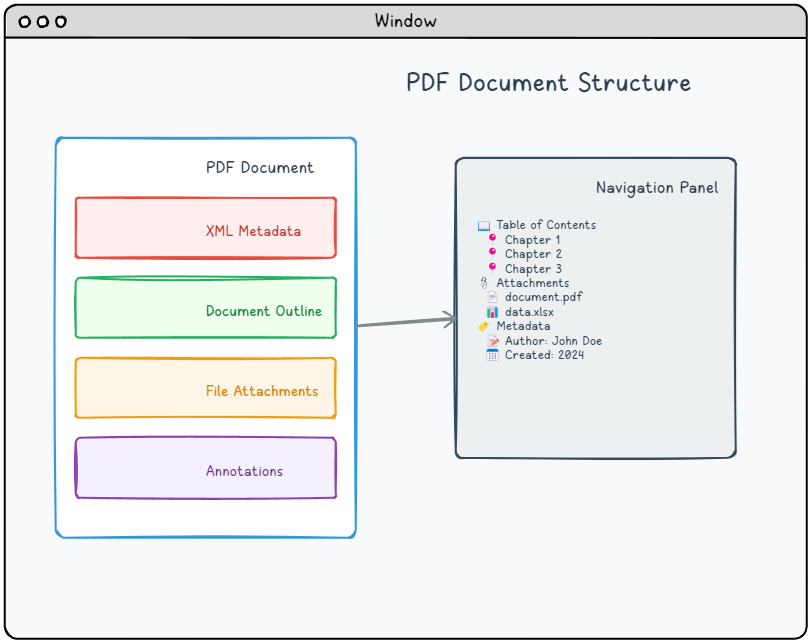
涵盖的关键主题
📍 目的地
精确的位置标记,用于定义 PDF 文档中的特定位置。这些标记可实现书签和超链接的精确导航,而文档大纲则提供分层目录功能。
📄 XML 元数据
结构化的 XML 数据流,使用标准化的 XMP 格式提供全面的文档元数据,不仅包括基本的文档属性,还包括丰富的描述性信息。
📎 文件附件
完整的嵌入文件功能,将外部资源直接打包到 PDF 文档中,创建类似于电子邮件附件的自包含文档包。
📝 注释
交互式覆盖元素,可以在 PDF 页面上添加文本、图形和可点击功能,而无需修改底层内容。包括超链接,可实现无缝的文档导航,以及各种标记工具,以增强读者的交互体验。
书签和目标
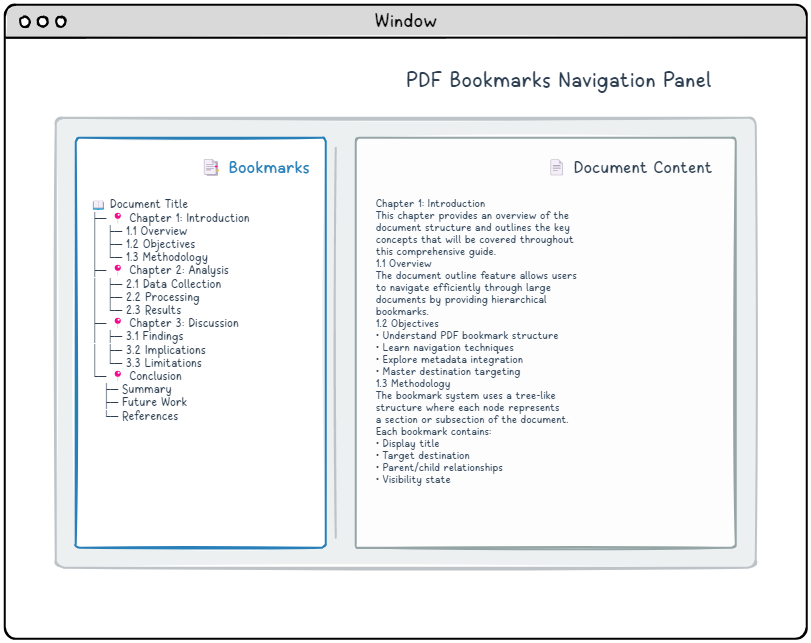
文档导航依赖于分层书签结构,技术上称为。 文档大纲这种树状结构系统呈现可点击的条目,通常是章节标题、段落标题和子段落名称,方便读者快速跳转到文档的特定部分。每个书签条目都将显示文本与目标信息结合在一起,目标信息指定链接应导航到的确切位置。
了解目标
PDF 目标在文档中充当精确的位置标记,指定要显示的页面、在该页面上的位置以及要应用的缩放级别。您可以创建目标,方法有两种:直接在行内定义它们(在我们的示例中,为了清晰起见,我们将使用这种方法),或者通过文档范围的命名系统通过名称引用它们。大多数 PDF 阅读器会在导航面板中显示书签,该面板位于主文档内容旁边。
每个目标都使用一种数组结构,其中特定元素会根据您希望实现的查看行为而有所不同。以下是可用的主要目标模式:
目标类型表
注意:“page”表示对页面对象的间接引用。默认情况下,这些目标与页面的裁剪框边界一起使用,如果没有定义裁剪框,则回退到媒体框。
| Array | Description |
|---|---|
| [page /Fit] | Scales the page to fit completely within the viewer window, adjusting both width and height proportionally. |
| [page /FitH top] | Positions the specified top coordinate at the window’s top edge while scaling horizontally to fit the full page width. |
| [page /FitV left] | Aligns the specified left coordinate with the window’s left edge while scaling vertically to fit the full page height. |
| [page /XYZ left top zoom] | Positions the coordinates (left, top) at the window’s upper-left corner and applies the specified zoom factor. Null values preserve current settings for those parameters. |
| [page /FitR left bottom right top] | Zooms and positions the view to display the rectangular area defined by the left, bottom, right, and top coordinates. |
| [page /FitB] | Similar to /Fit, but scales based on the actual content boundaries instead of the defined crop box area. |
| [page /FitBH top] | Functions like /FitH but uses the content bounding box instead of the crop box for horizontal scaling calculations. |
| [page /FitBV left] | Operates like /FitV but calculates vertical scaling based on the content bounding box rather than the crop box boundaries. |
文档大纲结构
文档大纲创建了一种分层导航结构,该结构作为 PDF 浏览器的交互式目录。这种树状结构有助于用户快速浏览复杂文档,因为它提供了清晰的结构概览。该系统依赖于两种基本对象类型:
- 大纲字典 – 大纲层级的根节点
- 大纲项字典 – 大纲中的各个条目
大纲字典结构表
| Key | Value Type | Value |
|---|---|---|
| /Type | name | If present, must be /Outlines. |
| /First | indirect reference to dictionary | References the initial top-level outline entry in the document hierarchy. This field is mandatory when outline entries exist. |
| /Last | indirect reference to dictionary | References the final top-level outline entry in the document hierarchy. This field is mandatory when outline entries exist. |
| /Count | integer | Specifies how many outline entries are currently expanded across the entire outline tree. Can be omitted when no entries are in an open state. |
大纲项实现
每个大纲项都由一个字典组成,该字典指定其显示标题、目标位置以及与其他层级中条目的关系。
让我们来看看如何在 PDF 语法中构建一个简单的文档大纲:
|
1 2 3 4 5 6 7 8 9 10 11 12 13 14 15 |
8 0 obj <</Type/Outlines/Count 4/First 9 0 R/Last 9 0 R>> endobj 9 0 obj <</Title(Chapter 1: Experiment A)/Count 3/Parent 8 0 R/First 12 0 R/Last 18 0 R>> endobj 12 0 obj <</Title(1: Introduction)/Count 0/Parent 9 0 R/Next 15 0 R>> endobj 15 0 obj <</Title(2: Methodology)/Count 0/Parent 9 0 R/Prev 12 0 R/Next 18 0 R>> endobj 18 0 obj <</Title(3: Result verification)/Count 0/Parent 9 0 R/Prev 15 0 R/>> endobj |
大纲项目字典结构表
* 表示必需条目
| Key | Value Type | Value |
|---|---|---|
| /Title* | text string | Text to be displayed for this entry. |
| /Parent* | indirect reference to dictionary | References this item’s parent within the outline hierarchy, which can be either another outline item or the root outline dictionary. |
| /Prev | indirect reference to dictionary | References the preceding sibling item at the same hierarchical level, when applicable. |
| /Next | indirect reference to dictionary | References the following sibling item at the same hierarchical level, when applicable. |
| /First | indirect reference to dictionary | References the initial child item under this entry, when child items exist. |
| /Last | indirect reference to dictionary | References the final child item under this entry, when child items exist. |
| /Count | integer | When the entry is expanded, indicates the count of visible descendant entries. When collapsed, stores a negative value representing the total number of hidden descendants that would become visible upon expansion. |
| /Dest | name, string or array | The destination. Arrays are destinations, names are references to entries in the /Dests entry in the document catalog, strings are references to entries in the /Dests entry in the document’s name dictionary. |
XML 元数据
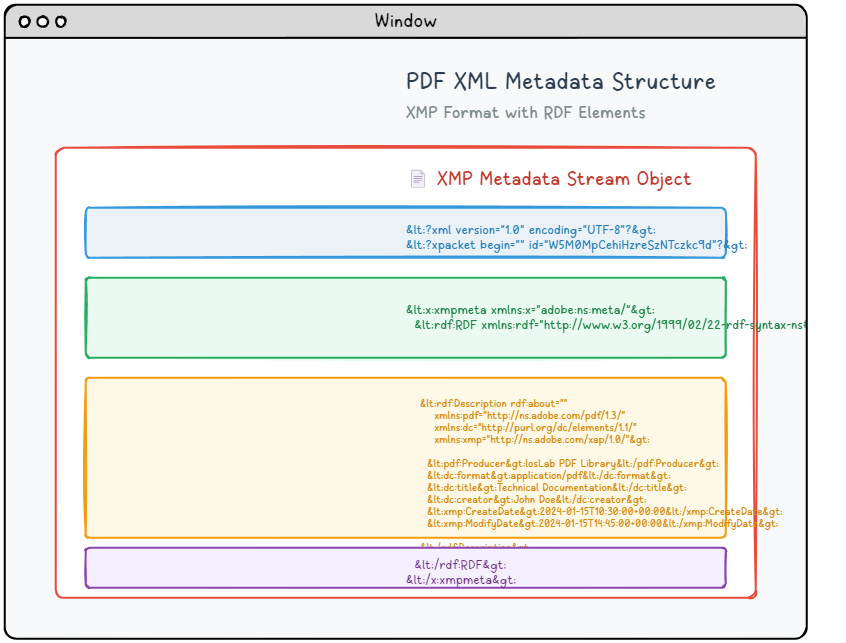
现代 PDF 文档可以包含复杂的基于 XML 的元数据流,这些流提供比传统文档属性更详细和结构化的信息。这种高级元数据系统利用 Adobe 的 XMP(可扩展元数据平台)规范,提供标准化、可供机器读取的文档描述,从而增强搜索能力、组织能力和自动化处理能力。
XMP 元数据结构
XMP 元数据被打包成一个 XML 文档,该文档使用 RDF(资源描述框架)语法来组织和描述文档属性,采用标准化的格式。此元数据内容嵌入在专用的流对象中,该对象包含适当的类型标识,以便 PDF 处理程序能够识别:
|
1 2 3 4 5 6 7 8 9 10 11 12 13 14 15 16 17 18 19 20 21 |
6 0 obj <</Length 1235/Type/Metadata/Subtype/XML>>stream <?xpacket begin="锘xBF" id="W5M0MpCehiHzreSzNTczkc9d"?> <x:xmpmeta xmlns:x="adobe:ns:meta/" x:xmptk="Adobe XMP Core 5.2-c001 63.139439, 2010/09/27-13:37:26" ><rdf:RDF xmlns:rdf="http://www.w3.org/1999/02/22-rdf-syntax-ns#" ><rdf:Description rdf:about="" xmlns:pdf="http://ns.adobe.com/pdf/1.3/" xmlns:dc="http://purl.org/dc/elements/1.1/" xmlns:xmp="http://ns.adobe.com/xap/1.0/" ><pdf:Producer>losLab PDF Library</pdf:Producer> <dc:creator>losLab.com</dc:creator> <dc:title>Delphi PDF SDKs</dc:title> <xmp:CreateDate>2025-06-29T10:46:27+08:00</xmp:CreateDate> <xmp:ModifyDate>2025-06-29T10:58:57+08:00</xmp:ModifyDate> <xmp:MetadataDate>2025-06-29T10:46:27+08:00</xmp:MetadataDate> <dc:description>Delphi Development Library for PDF creation & editing</dc:description> <xmp:CreatorTool>HotPDF Component</xmp:CreatorTool> <dc:subject>PDF Developer Library for RAD Studio></dc:subject> <pdf:Keywords>Delphi, PDF SDK, PDF Component</pdf:Keywords> </rdf:Description>Robust Delphi PDF development library</rdf:RDF> </x:xmpmeta> <?xpacket end="w"?> endstream endobj |
标准元数据模式
XMP 框架通过成熟的模式命名空间组织元数据,每个命名空间用于特定信息类别:
📋 Dublin Core (dc:)
基本书目信息
- dc:title – 文档标题
- dc:creator – 文档作者
- dc:subject – 文档主题/关键词
- dc:description – 文档描述
- dc:format – MIME 类型
🏷️ XMP Basic (xmp:)
核心 XMP 属性
- xmp:CreateDate – 创建日期
- xmp:ModifyDate – 修改日期
- xmp:CreatorTool – 创建应用程序
- xmp:MetadataDate – 元数据修改日期
📄 PDF Schema (pdf:)
PDF 专有属性
- pdf:Producer – PDF生成器
- pdf:Keywords – 文档关键词
- pdf:PDFVersion – PDF版本
与文档目录的集成
XML元数据流从文档目录中引用:
|
1 2 3 |
1 0 obj < < Type Catalog Pages 2 0 R Metadata 10 0 R Outlines 1 0 R>> endobj |
🎯 XML元数据最佳实践
- 为了获得最大的兼容性,始终包含文档信息字典和XMP元数据。
- 确保两个位置的元数据值一致。
- 使用正确的 XML 编码(UTF-8)来处理国际字符。
- 以 ISO 8601 格式包含创建和修改日期。
- 验证 XML 结构以防止解析错误。
文件附件
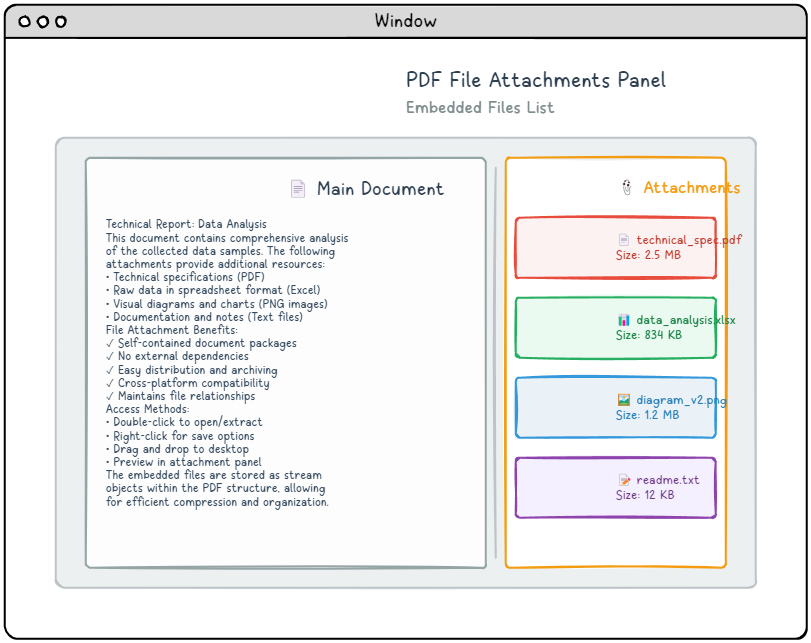
PDF 文件附件提供了一种方便的方法,可以将外部文件直接嵌入到 PDF 文档中,从而创建包含所有必要资源的自包含软件包。 这些附件可以与整个文档相关联,也可以链接到特定页面,具体取决于您的需求。 大多数现代 PDF 阅览器会将这些嵌入文件显示在专用的附件面板中,使用户可以轻松访问、查看或保存包含的内容。 此功能对于创建全面的文档包特别有用,例如包含补充资源的演示文稿或包含伴随数据文件的报告。
嵌入文件结构
从根本上说,嵌入文件由一个流对象组成,该对象包含实际的文件数据,以及一个流字典条目,用于指定 /Type /EmbeddedFile。 这种简单的方法允许存储任何类型的文件在 PDF 中。 以下是基本嵌入文件结构的示例:
|
1 2 3 4 5 6 |
8 0 obj < < Type EmbeddedFile Length 35>> stream This is a text file attachment... endstream endobj |
PDF 支持两种不同的方法来引用嵌入文件,每种方法都适用于不同的用例:文档级别的附件,可在整个文档中全局访问;以及页面级别的附件,作为特定页面的交互元素显示。
文档级别附件
对于文档范围内的附件,您需要添加一个 /EmbeddedFiles 条目到名称字典,该字典通过 /Names 条目在文档目录中访问。 这种方法使附件在整个 PDF 中全局可用,无论用户当前查看的是哪个页面。
|
1 2 3 4 5 6 |
9 0 obj < < Names << EmbeddedFiles << Names [ (attachment.txt) << EF << F 8 0 R>> /F (attachment.txt) /Type /Filespec >> ] >> >> /Pages 1 0 R /Type /Catalog >> endobj |
代码结构说明
- /Names – 包含文档的名称字典。
- /EmbeddedFiles – 专门处理嵌入的文件名
- (attachment.txt) – 用户看到的实际文件名
- /EF – 包含实际文件引用的嵌入文件字典
- /F 8 0 R – 对嵌入文件流对象的引用
- /Type /Filespec – 标识此文件为文件规范字典。
页面级附件。
特定页面的附件需要采用不同的方法,使用文件附件批注来实现。这些批注会添加到。 /Annots 在目标页面的字典中创建一个数组,从而在页面上显示一个可见的附件图标,用户可以直接与该图标进行交互。
|
1 2 3 4 5 6 7 8 |
9 0 obj < < Type Page (Other dictionary entries as usual) Annots [ << FS << EF << F 8 0 R>> /F (attachment.txt) /Type /Filespec >> /Subtype /FileAttachment /Contents (attachment.txt) /Rect [ 18 796.88976378 45 823.88976378 ] >> ] >> endobj |
页面附件属性。
- /FS - 文件规范字典(与 /EF 相同)
- /Subtype /FileAttachment – 标识此注释为一个文件附件。
- /Contents – 当鼠标悬停在附件图标上时显示的提示文本。
- /Rect – 定义附件图标在页面上的位置和大小的矩形。
附件使用场景
📊 数据文件
将电子表格、数据库或原始数据文件与报告和分析一起嵌入。
🎨 原始文件
包含原始设计文件、CAD图纸或可编辑的模板。
📹 媒体资源
附加视频演示、音频录音或交互式内容。
📋 辅助文档
捆绑相关的PDF文件、合同或参考资料。
批注
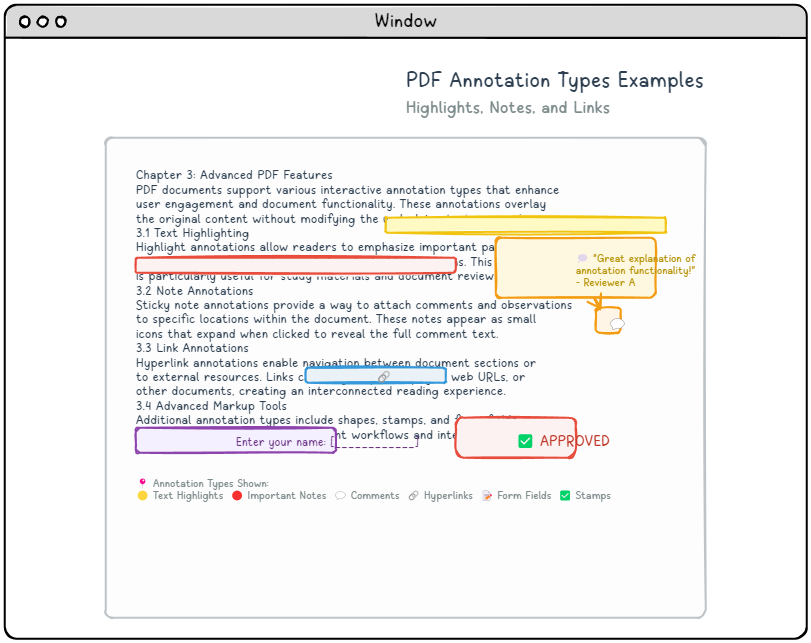
PDF 注解提供了一种强大的方法,可以在不更改原始页面内容的情况下,向文档添加交互元素和视觉标记。这些叠加元素通过允许用户突出显示文本、添加评论或创建可点击链接,从而增强阅读体验。最实用的注释类型之一是超链接,它可以在文档的不同部分之间或到外部资源之间实现无缝导航。
注解结构
尽管不同类型的注释具有不同的用途,但它们都遵循一致的基础结构,并根据需要添加特定于类型的属性。PDF 页面可以包含多个注释,这些注释以数组的形式组织,并通过每个页面的字典中的 /Annots 条目进行引用。每个注释都实现为自己的字典对象,具有特定的属性。
注解字典结构表
* 表示必需条目
| Key | Value Type | Value |
|---|---|---|
| /Type | name | When specified, this value must be set to /Annot to properly identify the dictionary type. |
| /Subtype* | name | Specifies the specific annotation category (e.g., Link, Text, Highlight). |
| /Rect* | rectangle | Defines the annotation’s position and dimensions using standard PDF coordinate units. |
| /Contents | text string | Contains the annotation’s text content or provides an alternative descriptive label for accessibility purposes. |
基础注释字典示例:
|
1 2 3 |
12 0 obj < < Type Annot Subtype Link Rect [100 200 300 250] Border [0 0 1] C [0.0 0.0 1.0] Dest [5 0 R XYZ null null null]>> endobj |
常用注释类型
🔗 链接注释
创建可点击的区域,用于导航到文档中的其他位置或外部资源。
- /Subtype /Link – 标识为链接注释
- /Dest – 目标数组或命名目标
- /A – 动作字典,用于更复杂的行为
📝 文本注释
显示点击时出现的弹出式注释和评论。
- /Subtype /Text – 标识为文本注释。
- /Contents – 注释的文本内容。
- /Open – 注释是否最初是打开状态。
🖍️ 标记注释。
突出显示、下划线或删除文本内容。
- /Subtype /Highlight – 文本高亮
- /Subtype /Underline – 文本下划线
- /Subtype /StrikeOut – 文本删除线
高级链接操作
链接注释可以执行各种操作,而不仅仅是简单的导航。
|
1 2 3 |
13 0 obj < < Type Annot Subtype Link Rect [50 50 200 100] A << Type Action S URI URI (https: www.example.com)>> >> endobj |
操作类型
- /S /GoTo – 导航至文档内的目标位置
- /S /GoToR – 导航至另一个文档的目标位置
- /S /URI – 打开网页链接
- /S /Launch – 启动外部应用程序
- /S /JavaScript – 执行 JavaScript 代码
注释外观
自定义视觉样式是通过外观流实现的,这使得可以精确控制注释如何向用户显示:
|
1 2 3 4 5 6 7 8 9 10 11 12 13 14 15 16 |
14 0 obj < < Type Annot Subtype Square Rect [100 100 200 150] C [1.0 0.0 0.0] BS << W 2 S S>> /AP < < N 15 0 R>> >> endobj 15 0 obj < < Type XObject Subtype Form BBox [0 0 100 50] Length 85>> stream q 1.0 0.0 0.0 RG 2 w 10 10 80 30 re S Q endstream endobj |
实用实施指南
文档结构集成
成功的实施需要理解这些元素如何在更广泛的PDF文档架构中协同工作。
|
1 2 3 4 |
1 0 obj < < Type Catalog Pages 2 0 R Outlines 3 0 R Names << EmbeddedFiles 4 0 R>> /Metadata 5 0 R >> endobj |
✅ 实施检查清单
- 文档目录设置 – 确保正确引用大纲、名称和元数据。
- 对象编号 – 保持对象编号和交叉引用的一致性。
- 流编码 – 为流应用适当的过滤器和编码。
- 验证。 – 使用验证工具检查 PDF 结构。
- 兼容性测试。 - 在不同的 PDF 阅览器和版本上进行测试。
常见问题和解决方案。
❌ 收藏夹未显示。
解决方案: 确认文档目录是否包含一个。 /Outlines 条目,并且确保大纲层级结构正确,父子关系也正确。
❌ 未识别的元数据。
解决方案: 确保 XML 元数据流格式正确,使用正确的命名空间,并在文档目录中进行引用。 /Type /Metadata 和 /Subtype /XML.
❌ 附件无法访问
解决方案: 检查嵌入文件是否在文档级别的名称字典或页面级别的注释字典中正确引用,并且文件规范字典的结构是否正确。
结论。
掌握 PDF 元数据和书签的实现对于开发专业级文档至关重要,这些文档提供卓越的用户体验和功能。这些强大的功能包括:
- 增强的导航 – 通过结构良好的书签和目标点
- 丰富的元数据 – 提高文档管理和可搜索性。
- 文件集成 – 将相关资源打包到文档中
- 交互元素 – 通过注释创建引人入胜的用户体验
通过正确实施这些功能,您可以创建超出简单文本和图形的 PDF 文档,使其成为全面、交互式的资源,能够有效地服务于人类读者和自动化系统。
🚀 下一步
- 练习在 PDF 创建工作流程中实施这些结构
- 尝试不同的注释类型和书签层级结构
- 在多个PDF查看器上测试您的实现。
- 在这些基础上,探索高级PDF功能。