假设有一条处理流水线,要按作者、公司或最后修改日期去分流一万份电子表格,它最不该做的事情就是把每个工作簿都完整打开。答案其实藏在文件的文档属性里,也就是 Office 世界所说的文档摘要信息:Windows Search 会索引它,SharePoint 会依据它管理文件,Excel 也会在属性对话框里显示它。这一层数据通常只有几 KB,而且在两种 Excel 格式里都放在定义清晰的位置。真正的难点,是怎样在 Delphi 中拿到这些信息,而不用为那一百万个根本不需要的单元格付出代价
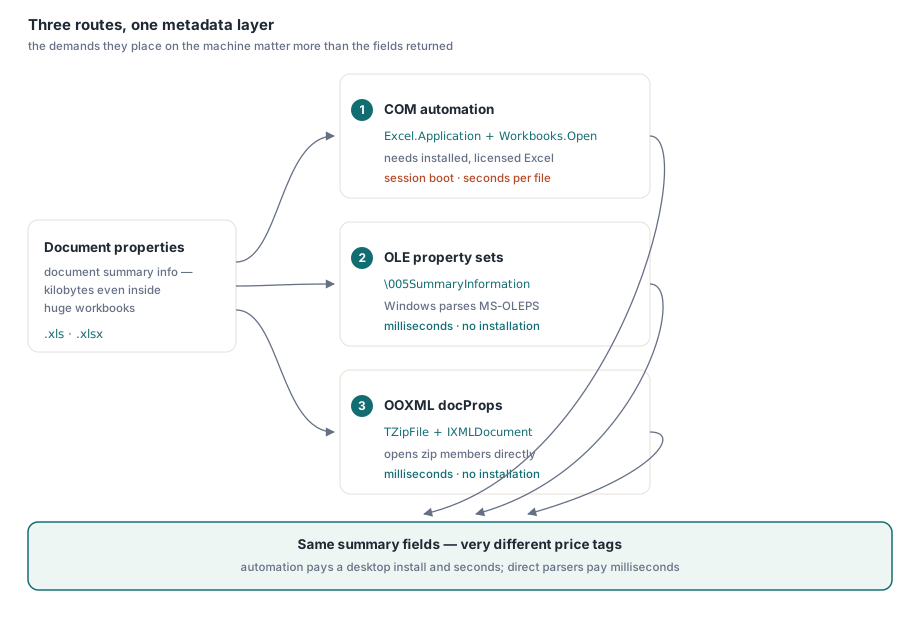
现实里主要有三条路径,它们在返回结果上的差异并不大,区别更多在于它们对运行环境的要求。COM 自动化会驱动 Excel 本体,把所有内容都读出来,但代价是桌面级的。.xls 把属性保存在 OLE 属性集流中,Windows 可以替你解析。.xlsx 则把属性放在 zip 包里的两个小型 XML 部件中,Delphi RTL 自己就能打开。下面分别给出可运行代码,并把成本说清楚
路径 1:COM 自动化读取全部内容,但代价是桌面级的
在单一对象模型下拿到完整覆盖的,只有自动化这条路:标准摘要属性、包含 Company 和 Manager 的扩展属性,以及用户自定义属性,都可以通过 BuiltinDocumentProperties 和 CustomDocumentProperties 访问。所有数据都会以 OleVariant 形式返回,而这个 API 有一个值得提前记住的习惯,否则迟早会踩坑:如果某个内建属性从未赋值,它不会返回空字符串,而是在你访问 Value 的瞬间抛出 EOleException。下面这个辅助函数把这种情况视为“未设置”,而不是失败
uses
  System.SysUtils, System.Variants, System.Win.ComObj;

procedure ReadPropertiesViaCom(const FileName: string);
var
  Excel, Book, Builtin, Custom: OleVariant;
  I: Integer;

  function BuiltinProp(const Name: string): string;
  begin
    try
      Result := VarToStr(Builtin.Item(Name).Value);
    except
      on EOleError do
        Result := '';   // 属性存在但从未赋值
    end;
  end;

begin
  Excel := CreateOleObject('Excel.Application');
  try
    Excel.DisplayAlerts := False;
    Book := Excel.Workbooks.Open(FileName, 0, True);   // read-only
    try
      Builtin := Book.BuiltinDocumentProperties;
      Writeln('Author : ', BuiltinProp('Author'));
      Writeln('Title  : ', BuiltinProp('Title'));
      Writeln('Subject: ', BuiltinProp('Subject'));
      Writeln('Company: ', BuiltinProp('Company'));
      Writeln('Manager: ', BuiltinProp('Manager'));

      Custom := Book.CustomDocumentProperties;
      for I := 1 to Custom.Count do
        Writeln(VarToStr(Custom.Item(I).Name), ' = ',
          VarToStr(Custom.Item(I).Value));
    finally
      Book.Close(False);
    end;
  finally
    Excel.Quit;   // 确保每条路径都能到达这里,否则 EXCEL.EXE 会残留
    Excel := Unassigned;
  end;
end;
接下来是代价。运行这段代码的每台机器上都必须安装 Excel,这一点本身就排除了大多数服务器,而且微软的支持政策也写得很明确:Office 既不是为无人值守的服务器端自动化设计的,也没有为这种用途授权。CreateOleObject 会启动完整的 EXCEL.EXE,Workbooks.Open 会解析整个工作簿,因此在第一条属性返回前,每个文件通常要等待两到四秒。还有,围绕 Quit 的 try..finally 并不是装饰:如果异常在 CreateOleObject 与 Quit 之间逃逸,就会留下一个孤儿 EXCEL.EXE,继续占着文件锁,直到下一次运行撞上它才暴露出来。把一个 Excel 实例复用在整批文件上,的确能摊薄启动成本,但也把风险集中起来,因为隐藏桌面上的一个意外对话框,就足以让后面排队的所有文件都卡住
路径 2:.xls 把属性保存在 OLE 属性集流中
BIFF8 工作簿本质上是一个 OLE 复合文件,也就是一个微型文件系统,里面有存储和流。单元格数据位于 Workbook 流中,元数据则放在它旁边的两个属性集流里,这两个流的名字都以控制字符 #5 开头:\005SummaryInformation 保存经典字段,\005DocumentSummaryInformation 保存扩展字段和自定义字段。每个流内部都是采用 MS-OLEPS 布局的二进制属性集,其中的节以格式标识符 FMTID 为键,属性则以整数属性 ID 为键。摘要节的 FMTID 是 {F29F85E0-4FF9-1068-AB91-08002B27B3D9},其中 PIDSI_TITLE 是 $02,PIDSI_AUTHOR 是 $04;Company $0F 和 Manager $0E 位于文档摘要节里,自定义属性则在第二个节以及其后的名称字典中
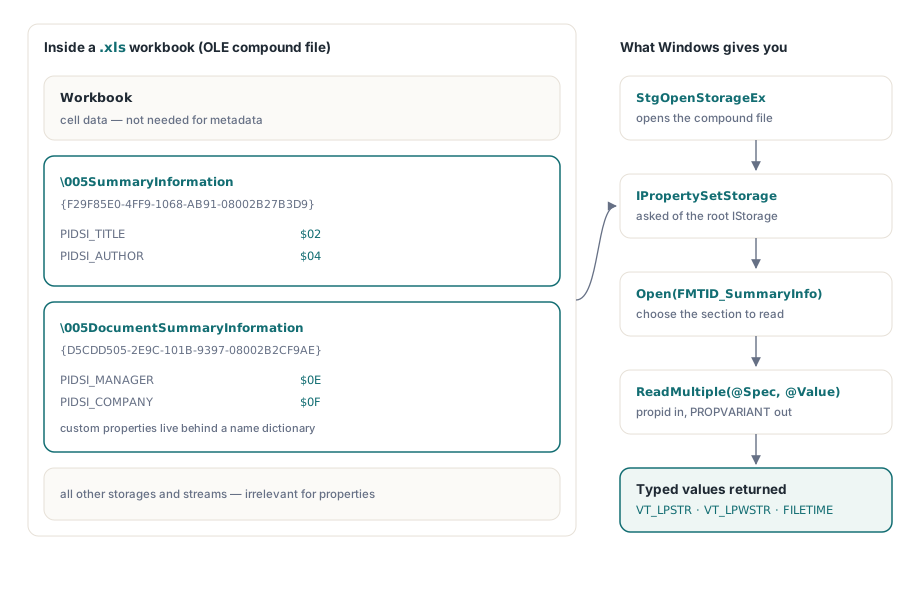
好消息是,在 Windows 上你完全不必自己解析这些字节。结构化存储会通过 IPropertySetStorage 暴露这些流,下面这段代码可以直接基于标准 RTL 单元编译通过
uses
  System.SysUtils, Winapi.Windows, Winapi.ActiveX, System.Win.ComObj;

const
  FMTID_SummaryInfo: TGUID = '{F29F85E0-4FF9-1068-AB91-08002B27B3D9}';
  PIDSI_TITLE    = $02;
  PIDSI_AUTHOR   = $04;
  STGFMT_STORAGE = 0;

function ReadXlsSummaryString(const FileName: string; PropId: TPropID): string;
var
  Unk: IUnknown;
  Stg: IStorage;
  PropSetStg: IPropertySetStorage;
  PropStg: IPropertyStorage;
  Spec: TPropSpec;
  Value: TPropVariant;
begin
  Result := '';
  OleCheck(StgOpenStorageEx(PWideChar(FileName),
    STGM_READ or STGM_SHARE_DENY_WRITE, STGFMT_STORAGE, 0, nil, nil,
    @IID_IStorage, Unk));
  Stg := Unk as IStorage;
  PropSetStg := Stg as IPropertySetStorage;
  OleCheck(PropSetStg.Open(FMTID_SummaryInfo,
    STGM_READ or STGM_SHARE_EXCLUSIVE, PropStg));
  Spec.ulKind := PRSPEC_PROPID;
  Spec.propid := PropId;
  if PropStg.ReadMultiple(1, @Spec, @Value) = S_OK then  // S_FALSE: not present
  try
    case Value.vt of
      VT_LPSTR:  Result := string(AnsiString(Value.pszVal));
      VT_LPWSTR: Result := Value.pwszVal;
    end;
  finally
    PropVariantClear(Value);
  end;
end;

// usage: Writeln('Author: ', ReadXlsSummaryString('ledger.xls', PIDSI_AUTHOR));
这段示例背后还藏着一些真实成本。字符串既可能以 VT_LPWSTR 返回,也可能以 VT_LPSTR 返回,而在 ANSI 情况下,字节序列使用的是属性集自身的代码页,这个代码页又保存在该节的属性 1 中,所以只有当这个代码页与系统代码页一致时,上面的强制转换才完全准确。时间戳会以 UTC 的 VT_FILETIME 返回。读取自定义属性,则意味着你要打开用户定义节 FMTID {D5CDD505-2E9C-101B-9397-08002B2CF9AE},再遍历其中的名称字典。IPropertyStorage 在 Windows 上会吸收这些复杂性;如果是在没有结构化存储的环境里自己写一个 MS-OLEPS 解析器,那是一个真正的项目,不是一下午能搞完的事
路径 3:.xlsx 把 docProps 作为 zip 内部的 XML 保存
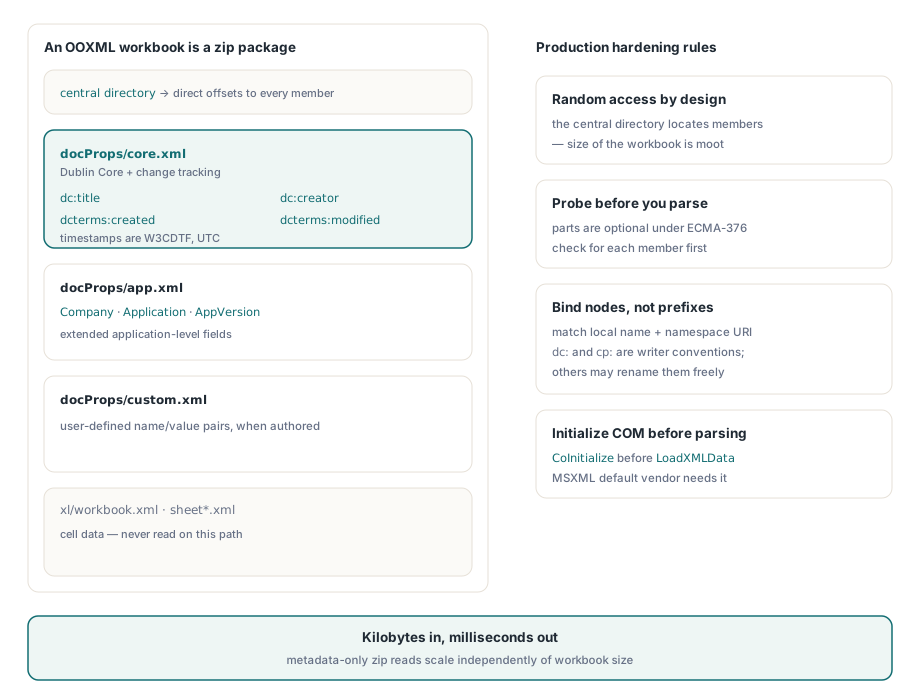
这是大多数处理流水线真正需要的路径,因为新文件成为 .xlsx 已经快二十年了。OOXML 工作簿本质上是一个 zip 包,它的属性会按用途拆分到几个小部件里:docProps/core.xml 保存 Dublin Core 字段,例如 dc:title、dc:creator、cp:lastModifiedBy,以及 UTC 的 W3CDTF 时间戳 dcterms:created 和 dcterms:modified;docProps/app.xml 保存 Company 和 AppVersion 一类应用级字段;docProps/custom.xml 则保存自定义属性。由于 zip 的中央目录可以直接定位每个部件,无论工作簿多大,读取这些信息通常只需要几 KB。出厂自带的 RTL 里,TZipFile 和 IXMLDocument 就足够完成这件事
uses
  System.SysUtils, System.Classes, System.Zip, Xml.XMLDoc, Xml.XMLIntf;

const
  NsDC    = 'http://purl.org/dc/elements/1.1/';
  NsTerms = 'http://purl.org/dc/terms/';
  NsCore  = 'http://schemas.openxmlformats.org/package/2006/metadata/core-properties';
  NsApp   = 'http://schemas.openxmlformats.org/officeDocument/2006/extended-properties';

function PartToXml(Zip: TZipFile; const PartName: string): IXMLDocument;
var
  Bytes: TBytes;
begin
  Zip.Read(PartName, Bytes);
  Result := LoadXMLData(TEncoding.UTF8.GetString(Bytes));
end;

function Field(const Doc: IXMLDocument; const LocalName, Ns: string): string;
var
  Node: IXMLNode;
begin
  Node := Doc.DocumentElement.ChildNodes.FindNode(LocalName, Ns);
  if Node <> nil then
    Result := Node.Text
  else
    Result := '';
end;

procedure ReadXlsxProperties(const FileName: string);
var
  Zip: TZipFile;
  Doc: IXMLDocument;
begin
  Zip := TZipFile.Create;
  try
    Zip.Open(FileName, zmRead);
    if Zip.IndexOf('docProps/core.xml') >= 0 then
    begin
      Doc := PartToXml(Zip, 'docProps/core.xml');
      Writeln('Title   : ', Field(Doc, 'title', NsDC));
      Writeln('Creator : ', Field(Doc, 'creator', NsDC));
      Writeln('Modifier: ', Field(Doc, 'lastModifiedBy', NsCore));
      Writeln('Modified: ', Field(Doc, 'modified', NsTerms));  // W3CDTF, UTC
    end;
    if Zip.IndexOf('docProps/app.xml') >= 0 then
    begin
      Doc := PartToXml(Zip, 'docProps/app.xml');
      Writeln('Company : ', Field(Doc, 'Company', NsApp));
      Writeln('App     : ', Field(Doc, 'Application', NsApp), ' ',
        Field(Doc, 'AppVersion', NsApp));
    end;
  finally
    Zip.Free;
  end;
end;
要让这条路径在生产环境里更稳,有两个细节不能忽略。第一,这些部件是可选的:完全没有 docProps 的最小包在 ECMA-376 下也是合法文件,所以代码要像上面那样用 IndexOf 探测,而不能想当然地假设它们一定存在。第二,匹配元素时应当像 FindNode 那样依据本地名和命名空间 URI,而不是字面前缀;dc: 和 cp: 只是 Excel 写文件时常用的前缀,其他生成器完全可以换成别的。还有一个环境注意点:默认的 IXMLDocument vendor 是 MSXML,因此控制台程序或工作线程在调用 LoadXMLData 之前必须先执行 CoInitialize,否则第一次解析就会以 COM 错误结束
成本对比,以及何时该用库而不是两个解析器
在一台普通开发机上测量时,如果每处理一个文件就新建一次自动化会话,COM 路径通常会落在每文件两到四秒,几乎全部开销都来自 EXCEL.EXE 启动和完整工作簿解析,而且无论部署到哪里都要求安装并授权 Excel。两条直接路径只读取元数据容器,通常每个文件几毫秒就能结束,除了 Delphi 可执行文件本身已经链接的内容之外无需额外安装。面对一个包含一万份文件的共享目录,这就是“耗掉大半个工作日”和“不到一分钟”之间的差别,而且还不用回答 Office 是否应该部署的问题
直接路径的麻烦在于,它其实是两条。一个同时接受两种格式的处理流水线,需要维护两个解析器,也需要承担两套彼此独立的故障模式:一边是代码页和 PROPVARIANT 类型,另一边是命名空间和可选部件,而且两者都读不了对方的格式。正因为如此,原生库才有意义。HotXLS 是 losLab 面向 Delphi 和 C++Builder 的 Object Pascal 电子表格库,它会把 Title、Author、Company、Created 等字段统一暴露为普通工作簿属性,.xls 与 .xlsx 在调用 Open 时都会填充它们,不需要安装 Excel,也不需要上面那些容器层面的样板代码。它读取属性的方式属于完整打开工作簿的一部分,而不是只做元数据探测,因此更适合后续本来就还要访问单元格数据的流水线;至于两套 facade 上完整的属性面,包括写入侧,则可以继续参考 我们关于用 HotXLS 设置 Excel 文档属性的文章
说明:完整的 Excel 解析和元数据提取能力可在 HotXLS Delphi VCL Component 中获得