Delphi HotPDF Bileşeninden Merhaba Dünya
Kapsamlı kılavuza hoş geldiniz. Delphi HotPDF Bileşeni MerhabaDünya tanıtım programı!
HotPDF Bileşeni Hakkında
HotPDF Bileşeni, Delphi ve C++Builder geliştiricileri için özel olarak tasarlanmış güçlü ve çok yönlü bir PDF işleme kitaplığıdır. Bu kapsamlı bileşen, geliştiricilerin PDF belgelerini kolaylıkla ve hassas bir şekilde oluşturmasına, işlemesine ve değiştirmesine olanak tanıyan kapsamlı bir API sağlar.
HotPDF Bileşeninin Temel Özellikleri:
- PDF Oluşturma ve Oluşturma: Düzen, biçimlendirme ve içerik üzerinde tam kontrole sahip olarak sıfırdan PDF belgeleri oluşturun
- Metin ve Grafik Desteği: PDF sayfalarına metin, görseller, şekiller ve karmaşık grafikler ekleyin
- Çok Dilli Destek: Uluslararası metin oluşturma için tam Unicode desteği
- Yazı Tipi Yönetimi: Farklı sistemlerde tutarlı belge görünümü için yazı tiplerini ekleyin
- Sıkıştırma Seçenekleri: Dosya boyutunu optimize etmek için sıkıştırma algoritmalarını kullanın
- Güvenlik Özellikleri: Belge şifreleme, parola koruması ve izin kontrolleri
- Belge İşleme: Mevcut PDF belgelerini birleştirin, bölün ve değiştirin
- Tablo ve Form Desteği: Karmaşık tablolar ve etkileşimli formlar oluşturun
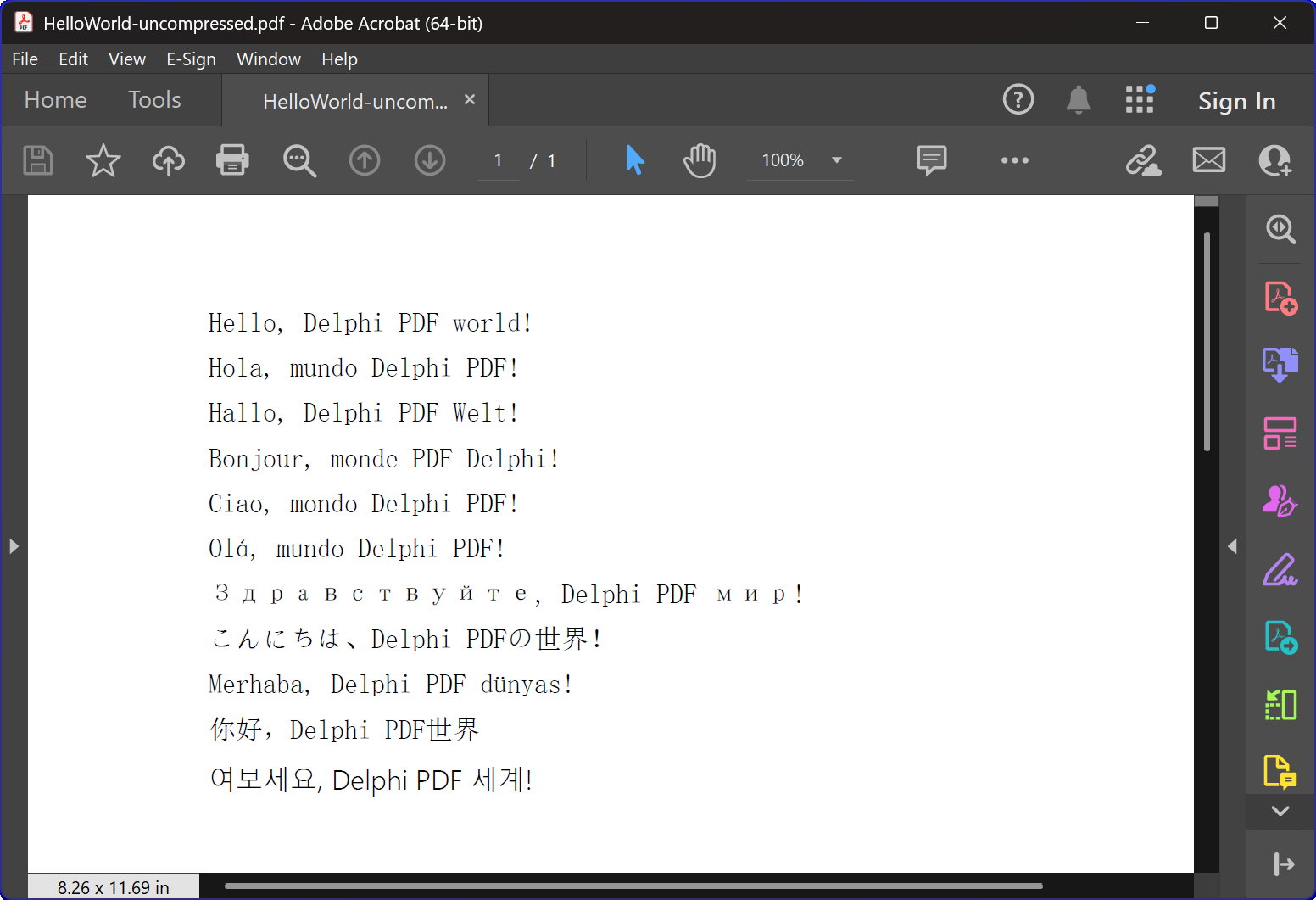
HelloWorld.dpr Programına Genel Bakış
HelloWorld.dpr örnek program, HotPDF Bileşenine mükemmel bir giriş görevi görür.
en temel ve önemli özellik: TexOut işlevi. Bu tanıtım programı aynı zamanda temel PDF oluşturma işlevini de gösterir.
Temel İşlevsellik:
1. PDF Belgesi Oluşturma
Programın birincil işlevi, çok dilli "Merhaba Dünya" metni içeren PDF belgeleri oluşturmaktır. CreatePDF prosedürü şunları gösterir:
- Bileşen Başlatma: THotPDF bileşeninin doğru kurulumu ve konfigürasyonu
- Belge Özellikleri: Sıkıştırma seçenekleri ve yazı tipi yerleştirme gibi meta verileri ayarlama
- Çok Dilde Metin Oluşturma: Metin İngilizce, İspanyolca, Almanca, Fransızca, İtalyanca, Portekizce, Rusça, Japonca, Türkçe, Çince ve Korece dahil olmak üzere 11 farklı dilde görüntüleniyor
- Yazı Tipi Yönetimi: Çok dilli ekran desteği için Arial Unicode MS yazı tipini kullanma
- Sıkıştırma: Sıkıştırılmış PDF belgesi oluşturma
2. Pencere Yönetimi ve Sistem Entegrasyonu
Program aşağıdakileri gösteren gelişmiş pencere numaralandırma işlevselliği içerir:
- Sistem Penceresi Numaralandırması: Windows API'yi kullanma
Tüm üst düzey pencereler arasında yineleme yapmak için
EnumWindowsişlevi - Pencere Başlığı Eşleştirme: Hedef uygulamaları tanımlamak için alt dize eşleştirmeyi uygulama
- Otomatik Pencere Kapatma: Gönderiliyor
Dosyaları açık olabilecek PDF görüntüleyicilerini kapatmak için
WM_CLOSEmesaj - Çatışmayı Önleme: Yeni PDF dosyaları oluştururken dosya erişim çakışmalarının oluşmamasını sağlamak
3. Hata İşleme ve Kaynak Yönetimi
Program aşağıdakiler için en iyi uygulamaları göstermektedir:
- Bellek Yönetimi: Bileşen örneklerinin doğru şekilde oluşturulması ve imha edilmesi
- İstisna Güvenliği: Kaynak temizliğini sağlamak için try-final bloklarını kullanma
- Kullanıcı Geri Bildirimi: Kullanıcıları programın ilerlemesi hakkında bilgilendirmek için konsol çıktısı sağlanıyor
Teknik Uygulama Detayları:
Sıkıştırma Teknolojisi
Program FlateDecode sıkıştırmasıyla bir PDF belgesi oluşturur
Yazı Tipi İşleme Stratejisi
Program karmaşık bir yazı tipi seçim stratejisi kullanır:
- Arial Unicode MS: Geniş karakter desteği nedeniyle çoğu dilde kullanılır
- Yazı Tipi Gömme: Farklı sistemlerde tutarlı görünüm sağlar
Çapraz Sürüm Uyumluluğu
Kod, hem modern hem de eski Delphi sürümlerini desteklemek için koşullu derleme yönergeleri içerir:
- XE2+ Desteği: Ad alanı birimlerini kullanır (WinApi.Windows, System.SysUtils, vb.)
- Eski Destek: Eski Delphi sürümleri için geleneksel birim adlarına geri dönülür
Eğitim Değeri
Bu HelloWorld örneği birden fazla eğitim amacına hizmet etmektedir:
- Bileşen Tanıtımı: HotPDF Bileşeni kullanımına yumuşak bir giriş sağlar
- En İyi Uygulamalar: Uygun kaynak yönetimini ve hata yönetimini gösterir
- Sistem Entegrasyonu: PDF oluşturmanın Windows sistem işlemleriyle nasıl entegre edileceğini gösterir
- Uluslararasılaşma: PDF belgelerinde çok dilli metin işlemeyi gösterir
Başlarken
Bu örnek programı çalıştırmak için:
- HotPDF Bileşeninin Delphi IDE'nize düzgün şekilde kurulduğundan emin olun
- HelloWorld.dpr proje dosyasını açın
- Programı derleyin ve çalıştırın
- Program otomatik olarak sıkıştırılmış bir PDF dosyası oluşturacaktır
- Çok dilli metin oluşturmayı görmek için oluşturulan dosyaları inceleyin
Kaynak Kodu
Aşağıda HelloWorld tanıtım programının eksiksiz, iyi belgelenmiş kaynak kodu bulunmaktadır:
Urvanov Sözdizimi Vurgulayıcı v2.9.1|
1 2 3 4 5 6 7 8 9 10 11 12 13 14 15 16 17 18 19 20 21 22 23 24 25 26 27 28 29 30 31 32 33 34 35 36 37 38 39 40 41 42 43 44 45 46 47 48 49 50 51 52 53 54 55 56 57 58 59 60 61 62 63 64 65 66 67 68 69 70 71 72 73 74 75 76 77 78 79 80 81 82 83 84 85 86 87 88 89 90 91 92 93 94 95 96 97 98 99 100 101 102 103 104 105 106 107 108 109 110 111 112 113 114 115 116 117 118 119 120 121 122 123 124 125 126 127 128 129 130 131 132 133 134 135 136 137 138 139 140 141 142 143 144 145 146 147 148 149 150 151 152 153 154 155 156 157 158 159 160 161 162 163 164 165 166 167 |
{************************************************************} // HotPDF PDF Component // Copyright(c)2007-2025, https://www.loslab.com {************************************************************} // HelloWorld Demo Program for HotPDF Component // This program demonstrates basic PDF creation capabilities // including multilingual text support and compression options {************************************************************} program HelloWorld; {$APPTYPE CONSOLE} // Console application type {$I ..\..\..\Lib\HotPDF.inc} // Include HotPDF configuration file uses // EurekaLog units for memory leak detection and debugging (optional) {$IFDEF EurekaLog} EMemLeaks, // Memory leak detection EResLeaks, // Resource leak detection EDebugJCL, // JCL debugging support EDebugExports, // Export debugging information EFixSafeCallException, // SafeCall exception handling EMapWin32, // Win32 mapping support EAppConsole, // Console application support EDialogConsole, // Console dialog support ExceptionLog7, // Exception logging {$ENDIF EurekaLog} // System units - different namespaces for XE2+ vs older versions {$IFDEF XE2+} WinApi.Windows, // Windows API functions WinApi.Messages, // Windows message constants System.SysUtils, // System utilities System.Classes, // Base classes (TStringList, etc.) Vcl.Graphics, // Graphics support {$ELSE} Windows, // Windows API functions (older Delphi) Messages, // Windows message constants (older Delphi) SysUtils, // System utilities (older Delphi) Classes, // Base classes (older Delphi) Graphics, // Graphics support (older Delphi) {$ENDIF} HPDFDoc; // HotPDF main component unit // Creates a compressed PDF file with multilingual "Hello World" text // Parameters: // FileName: Output PDF file name procedure CreatePDF(const FileName: string); var HotPDF: THotPDF; // Main HotPDF component instance begin // Create HotPDF component instance HotPDF := THotPDF.Create(nil); try // Configure PDF properties HotPDF.AutoLaunch := true; // Automatically open PDF after creation HotPDF.FileName := FileName; // Set output file name // Enable FlateDecode compression HotPDF.Compression := cmFlateDecode; // Enable FlateDecode compression WriteLn('Creating compressed PDF: ', FileName); HotPDF.FontEmbedding := true; // Embed fonts for better compatibility HotPDF.BeginDoc; // Start PDF document creation // Set Unicode font for multilingual text support // Arial Unicode MS supports most languages except Korean // procedure SetFont ( FontName: AnsiString; FontStyle: TFontStyles; ASize: Single; FontCharset: TFontCharset = DEFAULT_CHARSET; IsVertical: boolean = false); // DEFAULT_CHARSET: 1 - Font is chosen based on Name. If the described font is not available on the system, Windows will substitute another font HotPDF.CurrentPage.SetFont('Arial Unicode MS', [], 12, 1, False); // Display "Hello World" in multiple languages // TextOut parameters: (X, Y, Angle, Text) HotPDF.CurrentPage.TextOut(80, 50, 0, 'Hello, Delphi PDF world!'); // English HotPDF.CurrentPage.TextOut(80, 70, 0, 'Hola, mundo Delphi PDF!'); // Spanish HotPDF.CurrentPage.TextOut(80, 90, 0, 'Hallo, Delphi PDF Welt!'); // German HotPDF.CurrentPage.TextOut(80, 110, 0, 'Bonjour, monde PDF Delphi!'); // French HotPDF.CurrentPage.TextOut(80, 130, 0, 'Ciao, mondo Delphi PDF!'); // Italian HotPDF.CurrentPage.TextOut(80, 150, 0, 'Olá, mundo Delphi PDF!'); // Portuguese HotPDF.CurrentPage.TextOut(80, 170, 0, 'Здравствуйте, Delphi PDF мир!'); // Russian HotPDF.CurrentPage.TextOut(80, 190, 0, 'こんにちは、Delphi PDFの世界!'); // Japanese HotPDF.CurrentPage.TextOut(80, 210, 0, 'Merhaba, Delphi PDF dünyası!'); // Turkish HotPDF.CurrentPage.TextOut(80, 230, 0, '你好,Delphi PDF世界'); // Chinese HotPDF.CurrentPage.TextOut(80, 250, 0, '여보세요, Delphi PDF 세계!'); // Korean HotPDF.EndDoc; // Finalize and save the PDF document WriteLn('PDF created successfully: ', FileName); finally HotPDF.Free; // Clean up HotPDF component end; end; // Global variables for window enumeration and PDF creation var Title: String; // Individual title string (unused in current implementation) Titles: TStrings; // List of window titles to search for Window: HWND; // Window handle (unused in current implementation) WindowText: array [0 .. 255] of Char; // Buffer for window text (unused in current implementation) WindowTitle: String; // Window title string (unused in current implementation) I: Integer; // Loop counter (unused in current implementation) // Callback function for EnumWindows API // This function is called for each top-level window in the system // Parameters: // hWnd: Handle to the current window being enumerated // lParam: User-defined data (in our case, pointer to TStrings with target titles) // Returns: True to continue enumeration, False to stop function EnumWindowsProc(HWND: HWND; lParam: lParam): BOOL; stdcall; var Titles: TStrings; // List of target window titles I: Integer; // Loop counter WindowText: array [0 .. 255] of Char; // Buffer to store window text WindowTitle: String; // Current window's title as string begin Result := true; // Continue enumeration by default Titles := TStrings(lParam); // Cast lParam back to TStrings // Get the window title text if GetWindowText(HWND, WindowText, SizeOf(WindowText)) > 0 then begin WindowTitle := String(WindowText); // Convert char array to string // Check if window title contains any of our target strings for I := 0 to Titles.Count - 1 do begin // Use Pos function to check if target string is contained in window title if Pos(Titles[I], WindowTitle) > 0 then begin // Send WM_CLOSE message to close the window PostMessage(HWND, WM_CLOSE, 0, 0); Break; // Exit loop after finding first match end; end; end; end; // Main program execution begins here begin // Close any existing PDF files that might be open in PDF viewers // This prevents file access conflicts when creating new PDFs with same names Titles := TStringList.Create; try // Define list of window title substrings to search for // Any window containing these strings will be closed // This will close Adobe and Foxit PDF reader & editor and many other PDF apps Titles.CommaText := '"HelloWorld.pdf", "Foxit"'; // Enumerate all top-level windows and close matching ones // EnumWindows calls our callback function for each window EnumWindows(@EnumWindowsProc, lParam(Titles)); finally Titles.Free; // Clean up string list end; // Display program header WriteLn('=== HotPDF HelloWorld Demo ==='); WriteLn('This demo creates a compressed PDF file with multilingual text.'); WriteLn(''); // Create compressed PDF CreatePDF('HelloWorld.pdf'); // Display completion message WriteLn(''); WriteLn('PDF file created successfully!'); WriteLn('The PDF file uses FlateDecode compression for optimal file size.'); WriteLn(''); WriteLn('Press Enter to exit...'); ReadLn; // Wait for user input before closing console end. |