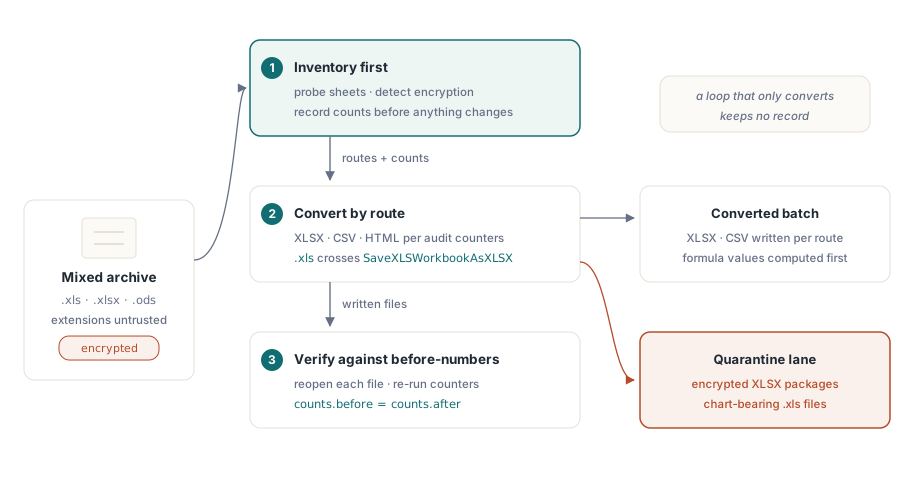
Toplu bir elektronik tablo normalleştirme işi, tek bir palto giymiş üç sorundur. Elinizde karışık biçimlerden oluşan bir arşiv var: BIFF döneminden .xls dosyaları, modern .xlsx dosyaları, bir LibreOffice denemesinden kalma birkaç .ods ve parolası eski bir çalışanla birlikte çıkıp gittiği için kimsenin açamadığı bir avuç dosya. Amaç her şeyi XLSX ve CSV biçimine çevirmek. Çoğu kişinin yazdığı sürüm, her dosyayı açıp yeni bir uzantıyla kaydeden bir döngüdür ve biri hangi dosyaların grafiklerini yitirdiğini, makrolarını düşürdüğünü ya da hiç açılmadığını sorana kadar da işini görür. Döngünün yanıtı yoktur; çünkü dönüştürme tek başına kayıt tutmaz. Bir tezgâh ise tutar: önce envanter çıkarır, sonra dönüştürür, sonra doğrular ve bunların herhangi birinin güvenilir olması için bu üç aşamanın bilgi paylaşması gerekir
Bu tezgâhı Delphi ya da C++Builder içinde kurmak, hiçbiri hattın hiçbir yerinde Excel kurulumu gerektirmeyen dört HotXLS yeteneğini birbirine bağlamak demektir. İki yerel motor var: .xls için bir BIFF8 cephesi ve .xlsx ile .ods için bir OOXML cephesi. Dosyanın tamamını ayrıştırmadan meta veri okuyan ucuz yoklama çağrıları var. Bir çalışma kitabının gerçekte ne barındırdığını söyleyen sayfa başına denetim sayaçları var. Ve her rota için belgelenmiş bir sadakat profili taşıyan bir dönüşüm matrisi var. İş, bunların her birinin nerede keskin bir kenarı olduğunu bilmekte; çünkü hepsinin var ve o kenarlar, temiz bir gece yığınını pazartesi sabahı olayına çeviren şeylerin ta kendisi
Yüklemeden önce yoklayın: sayfa adları ve şifreleme tespiti
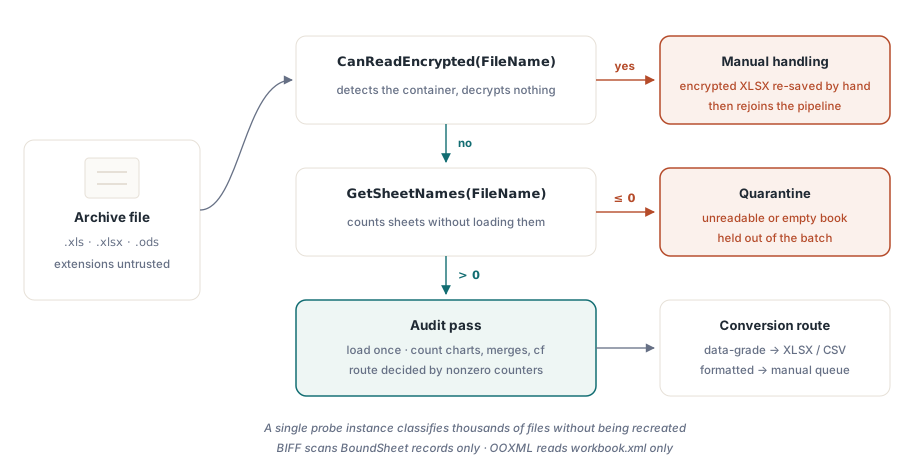
200 MB boyutunda bir çalışma kitabını yalnızca şifreli olduğunu keşfetmek için açmak dosya başına dakikalar harcar ve büyük bir arşiv boyunca çarpıldığında günler harcar. Her iki cephe de GetSheetNames sunar; bu çağrı çalışma kitabını doldurmadan sayfa meta verisini okur. BIFF gerçeklemesi yalnızca akışın başındaki BoundSheet kayıtlarını tarar; OOXML gerçeklemesi ise zip içindeki yalnızca workbook.xml parçasını okur. Onun yanında CanReadEncrypted, şifre çözmeye kalkışmadan bir şifreleme kapsayıcısını tespit eder:
var
  Probe: TXLSXWorkbook;
  Names: TStringList;
begin
  Names := TStringList.Create;
  Probe := TXLSXWorkbook.Create;
  try
    if Probe.CanReadEncrypted(FileName) then
    begin
      Writeln(FileName + ': encrypted container - route to manual handling');
      Exit;
    end;
    if Probe.GetSheetNames(FileName, Names) <= 0 then
      Writeln(FileName + ': unreadable - quarantine')
    else
      Writeln(Format('%s: %d sheet(s), first "%s"',
        [FileName, Names.Count, Names[0]]));
  finally
    Probe.Free;
    Names.Free;
  end;
end;
İki operasyonel ayrıntı bu döngüyü ucuz kılar. GetSheetNames çalışma kitabı örneğini ne sıfırlar ne doldurur; dolayısıyla tek bir yoklama nesnesi yeniden oluşturulmadan binlerce dosyayı sınıflandırabilir. Ayrıca aynı çağrının XLS cephesindeki sürümü .xlsx paketlerini de anlar; bu da dosya uzantılarına güvenilemediğinde, ki o kadar eski bir arşivde nadiren güvenilir, onu kullanışlı tek bir yoklama hâline getirir. Yüklemeden önce triyaj kendi başına ele alınmayı hak ediyor; hafif incelemenin mekaniği sayfa listeleme ve hafif çalışma kitabı incelemesi üzerine yazımızda
Bir çalışma kitabının gerçekte ne içerdiğini saymak
Bir dosya triyajı geçtiğinde dönüşüm rotasına denetim geçişi karar verir. XLSX cephesi, bir sadakat kararını etkileyen her özellik ailesi için bir sayaç sunar: birleştirilmiş hücreler, grafikler, resimler, koşullu biçimler, veri doğrulamaları, tablolar, köprüler ve yorumlar; ayrıca makrolar, koruma ve kaynak biçim için çalışma kitabı düzeyinde bayraklar. Bir dosyanın dönüşüm rotası neredeyse tümüyle bunlardan hangilerinin sıfırdan farklı döndüğüne bağlıdır
var
  Book: TXLSXWorkbook;
  Sheet: TXLSXWorksheet;
  I: Integer;
begin
  Book := TXLSXWorkbook.Create;
  try
    if Book.Open(FileName) <> 1 then Exit;
    for I := 0 to Book.Sheets.Count - 1 do
    begin
      Sheet := Book.Sheets[I];
      Writeln(Format('%s: cells=%d merges=%d charts=%d cf=%d dv=%d protected=%s',
        [Sheet.Name, Sheet.Cells.Count, Sheet.MergedCells.Count,
         Sheet.Charts.Count, Sheet.ConditionalFormats.Count,
         Sheet.DataValidations.Count, BoolToStr(Sheet.IsProtected, True)]));
    end;
    if Book.HasVbaProject then
      Writeln('  contains VBA project - macro policy applies');
    if Book.ExternalLinks.Count > 0 then
      Writeln(Format('  %d external link(s)', [Book.ExternalLinks.Count]));
  finally
    Book.Free;
  end;
end;
Cells.Count değerini bir çekinceyle okuyun. Hücre deposu seyrektir; dolayısıyla bu sayı, kullanılan aralığın dikdörtgen alanını değil örneklenmiş hücreleri sayar. A1 hücresinde bir değer, ZZ9999 hücresinde bir değer bulunan bir sayfa, aralarındaki milyona yakın hücreyi değil iki hücre bildirir. BIFF tarafındaki eşdeğer tarama UsedRange sınırlarını ForEachCell ile birlikte kullanır ve neredeyse herkesi ilk seferde tökezleten bir birim kaymayı taşır: UsedRange.FirstRow ve kardeşleri 0 tabanlıyken Cells.Item[Row, Col] 1 tabanlıdır. Her sınıra bir eklemeyi unutan bir gezinti yanlış dikdörtgeni denetler ve bunu asla söylemez
Büyük eski dosyalar üzerinde yalnızca denetim amaçlı bir geçişin maliyetini iki kaldıraç düşürür. Bir .xls dosyasını açmadan önce _DisableGraphics değerini true yapmak OfficeArt çizim katmanı ayrıştırmasını tümüyle atlar; bu da şekil yoğunluklu çalışma kitaplarında gerçek zaman kazandırır. Ancak bu kesinlikle salt okunur bir iyileştirmedir: öyle açılmış bir örnekten kayıt yapmak, hiç ayrıştırmadığı çizimleri düşürür; dolayısıyla bayrak yalnızca dosyayı asla geri yazmayacak yollara aittir. Denetim sayılar yerine hücre başına içerik gerektirdiğinde, ForEachCell geri çağırması dolu hücreleri doğrudan dolaşır ve dizinli hücre özelliklerinin her okumada ödediği erişim başına Variant yükünü aşar; bu yük milyonlarca hücre boyunca hızla birikir
Tutarsız dönüş kodlarını erkenden normalleştirin
HotXLS G/Ç çağrıları hataları istisnalarla değil tamsayı sonuçlarıyla bildirir ve gelenekler API genelinde tek biçimli değildir. Çoğu açma ve kaydetme çağrısı başarıda 1, başarısızlıkta -1 döndürür. GetSheetNames sayfa sayısını döndürür ya da liste temizlenmiş olarak -1 döndürür. XLSX tarafındaki SaveAsHTML deseni yeniden kırar: başarı için 0, aralık dışındaki bir sayfa dizini için -1 döndürür. Her yerde = 1 sınayan bir tezgâh, başarıyı başka biçimde bildiren çağrıları sessizce yanlış sınıflandırır; <> -1 sınayan bir tezgâh ise farklı bir kodla başarısız olanları yutar
API'nin tamamıyla temasa dayanan kural göründüğünden dardır: sayı döndüren çağrılarda <= 0 değerini başarısızlık sayın, gerçekten kullandığınız her kaydetme yordamı için belgelenmiş başarı değerini denetleyin ve her ikisini de küçük bir sonuç denetleme işlevinin arkasına koyun ki gelenek tam olarak tek bir yerde yaşasın. Yığın hatları, egzotik herhangi bir ayrıştırıcı hatasından çok daha sık, denetlenmemiş dönüş kodlarının yavaş birikmesi yüzünden başarısız olur ve bunu yanlış yapmanın bedeli kırk bin dosya sonra, hangi dönüşümlerin gerçekten tuttuğunu kimse hatırlamazken ortaya çıkar
Dönüşüm matrisi ve her yolun veriyi nerede kaybettiği
İki cephe dönüşüm işini aralarında paylaşır. TXLSXWorkbook, XLSX, ODS ve CSV açar; XLSX, ODS, CSV, HTML, RTF ve AES ile şifrelenmiş XLSX kaydeder. TXLSWorkbook, BIFF açıp kaydeder ve HTML, RTF ile CSV dışa aktarır. İşe yarayan yan şu ki her yol, belirsiz bir doğruluk sözü yerine belgelenmiş bir sadakat profiliyle gelir; böylece hangi rotaların hangi dosyalar için güvenli olduğuna önceden karar verebilirsiniz
CSV dışa aktarımı BOM ile UTF-8, CRLF satır sonları ve RFC 4180 tırnaklaması yazar. Yapmadığı şey formülleri değerlendirmektir: =SUM(...) tutan bir hücre düz formül metni olarak dışa aktarılır; dolayısıyla önce değerleri hesaplamazsanız bir formül sayfası bir dizge sayfasına dönüşür. HTML dışa aktarımı tek bir tablo üretir; birleştirilmiş hücrelerin yerini colspan ve rowspan alır ve temel stiller satır içine gömülür. RTF dışa aktarımının sınırı daha keskindir: birleştirilmiş hücreleri sütunlar boyunca yayamaz; bu yüzden bir birleştirmenin devam hücreleri boş çıkar. ODS içe aktarımı ise kütüphanenin kendi belgelerine göre bilerek hafiftir. Skaler değerler ve önbelleklenmiş formül sonuçları geçer; stiller, canlı ODF formül ifadeleri ve çizimler geçmez. Arşivde OASIS ODF 1.3 ile yönetilen gerçek OpenDocument dosyaları bulunduğu anda bu önem kazanır; orada görsel olarak sadık bir dönüşüme yaklaşan her şey, bu içe aktarma yolunun taşımak üzere kurulduğundan fazlasını ister ve yığın onları sessizce düzleştirmeden önce bu dosyaların varlığını size söyleyen şey denetim geçişidir
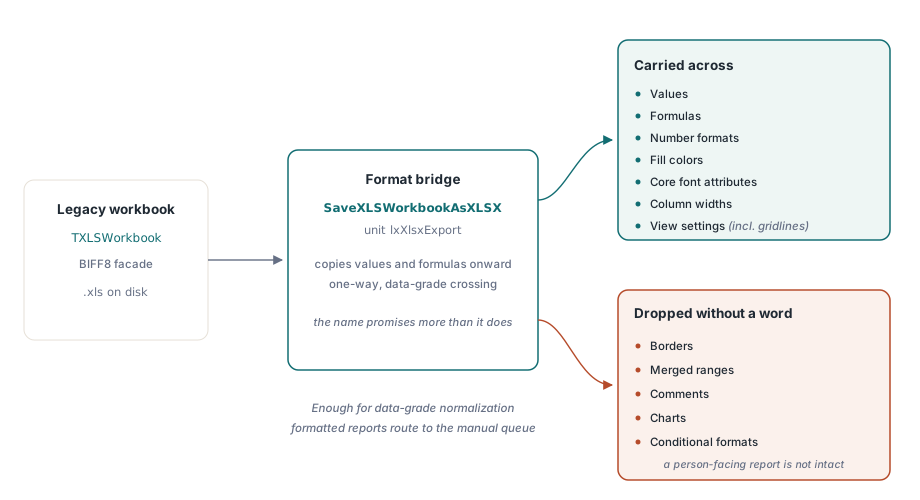
SaveXLSWorkbookAsXLSX bir veri köprüsüdür, düzen köprüsü değil
BIFF cephesi doğrudan OOXML yazamaz; bu yüzden .xls biçiminden .xlsx biçimine geçiş, lxXlsxExport biriminde bulunan SaveXLSWorkbookAsXLSX işlevi üzerinden yürür. O köprünün sadakatini açıkça söylemek gerekir; çünkü ad, olduğundan fazlasını çağrıştırır. Değerleri, formülleri, sayı biçimlerini, dolgu renklerini, temel yazı tipi niteliklerini, sütun genişliklerini ve kılavuz çizgileri gibi görünüm ayarlarını kopyalar. Kenarlıkları, birleştirilmiş aralıkları, yorumları, grafikleri ya da koşullu biçimleri kopyalamaz. Aşağı akış sistemlerinin sonucu ayrıştıracağı ve biçimlendirmeye kimsenin bakmayacağı veri düzeyinde normalleştirme için bu tam olarak yeterlidir ve kimsenin ihtiyaç duyduğu hiçbir şey kaybolmaz. Bir insan tarafından okunacak biçimlendirilmiş bir yönetim raporu içinse yeterli değildir ve denetim sayaçları tam olarak burada yerini hak eder: denetimin grafik ve koşullu biçim taşıdığını işaretlediği bir dosya, ikisini de tek kelime etmeden düşürecek bir köprüden değil elle işlenen bir kuyruğa gitmelidir
var
  Legacy: IXLSWorkbook;        // arayüz başvurusu: Free çağırmayın
  Modern: TXLSXWorkbook;
begin
  if SameText(ExtractFileExt(FileName), '.xls') then
  begin
    Legacy := TXLSWorkbook.Create;
    if Legacy.Open(FileName) <= 0 then Exit;
    if SaveXLSWorkbookAsXLSX(Legacy,
         ChangeFileExt(FileName, '.xlsx')) <= 0 then
      Writeln('bridge failed: ' + FileName);
  end
  else
  begin
    Modern := TXLSXWorkbook.Create;
    try
      Modern.StreamingWrite := True;     // sayfa XML'ini zip içine akıt
      if Modern.Open(FileName) = 1 then
        Modern.SaveAsCSV(ChangeFileExt(FileName, '.csv'), 0, ',');
    finally
      Modern.Free;
    end;
  end;
end;
Yukarıdaki döngü OOXML tarafındaki verim kaldıracını da gösteriyor. StreamingWrite değerini true yapmak, çalışma sayfası XML'ini bellekte tek bir dev dizge olarak hazırlamak yerine doğrudan çıktı paketine akıtır; dosyalar yüz binlerce satıra ulaştığında rahat bir çalıştırma ile bellek yetmezliği çökmesi arasındaki fark budur. Bu kipin boyutlandırma ve bellek davranışı sunucu yığın işleri için akışlı yazma üzerine yazımızda ayrıca ele alınıyor. Her çekirdeği kullanmak isteyen bir yığın için bir özellik daha önemlidir: hiçbir cephe iş parçacığı güvenli değildir ama hiçbiri genel durum da paylaşmaz; dolayısıyla paralel dönüşüm için desteklenen desen, aralarında kilitleme olmaksızın işçi iş parçacığı başına bir çalışma kitabı örneğidir
Parolalı dosyalar ve onlarla ne yapmalı
Arşivin kilitli dosyaları biçime göre temiz biçimde ayrılır ve bu ayrım nereye gideceklerini belirler. Eski .xls şifrelemesi, ister RC4, ister CryptoAPI üzerinden RC4, ister eski XOR gizlemesi olsun, okunabilir: parolayı Open çağrısına verin, dosya diğerleri gibi dönüşür. Şifreli .xlsx paketleri ise başka bir hikâye. HotXLS onları CanReadEncrypted ile tespit eder ama şifrelerini çözemez; dolayısıyla tek dürüst hamle, bir insanın her birini Excel'de açıp yeniden kaydettiği bir kuyruğa yönlendirmek ve dosyayı ondan sonra hatta geri katmaktır. Bu asimetriyi baştan tasarıma katmak gerekir; çünkü şifreli XLSX dosyaları, birinin gerçekten önemsediği kayıtlar olma olasılığı en yüksek olanlardır
Döngüyü doğrulamayla kapatmak
Üçüncü aşama atlanan aşamadır ve onu atlamak toplu bir dönüşümü bir yükümlülüğe çevirir. HotXLS'te hiçbir kaydetme yolu formülleri değerlendirmez. Excel bir dosyayı açtığında yeniden hesaplar; dolayısıyla XLSX biçiminden XLSX biçimine bir dönüşüm doğru kalır ama bir CSV hedefi, hat önce hücrelerde Calculate çalıştırıp sonuçları geri yazmadıkça formül metnini olduğu gibi alır. Bunu önceden bilmek, sayılarla dolu bir CSV ile aşağı akış bir içe aktarma onlara takılana dek kimsenin fark etmediği =SUM(...) dizgeleriyle dolu bir CSV arasındaki farktır
Doğrulamanın kendisi, dışarıda bırakmayı mazur gösteremeyecek kadar ucuzdur. Dönüştürülen her dosyayı aynı kütüphaneyle yeniden açın, denetim sayaçlarını yeniden çalıştırın ve envanter geçişinin zaten kaydettiği dönüşüm öncesi sayılarla karşılaştırın. Düşmüş bir sayfa sayısı, kaynakta üç varken sıfıra inen bir grafik sayısı, uçurumdan yuvarlanan bir hücre sayısı: her biri, tek bir açma maliyetiyle yakalanmış sessiz bir kayıptır. Bunun üstüne Excel ya da LibreOffice içinde gözle bir örneklem denetimi yapın; bu bileşim, dönüşüm hasarının ezici çoğunluğunu daha yola çıkmadan yakalar. Envanter aşamasının doğrulama aşamasını beslemesinin bütün nedeni budur. Önceki sayılar olmadan sonraki sayılar hiçbir şey kanıtlamaz
Önce denetim yapan bir tezgâh, riskli bir toplu dönüşümü, temiz geçemeyen dosyalar için karantina şeridi olan ölçülebilir bir sürece çevirir. Burada gösterilen bütün yoklama, sayma ve dönüştürme çağrıları HotXLS Delphi Component parçasıdır ve hepsini Excel otomasyonu olmadan süreç içinde yerel olarak çalıştırır