300.000 satırlık bir dışa aktarma işlemi bellek bütçesini aştığında, fatura genellikle satır sayısına kesilir. Satır sayısı genellikle masumdur. Büyük bir çalışma kitabının pahalı kısımları, yan etki olarak oluşturulan kısımlardır: Döngü içinde biçimlendirme eklendiği için hücre başına bir girişle büyüyen bir stil havuzu, kaydetme sırasında tek bir dev dize olarak birleştirilen çalışma sayfası XML'i, tek tek saklanan bir milyon özdeş formül gövdesi. losLab'in XLS ve XLSX dosyaları için yerel Delphi kütüphanesi olan HotXLS, bu maliyetlerin her biri için size özel bir manivela sunar. Her biri bir ödünleşim (trade-off) değiştirdiği için bunların hiçbiri varsayılan olarak etkin değildir; dolayısıyla hangi manivelanın hangi belirtiyle eşleştiğini bilmek asıl performans becerisidir
Büyük bir çalışma kitabı belleği nerede harcar?
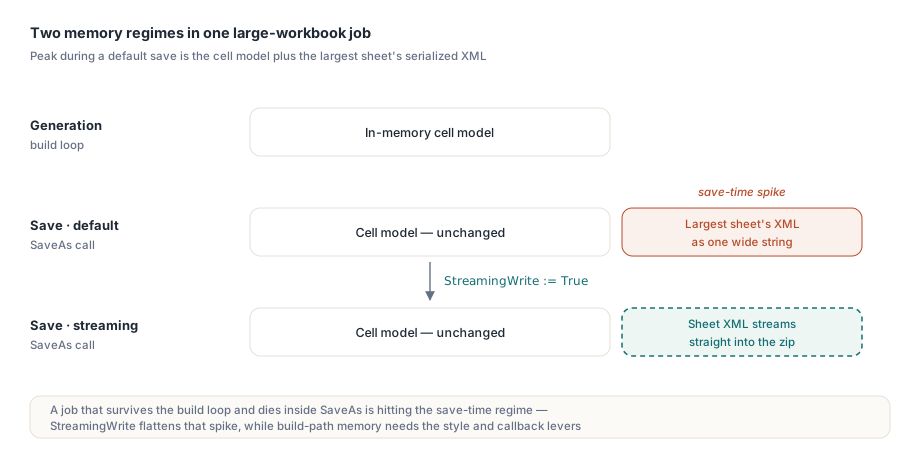
Akıl yürütülmesi gereken iki farklı bellek rejimi vardır. Oluşturma sırasında, bellek içi hücre modeli dokunduğunuz her hücreyle birlikte büyür: Değerler, biçimler ve formüllerin tümü nesnelere veya havuz girişlerine dönüşür. Kaydetme sırasında, varsayılan XLSX yolu ayrıca her çalışma sayfasının XML'ini zip kapsayıcısına sıkıştırmadan önce geniş bir dizeye işler, bu nedenle en yüksek kullanım, model artı en büyük sayfanın serileştirilmiş biçimidir. Oluşturma döngüsünden sağ çıkıp ardından SaveAs içinde ölen bir iş, birincisini değil ikincisini vuruyordur ve biri için yapılan düzeltme diğeri için hiçbir şey yapmaz
Dosya boyutu da benzer bir kuralı takip eder: Hücreler; stiller, paylaşılan dizeler, formüller, resimler ve yorumların yanı sıra katkıda bulunanlardan yalnızca biridir. ForEachCell ve sayfa başına koleksiyon sayıları ile yapılacak bir denetim geçişi, siz yanlış olanı optimize etmeden önce sorunlu bir dosyada gerçekte hangi kaynağın baskın olduğunu size söyler. Bir ölçüm inceliği: XLSX tarafındaki Sheet.Cells.Count, kullanılan aralığın alanını değil, seyrek depodaki (sparse store) örneklenmiş hücrelerin sayısını bildirir. Hücrelerin yarısı boş olan, verileri 1000'e 50'lik bir dikdörtgen kaplayan bir sayfa yaklaşık 50.000 değil 25.000 sayılır. Bir müşterinin "dev" dosyasını kendi test verilerinizle (fixtures) karşılaştırırken bu ayrım önemlidir, çünkü seyrek finansal düzenlerde kullanılan aralık alanı ile gerçek hücre nüfusu arasında büyüklük mertebesi kadar fark olabilir
StreamingWrite kaydetme yolunu düzeltir, oluşturma yolunu değil
TXLSXWorkbook.StreamingWrite := True ayarını yapmak, SaveAs işlevini, çalışma sayfası XML'ini doğrudan zip akışına yazan akışlı serileştiriciye geçirir ve sayfa başına ara dize kullanımını ortadan kaldırır. Davranış uyumluluğu için varsayılan olarak False'tur ve bunu açmak tek satırlık bir değişikliktir:
Book := TXLSXWorkbook.Create;
try
  Sheet := Book.Sheets.Add('Bulk');
  for R := 1 to 100000 do
  begin
    Sheet.Cells[R, 1].Value := R;
    Sheet.Cells[R, 2].Value := 'Row ' + IntToStr(R);
    Sheet.Cells[R, 3].Value := R * 1.5;
  end;
  Book.StreamingWrite := True;   // sayfa XML'i zip kapsayıcısına akar
  Book.SaveAs('bulk.xlsx');
finally
  Book.Free;
end;
Bunun ne kazandırdığı konusunda kesin olun: Döngü tarafından oluşturulan hücre modeli öncekiyle tamamen aynı miktarda bellek kaplar. StreamingWrite, tamamlanan toplu bir iş ile %95 sınırında başarısız olan bir iş arasındaki fark olan kaydetme süresi sıçramasını düzleştirir. Oluşturma döngüsünün kendisi belleği tüketiyorsa ihtiyacınız olan manivelalar sonraki ikisidir
Stil havuzları: Bir kez ekleyin, dizini yeniden kullanın
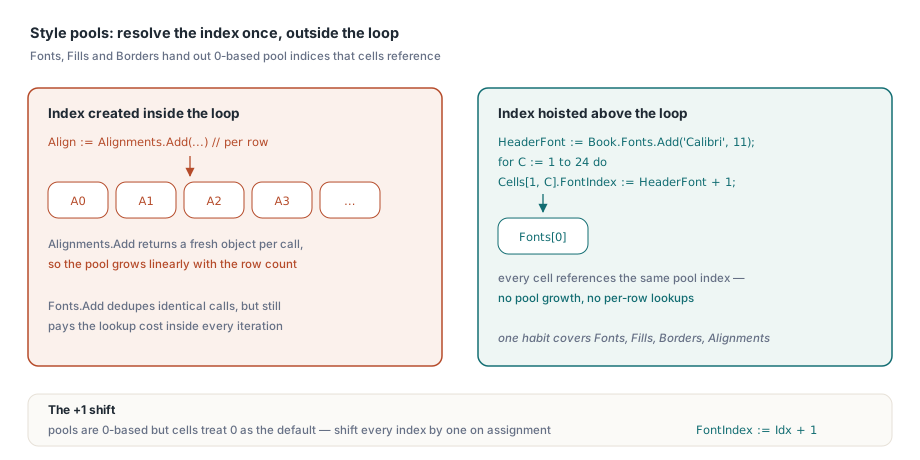
HotXLS'teki XLSX biçimlendirmesi havuz tabanlıdir: Book.Fonts.Add(...), Fills.AddSolid(...) ve Borders.Add(...), hücrelerin başvurduğu 0 tabanlı bir havuz dizini döndürür. Bir döngü içinde aynı parametrelerle Fonts.Add çağırmak tekilleştirilir, bu nedenle alandan ziyade zaman harcar. Alignments.Add ise farklı davranır: Çağrı başına yeni bir nesne döndürür, bu nedenle hücre başına hizalama oluşturulması, havuzu satır sayısı ile doğrusal olarak büyütür. Bir alışkanlık her iki durumu da kapsar: Her havuz dizinini döngünün dışında bir kez çözümleyin ve döngü içinde dizinleri atayın
// havuz aramalarını döngünün dışına taşıyın
HeaderFont := Book.Fonts.Add('Calibri', 11, True, False);   // 0 tabanlı havuz dizini
for C := 1 to 24 do
  Sheet.Cells[1, C].FontIndex := HeaderFont + 1;            // hücreler 1 tabanlı saklar; 0 = varsayılan
Buradaki + 1 bir yazım hatası değildir ve bunu unutmak buradaki klasik belirti üreten hatadır: Havuzlar 0 tabanlı dizinler dağıtırken, hücre tarafındaki özellikler 0'ı "varsayılan" olarak ele alır, bu nedenle atama sırasında her havuz dizini bir kaydırılmalıdır. İhmal nedeniyle bunu yanlış yaparsanız başlıklarınız sessizce çalışma kitabının varsayılan yazı tipinde işlenir; bu, marka incelemesine kadar kimsenin fark etmeyeceği bir kusurdur
Hücre başına Variant trafiğini satır geri çağırmalarıyla değiştirin
Her Sheet.Cells[R, C].Value := X işlemi, bir hücre arama-veya-oluşturma artı bir Variant ataması içerir. Birkaç yüz bin hücrede, erişim başına gelen bu yük profillerde ölçülebilir hale gelir. HotXLS, yinelemeyi motorun içine taşıyan ve kodunuza tek seferde bütün satırlar veren toplu geri çağırma API'lerini her iki arayüzde de sunar (okuma için ForEachCell ve ForEachRow, yazma için WriteCells ve WriteRows):
procedure TLedgerExport.FillRow(Sender: TObject;
  SheetIndex, Row, FirstCol, LastCol: Integer;
  var Values: Variant; var Skip: Boolean; var Cancel: Boolean);
begin
  if Row > FCount then
  begin
    Cancel := True;     // tüm yazmayı durdur
    Exit;
  end;
  Values := VarArrayOf([FRows[Row - 1].Account,
                        FRows[Row - 1].PostedOn,
                        FRows[Row - 1].Amount]);
end;

// yüz binlerce özellik erişimi yerine tek bir motor çağrısı
Sheet.WriteRows(1, 1, FCount, 3, FillRow);
Geri çağırmanın Skip bayrağı bir satıra dokunmadan geçmesini sağlar, Cancel ise işlemi erken sonlandırır; bu, kaynak ilerledikçe uzunluğunu keşfettiğiniz bir okuyucu olduğunda kullanışlıdır. Oluşturma için WriteRows ile kaydetme için StreamingWrite özelliklerini eşleştirin ve üretim yolunda hücre başına başka bir sıcak nokta (hot spot) kalmasın
XLS arayüzündeki okuma tarafı manivelaları
Büyük eski .xls dosyalarının kendi araç takımı vardır. Open işleminden önce _DisableGraphics := True ayarı, çizim katmanının ayrıştırılmasını tamamen atlar ve bu da yıllarca birikmiş şekiller ve gömülü resimler taşıyan çalışma kitaplarının yüklenmesini hızlandırır. Bu kısıtlama serttir: Çizim katmanı modelde bulunmaz, bu nedenle böyle bir çalışma kitabının kaydedilmesi, çizimleri olmayan bir dosya yazar. Bu bayrağı salt okunur analiz işleri için ayırın. SetTempDir, BIFF yazıcısının geçici dosyalarını yeniden yönlendirir; bu, varsayılan geçici konumun bir kotası olduğu veya yavaş depolama alanında bulunduğu sunucularda önem taşır. UseSharedFormulas, yinelenen formül gövdelerini paylaşılan formül kayıtlarında gruplayarak bir formül sütununun altmış bin satır boyunca tekrarlandığı dosyaları küçültür
XLS verileri üzerindeki okuma döngüleri, savunmacı bir şekilde ele alındığında işi ikiye katladığı ve kaçırıldığında sonuçları bozduğu için belirtilmeye değer bir indeksleme tuzağına sahiptir: UsedRange; FirstRow, LastRow, FirstCol ve LastCol sınırlarını 0 tabanlı bildirirken, Cells.Item[Row, Col] 1 tabanlıdir. Kullanılan aralığı gezen bir tarama, hücre erişiminde her koordinata bir eklemelidir (Cells.Item[Row + 1, Col + 1] gibi); aksi takdirde çapraz olarak bir hücre kaymış bir ızgara okur, sessizce son satırı ve sütunu düşürür ve hayali bir ilk satırı/sütunu dahil eder. ForEachCell geri çağırması bu uyumsuzluğu tamamen ortadan kaldırır, bu da tüm sayfayı tararken onu tercih etmek için bir başka nedendir
Dosyaları yüklemeden önce yoklayın (probe)
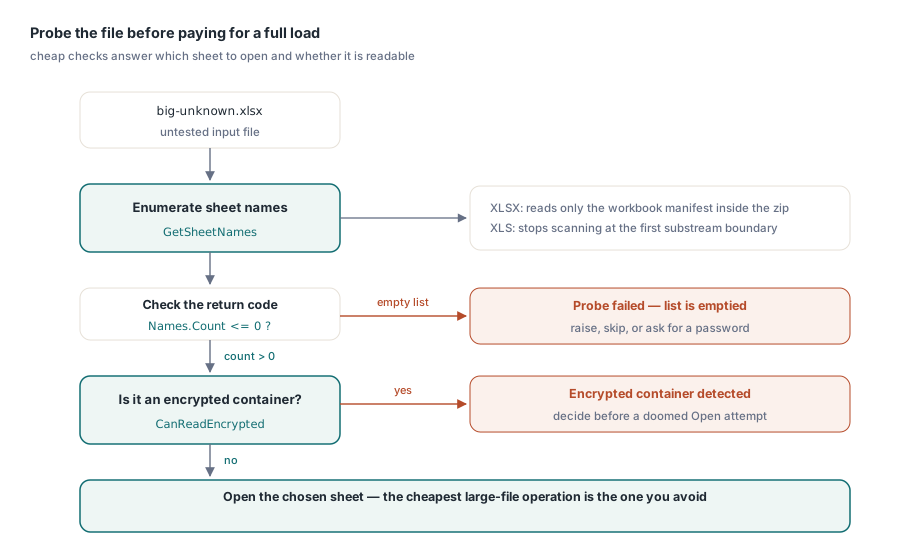
En ucuz büyük çalışma kitabı işlemi kaçındığınız işlemdir. Her iki arayüzdeki GetSheetNames, hücre verilerini yüklemeden bir dosyaın çalışma sayfalarını listeler. XLSX uygulaması yalnızca zip içindeki çalışma kitabı bildirimini okur ve çalışma kitabı örneğini açıkça boş bırakır; XLS arayüzü ise ilk alt akış (substream) sınırında taramayı durdurur. Bu, "bu içe aktarma işi hangi sayfayı hedeflemeli" sorusu için doğru ön uçuş kontrolü olmasını sağlar ve CanReadEncrypted, umutsuz bir Open denemesinden önce "bu şifreli bir kapsayıcı mı" sorusuna yanıt verir
Names := TStringList.Create;
Book := TXLSXWorkbook.Create;
try
  if Book.GetSheetNames('big-unknown.xlsx', Names) <= 0 then
    raise Exception.Create('cannot enumerate sheets');   // başarısızlık listeyi temizler
  // hedef sayfayı seçin, ardından tam bir Open işlemine değip değmeyeceğine karar verin
finally
  Book.Free;
  Names.Free;
end;
Dönüş kodu kuralına dikkat edin: Bu yoklama (probing) işlevleri, sıfır veya altındaki değerlerle başarısızlığı bildirir ve çıktı listesini boşaltır, bu nedenle belirli bir başarı değeriyle karşılaştırmak yerine <= 0 testi yapın
Yaklaşımı işe göre boyutlandırma
Sıralı olarak çok sayıda büyük dosya üreten gözetimsiz süreç hatları (pipelines) için iki alışkanlık daha resmi tamamlar: Çalışma kitabı nesneleri paylaşım için thread-safe değildir, ancak işçi iş parçacığı (worker thread) başına bir bağımsız çalışma kitabı oluşturulmasını hiçbir şey engellemez; bu da toplu dönüştürmeyi temiz bir şekilde paralel hale getirir. Ve çıktı disk yerine HTTP'ye gittiğinde, TStream kaydetme aşırı yüklemeleri StreamingWrite ile birleşir, böylece büyük bir yanıt asla geçici bir dosya olarak somutlaşmaz. Operasyonel bir dipnot geçerlidir: Akış kaydetme, geçerli konumdan geri sarmadan yazar, bu nedenle akışı yanıt çerçevesine (response framework) vermeden önce Position := 0 ayarlayın. Akışlı yazma ve toplu iş makalesi bu sunucu tarafı kalıbını geliştirir ve veri tabanı dışa aktarım makalesi bu manivelaların veri kümesi odaklı bir rapora nereye yerleştiğini gösterir
Son olarak, rapor ailesi başına en kötü durumdaki bir test verisini (fixture) saklayın ve bunu CI'da zamanlayın. Belge oluşturmadaki performans düşüşleri nadiren kendilerini duyurur. Bir döngünün içine eklenen bir stil veya tam bir Open ile değiştirilen bir yoklama işlevsel olarak hiçbir şeyi değiştirmez ve gece yarısı grubu sadece kırk dakika daha uzun sürer. Temsili yarım milyon hücrelik bir test verisi üzerinde zamanlanmış bir test, bu sapmayı bir operasyon olayı yerine kırmızı bir derlemeye (red build) dönüştürür
Değerlendirme sürümleri, toplu üretim örneği içeren demo projeleri ve tam API referansı HotXLS Bileşeni sayfasında mevcuttur