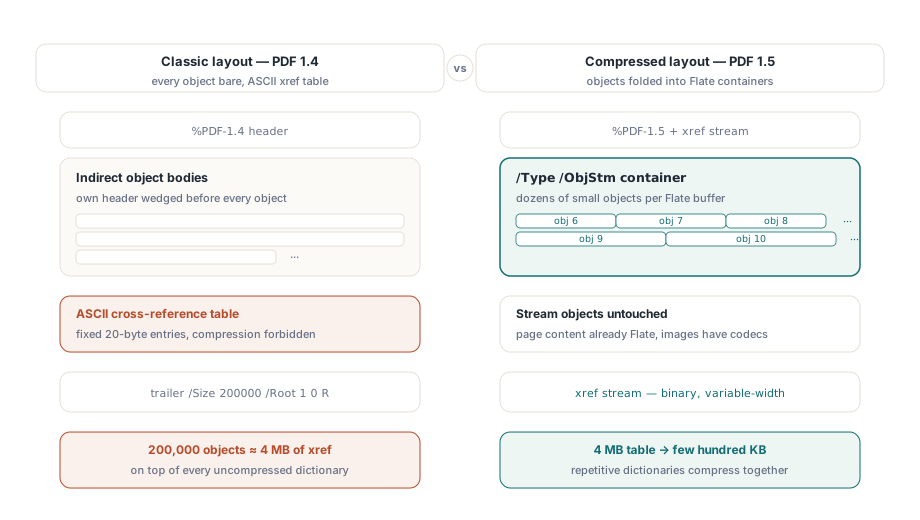
PDF 1.5, önceki dosya biçiminin ifade etmesinin hiçbir yolu olmayan iki depolama yapısı getirdi: Nesne akışı (object stream) ve çapraz referans akışı (cross-reference stream). Nesne akışı, /Type /ObjStm olarak etiketlenmiş, dosya gövdesine dağıtmak yerine uç uca paketlenmiş birçok küçük dolaylı nesneyi tutan, Flate ile sıkıştırılmış tek bir kapsayıcıdır. Çapraz referans akışı ise, sürüm 1.4'e kadar her PDF'i kapatan sabit genişlikteki ASCII tablosunun yerine, değişken genişlikte alanlara sahip sıkıştırılmış ikili (binary) olarak yeniden yazılmış dosya arama tablosudur. Birlikte seyahat ederler. Nesneler bir akışa katlandıktan sonra, eski metin tablosu artık onları adresleyemez, bu nedenle ikili xref'in de onunla birlikte gelmesi gerekir
Bunu klasik düzenle karşılaştırdığınızda, ortadan kaldırdığı maliyeti görmek kolaydır. Bir PDF 1.4 dosyasında, her dolaylı nesne kendi obj başlığının arkasında sıkıştırılmamış olarak durur ve kuyruktaki tablo, giriş başına tam olarak 20 bayt ASCII harcar, sıkıştırma yasaktır. 200.000 nesne içeren bir belge, tek bir glif çizilmeden önce kabaca 4 MB çapraz referans verisi taşır ve sıkıştırılmamış tüm sözlük gövdeleri üst üste yığılır. PDF 1.5 her iki sayıya birden saldırır: Sözlükler Flate kapsayıcılarına katlanır ve 4 MB'lık tablo birkaç yüz kilobaytlık ikili veriye küçülür. ISO 32000-1 bu iki yapıyı §7.5.7 ve §7.5.8'de tanımlar
Tasarruf gerçekte nereye yansır?
Nesne akışları yalnızca akış dışı (non-stream) nesnelere dokunur, bu nedenle pikselleri değil, yapıyı sıkıştırırlar. Sayfa içeriği 1.5'ten önce zaten Flate ile sıkıştırılmıştı ve resim verileri kendi codec'lerini taşır, bu nedenle resim ağırlıklı bir broşür neredeyse hiç küçülmez. Küçülen dosyalar yapı ağırlıklı olanlardır: Binlerce alan sözlüğü içeren AcroForm'lar, derin anahat ağaçları, etiketli-PDF yapı öğeleri. Bu nesneler küçüktür, çok sayıdadır ve birbirine neredeyse tamamen özdeştir; ve bu tekrarlama, aralarına sıkıştırılmış başlıklarla gövdeye yayılmak yerine tek bir tamponda (buffer) oturduklarında Flate'in tam olarak yararlandığı şeydir
Eski bir dosyanın ne kadarının ek yük (overhead) olduğunu küçümsemek kolaydır. Yıllar süren düzenlemeleri emmiş bir form arşivi, baytlarının yarısından çok fazlasını sözlük başlıklarına, xref dolgularına ve hiçbir okuyucunun asla bakmayacağı revizyonlara harcayabilir. Buradaki iki özellik, bunlardan ilk ikisini geri kazanır. Üçüncüsü olan birikmiş revizyonlar ise, dosyanın kendi geçmişini artık hatırlamak zorunda kalmamasıyla, yalnızca sıkıştırmaya (compaction) boyun eğer
HotPDF'te her iki özelliği de bir çift özellik aracılığıyla açarsınız ve bunların birbirine nasıl bağımlı olduğu, onları hangi sırayla yazdığınızdan daha önemlidir:
var
  Pdf: THotPDF;
begin
  Pdf := THotPDF.Create(nil);
  try
    Pdf.FileName := 'catalog-2026.pdf';
    Pdf.UseXRefStream := True;      // ikili xref, ObjStm için ön koşul
    Pdf.UseObjectStreams := True;   // nesneleri /Type /ObjStm içine paketle
    Pdf.BeginDoc;
    Pdf.CurrentPage.SetFont('Arial', [], 11);
    Pdf.CurrentPage.TextOut(50, 760, 0, 'Compressed structure demo');
    Pdf.EndDoc;                     // XRefStm + ObjStm kapsayıcılarını yayar
  finally
    Pdf.Free;
  end;
end;UseObjectStreams, UseXRefStream özelliğinin True olarak ayarlanmasını gerektirir. Sıkıştırılmış bir nesneye, bir nesne-akış numarası artı bir dizin kaydeden tip-2 xref girişi aracılığıyla ulaşılır ve klasik 20 baytlık metin satırının bu çifti saklayacak yeri yoktur. Bu nedenle UseObjectStreams tek başına görünür hiçbir şey yapmaz; BeginDoc çağrısından önce ayarlanan her iki bayrak da çalışan yapılandırmadır. Bunları BeginDoc çağrısından sonra ayarlarsanız HotPDF zaten eski düzene karar vermiştir
Her ikisi de neden varsayılan olarak kapalıdır?
HotPDF her iki özelliği de kutudan çıktığı haliyle False olarak bırakır ve bunun nedeni eski aşağı akış (downstream) kodlarıyla yapılan entegrasyonlarda ortaya çıkar. Yalnızca PDF 1.4'ü anlayan bir okuyucu, sıkıştırılmış nesneleri işleyemediğini duyurmaz. Bir xref akışıyla karşılaşır, beklediği fragman (trailer) anahtar kelimelerinden hiçbirini bulamaz ve hasarlı bir çapraz referans tablosu bildirir veya dosyayı açmayı reddeder. Gözle görülür bir boyutta olan veya fax gateway, donanım yazıcısı ya da on yıl önceki 1.4 ayrıştırıcısı gibi sistemlere giden çıktılarda her iki bayrağı da kapalı tutun ve daha büyük dosyaya katlanın. Her ana akım görüntüleyicinin yirmi yıldır PDF 1.5'i okuduğu arşivsel depolama ve web dağıtımı için bunları açmak, neredeyse sıfır maliyetle elde ettiğiniz bir sıkıştırmadır
Destek ekibinize anlatmaya değer ikinci dereceden bir etki vardır. Sözlükler nesne akışlarına paketlendikten sonra, oluşturulan iki dosyayı bayt bayt karşılaştırmak bir anlam ifade etmez; çünkü tek bir alanı değiştirmek tüm kapsayıcıyı yeniden Flate sıkıştırmasına tabi tutabilir ve ondan sonraki her şeyi karıştırabilir. Bu tür dosyaları ikili (binary) karşılaştırma ile değil, nesne içeriğine göre karşılaştırın (diff)
Artımlı güncellemeler ve korudukları bayt kaymaları (byte offsets)
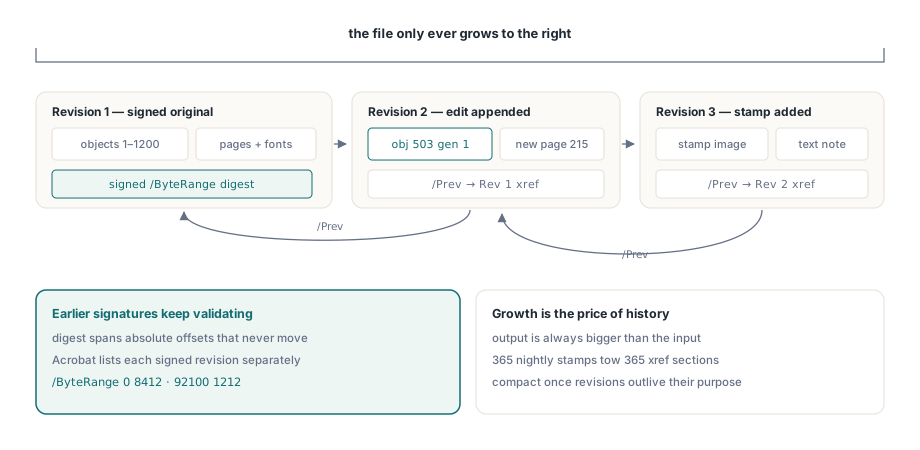
Dijital imza, açık bir /ByteRange'i kapsar: CMS özetinin (digest) üzerinden alındığı, mutlak bayt kaymaları (offsets) olarak verilen fiziksel dosyanın iki aralığı. Dosyayı ekranda aynı görünen bir şeye bile yeniden yazsanız, o ofsetlerin hepsi hareket eder. Özet eşleşmeyi durdurur ve imza bozuk olarak okunur. ISO 32000-1 §7.5.6'nın artımlı güncellemelerle (incremental updates) çözdüğü tam problem budur. Yeni ve değiştirilmiş nesneler mevcut %%EOF'tan sonra eklenir, ardından /Prev girişi bir öncekini gösteren yeni bir çapraz referans bölümü yazılır. Orijinal baytlar asla bozulmaz, bu nedenle imzalı bir revizyon doğrulanabilir kalır ve Acrobat her imzalı revizyonu imza panelinde kendi başına sunabilir
HotPDF bunu kendi giriş noktası aracılığıyla sunar:
Pdf.BeginIncrementalUpdate('contract-signed.pdf');
Pdf.AddPage;
Pdf.CurrentPage.SetFont('Arial', [], 10);
Pdf.CurrentPage.TextOut(50, 760, 0, 'Addendum recorded 2026-06-11');
Pdf.SaveIncrementalUpdate('contract-updated.pdf');  // yalnızca farkı (delta) ekler
İki şey insanları tökezletir. BeginIncrementalUpdate orijinal dosya adını almalıdır, çünkü eklenen xref bölümü yalnızca o tam orijinal baytlara karşı anlamlı olan ofsetleri kaydeder; bunu yeniden adlandırılmış veya yeniden kaydedilmiş bir kopyaya yönlendirirseniz ofsetler artık var olmayan bir dosyayı tanımlar. Ve kaydetme yapısı gereği yalnızca ekleme (append-only) şeklindedir, bu nedenle çıktı her zaman girdiden daha büyüktür. Bu büyüme, ayarlanıp yok edilecek bir israf değildir. Önceki imzalı revizyonları sağlam bırakan özelliğin kendisidir
Yüklü bir dosyayı değiştirmek LoadFromFile üzerinden gerçekleşir
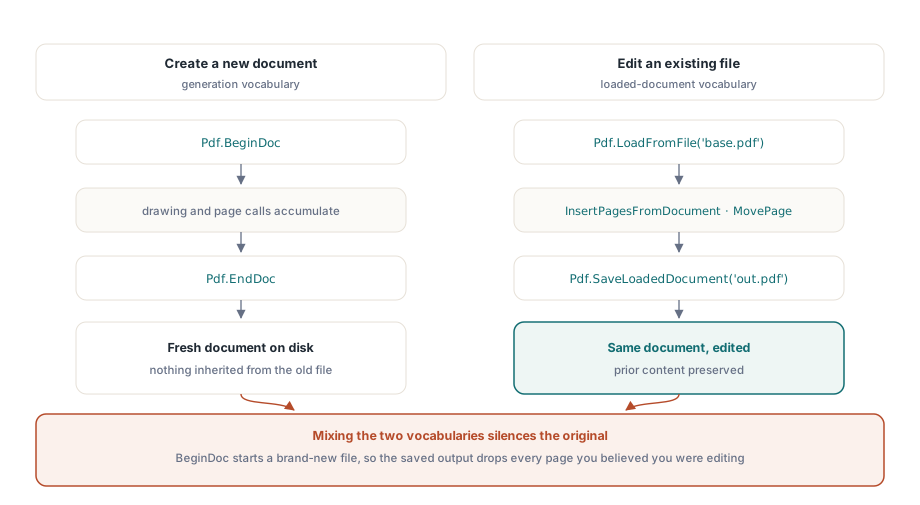
HotPDF ile ilk olarak oluşturma API'si aracılığıyla tanışan geliştiriciler belirli bir duvara çarpma eğilimindedir. BeginDoc yepyeni bir belge açar; bu, halihazırda var olan bir belgeyi değiştirmek istediğinizde yanlış araçtır. Mevcut bir dosyayı düzenlemek, bunun yerine yüklü belge çağrılarından geçer:
PageCount := Pdf.LoadFromFile('base.pdf');
Pdf.InsertPagesFromDocument(OtherDoc, '1-3', 5);  // sayfa 5'ten sonra 1-3 sayfaları
Pdf.MovePage(2, 5);
Pdf.SaveLoadedDocument('modified.pdf');
İkisini karıştırırsanız semptom, yeni içeriğinizi tutan ve orijinalinden hiçbir şey taşımayan bir çıktı dosyasıdır; çünkü BeginDoc, düzenlediğinizi sandığınız belgenin yanında neşeyle yeni bir belge oluşturmuştur. LoadFromFile ile SaveLoadedDocument'ı bir kelime hazinesi, BeginDoc ile EndDoc'ı ise başka bir kelime hazinesi olarak okuyun. Aynı dosyaya karşı her ikisine birden başvuran bir rutin neredeyse her zaman yanlıştır
Eklenmiş bir dosya ne zaman sıkıştırılmalıdır?
Yalnızca eklemeli (append-only) kaydetme yavaş bir maliyet taşır. Aynı PDF'e her gece bir durum satırı damgalayan bir iş, bir yıl boyunca 365 revizyon üretir ve her revizyon arkasında yeni bir xref bölümü sürükler. Bu geçmiş artık yararlılığını yitirdiğinde ve dosyadaki hiçbir imzanın hayatta kalması gerekmediğinde, yüklü belge yolu üzerinden tüm dosyayı yeniden serileştirerek düzleştirebilirsiniz:
Pdf.LoadFromFile('stamped.pdf');
Pdf.SaveLoadedDocument('compacted.pdf');
Bu yeniden kaydetme tam bir yeniden yazmadır. Önceki revizyonları bilerek atar ve dosyadaki mevcut imzaları bozar, bu nedenle bunu diğer yıkıcı adımlara uyguladığınız aynı politika kapısının arkasına koyun. Geçerli olan bir üretim kuralı: Revizyon sayısı bir eşiği aştığında veya eklenen yük temel dosyanın belirli bir payını geçtiğinde sıkıştırın ve imza panelinde herhangi bir şey olan bir belgeyi asla sıkıştırmayın
Çıktıyı göndermeden önce kontrol etme
Bu iki özelliğin doğrulanması canlandırıcı derecede somuttur. Sonucu Adobe Acrobat'ta açın ve üç noktayı doğrulayın: Nesne akışları açıldığında belge özellikleri PDF 1.5 veya sonrasını bildirir; imza paneli artımlı bir güncellemeden sonra önceden imzalanmış her revizyonu hala doğrular; ve sayfa sayısı ile yer imleri yükleme, değiştirme ve kaydetme döngüsünden zarar görmeden çıktı. Arşivsel çıktı için dosyayı veraPDF'ten de geçirin, çünkü sıkıştırılmış bir xref, katı bir doğrulayıcının hoşgörülü bir görüntüleyiciden daha yakından inceleyeceği tam bir yapıdır. Çalışmanız çok büyük girdileri de içeriyorsa, büyük PDF iş akışları için Doğrudan Dosya API'si incelememizdeki muayene yöntemleri artımlı kaydetmeyle doğal olarak eşleşir ve yukarıdaki bayt aralıklarının arkasındaki imza mekanizmaları HotPDF dijital imzaları ve PAdES makalesinde derinlemesine ele alınmıştır
Her iki özellik de, bu blogun başka yerlerinde ele alınan oluşturma, form, şifreleme ve imzalama API'lerinin yanında, Delphi and C++Builder için HotPDF Bileşeni'nin bir parçası olarak gönderilir. Yukarıdaki çağrıları kendi belge süreç hattınızla hizalamak istiyorsanız, ürün sayfası tam API referansına bağlantı verir