Mevcut bir PDF'den metin, görüntü ve font çıkarmak, gerçek bir belge kümesinden geçirene kadar çözülmüş bir problem gibi görünür. Bir arama indeksleyicisini kırk bin müşteri dosyasına yöneltin, bozulmalar birkaç tanıdık yığında toplanır. Sözcükler birbirine karışır çünkü hangi boşluk genişliğinin bir aralık sayılacağı çıkarıcıya hiç söylenmemiştir. Diğer sayfalar anlamsız karakterler olarak döner çünkü alt kümelenmiş bir font, glif kodlarından gerçek karakterlere giden bir eşleme taşımaz. Ve "şirket logosu" aslında bir yumuşak maskenin arkasında üst üste yığılmış dokuz ayrı görüntü nesnesi olduğu ortaya çıkar. Bunların hiçbiri kütüphanedeki bir hata değildir. Bu, bir çıkarma fonksiyonunu çağırmakla, o fonksiyonun diskteki baytlardan neyi kurtarıp neyi kurtaramayacağını anlamak arasındaki farktır
losLab PDF Library'nin Pascal sürümü, Delphi ve C++Builder koduna bu üç akışın her birini okumak için birden fazla yol sunar ve bu seviyeler garanti ettikleri şey bakımından farklılık gösterir. İşin sırrı, seviyeyi işe uydurmaktır: bir arama indeksi, bir redaksiyon incelemecisi ve bir PDF/A ön kontrol geçişi aynı sayfadan farklı şeyler ister ve yanlış çağrıya yönelmek ya emeği boşa harcar ya da güvenemeyeceğiniz bir çıktı üretir
Metin çıkarma seviyeleri ve her birinin vaat ettikleri
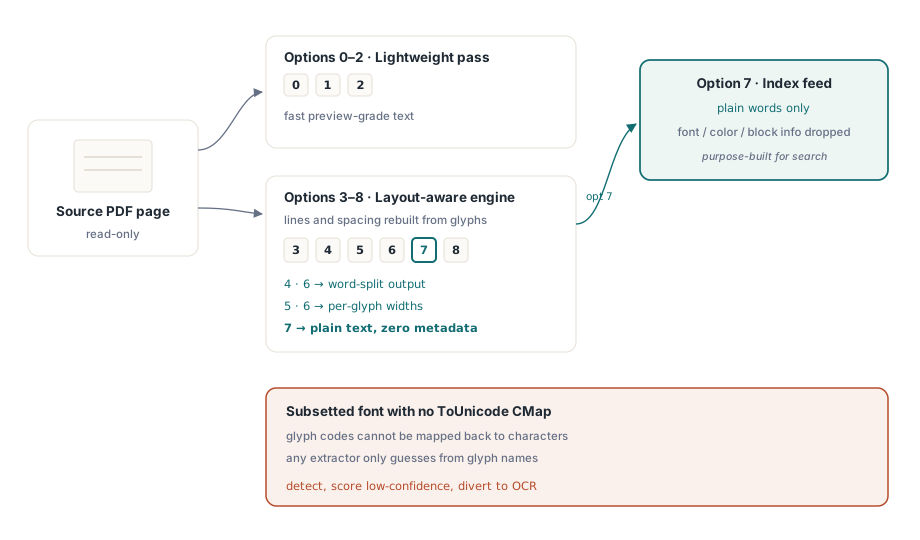
GetPageText, 0 ile 8 arasında bir seçenek değeri alır ve bu sayı bir biçim değil bir motor seçer. 0 ile 2 arasındaki değerler, hızlı bir önizleme için yeterli olan hafif bir geçiş çalıştırır. 3 ile 8 arasındaki değerler, glifin sayfada gerçekte nerede durduğundan satırları ve boşlukları yeniden oluşturan, düzen farkında motor üzerinden yönlendirilir. Bu aralıkta ayrımlar önemlidir: 4 ve 6 çıktıyı sözcüklere böler, 5 ve 6 glif başına genişlik değerleri verir ve 7, font, renk ve blok meta verilerinin kasten atıldığı düz metin döndürür. 7 seçeneği bir arama indeksine beslenecek olandır, çünkü indeks yalnızca sözcükleri ister, başka hiçbir şeyi değil
Hiçbir seçenek ayarı, baştan bu bilgiyi hiç taşımamış bir belgeyi kurtaramaz. PDF, karakter kodlarını glif şekillerine eşler ve bu kodları yeniden okunabilir metne çeviren tek şey bir fontun ToUnicode CMap'idir (ISO 32000-1 §9.10). Alt kümelenmiş bir font bunsuz gönderildiğinde her çıkarıcı çıkmaza girer. Bu kütüphane, bir görüntüleyicideki kopyala-yapıştır, rakip bir araç seti: hepsi glif adlarından tahmin yürütmeye ya da hiçbir şey döndürmemeye indirgenir. Pratik karşılık kahramanlık değil, tespittir. Sayfayı düşük güvenilirlikli olarak puanlayın ve OCR'a gönderin, çünkü çöpü sessizce indekslemek, okuyamadığınızı kabul etmekten daha kötüdür
Düz seçeneklerin kapsamadığı durumlar için, özel belirteçleştirme, içerik akışı adli incelemesi, kendi kurallarınıza göre kurulmuş bir metin hunisi, çözücü bir katman aşağıda kullanılabilir. TPDFExtractor, bir sayfanın kaynaklar sözlüğü ve font koleksiyonu üzerine inşa edilir. ExtractTextW metodu, Unicode'u kurtarmak için ham içerik akışı metin işlemlerini aynı font makinesinden yeniden geçirir ve OnFindObject olayı her nesneyi akıp geçerken elinize teslim eder. Çoğu kod bu kadar derine inmeye hiç ihtiyaç duymaz. Buna ihtiyaç duyan uygulamalar ise bu katmanın gömülü değil genel olmasına sevinen uygulamalardır
Konumlandırılmış bloklar: arama sonuçlarının ve redaksiyon incelemesinin birimi
Düz metin size sayfanın ne söylediğini anlatır. Er ya da geç bir ürünün, bir arama sonucunu vurgulayabilmesi, bir redaksiyon adayının etrafına kutu çizebilmesi ya da bir açıklamayı doğru noktaya sabitleyebilmesi için nerede söylediğini de bilmesi gerekir. ExtractPageTextBlocks, metin parçalarından oluşan bir listeye tutamaç döndürür ve her parça kendi metnini, sınırlayıcı kutusunu, ayarlandığı font adını ve boyutunu taşır:
var
  Pdf: TPDFlib;
  Blocks, I: Integer;
begin
  Pdf := TPDFlib.Create;
  try
    if Pdf.LoadFromFile('contract.pdf', '') <> 1 then
      raise Exception.Create('load failed');
    Pdf.SelectPage(1);
    Blocks := Pdf.ExtractPageTextBlocks(0);
    for I := 0 to Pdf.GetTextBlockCount(Blocks) - 1 do
      Writeln(Format('%s  [%s %.1f pt at %.0f,%.0f]',
        [Pdf.GetTextBlockText(Blocks, I),
         Pdf.GetTextBlockFontName(Blocks, I),
         Pdf.GetTextBlockFontSize(Blocks, I),
         Pdf.GetTextBlockBound(Blocks, I, 0),
         Pdf.GetTextBlockBound(Blocks, I, 1)]));
    Pdf.ReleaseTextBlocks(Blocks);
  finally
    Pdf.Free;
  end;
end;
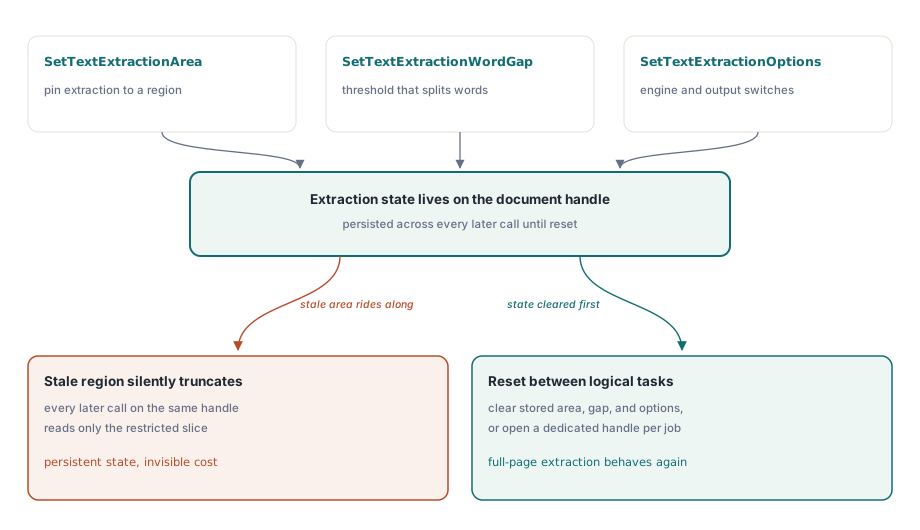
Bu alanda entegrasyonları başka her şeyden daha çok sekteye uğratan bir ayrıntı vardır. SetTextExtractionArea, SetTextExtractionWordGap ve SetTextExtractionOptions, çağrı başına geçirdiğiniz argümanlar değil, kalıcı olan belge düzeyinde durumlardır. Bir özellik için alan kısıtlaması yapılandırın, örneğin bir belgeyi sınıflandırmak için yalnızca başlık bandını okumak, ve bu, aynı tutamaç üzerinde sonra gelen her çıkarmayı, daha sonra başvurduğunuz düzen farkında GetPageText seviyeleri dahil, sessizce keser. Ya çıkarma durumunu mantıksal görevler arasında sıfırlayın ya da her göreve kendi belge tutamacını verin
Sözcük aralığı eşiği, ilk hata yığını olan birbirine karışan sözcükler için kullanılan kaldıraçtır. SetTextExtractionWordGap, düzen motoruna, sayfanın kendi glif aralığına göre ölçülen ne kadar yatay boşluğun bir sözcüğü diğerinden ayırdığını söyler. Yoğun bir tablo, gevşek dizilmiş bir pazarlama sayfasından daha küçük bir aralık ister, bu yüzden belge sınıfına göre ayarlanmış bir eşik, tek bir küresel sabitten daha iyidir. Bu değer, çıkarma durumunun geri kalanı gibi belgede kalıcıdır, bu yüzden bir kez ayarlayıp unutmak yerine bilinçli olarak ayarlamayı planlayın
Görüntüler: ekran görüntüleri değil, orijinal akışlar
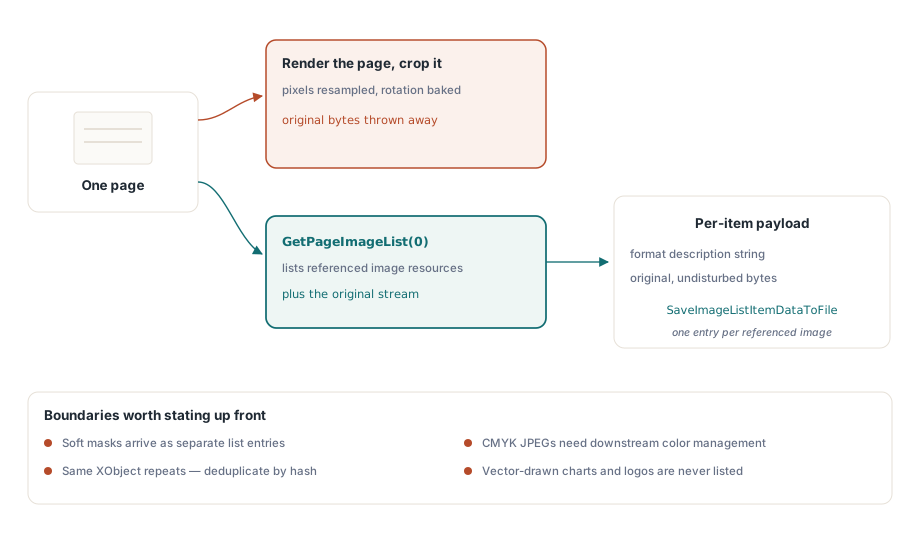
Bir PDF'den görüntüleri almanın yanlış yolu sayfayı render edip kırpmaktır. Bu, pikselleri yeniden örnekler, herhangi bir döndürmeyi içine gömer ve orijinalin ne olduğunu ne olursa olsun atar. Bunun yerine GetPageImageList, sayfanın başvurduğu gerçek görüntü kaynaklarını numaralandırır ve her öğe kendi özelliklerini ve orijinal, bozulmamış verisini geri verir:
var
  ImgList, I: Integer;
begin
  Pdf.SelectPage(1);
  ImgList := Pdf.GetPageImageList(0);
  for I := 0 to Pdf.GetImageListCount(ImgList) - 1 do
  begin
    Writeln(Pdf.GetImageListItemFormatDesc(ImgList, I, 0));
    Pdf.SaveImageListItemDataToFile(ImgList, I, 0,
      Format('page1-img%.2d.bin', [I]));
  end;
  Pdf.ReleaseImageList(ImgList);
end;
Bir öğe hakkında herhangi bir varsayımda bulunmadan önce GetImageListItemFormatDesc'i kontrol edin, çünkü bir sayfanın başvurduğu şey, görünen her görüntü için tek, düzgün bir resim olmaktan uzaktır. Bir yumuşak maske kendi ayrı girdisi olarak görünür. Aynı XObject genellikle birçok sayfada tekrarlanır, bu yüzden bir "tüm görüntüler" dışa aktarımını arşivlemeden önce içerik özetine göre yinelenenleri ayıklayın, yoksa aynı logoyu yüz kez yazarsınız. CMYK JPEG'ler, aşağı akışta uygulanan renk yönetimine ihtiyaç duyar, aksi halde kanalları oldukları gibi alan görüntüleyicilerde ters render edilirler. Bir seferde bir sayfa yerine belge genelinde bir envanter istediğinizde, SetFindImagesMode ile birlikte FindImages, tüm dosyayı tek geçişte tarar
Kimse kabul kriterlerini yazmadan önce paydaşlarla gündeme getirilmeye değer bir sınır vardır: görüntü çıkarma yalnızca raster kaynakları döndürür. Vektör yollar olarak çizilmiş bir logo ya da grafik, ekranda ne kadar açıkça bir resim gibi okunursa okunsun, kaynak anlamında bir görüntü değildir ve hiçbir görüntü listesinde ortaya çıkmaz. Gereksinim gerçekten o grafiği bir dosya olarak teslim etmekse, dürüst yaklaşım sayfa bölgesini bir bit eşlem olarak render etmektir, ki bu farklı doğrulukta farklı bir işlemdir. İki çıktı türü, hangisinin hangisi olduğunu belirten bir etiket olmadan aynı dışa aktarma klasörüne ait değildir
Fontlar: bir dışa aktarma özelliği değil, bir denetim yüzeyi
Font API'si fontlarla ilgili soruları yanıtlar. Font dosyalarının kendilerini size vermez ve bu ayrım, üzerine inşa edebileceğiniz her şeyi şekillendirir. FindFonts belgeyi taradıktan sonra, numaralandırma fontları ID'ye göre gezer ve özellik çağrıları o anda seçili olan hangi fontsa onun hakkında rapor verir:
var
  I: Integer;
begin
  Pdf.FindFonts;
  for I := 1 to Pdf.FontCount do        // font indeksleri 0'dan değil 1'den başlar
    if Pdf.SelectFont(Pdf.GetFontID(I)) = 1 then
      Writeln(Format('%s  type=%d  embedded=%d  subset=%d',
        [Pdf.FontName, Pdf.FontType,
         Pdf.GetFontIsEmbedded, Pdf.GetFontIsSubsetted]));
end;
Döngü sınırlarına dikkat edin. Font indeksleri 1'den FontCount'a kadar gider, oysa birkaç paragraf yukarıdaki metin bloğu ve görüntü listesi indeksleri sıfır tabanlıdır. Bir kuralı diğerine taşırsanız ya ilk fontu atlayan ya da sona taşan bir kayma hatası alırsınız ve bu, çoğu belgenin birkaç fontu olduğu ve yanlış olanın yine de makul göründüğü için gündelik testten geçer. Kapsam konusunda da net olun. Bu API'de bayt düzeyinde font dışa aktarımı yoktur. Hiçbir çağrı, gömülü font programını bir TTF veya OTF dosyası olarak döndürmez ve numaralandırma artı meta veri incelemesi, tasarlanan modelin tamamıdır. Bu model yine de üretim çalışmasının fontlardan gerçekte istediği şeyleri kapsar: ad kalıbına göre alt küme tespiti, bir arşivleme dönüşümünden önce gömme denetimleri (gömülmemiş bir font, Delphi'de PDF/A ve PDF/UA ön kontrolü'nün ele aldığı gibi kesin bir PDF/A engelleyicisidir) ve çıkarma güvenilirliği düştüğünde kodlama tanıları. Sınırın burada durmasının bir de lisanslama nedeni var. Alt küme bir font programı lisanslı bir materyaldir ve gliflerinin çoğu eksik olduğundan zaten kurulabilir bir font olarak işe yaramaz. Onu çıkarılabilir bir varlık yerine denetim meta verisi olarak ele almak savunabileceğiniz konumdur
Bu son çağrı, triyajda hakkını verir. Her fontta GetFontEncoding'i çalıştırın, bunu alt küme bayrağıyla birlikte okuyun, böylece tek bir karakter bile çekmeden çıkarma kalitesini tahmin edebilirsiniz. Fontlarının tümü standart olmayan kodlamalarla alt kümelenmiş bir sayfa, yalnızca incelemeyle bile bir OCR adayıdır, bu da bir toplu işlem hattının önce başarısız bir çıkarma geçişini boşa harcamadan sayfayı doğru şekilde yönlendirmesini sağlar
Belgeleri yüklemeden ölçekte çıkarma
Bir toplu işlem hattında, yalnızca bir sayfayı okumak için tüm bir belgeyi yüklemek boşa harcanan G/Ç'dir ve bir belge kümesi genelinde hızla birikir. Tek çağrılık varyantlar, ExtractFilePageText ve ExtractFilePageTextBlocks, doğrudan bir dosya adı, parola ve sayfa numarası alır ve tam yüklemeyi atlar. Gigabayt ölçeğindeki dosyalar için daha da düşük bir vites vardır. Doğrudan erişim yolu, bir dosyayı akan xref okumaları üzerinden açar, böylece DAOpenFileReadOnly'i izleyen DAExtractPageText, yalnızca bir sayfanın gerçekten ihtiyaç duyduğu nesnelere dokunur. Bununla birlikte akılda tutulmaya değer bir kural değişikliği gelir: DA fonksiyonları sayfalara ham sayfa numarasıyla değil, DAFindPage'den aldığınız bir nesne referansı tutamacı olan PageRef ile hitap eder. Numarayı tutamacın ait olduğu yere geçirirseniz çağrı, hata vermeden yanlış nesne üzerinde çalışır, ki bu hata ayıklaması en kötü türden bir hatadır. Doğrudan erişim araç setinin geri kalanı büyük PDF birleştirme, bölme ve doğrudan erişim içinde ele alınır
Gerçek bir belge kümesinde ayakta kalan çıkarma kodunu topallayan koddan ayıran tek bir alışkanlık varsa, o da sayfayı temiz bir veri kaynağı yerine güvenilmeyen bir girdi olarak ele almaktır. Görüntüleyicinin render ettiğiyle uyuşmayan metin, neredeyse her zaman bir kodlama sorunudur, tek bir glife çöken bir bitişik harf ya da ToUnicode girdileri eksik bir alt küme font, ve çözüm baytlarla mücadele etmek değil, güvenilirliği ölçüp kötü sayfaları OCR'a yönlendirmektir. Font API'si tasarım gereği asla bir TTF veya OTF üretmeyecektir, bu yüzden font iş akışlarını denetim soruları etrafında kurun. Ve kalıcı çıkarma durumu, hepsinden çok alan dikdörtgeni, bir çağrıdan sonra unuttuğunuz bir parametre değil, bir belge tutamacının ömrü boyunca sahip olduğunuz bir ayardır. Bu üç refleksi doğru yaparsanız API'nin geri kalanı beklendiği gibi davranır
Değerlendirme sürümleri, demo projeleri ve eksiksiz çıkarma API referansı losLab PDF Library for Delphi ürün sayfasında bulunur