Bemästra PDF-anteckningar med HotPDF-komponent
PDF-kommentarer är en av de mest kraftfulla funktionerna för att skapa interaktiva och samarbetande dokument. De tillåter användare att lägga till kommentarer, markeringar, stämplar och multimediainnehåll direkt till PDF-filer utan att ändra den ursprungliga dokumentstrukturen. Den här omfattande guiden utforskar hur du implementerar olika typer av PDF-kommentarer med hjälp av HotPDF-komponent, som täcker allt från grundläggande textkommentarer till avancerade multimediabilagor.
Förstå PDF-kommentarer: Mer än bara kommentarer
PDF-kommentarer är objekt som kan läggas till på PDF-sidor för att ge ytterligare information, interaktivitet eller visuella förbättringar. Till skillnad från vanligt sidinnehåll lagras kommentarer som separata objekt som kan visas eller gömmas, redigeras eller tas bort utan att påverka den underliggande dokumentstrukturen. Detta gör dem idealiska för:
- Dokumentgranskning: Lägga till kommentarer, anteckningar och feedback
- Formulärförbättring: Skapa interaktiva element och hjälptext
- Multimedia integration: Bädda in ljud-, video- och filbilagor
- Visuell märkning: Markera viktiga avsnitt med stämplar och former
- Samarbetsflöden: Gör det möjligt för flera användare att bidra utan konflikter
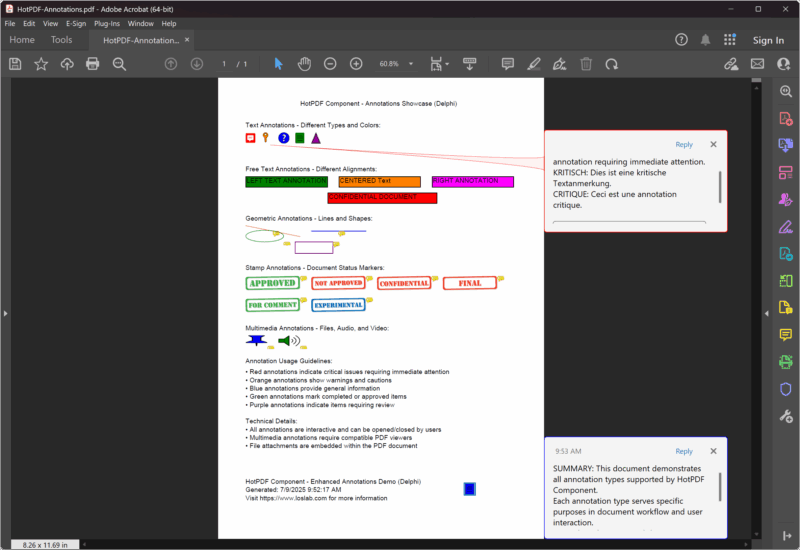
Snabbstart: Exempel på enkel textkommentar
Låt oss börja med ett grundläggande textanteckningsexempel för att förstå kärnkoncepten för PDF-kommentarer:
|
1 2 3 4 5 6 7 8 9 10 11 12 13 14 15 16 17 18 19 20 21 22 23 24 25 26 27 28 29 30 31 32 33 34 35 36 37 38 39 40 41 42 43 44 45 46 47 48 49 50 51 |
program SimpleAnnotation; {$I ..\..\..\Lib\HotPDF.inc} {$APPTYPE CONSOLE} uses {$IFDEF XE2+} System.Classes, System.SysUtils, Vcl.Graphics, {$ELSE} Classes, SysUtils, Graphics, {$ENDIF} HPDFDoc; var HotPDF: THotPDF; begin HotPDF := THotPDF.Create(nil); try // Configure PDF basic properties HotPDF.FileName := 'SimpleAnnotation.pdf'; HotPDF.Title := 'Simple Annotation Demo'; HotPDF.Author := 'HotPDF Component'; // Set font embedding for consistent display HotPDF.FontEmbedding := True; HotPDF.BeginDoc; // Set font HotPDF.CurrentPage.SetFont('Arial', [], 12, 0, False); // Add page content HotPDF.CurrentPage.TextOut(120, 65, 0, 'Click the annotation icon:'); // Add multilingual text annotations HotPDF.CurrentPage.AddTextAnnotation( 'This is a text annotation.' + #13#10 + 'Dies ist eine Textanmerkung.' + #13#10 + 'Ceci est une annotation textuelle.' + #13#10 + 'This is a text annotation.', Rect(120, 80, 140, 100), True, taComment, clBlue ); HotPDF.EndDoc; finally HotPDF.Free; end; end. |
Det här enkla exemplet visar flera kärnkoncept för PDF-kommentarer:
- Positionsinriktning: Den
Rect(120, 80, 140, 100)parametern definierar det klickbara området för anteckningen - Flerspråkig support: Innehållet inkluderar engelska, tyska, franska och kinesiska text
- Synlighetskontroll: Den
Trueparametern gör att anteckningen initialt öppnas - Anteckningstyp:
taCommentskapar en standardkommentarkommentar - Visuell anpassning:
clBlueanger färgen på anteckningen - Teckensnittsinbäddning:
FontEmbedding := Truesäkerställer konsekvent visning bland tittare
Komplett referens för anteckningstyper
HotPDF-komponenten stöder omfattande annoteringstyper, var och en optimerad för specifika användningsfall:
1. Textkommentarer
Textkommentarer är den vanligaste typen som ger olika visningsstilar:
|
1 2 3 4 5 6 7 8 9 10 11 12 13 14 15 16 17 18 19 20 21 22 23 24 25 26 27 28 29 30 31 32 33 34 35 36 37 38 39 40 41 42 43 44 45 46 47 48 49 50 51 52 53 54 55 |
// Available text annotation type enumeration THPDFTextAnnotationType = ( taComment, // Standard comment bubble taKey, // Key symbol for important notes taNote, // Note icon for general information taHelp, // Help icon for help text taNewParagraph, // New paragraph marker taParagraph, // Paragraph marker taInsert // Content insertion marker ); // Usage examples for different types procedure AddTextAnnotationExamples(PDF: THotPDF); begin WriteLn('Adding text annotations...'); // Section header text PDF.CurrentPage.TextOut(50, 80, 0, 'Text Annotations - Different Types and Colors:'); // Critical annotation with multilingual content PDF.CurrentPage.AddTextAnnotation( 'CRITICAL: This is a critical comment annotation requiring immediate attention.' + #13#10 + 'KRITISCH: Dies ist eine kritische Textanmerkung.' + #13#10 + 'CRITIQUE: Ceci est une annotation critique.', Rect(50, 95, 70, 115), True, taComment, clRed ); // Key point annotation PDF.CurrentPage.AddTextAnnotation( 'KEY POINT: Important information marker' + #13#10 + 'This annotation uses the key icon for emphasis.', Rect(80, 100, 100, 120), False, taKey, $0080FF // Orange ); // Help annotation PDF.CurrentPage.AddTextAnnotation( 'HELP: Click for additional assistance' + #13#10 + 'This help annotation provides user guidance.', Rect(110, 100, 130, 120), False, taHelp, clBlue ); // General note annotation PDF.CurrentPage.AddTextAnnotation( 'NOTE: General information annotation' + #13#10 + 'Standard note for supplementary information.', Rect(140, 100, 160, 120), False, taNote, clGreen ); // Insert marker annotation PDF.CurrentPage.AddTextAnnotation( 'INSERT: Content insertion marker' + #13#10 + 'Indicates where new content should be added.', Rect(170, 100, 190, 120), False, taInsert, $800080 // Purple ); end; |
2. Fritextkommentarer
Fritextkommentarer visar text direkt på sidan utan att det krävs användarinteraktion:
|
1 2 3 4 5 6 7 8 9 10 11 12 13 14 15 16 17 18 19 20 21 22 23 24 25 26 27 28 29 30 31 32 33 34 35 36 37 38 39 40 41 42 43 44 45 46 47 |
// Free text alignment options enumeration THPDFFreeTextAnnotationJust = ( ftLeftJust, // Left-aligned text ftCenter, // Center-aligned text ftRightJust // Right-aligned text ); // Example: Create free text annotations with different alignments procedure AddFreeTextAnnotationExamples(PDF: THotPDF); begin WriteLn('Adding free text annotations...'); // Section header PDF.CurrentPage.TextOut(50, 160, 0, 'Free Text Annotations - Different Alignments:'); // Left-justified free text PDF.CurrentPage.AddFreeTextAnnotation( 'LEFT TEXT ANNOTATION', Rect(50, 180, 200, 200), ftLeftJust, $008000 // Green ); // Center-justified free text PDF.CurrentPage.AddFreeTextAnnotation( 'CENTERED Text', Rect(220, 180, 370, 200), ftCenter, $0080FF // Orange ); // Right-justified free text PDF.CurrentPage.AddFreeTextAnnotation( 'RIGHT ANNOTATION', Rect(390, 180, 540, 200), ftRightJust, clFuchsia // Fuchsia ); // Document status annotation PDF.CurrentPage.AddFreeTextAnnotation( 'CONFIDENTIAL DOCUMENT', Rect(200, 210, 400, 230), ftCenter, clRed ); end; |
3. Geometriska anteckningar
Linje- och formkommentarer ger visuell betoning och markeringsfunktionalitet:
|
1 2 3 4 5 6 7 8 9 10 11 12 13 14 15 16 17 18 19 20 21 22 23 24 25 26 27 28 29 30 31 32 33 34 35 36 37 38 39 40 41 42 43 44 45 46 47 48 49 50 51 52 53 54 55 |
// Line and shape annotation examples procedure AddGeometricAnnotationExamples(PDF: THotPDF); var StartPoint, EndPoint: THPDFCurrPoint; begin WriteLn('Adding geometric annotations...'); // Section header PDF.CurrentPage.TextOut(50, 250, 0, 'Geometric Annotations - Lines and Shapes:'); // Line annotation - diagonal StartPoint.X := 50; StartPoint.Y := 270; EndPoint.X := 150; EndPoint.Y := 290; PDF.CurrentPage.AddLineAnnotation( 'Diagonal line pointing to important content', StartPoint, EndPoint, $0080FF // Orange ); // Line annotation - horizontal StartPoint.X := 170; StartPoint.Y := 280; EndPoint.X := 270; EndPoint.Y := 280; PDF.CurrentPage.AddLineAnnotation( 'Horizontal line for emphasis', StartPoint, EndPoint, clBlue ); // Circle annotation PDF.CurrentPage.AddCircleSquareAnnotation( 'Circle highlighting important area', Rect(50, 300, 120, 320), csCircle, clGreen ); // Square annotation PDF.CurrentPage.AddCircleSquareAnnotation( 'Square frame for emphasis', Rect(140, 300, 210, 320), csSquare, $800080 // Purple ); end; // Circle and square annotation types THPDFCSAnnotationType = (csCircle, csSquare); |
4. Stämpelkommentarer
Stämpelkommentarer ger fördefinierade visuella markörer för dokumentstatus och arbetsflöde:
|
1 2 3 4 5 6 7 8 9 10 11 12 13 14 15 16 17 18 19 20 21 22 23 24 25 26 27 28 29 30 31 32 33 34 35 36 37 38 39 40 41 42 43 44 45 46 47 48 49 50 51 52 53 54 55 56 57 58 59 60 61 62 63 64 65 66 67 68 69 |
// Available stamp type enumeration THPDFStampAnnotationType = ( satApproved, // Green "Approved" stamp satExperimental, // "Experimental" marker satNotApproved, // Red "Not Approved" stamp satAsIs, // "As Is" status satExpired, // "Expired" warning satNotForPublicRelease, // Confidential marker satConfidential, // "Confidential" stamp satFinal, // "Final" marker satSold, // "Sold" status satDepartmental, // Department-specific marker satForComment, // "For Comment" review stamp satTopSecret // "Top Secret" classification ); // Example: Add various stamp annotations procedure AddStampAnnotationExamples(PDF: THotPDF); begin WriteLn('Adding stamp annotations...'); // Section header PDF.CurrentPage.TextOut(50, 340, 0, 'Stamp Annotations - Document Status Markers:'); // Approval stamps PDF.CurrentPage.AddStampAnnotation( 'Document approved for release', Rect(50, 360, 150, 390), satApproved, clGreen ); PDF.CurrentPage.AddStampAnnotation( 'Document rejected - requires revision', Rect(170, 360, 270, 390), satNotApproved, clRed ); // Security stamps PDF.CurrentPage.AddStampAnnotation( 'Confidential information marker', Rect(290, 360, 390, 390), satConfidential, clRed ); PDF.CurrentPage.AddStampAnnotation( 'Final version stamp', Rect(410, 360, 510, 390), satFinal, clBlue ); // Workflow stamps PDF.CurrentPage.AddStampAnnotation( 'For comment and review', Rect(50, 400, 150, 430), satForComment, $800080 // Purple ); PDF.CurrentPage.AddStampAnnotation( 'Experimental version', Rect(170, 400, 270, 430), satExperimental, $0080FF // Orange ); end; |
Multimediakommentarer: Beyond Text Interaction
Moderna PDF-arbetsflöden kräver ofta multimediaintegration. HotPDF-komponenten stöder multimediakommentarer:
5. Anteckningar för bifogade filer
Anteckningar för bifogade filer gör att externa filer kan bäddas in i PDF-dokument:
|
1 2 3 4 5 6 7 8 9 10 11 12 13 14 15 16 17 18 19 20 21 22 23 24 25 26 27 28 29 30 31 32 33 34 35 36 37 38 39 40 41 42 43 44 45 46 47 48 49 50 51 |
// File attachment annotation example procedure AddMultimediaAnnotationExamples(PDF: THotPDF); var DemoTextFile, DemoAudioFile: string; DemoContent: TStringList; begin WriteLn('Adding multimedia annotations...'); // Section header PDF.CurrentPage.TextOut(50, 450, 0, 'Multimedia Annotations - Files, Audio, and Video:'); // Create demo text file if it doesn't exist DemoTextFile := 'DemoAttachment.txt'; if not FileExists(DemoTextFile) then begin DemoContent := TStringList.Create; try DemoContent.Add('HotPDF Component Demo Attachment'); DemoContent.Add('================================'); DemoContent.Add('This is a sample text file attached to the PDF document.'); DemoContent.Add('It demonstrates the file attachment annotation capability.'); DemoContent.Add('Created: ' + DateTimeToStr(Now)); DemoContent.SaveToFile(DemoTextFile); finally DemoContent.Free; end; end; // File attachment annotation PDF.CurrentPage.AddFileAttachmentAnnotation( 'Demo text file attachment', DemoTextFile, Rect(50, 470, 90, 490), clBlue ); // Multiple file attachment examples PDF.CurrentPage.AddFileAttachmentAnnotation( 'Legal agreement document', 'Contract.docx', Rect(100, 470, 140, 490), clPurple ); PDF.CurrentPage.AddFileAttachmentAnnotation( 'Reference image for comparison', 'Reference.png', Rect(150, 470, 190, 490), clGreen ); end; |
6. Ljudkommentarer
Med ljudkommentarer kan du bädda in ljudfiler för röstanteckningar eller förklaringar:
|
1 2 3 4 5 6 7 8 9 10 11 12 13 14 15 16 17 18 19 20 21 22 23 24 25 26 27 28 29 30 31 32 33 34 35 36 37 38 39 40 41 42 |
// Sound annotation example procedure AddSoundAnnotationExample(PDF: THotPDF); var DemoAudioFile: string; begin // Check for existing multimedia files and add annotations DemoAudioFile := 'Music.wav'; if FileExists(DemoAudioFile) then begin PDF.CurrentPage.AddSoundAnnotation( 'Demo audio file - Click to play', DemoAudioFile, Rect(110, 470, 150, 490), clGreen ); end else begin PDF.CurrentPage.AddTextAnnotation( 'Audio file not found: ' + DemoAudioFile, Rect(110, 470, 130, 490), False, taNote, $0080FF // Orange ); end; // Multi-language sound annotation example PDF.CurrentPage.AddSoundAnnotation( 'English narration', 'Narration_EN.mp3', Rect(60, 350, 100, 390), clBlue ); PDF.CurrentPage.AddSoundAnnotation( 'Chinese narration', 'Narration_CN.mp3', Rect(110, 350, 150, 390), clGreen ); end; |
Komplett anteckningsexempel: Förbättrat demoprojekt
Här är det kompletta, uppdaterade exemplet som visar alla anteckningstyper i ett enda omfattande projekt:
|
1 2 3 4 5 6 7 8 9 10 11 12 13 14 15 16 17 18 19 20 21 22 23 24 25 26 27 28 29 30 31 32 33 34 35 36 37 38 39 40 41 42 43 44 45 46 47 48 49 50 51 52 53 54 55 56 57 58 59 60 61 62 63 64 65 66 67 68 69 70 71 72 73 74 75 76 77 78 79 80 81 82 83 84 85 86 87 88 89 90 91 92 93 94 95 96 97 98 99 100 101 102 103 104 105 106 107 108 109 110 111 112 113 114 115 116 117 118 119 120 121 122 123 124 125 126 127 128 129 |
{***********************************************************} // HotPDF PDF Component - Enhanced Annotations Demo Delphi // Copyright(c)2007-2025, https://www.loslab.com // This demo showcases comprehensive annotation functionality {***********************************************************} program Annotations; {$I ..\..\..\Lib\HotPDF.inc} {$APPTYPE CONSOLE} uses {$IFDEF XE2+} System.Classes, System.SysUtils, Vcl.Graphics, {$ELSE} Classes, SysUtils, Graphics, {$ENDIF} HPDFDoc; var HotPDF: THotPDF; // ... existing code ... procedure AddDocumentationAndFooter(PDF: THotPDF); begin WriteLn('Adding documentation and footer...'); // Documentation section PDF.CurrentPage.TextOut(50, 510, 0, 'Annotation Usage Guidelines:'); PDF.CurrentPage.TextOut(50, 530, 0, '• Red annotations indicate critical issues requiring immediate attention'); PDF.CurrentPage.TextOut(50, 545, 0, '• Orange annotations show warnings and cautions'); PDF.CurrentPage.TextOut(50, 560, 0, '• Blue annotations provide general information'); PDF.CurrentPage.TextOut(50, 575, 0, '• Green annotations mark completed or approved items'); PDF.CurrentPage.TextOut(50, 590, 0, '• Purple annotations indicate items requiring review'); // Technical information PDF.CurrentPage.TextOut(50, 620, 0, 'Technical Details:'); PDF.CurrentPage.TextOut(50, 635, 0, '• All annotations are interactive and can be opened/closed by users'); PDF.CurrentPage.TextOut(50, 650, 0, '• Multimedia annotations require compatible PDF viewers'); PDF.CurrentPage.TextOut(50, 665, 0, '• File attachments are embedded within the PDF document'); // Footer PDF.CurrentPage.TextOut(50, 730, 0, 'HotPDF Component - Enhanced Annotations Demo (Delphi)'); PDF.CurrentPage.TextOut(50, 745, 0, 'Generated: ' + DateTimeToStr(Now)); PDF.CurrentPage.TextOut(50, 760, 0, 'Visit https://www.loslab.com for more information'); // Add a final summary annotation PDF.CurrentPage.AddTextAnnotation( 'SUMMARY: This document demonstrates all annotation types supported by HotPDF Component.' + #13#10 + 'Each annotation type serves specific purposes in document workflow and user interaction.' + #13#10 + 'For technical support and documentation, visit https://www.loslab.com', Rect(450, 740, 470, 760), False, taNote, clBlue ); end; begin WriteLn('HotPDF Enhanced Annotations Demo (Delphi)'); WriteLn('========================================='); WriteLn('Creating comprehensive PDF with all annotation types...'); WriteLn(''); HotPDF := THotPDF.Create(nil); try try // Configure PDF properties HotPDF.FileName := 'HotPDF-Annotations.pdf'; HotPDF.Title := 'HotPDF Annotations Demo (Delphi)'; HotPDF.Author := 'HotPDF Component'; HotPDF.Subject := 'Comprehensive annotation examples'; HotPDF.Keywords := 'PDF, Annotations, HotPDF, Demo, Interactive, Delphi'; // Set font embedding for consistent display HotPDF.FontEmbedding := True; // Enable FlateDecode compression for smaller file sizes HotPDF.Compression := cmFlateDecode; // Set initial zoom to fit page height in window HotPDF.InitialZoom := izFitV; HotPDF.BeginDoc; // Use standard font HotPDF.CurrentPage.SetFont('Arial', [], 12, 0, False); // Add page title HotPDF.CurrentPage.TextOut(150, 40, 0, 'HotPDF Component - Annotations Showcase (Delphi)'); // Add all annotation examples AddTextAnnotationExamples(HotPDF); AddFreeTextAnnotationExamples(HotPDF); AddGeometricAnnotationExamples(HotPDF); AddStampAnnotationExamples(HotPDF); AddMultimediaAnnotationExamples(HotPDF); AddDocumentationAndFooter(HotPDF); HotPDF.EndDoc; WriteLn('Annotations PDF created successfully!'); WriteLn(''); WriteLn('Output file: ' + HotPDF.FileName); WriteLn(''); WriteLn('The PDF contains:'); WriteLn('• Text annotations with different types and colors'); WriteLn('• Free text annotations with various alignments'); WriteLn('• Geometric annotations (lines, circles, squares)'); WriteLn('• Stamp annotations for document workflow'); WriteLn('• Multimedia annotations (file, audio, video)'); WriteLn('• Comprehensive documentation and usage guidelines'); except on E: Exception do begin WriteLn('Error creating PDF: ' + E.Message); ExitCode := 1; end; end; finally HotPDF.Free; end; end. |
Bästa metoder för PDF-kommentarer
1. Modern kodstruktur och kompatibilitet
Den uppdaterade HotPDF-komponenten använder moderna Delphi-kodningsmetoder:
|
1 2 3 4 5 6 7 8 9 10 11 12 13 14 15 16 17 18 19 20 21 22 23 24 25 26 27 28 29 30 31 |
// Modern unit structure with conditional compilation uses {$IFDEF XE2+} System.Classes, System.SysUtils, Vcl.Graphics, {$ELSE} Classes, SysUtils, Graphics, {$ENDIF} HPDFDoc; // Enhanced PDF configuration procedure ConfigureModernPDF(PDF: THotPDF); begin // Font embedding for consistent display across viewers PDF.FontEmbedding := True; // FlateDecode compression for smaller file sizes PDF.Compression := cmFlateDecode; // Initial zoom setting for better user experience PDF.InitialZoom := izFitV; // Fit to page height // Complete metadata for better document management PDF.Title := 'Professional PDF with Annotations'; PDF.Author := 'HotPDF Component'; PDF.Subject := 'Comprehensive annotation examples'; PDF.Keywords := 'PDF, Annotations, Interactive, Professional'; end; |
2. Felhantering och robusthet
Implementera korrekt felhantering för produktionsapplikationer:
|
1 2 3 4 5 6 7 8 9 10 11 12 13 14 15 16 17 18 19 20 21 22 23 24 25 26 27 28 29 30 31 32 33 34 35 36 37 38 39 40 41 42 43 44 45 46 47 |
// Robust file handling with error checking procedure SafeAddFileAttachment(PDF: THotPDF; const FileName: string; const Description: string); begin if FileExists(FileName) then begin PDF.CurrentPage.AddFileAttachmentAnnotation( Description, FileName, Rect(10, 10, 50, 50), clGreen ); end else begin // Add error annotation instead PDF.CurrentPage.AddTextAnnotation( Format('File not found: %s', [ExtractFileName(FileName)]), Rect(10, 10, 30, 30), True, taKey, clRed ); end; end; // Exception handling in main program begin HotPDF := THotPDF.Create(nil); try try // PDF creation code here HotPDF.BeginDoc; // ... annotation code ... HotPDF.EndDoc; WriteLn('PDF created successfully!'); except on E: Exception do begin WriteLn('Error creating PDF: ' + E.Message); ExitCode := 1; end; end; finally HotPDF.Free; end; end; |
3. Färgkonsistens och visuell design
Använd konsekventa färgscheman för bättre användarupplevelse:
|
1 2 3 4 5 6 7 8 9 10 11 12 13 14 15 16 17 18 19 20 21 22 23 24 25 26 27 28 29 30 31 32 33 34 35 36 37 38 |
// Color constants for consistent annotation design const ANNOTATION_COLOR_ERROR = clRed; ANNOTATION_COLOR_WARNING = $0080FF; // Orange ANNOTATION_COLOR_INFO = clBlue; ANNOTATION_COLOR_SUCCESS = clGreen; ANNOTATION_COLOR_REVIEW = $800080; // Purple // Consistent color application procedure AddColorCodedAnnotations(PDF: THotPDF); begin // Error annotation PDF.CurrentPage.AddTextAnnotation( 'ERROR: Critical issue requiring immediate attention', Rect(50, 100, 70, 120), True, taKey, ANNOTATION_COLOR_ERROR ); // Warning annotation PDF.CurrentPage.AddTextAnnotation( 'WARNING: Caution required', Rect(80, 100, 100, 120), False, taComment, ANNOTATION_COLOR_WARNING ); // Information annotation PDF.CurrentPage.AddTextAnnotation( 'INFO: Additional information available', Rect(110, 100, 130, 120), False, taNote, ANNOTATION_COLOR_INFO ); end; |
Prestandaoptimering för stora dokument
1. Strukturerad strategi med procedurer
Det uppdaterade exemplet använder ett modulärt tillvägagångssätt för bättre underhåll:
|
1 2 3 4 5 6 7 8 9 10 11 12 13 14 15 16 17 18 19 20 21 22 23 24 25 26 27 28 29 30 31 32 33 34 35 36 37 38 39 40 41 42 43 44 45 |
// Modular annotation management procedure AddTextAnnotationExamples(PDF: THotPDF); begin WriteLn('Adding text annotations...'); // Text annotation code here end; procedure AddFreeTextAnnotationExamples(PDF: THotPDF); begin WriteLn('Adding free text annotations...'); // Free text annotation code here end; procedure AddGeometricAnnotationExamples(PDF: THotPDF); begin WriteLn('Adding geometric annotations...'); // Geometric annotation code here end; // Main execution with clear structure begin HotPDF := THotPDF.Create(nil); try // Configure PDF HotPDF.FileName := 'HotPDF-Annotations.pdf'; HotPDF.FontEmbedding := True; HotPDF.Compression := cmFlateDecode; HotPDF.InitialZoom := izFitV; HotPDF.BeginDoc; HotPDF.CurrentPage.SetFont('Arial', [], 12, 0, False); // Add all annotation examples in organized manner AddTextAnnotationExamples(HotPDF); AddFreeTextAnnotationExamples(HotPDF); AddGeometricAnnotationExamples(HotPDF); AddStampAnnotationExamples(HotPDF); AddMultimediaAnnotationExamples(HotPDF); AddDocumentationAndFooter(HotPDF); HotPDF.EndDoc; finally HotPDF.Free; end; end; |
2. Minneshantering och resursrensning
Korrekt resurshantering för tillförlitlig drift:
|
1 2 3 4 5 6 7 8 9 10 11 12 13 14 15 16 17 18 19 20 21 22 23 24 25 26 27 28 29 30 31 32 33 34 35 36 37 38 39 |
// Proper resource management procedure CreateAnnotatedPDF; var HotPDF: THotPDF; TempFiles: TStringList; begin HotPDF := THotPDF.Create(nil); TempFiles := TStringList.Create; try try // Create temporary files for demonstration CreateDemoFiles(TempFiles); // Configure and create PDF ConfigurePDF(HotPDF); HotPDF.BeginDoc; // Add annotations AddAllAnnotations(HotPDF, TempFiles); HotPDF.EndDoc; WriteLn('PDF created successfully!'); except on E: Exception do begin WriteLn('Error: ' + E.Message); raise; // Re-raise for proper error handling end; end; finally // Clean up resources TempFiles.Free; HotPDF.Free; // Clean up temporary files CleanupTempFiles; end; end; |
Avancerade funktioner och moderna förbättringar
1. Komprimering och optimering
Den uppdaterade komponenten innehåller förbättrade komprimeringsalternativ:
|
1 2 3 4 |
// Modern compression settings HotPDF.Compression := cmFlateDecode; // Best compression ratio HotPDF.FontEmbedding := True; // Consistent font display HotPDF.InitialZoom := izFitV; // Optimal viewing experience |
2. Förbättrat stöd för metadata
Komplett dokumentmetadata för professionella dokument:
|
1 2 3 4 5 6 7 8 9 10 |
// Complete metadata configuration procedure ConfigureDocumentMetadata(PDF: THotPDF); begin PDF.Title := 'Professional PDF with Annotations'; PDF.Author := 'HotPDF Component'; PDF.Subject := 'Comprehensive annotation examples'; PDF.Keywords := 'PDF, Annotations, HotPDF, Demo, Interactive, Delphi'; PDF.Creator := 'HotPDF Component Demo'; PDF.Producer := 'HotPDF Component v2.x'; end; |
Slutsats
Den uppdaterade HotPDF-komponenten ger omfattande stöd för PDF-kommentarer med moderna Delphi-kodningsmetoder. Det förbättrade demoprojektet visar upp alla annoteringstyper med förbättrad kodstruktur, felhantering och resurshantering.
Viktiga förbättringar i den uppdaterade versionen:
- Modern kodstruktur: Använder villkorlig kompilering för XE2+-kompatibilitet
- Förbättrad felhantering: Robust undantagshantering och resursrensning
- Förbättrad prestanda: FlateDecode-komprimering och teckensnittsinbäddning
- Bättre organisation: Modulära procedurer för olika anteckningstyper
- Professionella funktioner: Komplettera metadatastöd och optimeringsinställningar
- Omfattande exempel: Alla anteckningstyper med praktiska användningsfall
Oavsett om du bygger dokumentgranskningssystem, interaktiva formulär eller multimediarika presentationer, tillhandahåller den uppdaterade HotPDF-komponenten de verktyg och exempel som behövs för att skapa professionella, funktionsrika PDF-dokument med omfattande annoteringsstöd.
Den fullständiga källkoden finns tillgänglig i katalogen Demo/Delphi/Annotations, vilket ger en solid grund för dina PDF-anteckningsprojekt.