Hello World från Delphi HotPDF Component
Välkommen till den omfattande guiden för Delphi HotPDF-komponent HelloWorld demonstrationsprogram!
Om HotPDF-komponent
HotPDF Component är ett kraftfullt och mångsidigt PDF-bearbetningsbibliotek designat speciellt för Delphi- och C++Builder-utvecklare. Denna omfattande komponent tillhandahåller ett omfattande API som gör det möjligt för utvecklare att skapa, manipulera och ändra PDF-dokument med lätthet och precision.
Huvudfunktioner i HotPDF-komponenten:
- Skapa och skapa PDF: Skapa PDF-dokument från grunden med full kontroll över layout, formatering och innehåll
- Text- och grafikstöd: Lägg till text, bilder, former och komplex grafik till PDF-sidor
- Flerspråkig support: Fullständigt Unicode-stöd för internationell textåtergivning
- Teckensnittshantering: Bädda in teckensnitt för konsekvent dokumentutseende i olika system
- Kompressionsalternativ: Använd komprimeringsalgoritmer för att optimera filstorleken
- Säkerhetsfunktioner: Dokumentkryptering, lösenordsskydd och behörighetskontroller
- Dokumentmanipulation: Slå samman, dela och ändra befintliga PDF-dokument
- Tabell- och formulärstöd: Skapa komplexa tabeller och interaktiva formulär
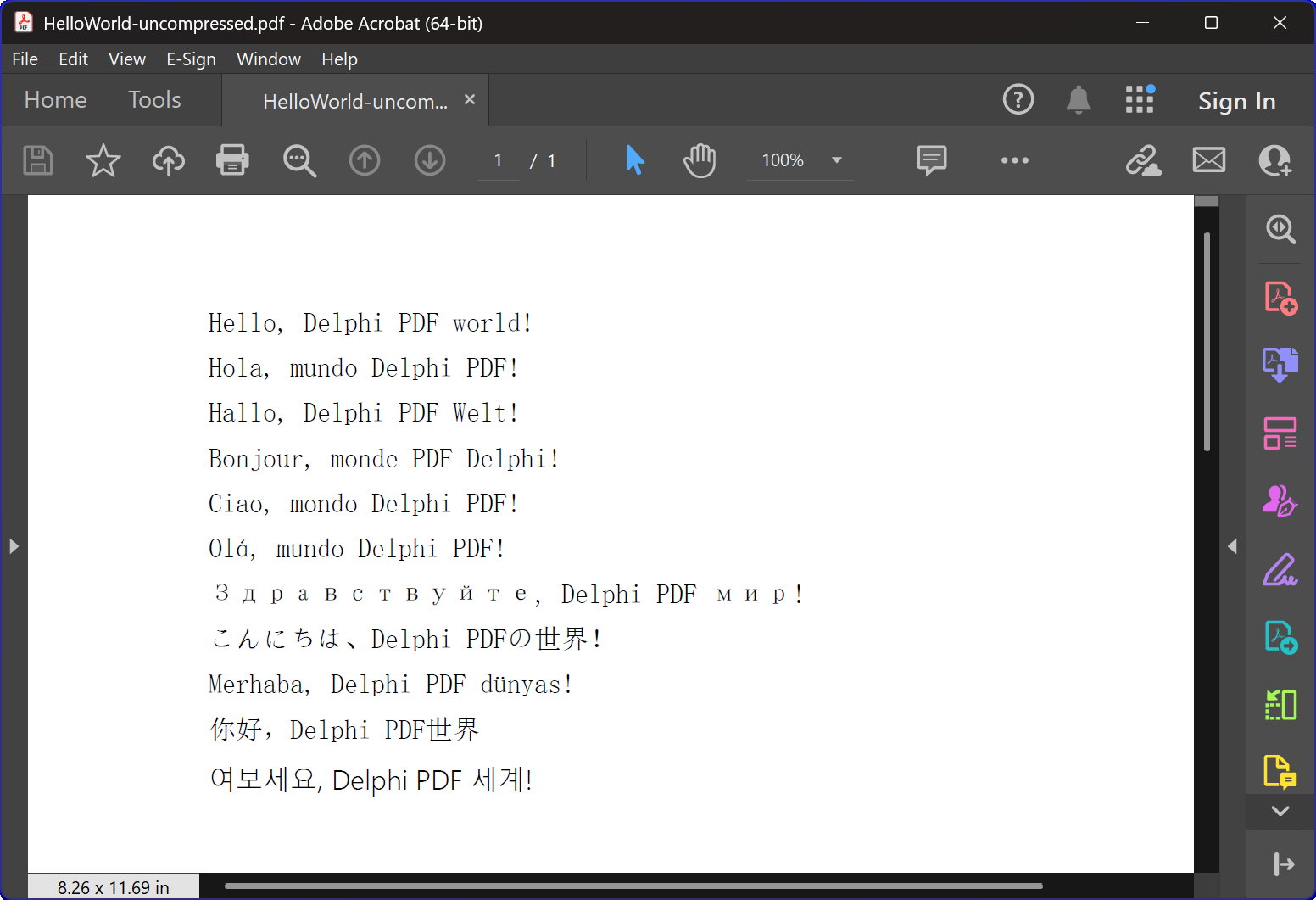
HelloWorld.dpr Programöversikt
Den HelloWorld.dpr exempelprogrammet fungerar som en utmärkt introduktion till HotPDF-komponenten
mest grundläggande och viktigaste funktionen: TexOut-funktionen. Detta demonstrationsprogram visar också upp den grundläggande PDF-skapande funktionaliteten.
Kärnfunktioner:
1. Skapa PDF-dokument
Programmets primära funktion är att generera PDF-dokument som innehåller flerspråkig "Hello World"-text. Den CreatePDF proceduren visar:
- Komponentinitiering: Korrekt installation och konfiguration av THotPDF-komponenten
- Dokumentegenskaper: Ställa in metadata som komprimeringsalternativ och teckensnittsinbäddning
- Flerspråkig textåtergivning: Visar text på 11 olika språk inklusive engelska, spanska, tyska, franska, italienska, portugisiska, ryska, japanska, turkiska, kinesiska och koreanska
- Teckensnittshantering: Använder Arial Unicode MS-teckensnitt för flerspråkig skärmstöd
- Kompression: Skapa ett komprimerat PDF-dokument
2. Fönsterhantering och systemintegration
Programmet innehåller sofistikerad fönsteruppräkningsfunktion som visar:
- Systemfönsteruppräkning: Använder Windows API
EnumWindowsfunktion för att iterera genom alla fönster på toppnivå - Matchning av fönstertitel: Implementering av delsträngsmatchning för att identifiera målapplikationer
- Automatisk fönsterstängning: Skickar
WM_CLOSEmeddelanden för att stänga PDF-läsare som kan ha filer öppna - Konfliktförebyggande: Se till att inga filåtkomstkonflikter uppstår när nya PDF-filer skapas
3. Felhantering och resurshantering
Programmet visar bästa praxis för:
- Minneshantering: Korrekt skapande och kassering av komponentinstanser
- Undantagssäkerhet: Använder försök-äntligen block för att säkerställa resursrensning
- Användarfeedback: Tillhandahåller konsolutgång för att informera användarna om programmets framsteg
Tekniska implementeringsdetaljer:
Kompressionsteknik
Programmet skapar ett PDF-dokument med FlateDecode-komprimering
Teckensnittshanteringsstrategi
Programmet använder en sofistikerad typsnittsvalsstrategi:
- Arial Unicode MS: Används för de flesta språk på grund av dess breda teckenstöd
- Teckensnittsinbäddning: Säkerställer ett konsekvent utseende över olika system
Cross-version kompatibilitet
Koden innehåller villkorliga kompileringsdirektiv för att stödja både moderna och äldre Delphi-versioner:
- XE2+ Support: Använder namnavgränsade enheter (WinApi.Windows, System.SysUtils, etc.)
- äldre support: Faller tillbaka till traditionella enhetsnamn för äldre Delphi-versioner
Utbildningsvärde
Detta HelloWorld-exempel tjänar flera utbildningsändamål:
- Komponentintroduktion: Ger en skonsam introduktion till HotPDF-komponentanvändning
- Bästa metoder: Visar korrekt resurshantering och felhantering
- Systemintegration: Visar hur man integrerar PDF-generering med Windows-systemoperationer
- Internationalisering: Illustrerar flerspråkig texthantering i PDF-dokument
Komma igång
Så här kör du detta exempelprogram:
- Se till att HotPDF-komponenten är korrekt installerad i din Delphi IDE
- Öppna HelloWorld.dpr-projektfilen
- Kompilera och kör programmet
- Programmet skapar automatiskt en PDF-fil med komprimering
- Undersök de genererade filerna för att se den flerspråkiga textåtergivningen
Källkod
Nedan finns den kompletta, väldokumenterade källkoden för HelloWorld-demonstrationsprogrammet:
|
1 2 3 4 5 6 7 8 9 10 11 12 13 14 15 16 17 18 19 20 21 22 23 24 25 26 27 28 29 30 31 32 33 34 35 36 37 38 39 40 41 42 43 44 45 46 47 48 49 50 51 52 53 54 55 56 57 58 59 60 61 62 63 64 65 66 67 68 69 70 71 72 73 74 75 76 77 78 79 80 81 82 83 84 85 86 87 88 89 90 91 92 93 94 95 96 97 98 99 100 101 102 103 104 105 106 107 108 109 110 111 112 113 114 115 116 117 118 119 120 121 122 123 124 125 126 127 128 129 130 131 132 133 134 135 136 137 138 139 140 141 142 143 144 145 146 147 148 149 150 151 152 153 154 155 156 157 158 159 160 161 162 163 164 165 166 167 |
{************************************************************} // HotPDF PDF Component // Copyright(c)2007-2025, https://www.loslab.com {************************************************************} // HelloWorld Demo Program for HotPDF Component // This program demonstrates basic PDF creation capabilities // including multilingual text support and compression options {************************************************************} program HelloWorld; {$APPTYPE CONSOLE} // Console application type {$I ..\..\..\Lib\HotPDF.inc} // Include HotPDF configuration file uses // EurekaLog units for memory leak detection and debugging (optional) {$IFDEF EurekaLog} EMemLeaks, // Memory leak detection EResLeaks, // Resource leak detection EDebugJCL, // JCL debugging support EDebugExports, // Export debugging information EFixSafeCallException, // SafeCall exception handling EMapWin32, // Win32 mapping support EAppConsole, // Console application support EDialogConsole, // Console dialog support ExceptionLog7, // Exception logging {$ENDIF EurekaLog} // System units - different namespaces for XE2+ vs older versions {$IFDEF XE2+} WinApi.Windows, // Windows API functions WinApi.Messages, // Windows message constants System.SysUtils, // System utilities System.Classes, // Base classes (TStringList, etc.) Vcl.Graphics, // Graphics support {$ELSE} Windows, // Windows API functions (older Delphi) Messages, // Windows message constants (older Delphi) SysUtils, // System utilities (older Delphi) Classes, // Base classes (older Delphi) Graphics, // Graphics support (older Delphi) {$ENDIF} HPDFDoc; // HotPDF main component unit // Creates a compressed PDF file with multilingual "Hello World" text // Parameters: // FileName: Output PDF file name procedure CreatePDF(const FileName: string); var HotPDF: THotPDF; // Main HotPDF component instance begin // Create HotPDF component instance HotPDF := THotPDF.Create(nil); try // Configure PDF properties HotPDF.AutoLaunch := true; // Automatically open PDF after creation HotPDF.FileName := FileName; // Set output file name // Enable FlateDecode compression HotPDF.Compression := cmFlateDecode; // Enable FlateDecode compression WriteLn('Creating compressed PDF: ', FileName); HotPDF.FontEmbedding := true; // Embed fonts for better compatibility HotPDF.BeginDoc; // Start PDF document creation // Set Unicode font for multilingual text support // Arial Unicode MS supports most languages except Korean // procedure SetFont ( FontName: AnsiString; FontStyle: TFontStyles; ASize: Single; FontCharset: TFontCharset = DEFAULT_CHARSET; IsVertical: boolean = false); // DEFAULT_CHARSET: 1 - Font is chosen based on Name. If the described font is not available on the system, Windows will substitute another font HotPDF.CurrentPage.SetFont('Arial Unicode MS', [], 12, 1, False); // Display "Hello World" in multiple languages // TextOut parameters: (X, Y, Angle, Text) HotPDF.CurrentPage.TextOut(80, 50, 0, 'Hello, Delphi PDF world!'); // English HotPDF.CurrentPage.TextOut(80, 70, 0, 'Hola, mundo Delphi PDF!'); // Spanish HotPDF.CurrentPage.TextOut(80, 90, 0, 'Hallo, Delphi PDF Welt!'); // German HotPDF.CurrentPage.TextOut(80, 110, 0, 'Bonjour, monde PDF Delphi!'); // French HotPDF.CurrentPage.TextOut(80, 130, 0, 'Ciao, mondo Delphi PDF!'); // Italian HotPDF.CurrentPage.TextOut(80, 150, 0, 'Olá, mundo Delphi PDF!'); // Portuguese HotPDF.CurrentPage.TextOut(80, 170, 0, 'Здравствуйте, Delphi PDF мир!'); // Russian HotPDF.CurrentPage.TextOut(80, 190, 0, 'こんにちは、Delphi PDFの世界!'); // Japanese HotPDF.CurrentPage.TextOut(80, 210, 0, 'Merhaba, Delphi PDF dünyası!'); // Turkish HotPDF.CurrentPage.TextOut(80, 230, 0, '你好,Delphi PDF世界'); // Chinese HotPDF.CurrentPage.TextOut(80, 250, 0, '여보세요, Delphi PDF 세계!'); // Korean HotPDF.EndDoc; // Finalize and save the PDF document WriteLn('PDF created successfully: ', FileName); finally HotPDF.Free; // Clean up HotPDF component end; end; // Global variables for window enumeration and PDF creation var Title: String; // Individual title string (unused in current implementation) Titles: TStrings; // List of window titles to search for Window: HWND; // Window handle (unused in current implementation) WindowText: array [0 .. 255] of Char; // Buffer for window text (unused in current implementation) WindowTitle: String; // Window title string (unused in current implementation) I: Integer; // Loop counter (unused in current implementation) // Callback function for EnumWindows API // This function is called for each top-level window in the system // Parameters: // hWnd: Handle to the current window being enumerated // lParam: User-defined data (in our case, pointer to TStrings with target titles) // Returns: True to continue enumeration, False to stop function EnumWindowsProc(HWND: HWND; lParam: lParam): BOOL; stdcall; var Titles: TStrings; // List of target window titles I: Integer; // Loop counter WindowText: array [0 .. 255] of Char; // Buffer to store window text WindowTitle: String; // Current window's title as string begin Result := true; // Continue enumeration by default Titles := TStrings(lParam); // Cast lParam back to TStrings // Get the window title text if GetWindowText(HWND, WindowText, SizeOf(WindowText)) > 0 then begin WindowTitle := String(WindowText); // Convert char array to string // Check if window title contains any of our target strings for I := 0 to Titles.Count - 1 do begin // Use Pos function to check if target string is contained in window title if Pos(Titles[I], WindowTitle) > 0 then begin // Send WM_CLOSE message to close the window PostMessage(HWND, WM_CLOSE, 0, 0); Break; // Exit loop after finding first match end; end; end; end; // Main program execution begins here begin // Close any existing PDF files that might be open in PDF viewers // This prevents file access conflicts when creating new PDFs with same names Titles := TStringList.Create; try // Define list of window title substrings to search for // Any window containing these strings will be closed // This will close Adobe and Foxit PDF reader & editor and many other PDF apps Titles.CommaText := '"HelloWorld.pdf", "Foxit"'; // Enumerate all top-level windows and close matching ones // EnumWindows calls our callback function for each window EnumWindows(@EnumWindowsProc, lParam(Titles)); finally Titles.Free; // Clean up string list end; // Display program header WriteLn('=== HotPDF HelloWorld Demo ==='); WriteLn('This demo creates a compressed PDF file with multilingual text.'); WriteLn(''); // Create compressed PDF CreatePDF('HelloWorld.pdf'); // Display completion message WriteLn(''); WriteLn('PDF file created successfully!'); WriteLn('The PDF file uses FlateDecode compression for optimal file size.'); WriteLn(''); WriteLn('Press Enter to exit...'); ReadLn; // Wait for user input before closing console end. |